From the budget-friendly iPad (11th gen) to the high-end M5 iPad Pro, Apple offers a wide range of iPad models. So, finding the best iPad to buy can be challenging. In this guide, I’ll explain the key factors to consider when buying an iPad and help you choose the iPad that best meets your requirements and budget. Let’s begin!
Overview of iPad Models in 2026
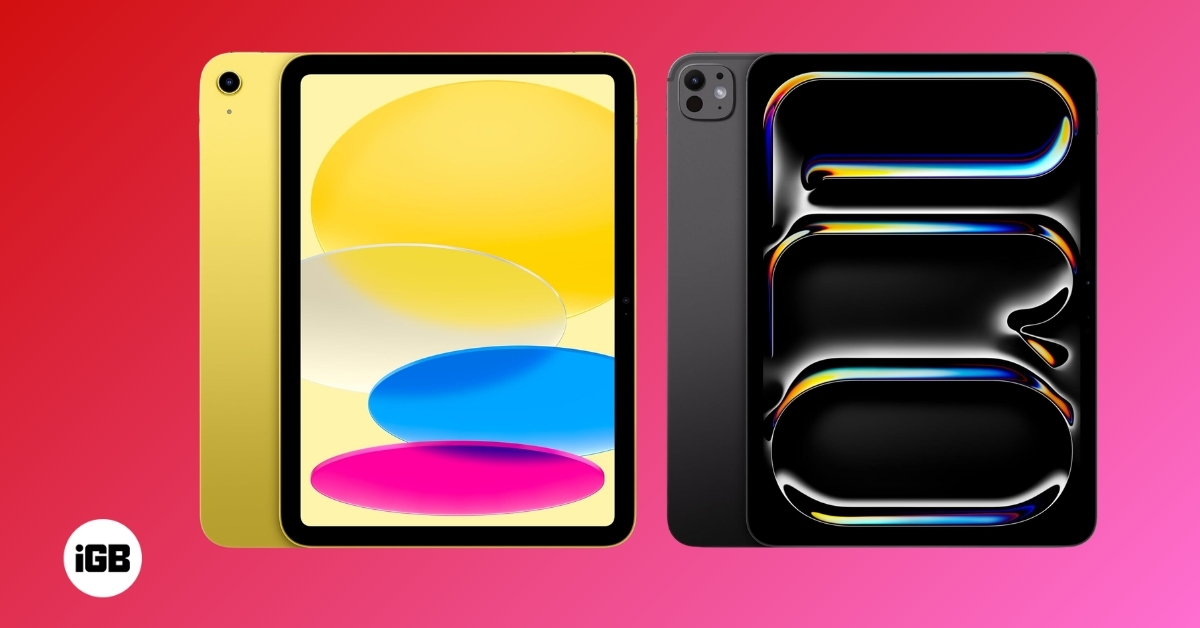
As of 2026, Apple’s iPad family includes four different lineups: iPad Pro, iPad Air, iPad, and iPad mini. The Pro version offers top-tier performance and advanced features designed for power users and creators. On the other hand, the Air lineup delivers performance in a thin, light design, making it suitable for professionals and businesspeople.
The standard model is best for everyday tasks and suits most people. And finally, the compact iPad mini remains a favorite among users seeking portability without sacrificing functionality.
Current iPad Lineup (2026)
All iPad models are available in two configurations: Wi-Fi and Wi-Fi + Cellular. Here is a quick overview of the iPads available to buy right now:
| Model | Chip | Display sizes | Release year |
|---|---|---|---|
| iPad (11th Generation) | A16 | 11-inch | 2025 |
| iPad Air (8th Generation) | M4 | 11-inch, 13-inch | 2026 |
| iPad Pro (8th Generation) | M5 | 11-inch, 13-inch | 2025 |
| iPad mini (7th Generation) | A17 Pro | 8.3-inch | 2024 |
Upcoming iPad Models (2026):
| Model | Possible chipset | Possible Release date |
|---|---|---|
| iPad mini | A19 Pro | 2026 |
| iPad (12th gen) | A18 | 2026 |
Who Should Buy Which iPad Model?
- Best iPad for everyday user: 2025 iPad (A16)
- Best iPad for creators: 2025 iPad Pro M5
- Best iPad for professionals: 2026 iPad Air M4
- Best iPad for students: 2024 iPad mini
Key Factors to Consider When Choosing an iPad
Selecting the right iPad in 2026 depends on your needs, budget, and how you plan to use the device. Apple offers a range of models with different features, so it’s important to evaluate which features matter most to you. Below are the key factors to consider before making your decision.
Performance
The processor determines how smoothly your iPad runs applications, handles multitasking, and maintains overall efficiency. Apple has equipped different iPad models with various chips to suit different needs.
- A16 Chip (iPad 11th Gen): Ideal for everyday tasks like browsing, social media, streaming, and light productivity work.
- M4 Chip (iPad Air 8th Gen): A powerful choice for professionals and students who need more speed for multitasking, document editing, and casual creative work.
- M5 Chip (iPad Pro 8th Gen): The top-tier option for professionals, creators, and power users who require high performance for 3D modeling, video editing, and demanding apps.
- A17 Pro Chip (iPad mini 7th Gen): Designed for portability without compromising on performance, perfect for reading, note-taking, and on-the-go work.
If you need an iPad for basic tasks, the A16 or A17 Pro chip is more than sufficient. However, if you’re a creator or professional working with heavy apps, an M4 or M5 chip will provide a much smoother experience.
Display
The display size and quality can significantly impact your user experience, whether you’re watching movies, reading, or using the Apple Pencil for creative work. The iPad mini’s compact display is ideal for portability, while the iPad Air’s larger screen is well-suited for creative work and media consumption.
Moreover, the iPad Pro features an Ultra Retina XDR display and ProMotion technology for an immersive experience. For more clarity, you may also opt for the Nano-texture display glass option, which costs a bit more.
iPadOS Support
Software updates are crucial for keeping your device secure and up to date with the latest features. Apple typically provides long-term iPadOS support, ensuring your iPad remains functional for years.
All the latest iPads support iPadOS 26 and will receive future updates for at least five years. Choosing a newer model ensures longer software support, keeping your device relevant for longer.
Battery Life
Battery performance is an essential consideration, especially if you plan to use your iPad while traveling or for long study/work sessions. Apple rates most iPads for around 10 hours of battery life on typical web browsing and media consumption. However, real-world battery life depends on usage.
- The iPad (11th Gen) and iPad Air (8th Gen) offer great all-day battery life for casual users.
- The iPad Pro (M5 chip) consumes more power due to its advanced display and high-performance processor, but it still delivers excellent battery life.
- The iPad mini (7th Gen) has a smaller battery due to its compact size, but it lasts just as long for regular use.
Portability and Accessories
Portability is an important factor if you plan to carry your iPad regularly. Here’s how each model stacks up in terms of weight and portability:
| iPad Model | Weight (Wi-Fi version) | Dimensions |
|---|---|---|
| iPad (11th Gen) | 477g | 248.6 × 179.5 × 7.0 mm |
| iPad Air (8th Gen) | 464g (11-inch) 616g (13-inch) | 247.6 × 178.5 × 6.1 mm (11-inch) 280.6 × 214.9 × 6.1 mm (13-inch) |
| iPad Pro (8th Gen) | 444g (11-inch) 579g (13-inch) | 249.7 × 177.5 × 5.3 mm (11-inch) 281.6 × 215.5 × 5.1 mm (13-inch) |
| iPad mini (7th Gen) | 293g | 195.4 × 134.8 × 6.3 mm |
The iPad mini is the most portable if you prefer a lightweight device. For a larger screen, good portability, and the sleekest design, the iPad Pro 11-inch is a great choice. It’s only 0.21 inches (5.3mm) thin, much less than the mini and Air models!
Additionally, Apple offers several iPad accessories, such as Magic Keyboard, Apple Pencil (2nd gen or Pro), Smart Folio, etc., with unique features. So, you must ensure your chosen iPad is compatible with the accessory you will use the most.
Best iPad accessories:
- iPad Pro USB-C Hub, 7-in-1 Adapter
- iPad Docking Station
- MoKo Sleeve Bag Handle Carrying Case
- Apple USB-C Digital AV Multiport Adapter
Apple Intelligence
Apple has significantly integrated Apple Intelligence across its iPad lineup, making AI-driven features a key factor in choosing a model. These features can boost productivity, creativity, and automation.
If you want the best AI experience, the iPad Pro with an M5 chip is the top choice, as it can run Apple’s latest AI-powered tools smoothly. The iPad Air with M4 chip is a great mid-range option, while the iPad mini (A17 Pro chip) packs AI into a compact form factor. However, the 11th-generation iPad doesn’t support Apple Intelligence.
Budget
Price is a major deciding factor. Apple’s iPad lineup ranges from budget-friendly to premium options. Pricing also varies based on the storage option you choose. Here’s a breakdown of the starting prices for the iPad lineup:
| iPad Model | Starting Price (Wi-Fi version) | Starting Price (Wi-Fi + Cellular) |
|---|---|---|
| iPad (11th Gen) | $349 | $499 |
| iPad Air (8th Gen) | $599 (11-inch) $799 (13-inch) | $749 (11-inch) $949 (13-inch) |
| iPad Pro (8th Gen) | $999 (11-inch) $1,299 (13-inch) | $1,199 (11-inch) $1,499 (13-inch) |
| iPad mini (7th Gen) | $499 | $649 |
If you’re on a tight budget, the iPad (11th Gen) is the most cost-effective choice. If you want high performance at a reasonable price, the iPad Air (M4) is a solid middle ground. The iPad Pro is for those who need the absolute best performance and display quality.
Best iPad for Most People: 2025 iPad (A16)

The iPad (11th Gen) is the best choice for most users. It features an 11-inch Liquid Retina display with peak brightness of 500 nits for clear, vibrant visuals. While it might not be the most powerful iPad, the A16 chip still delivers a smooth performance.
The dual mics and landscape stereo speakers ensure good sound quality, making it ideal for everyday tasks like browsing the web, reading, video meetings, consuming content, and light productivity work. With iPadOS 26 support, it’s a budget-friendly yet capable option.
The back features a 12MP Wide camera with 4K video recording and Smart HDR 4 support. The front has a 12MP Center-Stage camera for clear FaceTime video calls. Moreover, Apple doubled the base storage to 128GB, so you can use the device longer.
Besides, by pairing it up with a Magic Keyboard and Apple Pencil (1st gen), you can quickly take notes and go over some work-related stuff. The only downside is that this iPad’s battery doesn’t last an entire day. Also, while testing, I missed the convenience of Face ID and Apple Intelligence features.
So, at $349, the iPad 11th Gen offers a good balance of performance, affordability, and longevity, making it the most affordable iPad for most people, students, and families.
Best iPad for Creators: 2025 iPad Pro M5

If you are wondering about the best iPad for creators, don’t look further than the iPad Pro M5. This 3nm powerhouse chip, with an integrated Neural Accelerator in the GPU, is designed for demanding AI workflows, filmmaking, video editing, graphic design, and music production.
It delivers around 15% better multi-core CPU performance, up to 4x faster GPU compute, up to 153 GB/s of bandwidth, and 45% stronger graphics than the M4. So, you will get the finest AI image & video generation, video editing experience using Final Cut Pro and AI-infused music production on Logic Cut Pro.
Apple has also included its first custom modem, C1X, offering up to 50% faster data speeds and 30% lower power use for longer battery life. Moreover, it features an Ultra Retina XDR OLED display with peak HDR brightness of 1600 nits for the best visuals. You can opt for the Nano-texture display glass for greater clarity.
What’s more? This iPad Pro is only 5.1mm thick, making it the thinnest Apple product. The pro camera system with LiDAR scanner lets you capture 4K ProRes videos. With its 13-inch screen, latest M5 chip, studio-quality mic, and speakers, Apple Intelligence—combined with Apple Pencil Pro and Magic Keyboard—can easily replace your laptop.
Best iPad for Professionals: 2026 iPad Air M4

Do you need a workhorse with pro-like features at an affordable price? The iPad Air M4 is the best choice. Available in 11-inch and 13-inch models, it features a sleek design with a Liquid Retina display that delivers vibrant visuals.
The M4 chip with 12GB of unified memory ensures smooth multitasking, efficient handling of demanding applications, and support for Apple Intelligence processes. Additionally, it has a 9-core GPU with advanced hardware-accelerated ray tracing capabilities for 3D modeling, making it the best iPad for architects.
The best part is that you can use Apple Pencil Pro on this iPad Air and complete your creative tasks in design apps. Further, if you get the 13-inch variant and pair it up with the Magic Keyboard with a larger trackpad, you might as well get a MacBook Air-like setup!
Best iPad for Students: 2024 iPad mini

If you are looking for the ultimate portable, compact iPad, the iPad mini is your answer. It is designed for students who need a handy, lightweight, and affordable device for schoolwork and entertainment. You will get the crisp Liquid Retina display to watch content or read stuff.
Besides, the camera setup does a decent job of scanning documents and attending video calls. Its powerful A17 Pro Bionic chip ensures smooth performance for studying, note-taking, and creative projects. Basically, it can handle all kinds of day-to-day productivity tasks and offer Apple Intelligence features.
However, this price point does not justify the storage option and battery life. Also, you can’t attach a Keyboard case to this iPad. The iPad mini is a great value-for-money device if you can put aside these minor issues.
When and Where to Buy an iPad in 2026?
Buying an iPad at the right time and from the right place can help you save money and get the best value. You can purchase an iPad from several retailers, both online and in-store. The Apple Store is the most reliable option, offering the latest models, customization, and financing options. Apple also offers trade-in discounts.
Amazon frequently offers competitive pricing, bundle deals, and fast shipping for Prime members. You may also check out Best Buy, which offers student discounts and trade-in options for select models. If you prefer offline purchases, you can go to Walmart or Target. They offer occasional discounts on older models.
You can find great deals during major sales events like Back-to-School Season, Amazon Prime Day, Black Friday & Cyber Monday, and Year-End Holiday Sales. Apple often offers free AirPods or discounts on accessories.
If you’re on a budget, consider buying the iPad Pro M4 or the iPad Air M3 instead of the latest models. They still offer similar performance to the latest models, years of iPadOS 26 support, and lower prices after newer models are released. If you need a cellular iPad, some carriers offer discounts when you bundle it with a phone plan.
I also recommend buying a refurbished model to get some good discounts. Apple Refurbished Store is a great place to find certified refurbished iPads at lower prices with Apple’s warranty and battery replacement.
Pick the Right iPad for You!
Choosing the right iPad in 2026 depends on your needs and budget. No matter which iPad you choose, you’re getting a powerful device with Apple’s latest features that will last for years. So, which iPad model caught your eye? Let me know in the comments below!
Recommended for You: