FaceTime Like a Pro
Get our exclusive Ultimate FaceTime Guide 📚 — absolutely FREE when you sign up for our newsletter below.

FaceTime Like a Pro
Get our exclusive Ultimate FaceTime Guide 📚 — absolutely FREE when you sign up for our newsletter below.


 ByMarcus


AirPlay on Apple devices lets you stream songs and videos to other AirPlay-compatible speakers and TV. But here’s the less-known fact: you can also use AirPlay on your Apple Watch.
Your Apple Watch has an AirPlay audio icon in its Control Center (accessed by swiping up from the watch screen’s bottom). This makes it possible to choose which device you want to play music from. Here’s how to use AirPlay on your Apple Watch.
Background: The tiny speaker on your Apple Watch gives Siri answers, system feedback, etc. But it cannot use this speaker to play music. Thus, you always have to connect your Apple Watch to a compatible device like AirPods, AirPods Max, Beats headphones, third-party Bluetooth headphones, speakers, or Apple TV.
This may also make you think that you can AirPlay directly from your watch to other AirPlay devices. But you must understand that it’s just a button to choose audio output to the limited devices mentioned above. You can’t use this to connect to AirPlay Speakers, etc.
You’re limited to Bluetooth devices. This fact can be confirmed when you tap the watch’s AirPlay icon from Control Center → tap Connect a Device → it opens the Bluetooth pairing screen of the watch Settings.
Apple Insider says that AirPlay is limited on the watch to preserve battery life. I couldn’t agree more.
One more thing: You cannot stream (AirPlay) songs directly from your Apple Watch to HomePod. But if the HomePod is playing songs via, say, iPhone, you can control it using your Apple Watch.
Conclusion: AirPlay on Apple Watch is limited in functionality. It is a “select Bluetooth output device” button.
Now that you understand the crux, here’s how to use that Apple Watch AirPlay icon to select or change the audio output from your wrist.


Notes:


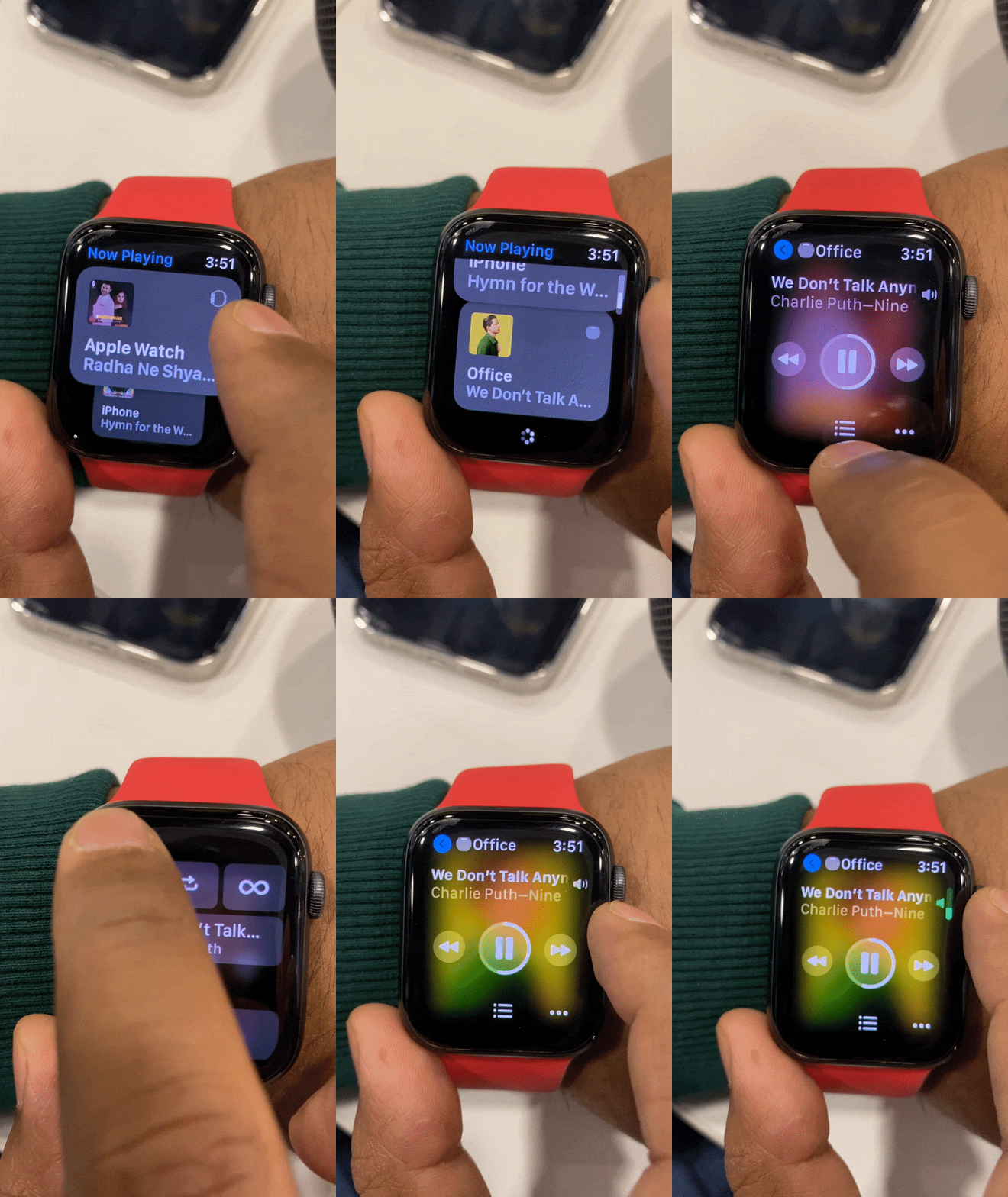
Note: Make sure your HomePod, iPhone, and Apple Watch are all connected to the same Wi-Fi.
Enjoy AirPlaying audio content on your Apple Watch!
This is how you can use the AirPlay icon on your Apple Watch. I hope this guide helps answer your questions.
If you got stuck somewhere or have any other questions, ask away in the comments. We’ll do our best to help you out!
Recommended posts: