For years, Safari felt like the browser I used because I owned an iPhone. Chrome was superior when it came to Chrome extensions, while Edge was playing around with AI. Arc made browsing interesting again, whereas Safari was fast, private, and not quite exciting. That changes with iOS 27.
Apple is introducing new features for tackling tab overload, automating boring browsing activities, and monitoring websites without the need to refresh them all the time. After trying them out myself, I found that these were some of the most useful Safari updates from Apple ever.
If you spend hours researching, shopping online, comparing products, following stock updates, or open up dozens of tabs at the same time, the new Safari will definitely alter your way of browsing. Here’s everything coming to Safari in iOS 27.
1. Safari can automatically organize your tabs
Let’s be honest. Most of us start with three tabs and somehow end up with 37. This may include tabs for research, shopping, work, and some random articles we’ll “read later.”
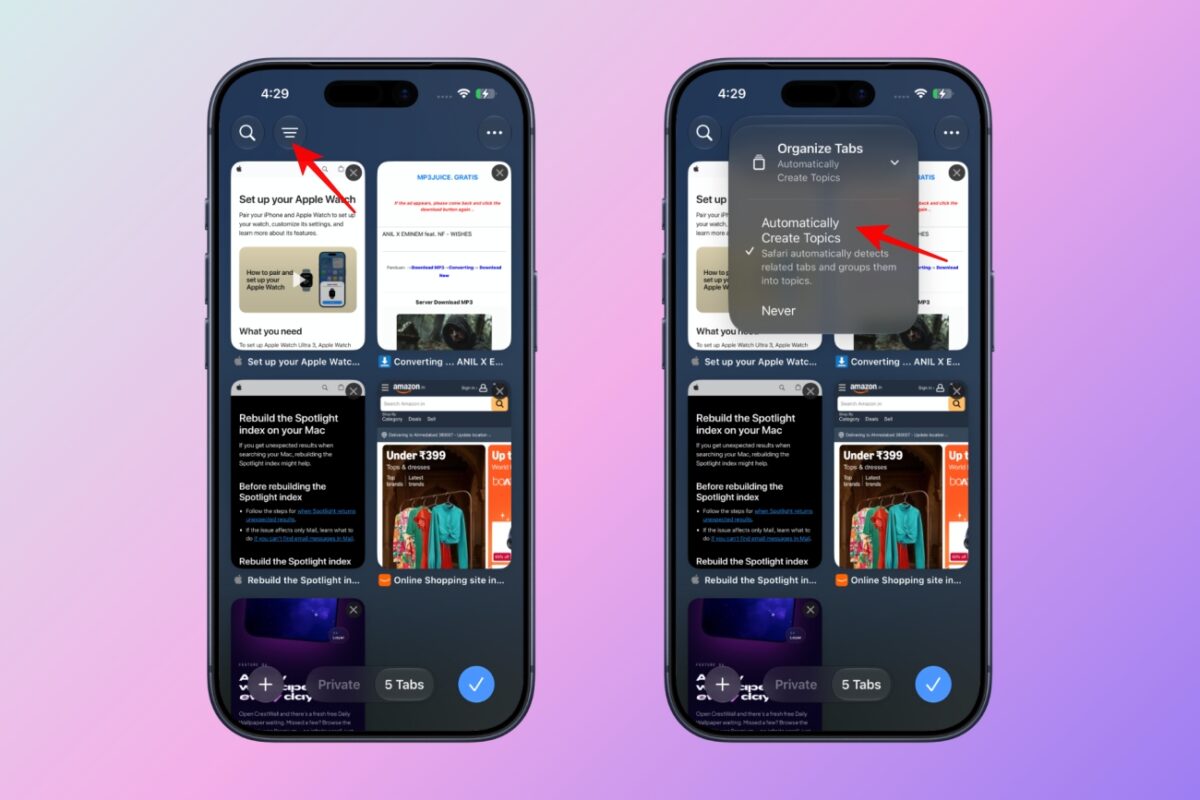
Safari’s new automatic tab organization feature tackles that mess automatically. With the help of Apple Intelligence, Safari is able to identify open tabs and combine them into logical groups without requiring manual organization. Simply, go to the tab view menu and toggle on Automatically Create Topics. From here, you can also filter topics to see only relevant tabs.
For instance, I opened several flight and hotel booking websites and WWDC news tabs. Safari created two topic groups and sorted the tabs accordingly. As I added new tabs, Safari put them into existing groups or created new ones.
This matters because Tab Groups have existed for years but most people don’t use them because organizing tabs manually feels like work. If you’ve ever ended a day with dozens of unrelated tabs scattered everywhere, this feature alone may be worth the upgrade.
2. You can create Safari extensions using AI
One of Safari’s biggest weaknesses has always been its limited extension ecosystem compared to Chrome. Apple’s answer isn’t trying to catch up extension by extension. Instead, it’s letting users create exactly what they need.
Safari can now generate custom browser extensions that adapt web pages from natural language prompts. Instead of writing code, you can choose from pre-built actions like Boost Productivity, Improve Focus, Get Creative, and Develop and Design and simply describe what you want an extension to do in plain English. Safari then creates it using Apple Intelligence.
Imagine saying:
- “Create an extension that saves recipes into a folder.”
- “Build an extension that highlights coupon codes.”
- “Create a tool that extracts product prices from shopping pages.”
And Safari generates it for you. Then you can allow websites where the extension will work. If Apple executes this well, it could be one of the most ambitious Safari upgrades and the smartest uses of AI in a browser.
3. “Notify Me” watches websites so you don’t have to
This is easily my favorite new iOS 27 feature. I keep refreshing websites for product restocks, price drops, event ticket availability, reservation openings, new content updates, and many more. Now, it’s no longer necessary because Safari will do it on its own.
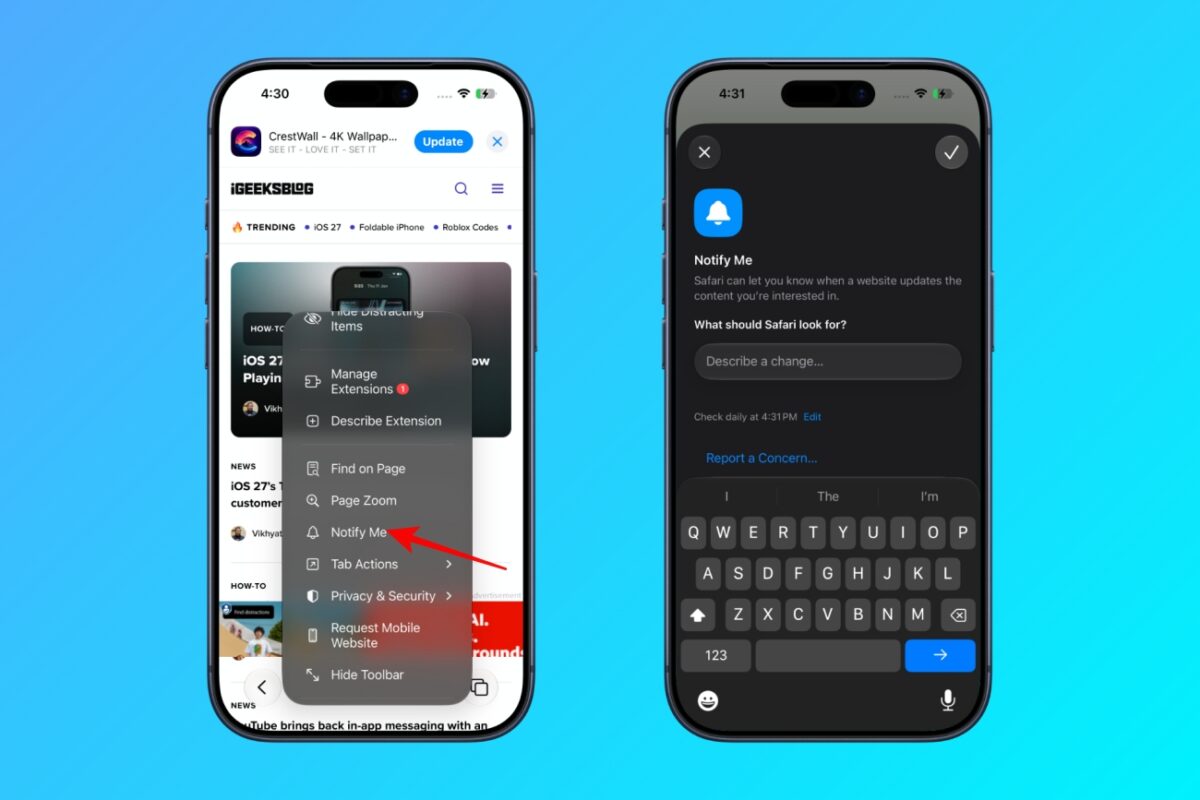
With the new Apple Intelligence-powered Notify Me feature, you can ask Safari in natural language to keep an eye on a page for a specific change. It will alert you when it finds the matching update. Simply, tap the settings icon on any page, select Notify Me, describe your criteria, and set the tracking frequency like daily, weekly, or monthly.
I feel this might quietly become the most-used Safari feature. Most people currently rely on third-party services, browser extensions, or dedicated tracking apps for this. Safari is bringing the capability directly into the browser. That means fewer apps, less hassle, and better battery life.
4. Safari gets smarter password management
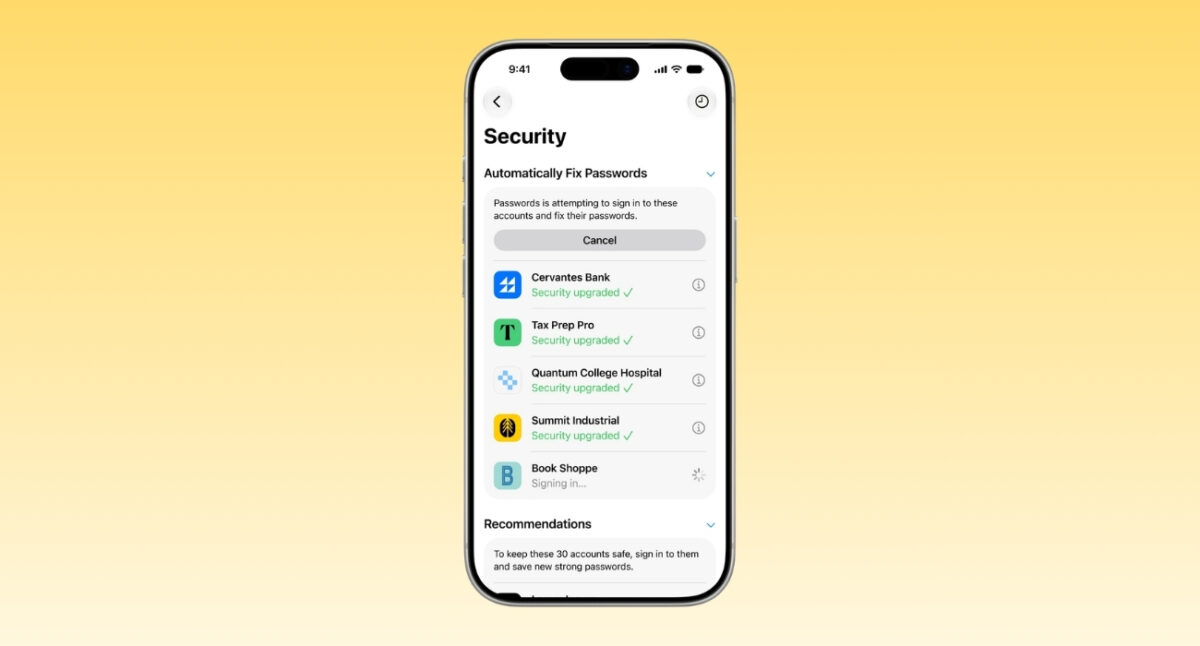
Apple is also improving how Safari handles passwords with a background agentic tool. Powered by Apple Intelligence, Passwords app can now go to supported websites, sign in using existing credentials, and update weak and compromised passwords with a single tap. This makes security maintenance much less painful.
Most users know they should replace weak or leaked passwords but very few actually do it. By simplifying the process, Apple removes one of the biggest barriers to better online security.
5. New Ask to Browse controls for families
Apple is expanding child safety features in iOS 27 with a new Ask to Browse feature. When enabled, children need parental approval before visiting a new website.
For families, this could be one of the most important additions in iOS 27. It gives parents greater visibility and control without completely locking down web access.
6. Safari is getting faster behind the scenes
The flashier features are getting the attention, but Apple’s performance improvements may end up benefiting everyone. According to Apple, Safari in iOS 27 delivers better power efficiency, faster web app loading, quicker JavaScript execution, and smoother graphics performance. Also, all the new AI features are made keeping privacy in mind.
This matters because a browser that’s faster, smoother, and more battery-efficient affects literally every website you visit.
The catch: Not everyone gets everything
There’s one important limitation.
Many of new Safari features, including Automatic Tab Organization, AI-generated extensions, and Notify Me, require Apple Intelligence. That means you’ll need a supported device, such as an iPhone 15 Pro or newer.
If you’re using an older iPhone running iOS 27, you’ll still get Safari improvements, but some of the most advanced capabilities may not be available.
The feature I liked the most in iOS 27 Safari app
If I had to pick one feature that best represents Apple’s new direction for Safari, it wouldn’t be AI-generated extensions or even tab organization. It would be Notify Me.
For years, browsers have been passive tools. You open them, search, refresh pages, and check websites manually. Notify Me flips that model. Now the browser can watch the web for you.
That’s a subtle shift, but it’s potentially a huge one.
Final thoughts
iOS 27 doesn’t reinvent Safari. But it makes the browser feel smarter, more helpful, and less demanding of your attention. Automatic tab organization tackles browser clutter, AI-generated extensions open new possibilities, and Notify Me eliminates constant webpage checking.
Also, faster performance improves everyday browsing and better parental controls make Safari more family-friendly. For the first time in a while, Safari isn’t just catching up to other browsers. In a few areas, it’s setting a genuinely interesting direction for where web browsing could go next.
What do you think about the new features? Share your opinion in the comments below!
Related articles worth reading: