Snapchat uses dozens of arrows, emojis, and status icons to show everything from message activity to Snapstreaks and friendship levels. If you’ve ever wondered what a red arrow, hourglass, or yellow heart actually means, you’re not alone.
I still remember checking my chats one day and noticing an hourglass emoji next to a friend’s name. My first thought was that Snapchat had added another random feature. As it turns out, it was warning me that our Snapstreak was about to end.
In this post, I’ll explain the most important Snapchat symbols, emojis, and icons you’ll encounter across chats, Stories, Snap Map, and Snapchat+.
Snapchat messaging symbols
Snapchat uses several icons in chats to show the status of your Snaps and messages. These icons tell you the status of your Snaps and messages and help you understand what’s happening in a conversation at a glance.
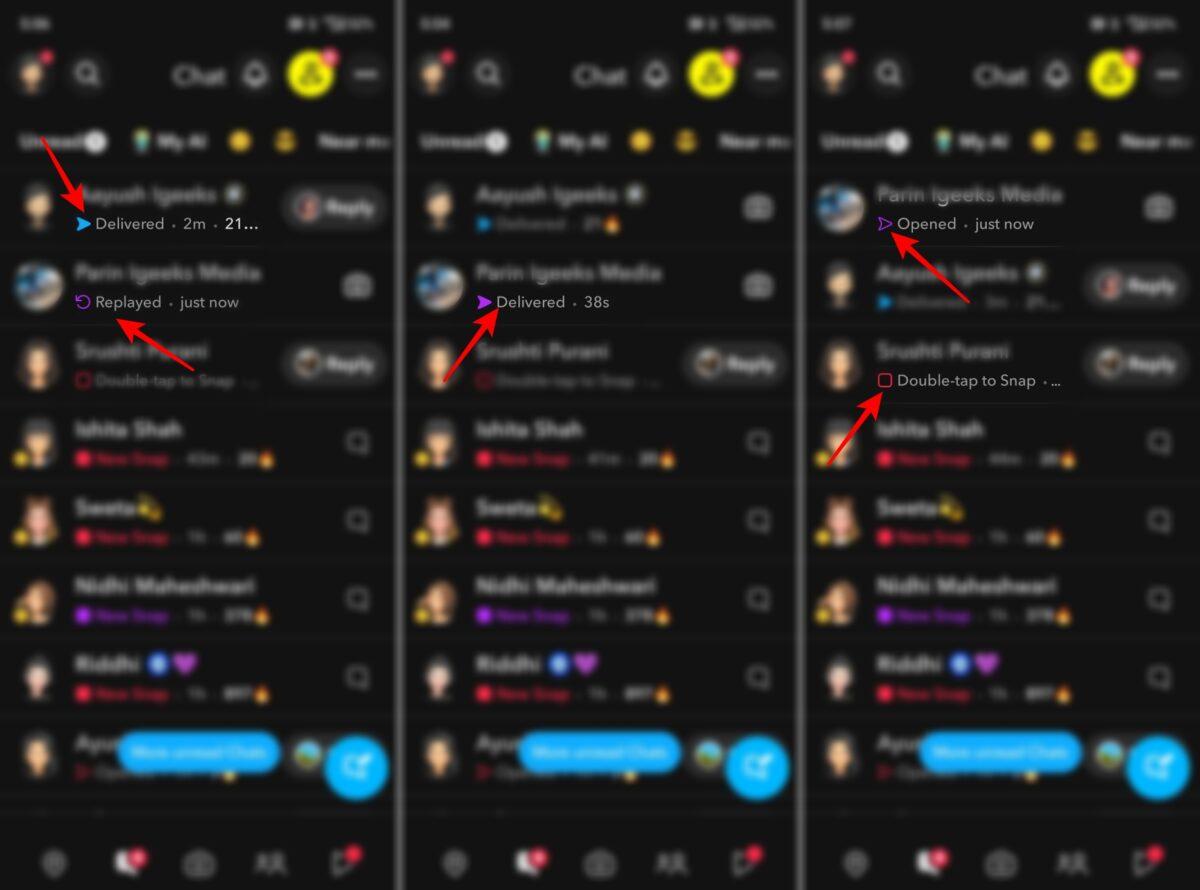
- Red Arrow: Sent a photo Snap without audio.
- Purple Arrow: Sent a video Snap with audio.
- Blue Arrow: Sent a chat message.
- Red Square: Received a photo Snap without audio.
- Purple Square: Received a video Snap with audio.
- Blue Chat Bubble: Received a chat message.
- Empty Red Arrow: Your photo Snap without audio has been opened.
- Empty Purple Arrow: Your video Snap with audio has been opened.
- Empty Blue Arrow: Your chat message has been viewed.
- Empty Blue Chat Bubble: You’ve opened and read a chat message.
- Replay Icon: Someone replayed your Snap.
- Green Dot: Your friend is active on Snapchat right now (Activity Indicator).
Snapchat friend emojis explained
Friend emojis are unique because they’re based on your interactions with other users. Snapchat automatically assigns these emojis depending on how frequently you exchange Snaps with specific friends.
- Yellow Heart 💛: The yellow heart means you’ve become each other’s #1 Best Friend on Snapchat.
- Red Heart ❤️: A red heart appears after you’ve remained #1 Best Friends for two consecutive weeks. It’s essentially the next stage of the yellow heart.
- Pink Hearts 💕: Pink hearts indicate that you’ve maintained your #1 Best Friend status for two months straight.
- Smiling Face 😊: This emoji means the person is one of your Best Friends. You interact with them frequently, but they’re not necessarily your top contact.
- Sunglasses Face 😎: The sunglasses emoji appears when you and another person share a mutual Best Friend. It’s Snapchat’s way of showing overlapping friend circles.
- Grimacing Face 😬: This emoji means your #1 Best Friend is also their #1 Best Friend. It’s a surprisingly specific symbol, but longtime Snapchat users often recognize it instantly.
- Fire emoji 🔥: The fire emoji represents a Snapstreak. You’ll see a number beside the emoji showing how many consecutive days you’ve exchanged Snaps with that person.
- Hundred emoji 💯: After maintaining a Snapstreak for 100 days, Snapchat rewards you with the hundred emoji. It’s a milestone that many users proudly celebrate.
- Hourglass Emoji ⌛: The hourglass is Snapchat’s warning sign. When it appears, your Snapstreak is in danger of ending. You’ll need to exchange Snaps soon if you want to keep the streak alive.
- Birthday Cake 🎂: The birthday cake emoji appears on a friend’s birthday.
Snapchat Story icons and symbols
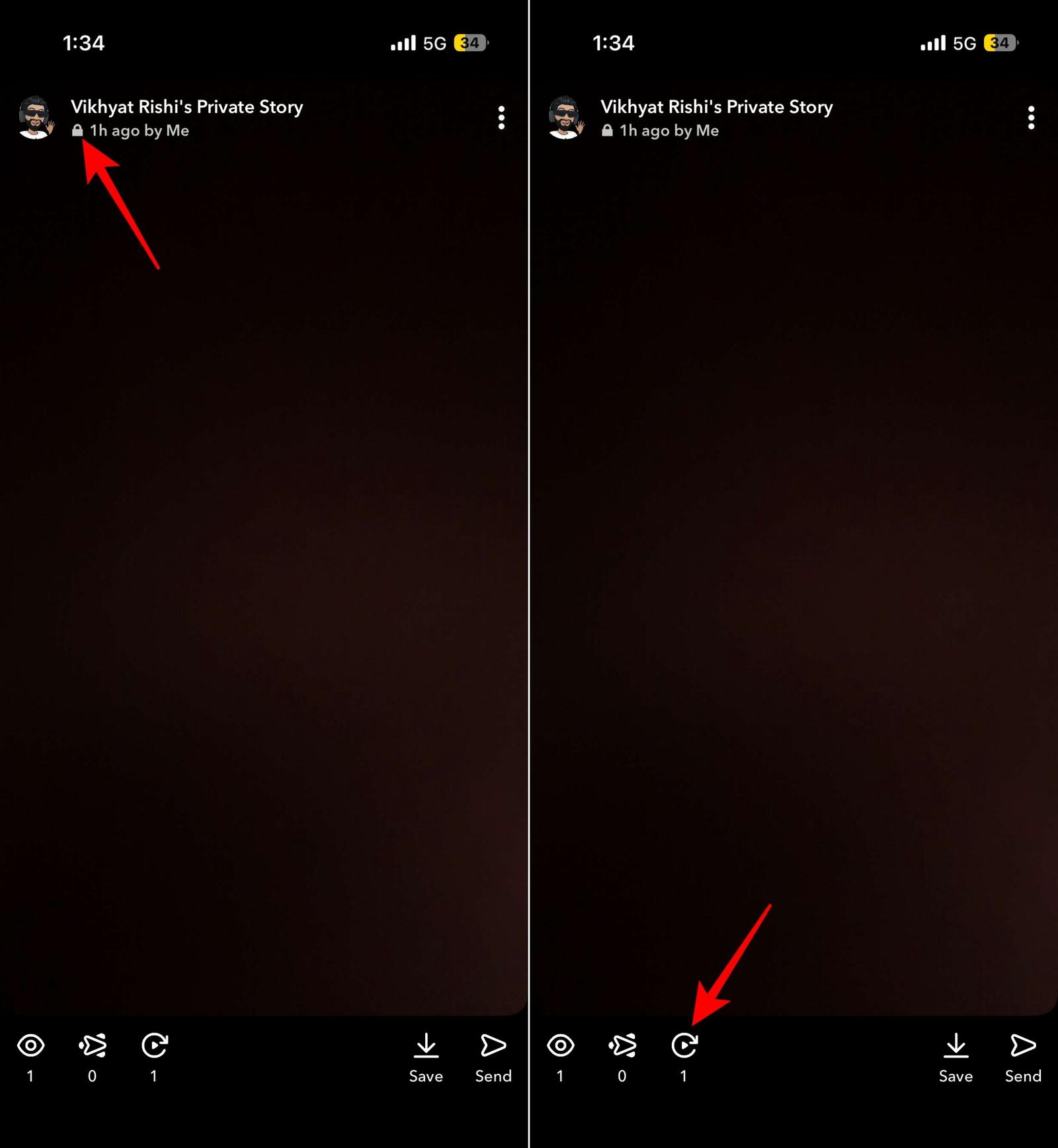
Story icons help identify who can view a Snapchat Story and how users are interacting with it.
Lock Icon 🔒
The lock icon indicates a Private Story. It means the Story is only visible to a selected group of friends chosen by the creator.
Story replay count icon
If you’re a Snapchat+ subscriber, Snapchat can show a replay count on your Stories. The replay indicator appears alongside a number, showing how many friends rewatched your Story after viewing it for the first time.
Snapchat+ symbols explained
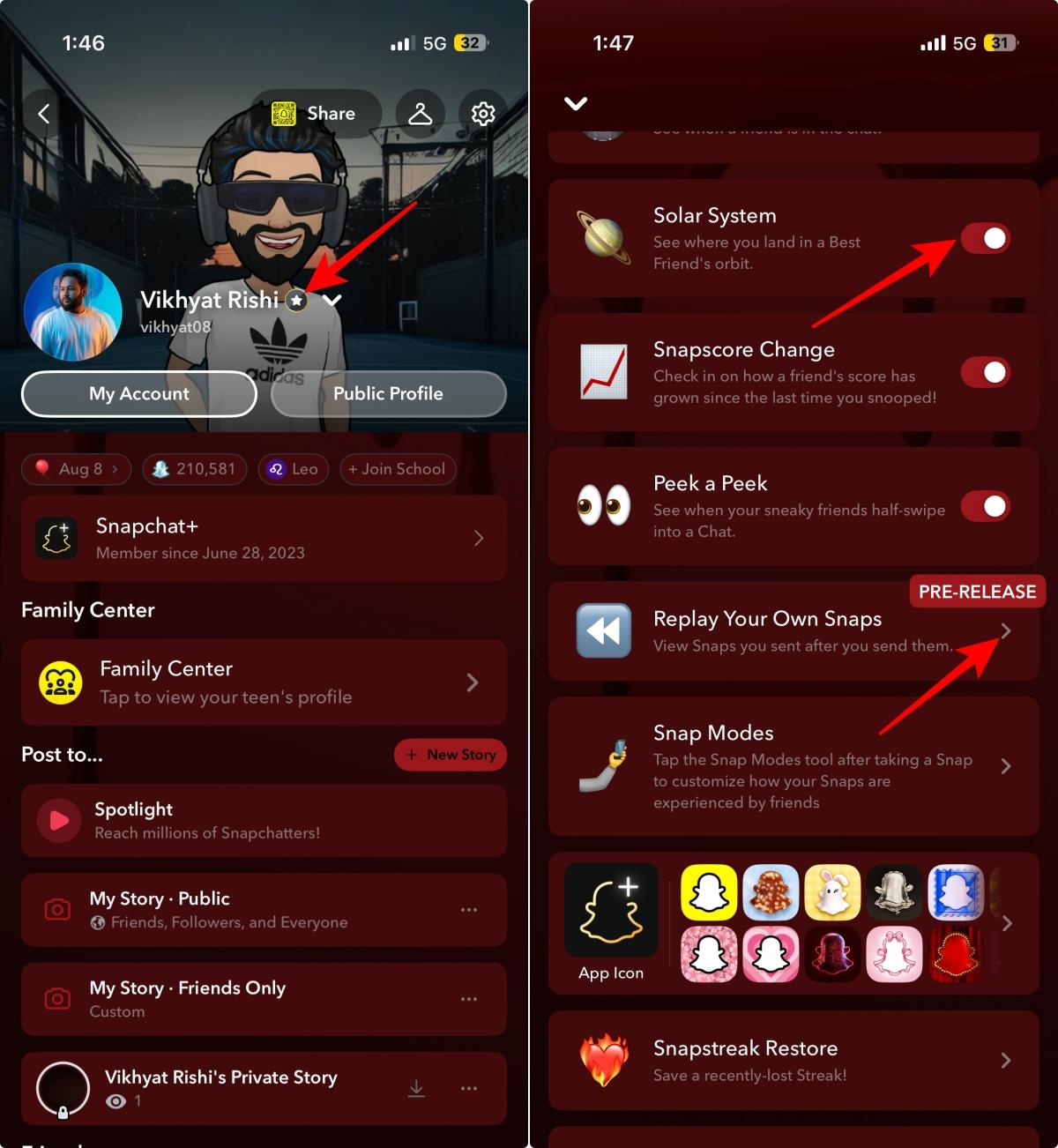
Snapchat Plus subscribers gain access to exclusive badges and features that introduce several additional icons.
- Snapchat+ badge ⭐: The Snapchat+ badge appears on user profiles if subscribers choose to display it. It’s one of the easiest ways to identify Snapchat+ users.
- Friend Solar System icon: This symbol represents Snapchat’s Friend Solar System feature, which ranks your closest friends based on interaction levels.
- Story Rewatch indicator 👀: Another Snapchat+ exclusive, this indicator helps creators understand when people return to watch their Stories again.
Snapchat Friend Solar System emojis
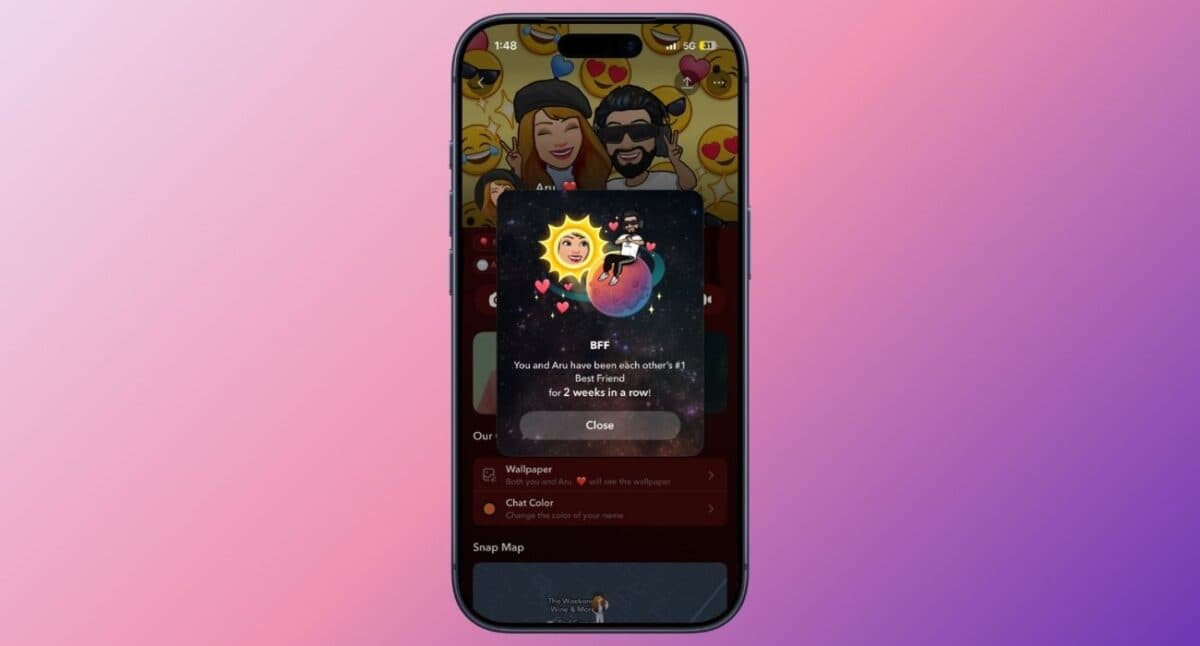
The Friend Solar System is a Snapchat+ feature that ranks your top eight Best Friends using planets. The closer the planet is to the Sun, the closer that friend is to you on Snapchat.
| Planet | Friendship Rank |
|---|---|
| Mercury | #1 Best Friend (closest friend) |
| Venus | #2 Best Friend |
| Earth | #3 Best Friend |
| Mars | #4 Best Friend |
| Jupiter | #5 Best Friend |
| Saturn | #6 Best Friend |
| Uranus | #7 Best Friend |
| Neptune | #8 Best Friend |
Snapchat Snap Map icons explained
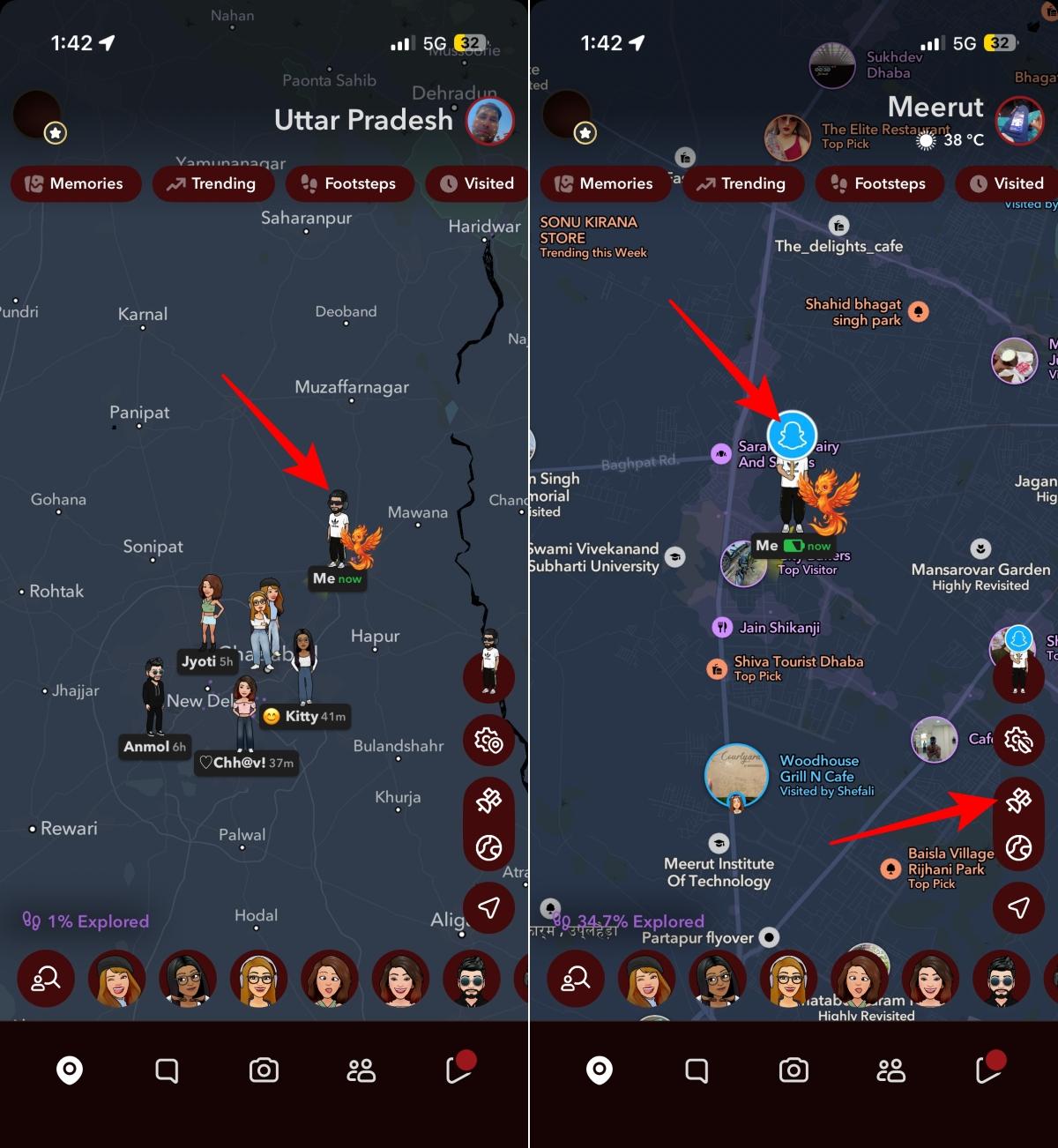
Snap Map uses its own set of symbols to indicate location status and activity.
Ghost Mode icon
The blue Snapchat ghost inside a map marker is the Ghost Mode icon. When enabled, Ghost Mode hides your location from friends on Snap Map. It’s useful when you don’t want others to see your real-time location.
Bitmoji on map
On Snap Map, friends are represented by their Bitmojis instead of traditional map markers. These Bitmojis can sometimes appear with different poses or activities depending on what Snapchat detects, such as traveling, listening to music, or spending time at a specific place.
Satellite Icon
The satellite icon appears in the bottom-right corner of Snap Map and lets you switch between Snapchat’s standard map view and satellite imagery.
Common Snapchat navigation icons
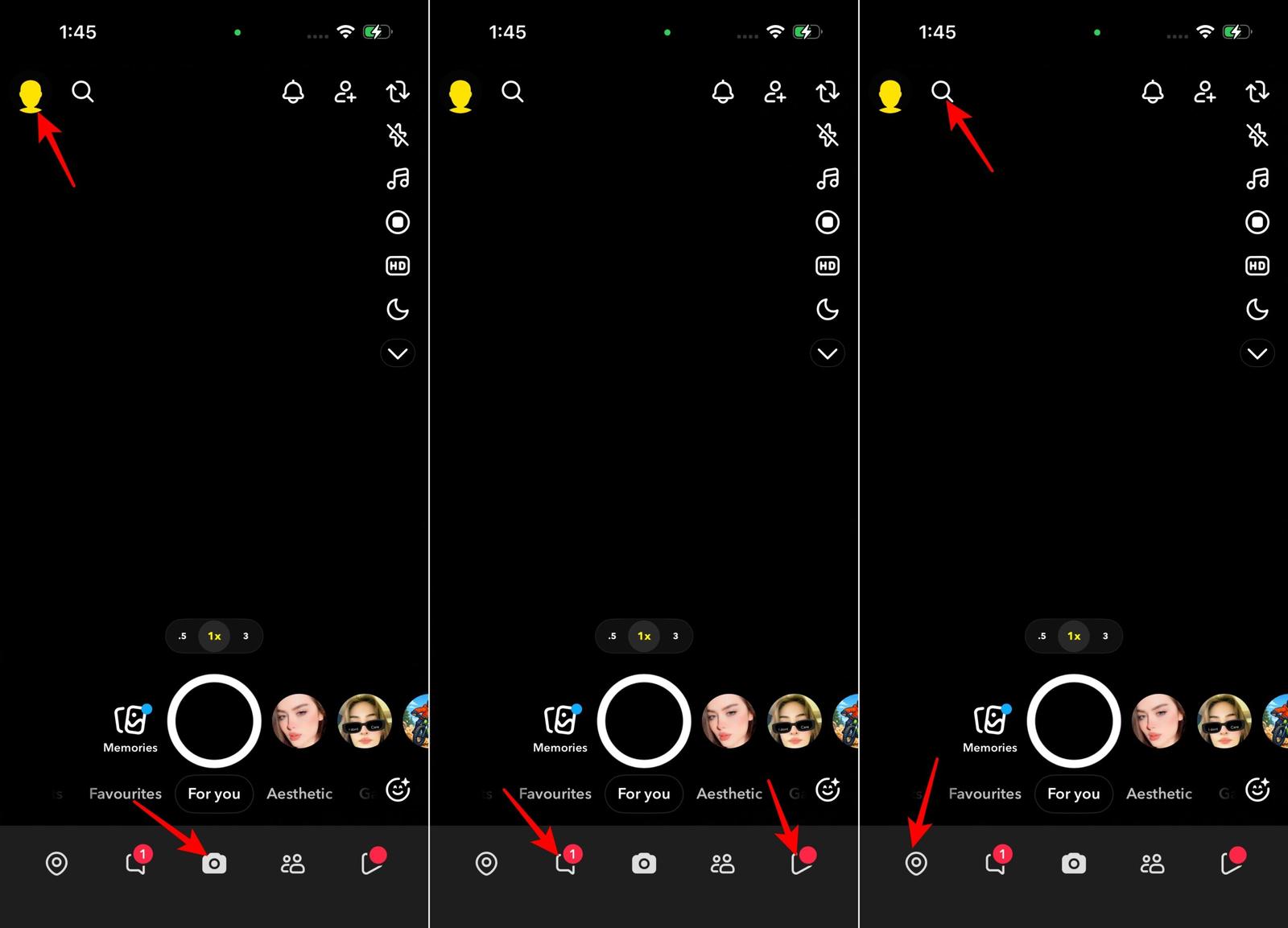
Beyond chats and Stories, Snapchat includes several icons that help users navigate the app.
- Ghost icon 👻: The ghost icon takes you to your Snapchat profile. If your account has a Bitmoji associated with it, the ghost icon is replaced by your Bitmoji.
- Camera icon 📷: This is the default screen you’ll see when opening Snapchat.
- Chat icon 💬: The chat icon opens your conversations.
- Play icon ▶️: This icon leads to Stories and Spotlight content.
- Location pin icon: This icon takes you to Snap Map.
- Search icon 🔍: Use the search icon to find friends, creators, and content.
- Settings icon ⚙️: The settings icon provides access to account preferences and privacy controls.
Snapchat icons explained
At first glance, Snapchat’s symbols can seem overwhelming. Fortunately, most of these symbols follow a simple pattern. Once you understand Snapchat’s arrows, emojis, and status indicators, it’s much easier to tell what’s happening in your chats, Stories, and Snapstreaks without guessing what every symbol means.
Still have questions about a Snapchat symbol or icon that isn’t covered in this guide? Drop it in the comments below, and I’ll help you figure out exactly what it means.
Related articles worth reading: