I used to think spotting a Snapchat Plus subscriber was easy: look for the little star and move on. Then I started noticing something more interesting.
Some people had no visible badge at all, yet they were using features that regular Snapchat accounts simply don’t get. Others had flashy Bitmoji backgrounds or unusual Snap behavior that looked like Snapchat Plus, but turned out to be nothing more than a misleading clue.
So I dug into the features and found 12 clues worth knowing, but they aren’t equally reliable. One is a genuine giveaway. A handful are strong pieces of supporting evidence. And several popular tricks are simply not proof that someone pays for the subscription.
Here’s how to tell if someone has Snapchat Plus.
What is Snapchat Plus?
Snapchat+ (also called Snapchat Plus) is an optional paid subscription. It gives subscribers access to exclusive, experimental, and pre-release features and tools that aren’t available to everyone.
Think of it as Snapchat’s VIP club, offering perks such as:
- Snapchat Plus badge,
- Custom Story expiration, Story timestamps, Story Rewatch,
- Unique Bitmoji backgrounds and exclusive Bitmoji pets and cars,
- Premium chat wallpapers,
- Instant Streaks,
- Peek a Peek,
- Post View Emoji,
- Replay Again,
- Friend Solar System,
- AI-generated profile backgrounds,
- Advanced analytics, among others.
Many of these premium options leave visible clues, like special badges, unique icons, or customizations, that can help you spot who’s using Snapchat Plus, which we’ll explore in detail below.
However, a subscriber can turn off some features, never use others, and even hide the Snapchat+ badge. So, my rule of thumb is don’t treat one unusual Snapchat feature as proof. Look for a pattern.
How to tell if someone has Snapchat Plus
1. Look for the Snapchat Plus badge (star icon) next to their name
Reliability: 10/10 — the closest thing to definitive proof.
This is the obvious one, but there’s an important catch.
Snapchat Plus subscribers can display a special black star badge next to their display name. Snapchat says the badge is off by default, meaning a person can absolutely have the premium features without showing it.
How to spot it:
- Open Snapchat and go to the Friends tab.
- Tap on your friend’s Bitmoji or profile picture to view their profile.
- Look for a star icon next to their display name.
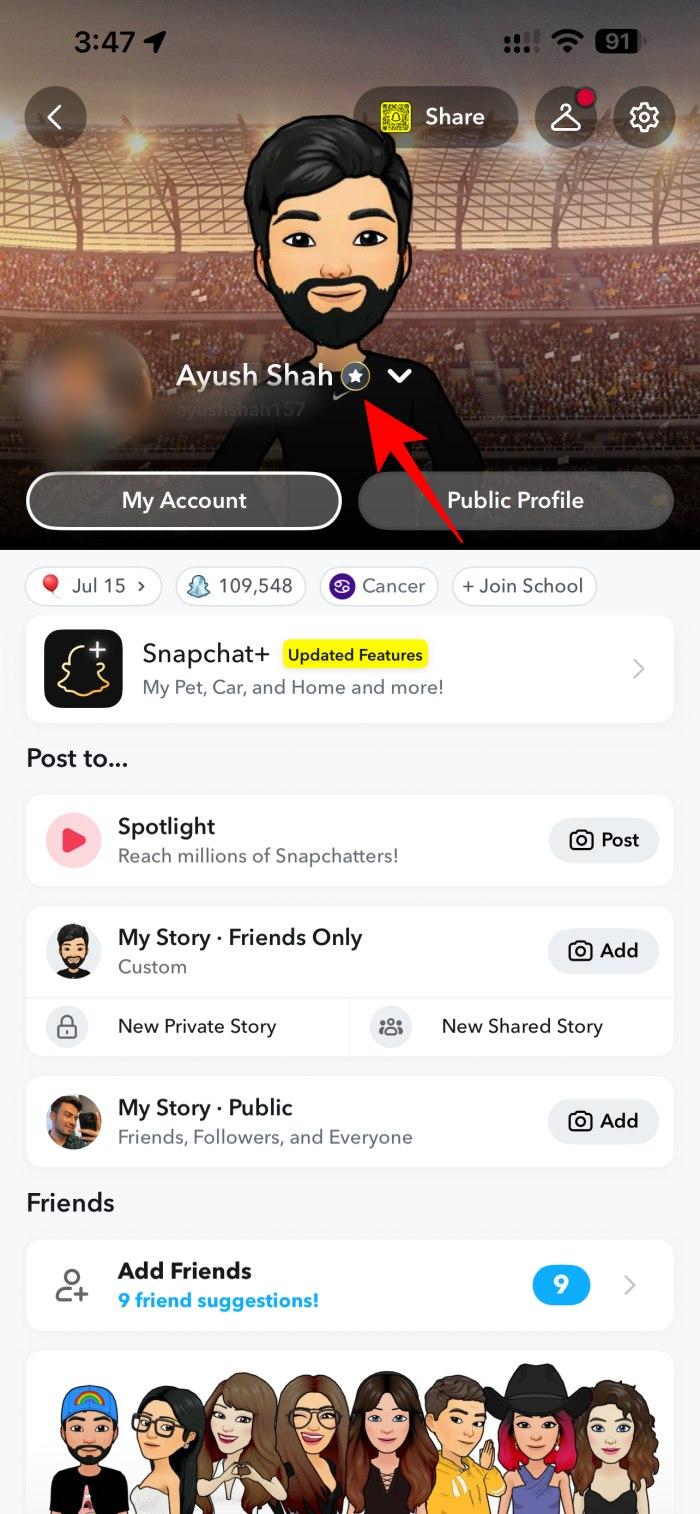
So whenever I see the Snapchat Plus badge, that’s my strongest clue. However, if you don’t see it, that does not mean they aren’t subscribed. That’s the first mistake I see people make when trying to identify Snapchat Plus users.
2. Stories visible for more than 24 hours
Reliability: 7/10 — useful, but not foolproof.
Normal Snapchat friend Stories are generally available for 24 hours. Snapchat Plus includes Custom Story Expiration, which lets eligible subscribers keep their Stories up for as long as a week.
- Check your friend’s Story.
- If the same Story is still visible after a full day, it’s a strong sign they’re using Snapchat Plus.
However, there’s a catch! Once I noticed my friend’s vacation Story was up for three days straight and concluded that “they have Plus.” But the reality was that they reposted their Story to keep it up longer. So, always double-check that it’s the same content and not a fresh post.
3. Unique Bitmoji or AI-generated profile backgrounds
Reliability: 6/10 — a good supporting clue.
This is one of the more visually obvious Snapchat Plus features.
The Plus perks include exclusive Bitmoji backgrounds such as galaxy scenes, neon designs, and custom AI artwork, as well as generative profile backgrounds. It can give a person’s 3D header behind their avatar a look you don’t normally see on a standard account. Snapchat also lists AI creative tools among its subscriber features.
How to spot it:
- Go to your friend’s profile.
- Look for a distinctive generated or premium-looking background.
- Now, you may open your Snapchat profile, tap your Bitmoji, select Scene, and check if your friend’s background is showing there with a lock icon.
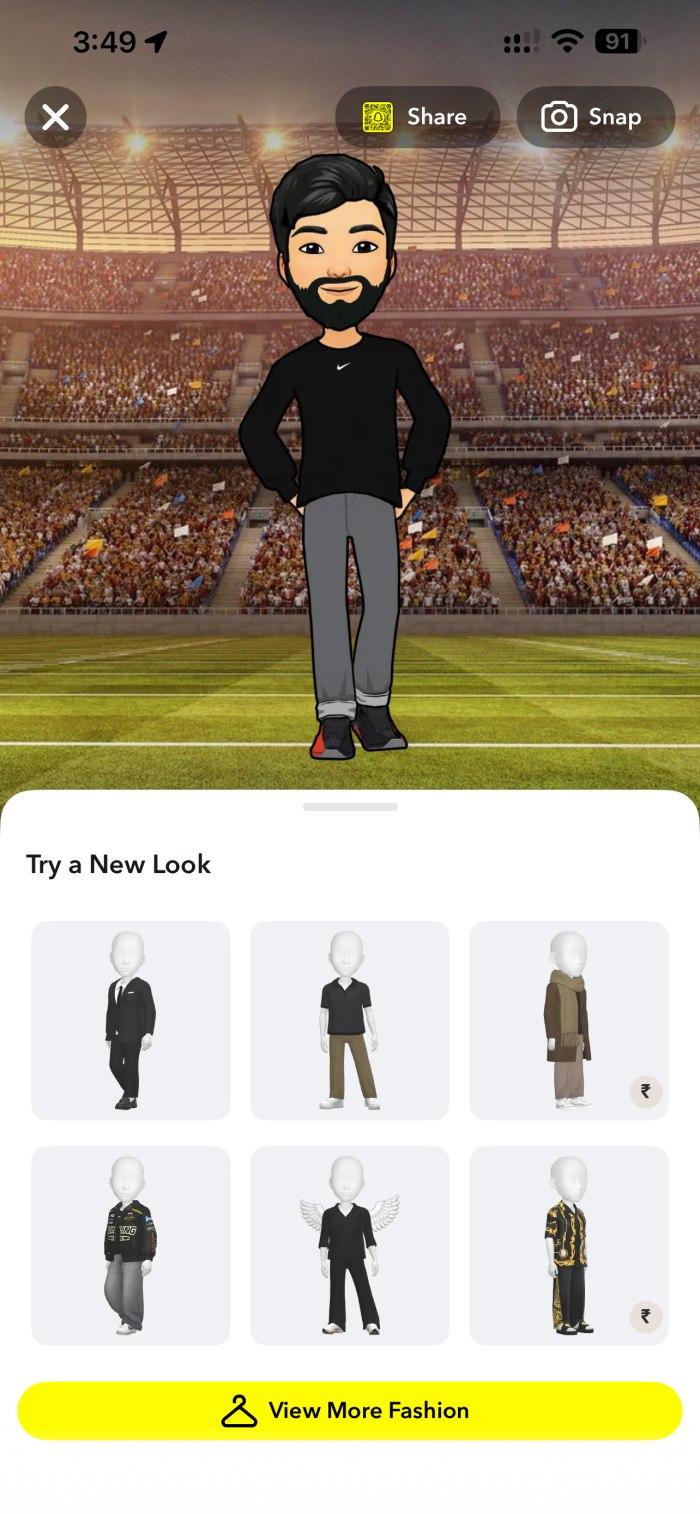
But here’s my warning: don’t use aesthetics alone as proof. Snapchat regularly changes its creative tools, and not every unusual background means the person is currently paying for Snapchat Plus. Treat it as a clue that becomes much stronger when paired with other evidence.
4. Premium chat wallpapers
Reliability: 8/10 — one of the better visual clues.
Plus subscribers can set premium chat wallpapers, including custom images from their camera roll and AI-generated artworks.
- Open a chat with your friend.
- Notice if the wallpaper is unique, super fancy, or custom, like their personal images.
- Now, tap the friend’s name > Wallpaper > Select Wallpaper or Change, then view all from Snapchat. Check if their wallpaper is showing under the lock sign.
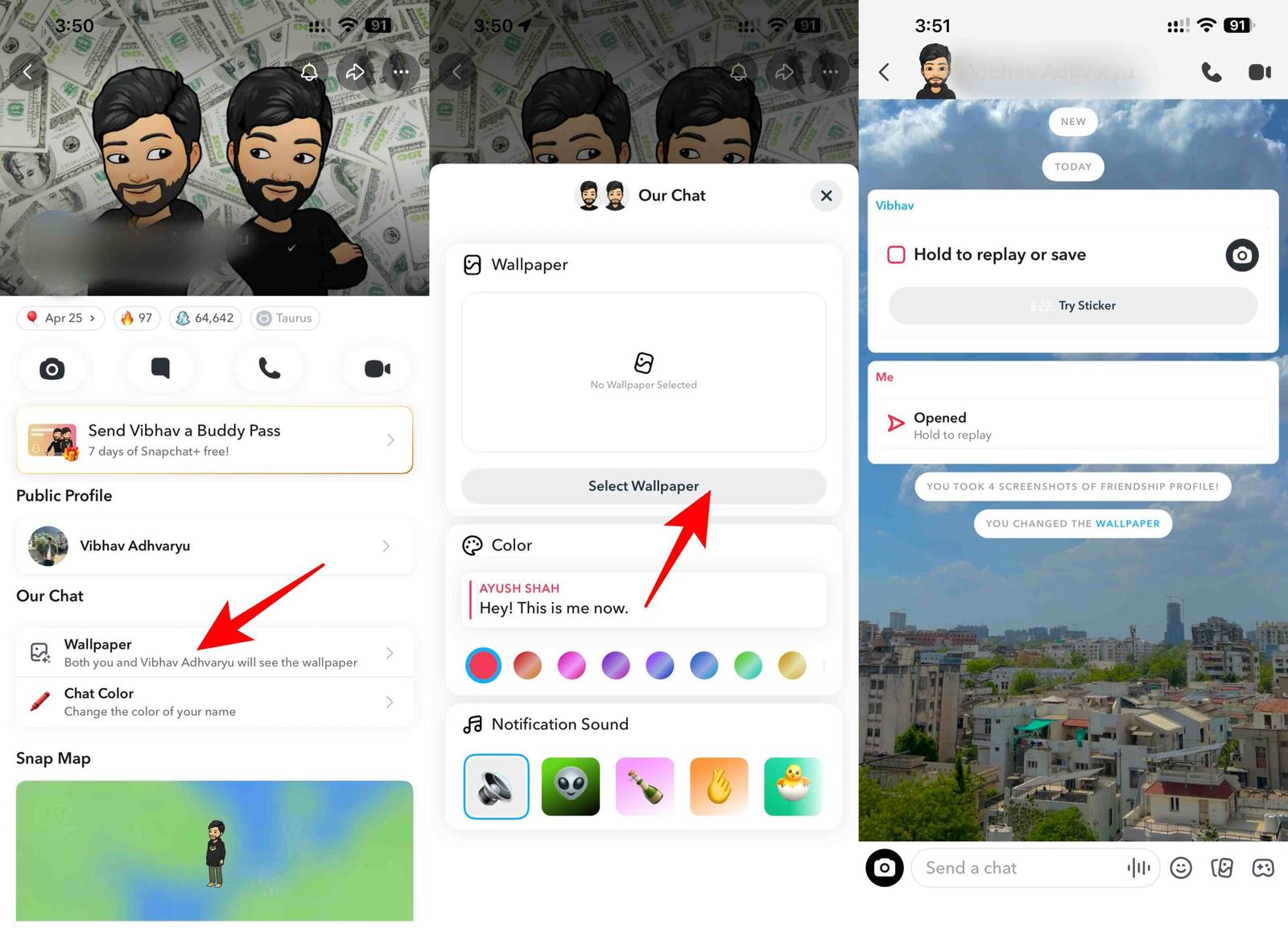
However, not all premium or AI-generated wallpapers are obvious. So, I wouldn’t call it absolute proof.
5. Extra Snap replays — the “replayed twice” clue
Reliability: 9/10 — a very strong behavioral clue.
One day, I received two notifications from the same friend that my Snap was replayed. That one thing revealed that they are a Plus member.
Snapchat Plus subscribers get Replay Again, which allows them to replay a Snap twice immediately after viewing it. For regular users, it’s one-and-done.
How to spot it:
- Send a Snap to your friend.
- If you get notifications that your Snap was replayed twice, they’re using Snapchat Plus.
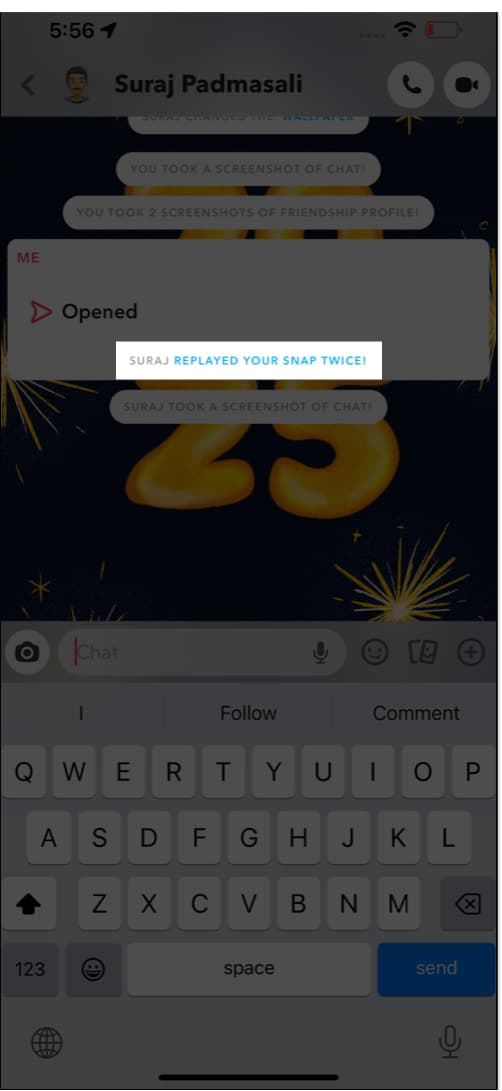
However, note that only the sender can see the replay notifications, so you’ll need to be the one sending Snaps to notice this.
6. Friend Solar System icons (planets)
Reliability: 9/10 — strong clue when you actually see the feature.
This is probably the most fun Snapchat Plus feature to spot.
Snapchat’s Friend Solar System assigns planets to friends based on their position in a subscriber’s Best Friends list. Mercury represents one position, Venus second, then Earth, Mars, Jupiter, Saturn, Uranus, and Neptune.
Once, my friend told me that I am her Earth. It was a bit confusing at first. But later she showed me that my Best Friend profile is represented as a planet on her Snapchat. That’s a confirmation of Plus membership.
There is one wrinkle: Solar System is off by default for first-time subscribers, according to Snapchat. So, again, absence doesn’t prove anything. But if the feature is visibly active, put a big checkmark next to Snapchat Plus.
7. Custom Post View Emojis
Reliability: 8/10 — surprisingly good clue.
Snapchat Plus subscribers can choose a Post View Emoji that appears next to their name in Chat after someone views a Snap they’ve sent.
You might simply notice an unusual emoji like a cupcake, smiley, flower, or anything appearing beside someone’s name after you’ve viewed their Snap.
But not all subscribers use this feature, and emojis can be easy to miss. That’s exactly why I consider it a hidden clue. If the emoji is consistently associated with that person’s post-view behavior, Snapchat Plus becomes a strong possibility.
8. Unique Snap Map icons like pets, cars, and other options
Reliability: 7/10 — a useful visual clue, but don’t overstate it.
Snapchat Plus includes exclusive Bitmoji Pet and Car options, giving subscribers additional ways to customize their Bitmoji’s appearance on Snap Map.
How to spot it:
- Open the Snap Map.
- Look for unique Bitmojis, like they’re riding in a distinctive car or accompanied by a special pet.
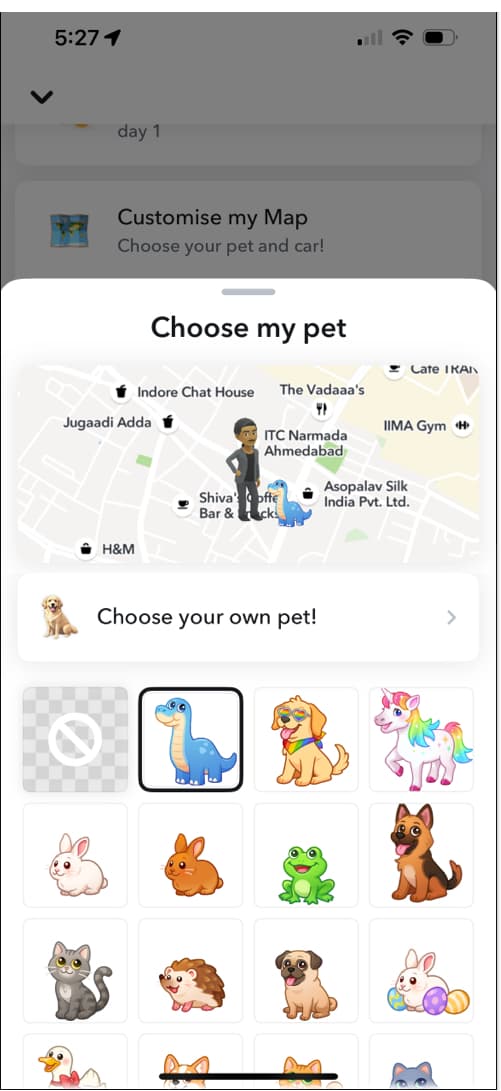
But this is not a “gotcha.” Some icons might appear during special events, but if a friend always has a pet or car by their side, it’s likely a Plus feature.
9. Instant Snap Streaks
Reliability: 8/10 — strong clue when you know what you’re looking at.
This one surprised me because it seems as if Snapchat is breaking its own Streak rules.
Normally, you need to Snap back and forth for three days to start a Streak. Snapchat Plus lets you skip the wait and start a Snap Streak immediately.
How to spot it:
- Start chatting with a new friend.
- If you see the fire emoji (Streak) appear right away, they’re likely a Plus subscriber.
Note:
that the feature appears only when a subscriber has Instant Streak enabled. You also need to pay close attention to new Streaks to consider it as a clue.
10. Half Swipe / Peek a Peek
Reliability: 5/10 — only if they confront you.
Snapchat Plus’s Peek a Peek feature is essentially a half-swipe detector.
Normally, you can half-swipe on a friend’s chat to preview their message without opening it fully. This means they won’t see the “Opened” status, and you can easily act like you never read it.
With Peek a Peek, Snapchat alerts the other person when you half-swipe and peek at their chat. They can see an eyes emoji in the Chat feed or the friend’s Bitmoji at the side of the screen if they’re looking at the chat at the same time. It’s basically Snapchat’s way of saying, “They read it, they just didn’t open it.”
How to spot it:
When you half-swipe on someone’s chat to preview their message, and they confront you about it later, there’s a good chance they’re using Snapchat Plus.
Important:
This is a subtle indicator that appears only when the person is on the Chats tab. Also, the Snapchat Plus user must enable Peek a Peek from their Snapchat Plus settings for it to work.
11. Snaps clicked with GenAI-powered Lenses
Reliability: 3/10
This sounds convincing because Snapchat Plus includes AI creative tools.
If you notice someone sharing Snaps with cool AI effects, you can try the same Lens yourself. Open their Snap or Story and look for the Try Lens option. Tap it, and Snapchat will open the camera with that Lens ready to use.
Once you try it, you may notice that the Lens is powered by Generative AI or is a premium Lens. Look for the sparkle icon next to the Lens name or on the screen while the effect is active.
Keep in mind, though, that an AI-powered Lens alone doesn’t confirm that someone has Snapchat Plus. Some AI Lenses may also be available to regular Snapchat users. So, use this as one clue and check for other Snapchat Plus features before assuming they have a subscription.
12. Comic Bitmoji
Comic Bitmoji is a Snapchat Plus feature that lets users turn their Bitmoji into a comic-style character. Instead of the regular Bitmoji look, their avatar has a more dramatic, illustrated vibe, almost like it belongs in a comic strip.
It’s mostly a cosmetic upgrade, but it stands out because the Bitmoji looks noticeably different from the standard version.
How to spot it:
So if someone’s Bitmoji suddenly looks more “comic-like” with sharper outlines and a more stylized appearance, they most probably have Snapchat Plus.
But this is not a guaranteed sign on its own, since Snapchat also occasionally rolls out Bitmoji-style updates. But if the comic look appears as a distinct style option (not the default Bitmoji look), it’s a strong hint that the person is a Plus subscriber.
Limitations and things to keep in mind
Before you start investigating your entire friend list, there are a few important limitations.
- The Snapchat+ badge can be hidden: Snapchat says the Plus badge is off by default. A subscriber can choose whether to display it. So “no star = no Snapchat Plus” is simply wrong.
- Features can be turned off: Several premium features are optional. Solar System, for example, is off by default for first-time subscribers and can be toggled on or off. That means two people with subscriptions can have completely different-looking accounts.
- Not all features are visible to others: Some perks, like advanced analytics or app icon changes, are private.
- Features roll out at different times: Snapchat Plus includes experimental and pre-release features, so availability can vary. If you see a feature on one person’s account but not another’s, that doesn’t mean one person has Plus and the other doesn’t.
- Don’t confuse Snapchat Plus with verification badges: Subscription badges don’t include Gold Star or Yellow Star. They are for verified public profiles and business profiles.
How to hide your Snapchat Plus status
If you’re the Snapchat Plus subscriber rather than the detective, you may be wondering how to make your subscription less obvious.
The simplest step is to turn off the Snapchat Plus badge.
- Open Snapchat and go to your profile.
- Tap on the Snapchat+ menu.
- Turn off the Snapchat+ Badge option.
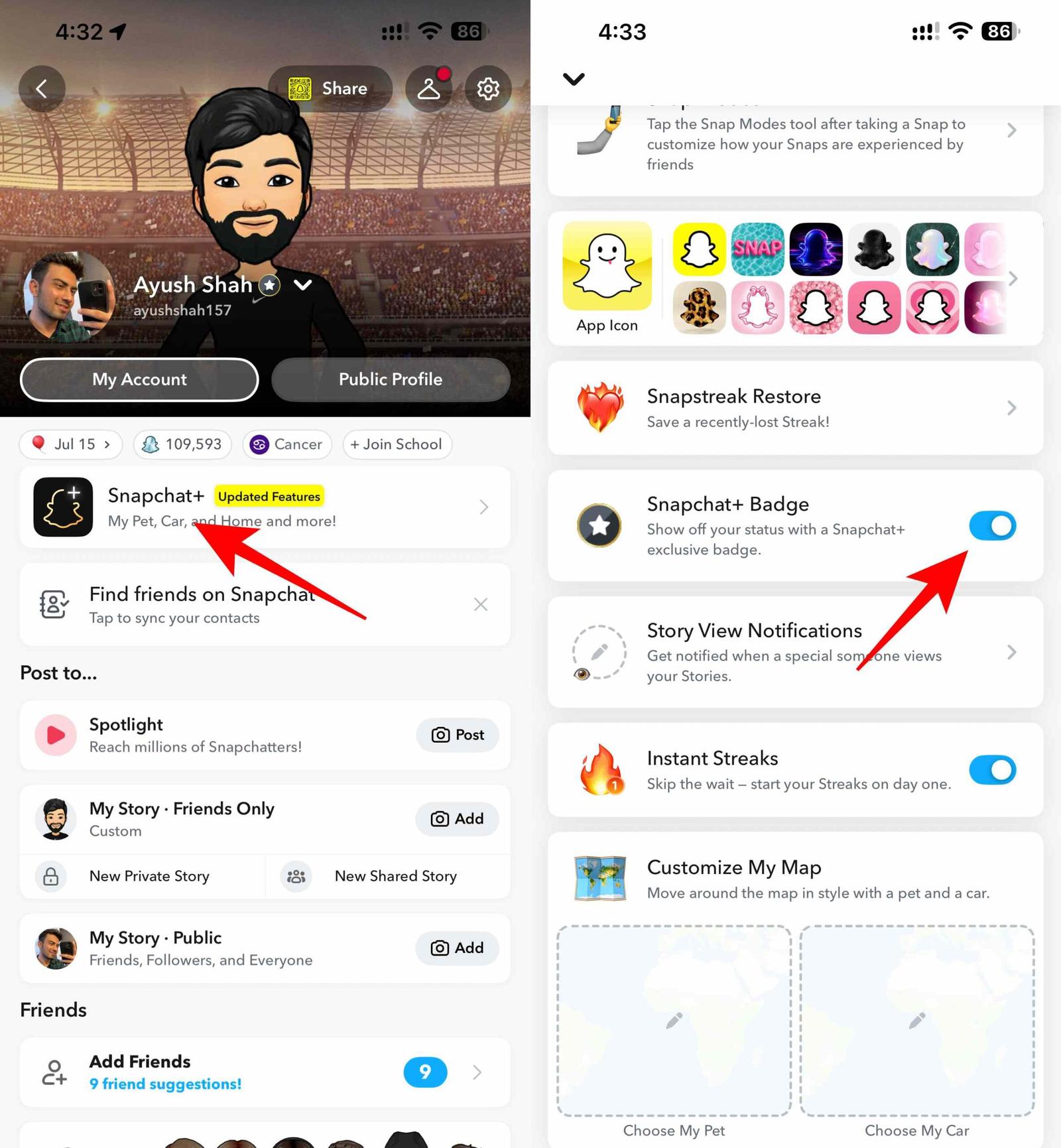
But hiding the badge doesn’t make every Plus feature invisible.
If you actively use subscriber-exclusive features such as Post View Emoji, custom chat wallpapers, Instant Streaks, or Replay Again, friends may still encounter those features. If privacy matters, the better strategy is to avoid enabling the highly recognizable subscriber features.
Final thoughts
After going through the whole list of signs, I came away with a much simpler answer than I expected. The smartest way is to stop looking for one magical tell and start looking for a cluster of exclusive features.
And honestly, that’s what makes Snapchat Plus interesting: the subscription isn’t designed to announce itself everywhere. It’s designed to give people small advantages and customization options that become obvious only when you know exactly what to look for.
So the next time a friend’s Snapchat suddenly has planets, strange post-view emojis, custom wallpapers, or an extra replay, you’ll know what that Snapchat icon or notification means.