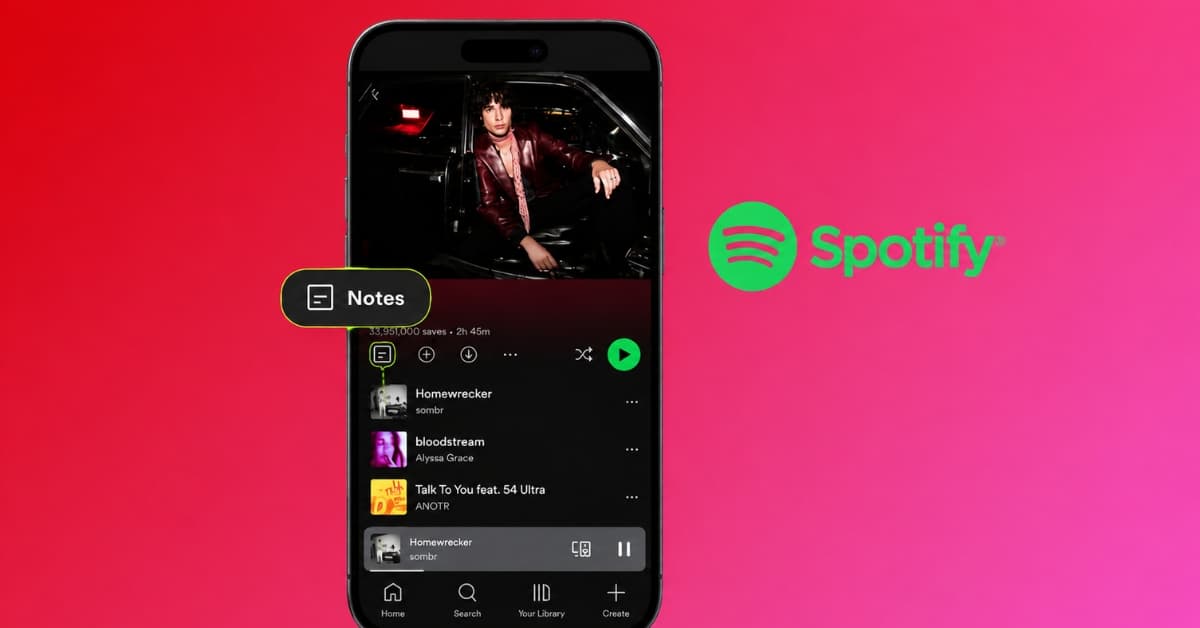
Spotify has launched a new feature called Playlist Notes, and honestly, it’s one of those small updates I didn’t know I needed until I saw it.
According to Spotify’s official Newsroom, Playlist Notes lets you add your own thoughts, memories, recommendations, or little explanations to songs, podcast episodes, and audiobooks in your playlists.
For me, the best part is that it makes a playlist feel a little more personal. Instead of just adding a song and moving on, I can now leave a note explaining why it’s there. Here’s how the Spotify Playlist Notes feature works and how you can add one.
What are Spotify Playlist Notes?
Spotify Playlist Notes let you attach a written note to individual tracks, podcast episodes, or audiobooks inside a playlist you created or collaborated on. Think of them as tiny captions attached to the things you listen to.
You can use a note to explain:
- Why you added a song
- Where you discovered it
- What memory it reminds you of
- Why you think someone else should listen
- What mood it is supposed to create
- Why it belongs in that particular playlist
- What makes the track special to you
A normal playlist tells someone what to listen to. A playlist with notes can tell them why. And I think that makes a huge difference.
Spotify says the feature is designed to let listeners capture memories, share recommendations, and explain why particular picks made the cut. Notes are visible to anyone who can view the playlist, and the note author’s name links to their Spotify profile.
Note:
Playlist Notes are different from playlist descriptions, which tell you about the playlist. Notes are about the individual song.
How to add notes to a Spotify Playlist
The good news: Spotify hasn’t buried this feature behind menus and a settings page. Writing a custom user note to your Spotify Playlist takes just a few taps.
Here’s how I use Spotify Playlist Notes:
- Open a playlist you own or collaborate on.
- Find the song, podcast episode, or audiobook you want to annotate.
- Tap the three dots (…) next to it.
- Select Add note from the menu.
- Write your note and tap Save.
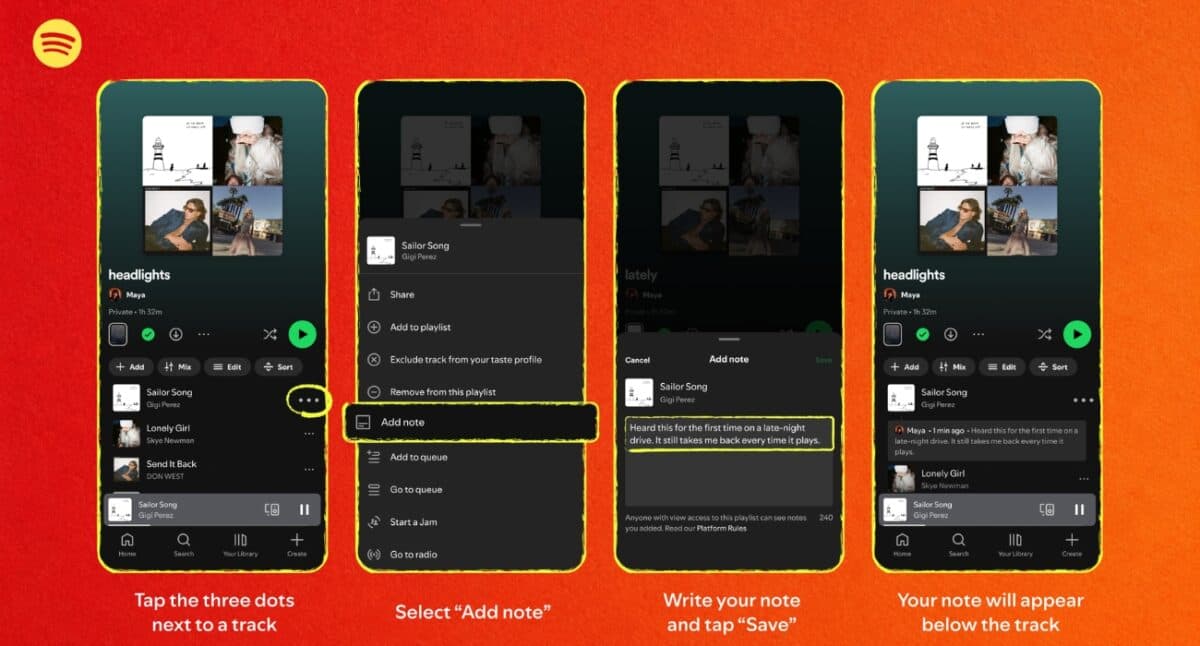
That’s it. Your note will appear underneath the item in the playlist.
If you don’t see the Add Note feature yet, don’t immediately assume you’re doing something wrong. It may simply not have reached your account.
Spotify says Playlist Notes are currently rolling out to iOS and Android users in more than 100 markets globally, although availability can vary as the rollout continues. I recommend updating the app to get the latest features as they become available.
My favorite thing about Spotify Playlist Notes
The obvious use for Playlist Notes is writing something like: “This was my favorite song of the summer.” And that’s fine. But honestly, I think you’re underselling the feature if that’s all you use it for.
The more interesting notes are the ones that give the listener a reason to stop and care. For example, I added: “Play this one when you’re driving home after midnight.” That’s better than writing “Great song.”
Even better if you write: “Added this after hearing it at that tiny club in Berlin. The live version was even better.” Now you’ve created context. The song isn’t just audio anymore. It’s attached to a place, a moment, and a story. That’s where Spotify Playlist Notes become genuinely interesting.
4 actually useful ways to use Spotify Playlist Notes
If you’re wondering what you’re supposed to write in these little notes, don’t overthink it.
Here are the uses I think are genuinely worth trying.
1. Turn a playlist into a personal time capsule
This is probably the most meaningful use.
Create a playlist for a particular period of your life and use notes to preserve the details that you’ll forget later.
Try notes like:
- “I found this during my first month at the new job.”
- “Played this constantly during the summer of 2026.”
- “This was on repeat during our Paris trip.”
- “First heard this at 2 a.m. and immediately added it.”
Six months from now, the playlist will be more than music. It becomes evidence of who you were.
2. Explain why a song is there
We’ve all received a playlist from someone containing one completely baffling song.
Now there’s an easy solution. Write: “Trust me. Wait until the chorus.” Or: “This doesn’t make sense until track 7.”
Suddenly, the listener has a reason to keep going. I think it will finally make the carefully sequenced playlists, where every track is supposed to lead into the next, easy to understand.
3. Make better shared playlists
This is where I think Playlist Notes could become surprisingly useful.
Spotify allows people to collaborate on playlists, so multiple people can contribute tracks. But collaboration can also create musical chaos. One person adds indie rock, another adds Bollywood, and others add a 12-minute experimental jazz track.
A note can provide some context: “Added this for the late-night section.” Or: “This is the song I meant when I said something dreamy.” It gives collaborators a little more communication without having to leave Spotify.
4. Create a playlist for someone else
It helps me more when making a playlist for a friend and adding a short personal note to every few songs.
For example: “You said you wanted something upbeat for your morning commute. Start here.” Then: “This one reminded me of you immediately.” Or: “As you like K-Pop, listen to this one”
It’s like I am giving them a guided tour through my taste. And don’t write reviews; only add context for the emotional touch.
6. Remember why you saved a Podcast or Audiobook
This is an underrated part of the update. Spotify isn’t limiting Playlist Notes to music. You can also add notes to podcast episodes and audiobooks you’ve added to playlists.
That opens up a completely different use case. I have added: “Listen to this episode before the interview.” Or: “The section around 32 minutes is the part I want to revisit.” It made my saved audio easier to navigate and remember.
Note:
Notes are visible to people who can view your playlist, so don’t treat them like private diary entries. Additionally, Spotify says Playlist Notes must comply with its Platform Rules and Terms of Use. So, be careful!
Spotify is also giving its editors a voice
There is another side to Playlist Notes that I find even more interesting. Spotify isn’t only giving listeners the ability to add notes. Spotify’s editors are getting them too.
According to Spotify, editors can use Playlist Notes to explain why a track matters, why it is culturally relevant, or why it belongs in a particular playlist. The company is also introducing Editor Profiles, where listeners can see an editor’s top tracks and albums, as well as the playlists they contribute to.
Initially, editor notes are appearing on major playlists, including:
- Today’s Top Hits
- RapCaviar
- Hot Country
- All New Pop
- mint
- Fresh Finds Hip-Hop
Simply open the Playlist, tap the Notes button above the tracks, and the editor’s notes will appear.
The editorial rollout is currently aimed at Free and Premium users aged 16 and older in the U.S., Canada, the U.K., Ireland, Australia, and New Zealand.
And this is where Spotify is making a subtle but important shift. For years, editorial playlists have largely been a black box. A song appears, you listen, and move on. Now Spotify can potentially give you a little more of the human reasoning behind that choice.
Your Spotify playlists just got a memory
Spotify has spent years getting better at predicting what we want to hear next. Playlist Notes add something the algorithm can’t manufacture quite as convincingly: personal meaning.
So the next time you create a playlist, don’t just add the song. Add the reason, memory, joke, warning, or tiny piece of context that turns a random track into your track.
What do you think about the new Spotify feature? Let me know in the comments below!
You may like to read: