
How to Find Lost Apple Pencil: 4 Simple Methods
Here’s how to find any lost Apple Pencil and practical tips to prevent losing it again.
- Why your Apple Pencil model matters: Tracking options differ across Apple Pencil Pro, USB C, 2nd Gen, and 1st Gen, so identifying your model helps narrow down the right method.
- Find My works only with Apple Pencil Pro: The Pro model includes an Ultra Wideband chip that lets the Find My app guide you with precise distance and direction indicators.
- Check Bluetooth for older Apple Pencil models: If you use the USB C, 2nd Gen, or 1st Gen Pencil, Bluetooth settings can confirm whether it’s nearby and still connected.
- Use Bluetooth finder apps for signal clues: Apps like Wunderfind estimate distance by measuring signal strength, helping you locate a misplaced Pencil even when it isn’t actively paired.
- Physical searching remains essential: Retrace your steps and check common hiding spots like sofa gaps, backpack pockets, or desk edges, using bright lighting to spot the Pencil’s slim white body.
Losing an Apple Pencil can be frustrating, especially when you’re ready to take notes or sketch and suddenly realize it’s missing. The good news is that, depending on the model you own, there are several ways to track it down. Even if your Apple Pencil doesn’t support advanced tracking, a few simple tricks can help you locate it quickly.
This guide covers how to find your lost Apple Pencil or Pencil Pro, and offers smart habits to help you avoid misplacing it again.
Which Apple Pencil Do You Have?
Before we jump into the search, let’s quickly figure out which Pencil you own. Because some support advanced Find My features, while others don’t.
| Apple Pencil Model | Find My Support | Magnetic Attachment |
|---|---|---|
| Pencil (1st Gen) | No | No |
| Pencil (2nd Gen) | No | Yes |
| Pencil (USB-C) | No | Yes |
| Pencil Pro | Yes | Yes |
How to Find Your Lost Apple Pencil
Here, I have shown 4 different methods based on the Apple Pencil model.
Method 1: Use Find My to Locate Apple Pencil Pro
If you have the Apple Pencil Pro, you’re in luck! It has an Ultra Wideband chip, so you can use Find My to locate it.
- Open the Find My app on your iPhone or iPad in portrait mode.
- Move to the Devices tab at the bottom.
- Tap your Apple Pencil Pro from the list. Here, you can see its last known location.
- Tap Find to reach your Pencil. You will see a circle indicating its location.
- As you move towards it, the text changes from “far,” to “near,” to “within reach.”
Can’t see your Apple Pencil Pro on the list? Maybe you forgot to add it to your Find My. In such a case, follow the next method.
Method 2: Check Bluetooth Settings
To find the Apple Pencil Gen 1, 2, and USB-C models, you’ll need to use your iPad’s Bluetooth settings, as they don’t support Find My tracking.
If it recently connected to your iPad:
- Go to Settings → Bluetooth.
- Ensure Bluetooth is toggled on.
- If your Apple Pencil is connected to your iPad, it is within 30 feet of your iPad.
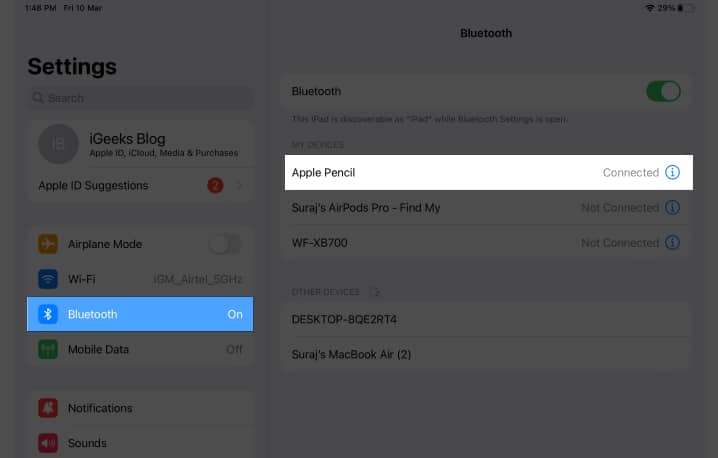
- Walk around the area where you last used your Apple Pencil. If it disconnects, you passed it.
Method 3: Use a Bluetooth Finder App to Track an Apple Pencil
Checking Bluetooth connection status is a vague indication that your Apple Pencil is in close proximity. For a more granular search, use a Bluetooth tracker like the Wunderfind app. It shows the approximate distance between your iPad and Apple Pencil in meters.
- Download the Wunderfind app from the App Store.
- Once the download is complete, launch the Wunderfind app.
- Tap Allow when prompted to allow the app to use Bluetooth.

- If you want to use the app for free, just close the payment interface.
- You can now view the accessories connected to your iPad.
- Select the Apple Pencil from the menu, and a radar depicting the signal of the Apple Pencil will appear.
- Move around until the signal strength reaches 100%.
- When you find the Apple Pencil, tap I found it to conclude the search.
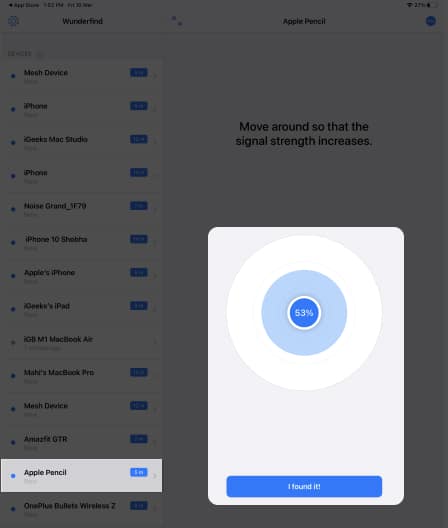
However, the app only works if your Apple Pencil has enough battery, is awake, and is connected to your iPad.
Note:
Method 4: Retrace Your Steps and Nudge Things Around
If you still don’t have a location clue, this is your last resort.
Think about the last time you used it. Was it on your desk, in a meeting, or at a coffee shop? Check common hiding spots, such as under furniture, in couch cushions, on desks, and inside bags and pockets. Use a flashlight to peer into dark areas. The Pencil’s white body can blend in, but it reflects light well.
Also, move your belongings when searching. The pencil can sleep for a long time when disconnected, so it doesn’t appear on your Bluetooth list. Shuffling things can nudge the pencil to wake up and reconnect to your iPad if nearby.
Tips to Avoid Losing Your Apple Pencil Again
Prevention is better than hunting, right? Here are some straightforward ways to keep your Pencil safe and sound.
- Use a magnetic iPad case with a pencil holder. This works especially well with Apple Pencil 1st Generation and USB-C devices, as they don’t attach magnetically.
- Add a silicone grip to your pencil. These holders keep it from rolling off desks and give it a personalized look.
- Regularly check the iPad battery widget to quickly notice when the Pencil isn’t connected.
- After every use, store your pencil in the same place, such as attached to your iPad, in a particular slot in your bag, or in a pencil case or sleeve. And stick to it.
- For non-Find-My models, attach an AirTag to it. It will help you track your pencil even if it’s discharged or out of Bluetooth range.
- Ensure that your Apple Pencil is charged after every use so you can use Bluetooth to locate it.
Get Back Your Lost Apple Pencil!
Finding a lost Apple Pencil can feel like hunting for a white needle in a white room. But with the right approach, like using Find My (for the Pro), Bluetooth clues, and smart search habits, you can usually track it down quickly. And once you do, a few simple preventive habits will help you avoid losing it again.
Have you found your iPad buddy yet? Let me know in the comments below!
Read more:
Topics

Written by
Jignesh PadhiyarJignesh Padhiyar is the co-founder of iGeeksBlog.com, who has a keen eye for news, rumors, and all the unusual stuff around Apple products. During his tight schedule, Jignesh finds some moments of respite to share side-splitting content on social media.
View all posts →More from How-to

Snapchat Parental Controls: How to Set Up Family Center and Keep Your Teen Safe
Snapchat’s Family Center lets parents monitor their teen’s friend activity and screen time without reading private messages. Here’s how to set it up and what to expect.
 VikhyatMarch 3, 2026
How to Block and Unblock Someone on Instagram
Instagram lets you block or unblock someone in seconds. Follow these simple steps to take full control of your privacy and online peace.
 Ava BiswasMarch 2, 2026
Apple Watch Not Responding? 8 Fixes That Actually Work
Is your Apple Watch unresponsive or stuck on a black screen? Here are 8 proven fixes to help you unfreeze it and get it working again quickly.
VikhyatMarch 3, 2026