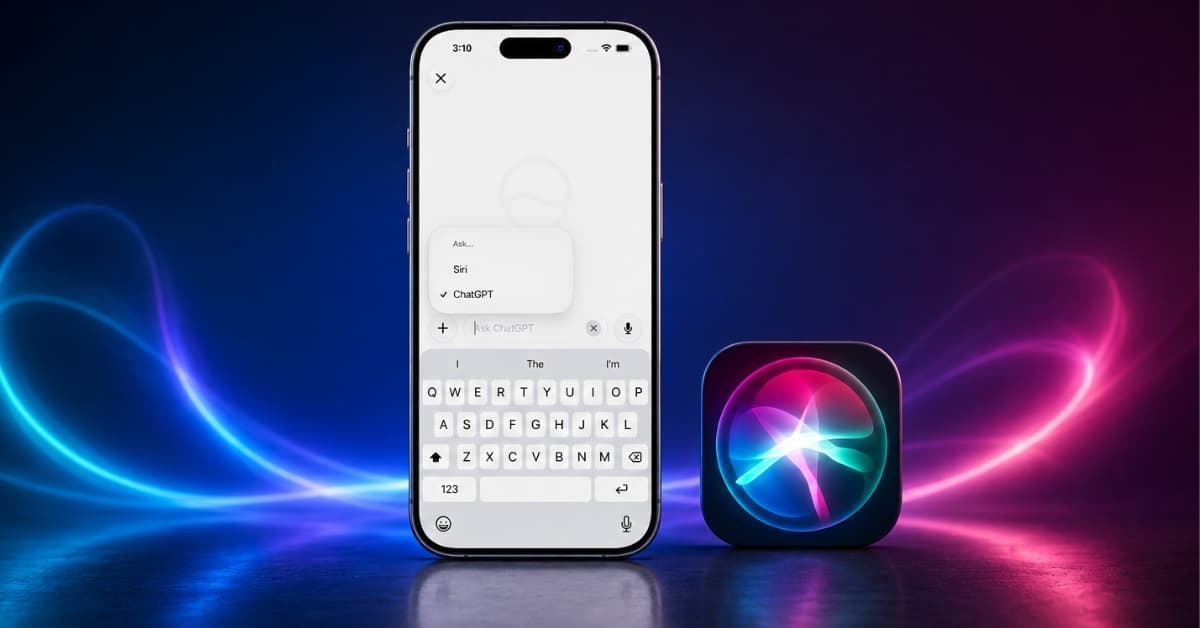
Apple has finally made Siri feel less like a voice assistant and more like a proper AI chatbot. In iOS 27, iPadOS 27, and macOS 27, the new Siri AI app offers a conversational interface that will feel surprisingly familiar if you already use ChatGPT, Claude, or Grok.
The exciting thing is that although Siri is powered by Google’s Gemini model behind the scenes, you can switch to ChatGPT as an alternative AI provider. I spent some time asking ChatGPT, instead of Siri, on my iPhone in the new app. Here’s how the feature works, what it’s like to use, and whether it’s actually worth replacing the ChatGPT app.
What’s changed with Siri in OS 27?
The biggest change isn’t simply that Siri got smarter. Apple has turned Siri into an app.
With iOS 27, iPadOS 27, and macOS 27, you get a dedicated Siri AI experience that looks and behaves much more like a conventional AI chatbot. You can start conversations, type questions, use your voice, and return to previous Siri conversations later. Apple also syncs Siri conversations across devices through iCloud.
That makes the old Siri-versus-ChatGPT relationship considerably more interesting.
Previously, ChatGPT was essentially Siri’s backup plan. Whenever I asked a complicated question that Siri couldn’t answer, it would ask for my permission to send the request to ChatGPT. You could also explicitly prompt Siri to use ChatGPT to answer questions, create images, explain what’s on your screen, and more.
The new Siri app flips that experience around. Instead of waiting for Siri to decide that a question is too complicated, you can choose ChatGPT yourself. That’s the part I like most. If I want ChatGPT to handle something where I prefer its style or capabilities over Gemini-powered Siri, I can explicitly select ChatGPT.
How to use ChatGPT inside the Siri app on iPhone or iPad
Getting ChatGPT working inside the new Siri app is surprisingly straightforward.
Before starting, make sure you have a compatible iPhone or iPad running iOS 27 or iPadOS 27 and that you’ve already set up the new Siri AI experience by going to Settings > Siri > and tapping Try New Siri.
Note:
iOS 27 and iPadOS 27 are currently in beta, so the interface may change before the final release.
Once you’re ready:
- Open the Siri app.
- Start a new conversation by tapping the compose button.
- Now, tap and hold the Ask Siri typing field.
- Select Ask from the pop-up menu, then choose ChatGPT from the options.
- Look at the input field. The placeholder changes from Ask Siri to Ask ChatGPT.
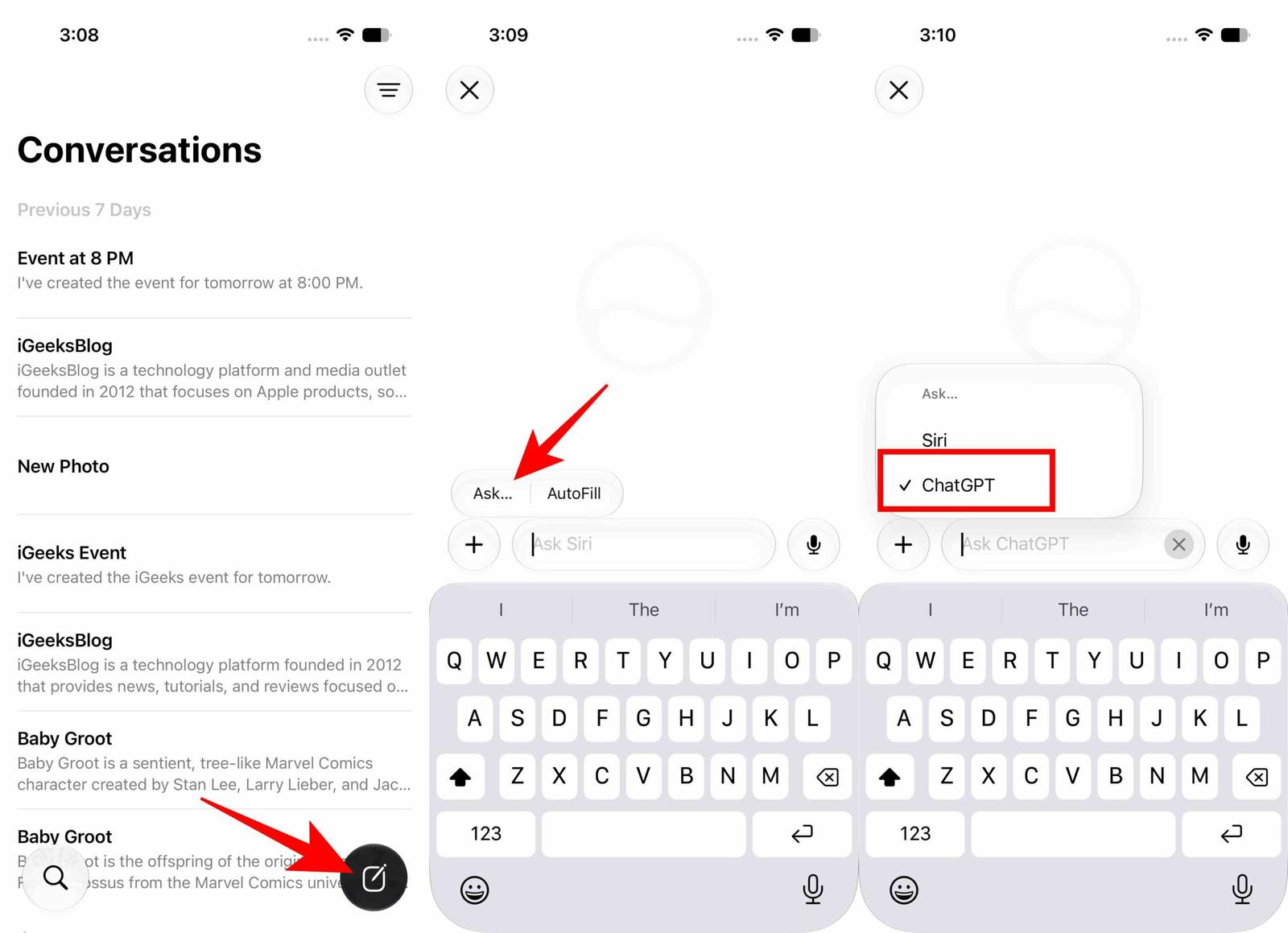
That’s how you know OpenAI is now handling your questions instead of Siri. From there, simply type your prompt or ask your question.
How to use ChatGPT inside Siri on Mac
The process is almost identical on Mac, although the interaction is slightly different.
On a Mac running macOS 27 Golden Gate:
- Open the Siri app.
- Start a new conversation.
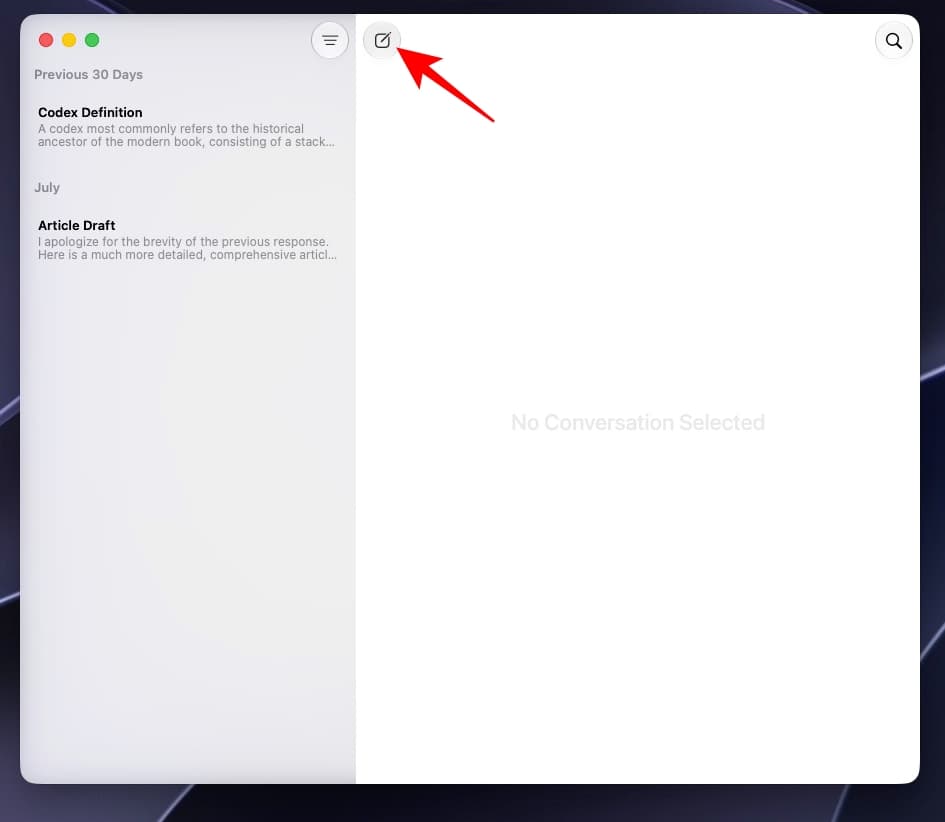
- Control-click inside the Ask Siri field.
- Select Ask and choose ChatGPT from the drop-down.
- Start typing your question.
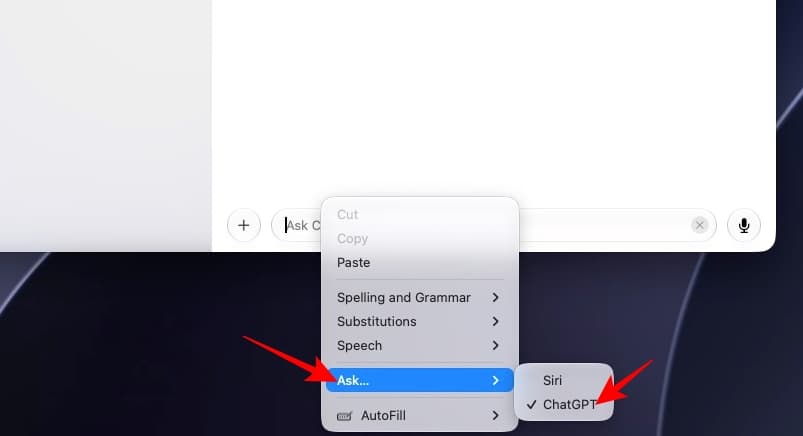
The input field changes to Ask ChatGPT, confirming that ChatGPT is now handling the conversation.
I like the consistency here. Apple hasn’t created a completely different workflow for Mac users. The basic idea remains the same: open Siri, choose the AI assistant you want, and start chatting.
What happens when you switch between Siri and ChatGPT?
This is where using the feature becomes more interesting. Siri and ChatGPT don’t behave like two completely separate apps. They can take turns handling the same conversational space.
During my testing, I found that after switching to ChatGPT, asking “Who are you?” results in an answer stating that ChatGPT is assisting me. Then, saying “Is it the Siri app?” surprisingly shifts the conversation from ChatGPT back to Siri. That’s a neat trick because it makes the experience feel fluid. You aren’t necessarily locked into one AI for the entire conversation.
But the reverse behavior is much less elegant. If you ask Siri to “Switch to ChatGPT,” it doesn’t simply change the provider inside the Siri conversation. Instead, it opened the standalone ChatGPT app on my iPhone as it was already installed.
That’s exactly the kind of inconsistency that makes me think this feature still needs some polishing. Apple has created a menu for choosing ChatGPT, so I would rather see that choice work consistently in both directions.
The annoying catch: ChatGPT doesn’t stay selected
This is the biggest problem I found. ChatGPT is not a permanent setting in the new Siri app. You can select it to use it. But then Siri quietly forgets your preference.
In my testing, the app switches back to Siri when you:
- Start a new conversation.
- Leave a conversation and return to it.
- Close and reopen the Siri app.
There is currently no setting that lets you permanently set ChatGPT as the default AI provider in the Siri app.
And honestly, this is the part I would want Apple to change first. If I deliberately choose ChatGPT, there’s a good chance I chose it because I want ChatGPT to handle my next questions too. Making me select it again every time isn’t a major inconvenience, but it is unnecessary friction.
Another catch: Siri ChatGPT conversations don’t appear in ChatGPT history
This limitation surprised me even more. You might reasonably assume that signing into your OpenAI account would make conversations started with ChatGPT inside Siri appear in your normal ChatGPT history.
They don’t. Any questions I ask through ChatGPT in the Siri app don’t appear in my ChatGPT account history, even after signing in to my OpenAI account through the device’s Siri and ChatGPT settings.
That’s important because it creates two separate ChatGPT experiences.
There’s:
- ChatGPT inside the Siri app
- ChatGPT inside the ChatGPT app
They may both be powered by OpenAI, but your conversation history isn’t treated the same way.
For me, this makes the Siri integration much less compelling for anything I expect to revisit later. If I’m researching something, brainstorming an article, working on a project, or asking a question whose answer I’ll need tomorrow, I’d rather use the ChatGPT app.
What to do if ChatGPT isn’t showing up
If you don’t see ChatGPT as an option inside the Siri app, don’t assume the feature is broken.
The first thing to check is that the ChatGPT extension is enabled for Siri.
On iPhone, iPad, or Mac:
- Open Settings on iPhone/iPad or System Settings on Mac.
- Go to Siri and select ChatGPT.
- Make sure Use Extension is enabled.
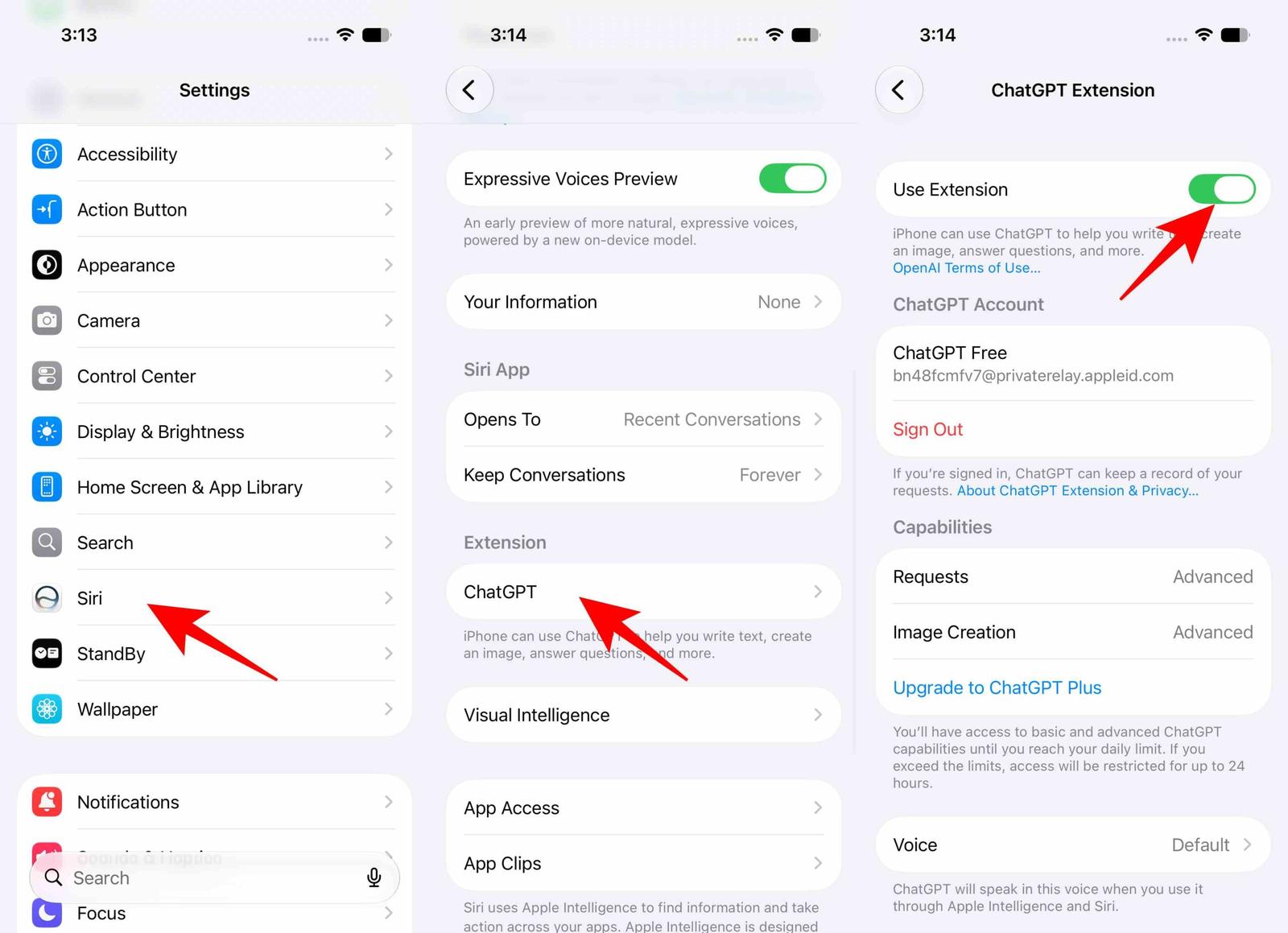
- Return to the Siri app.
- Try selecting ChatGPT again.
If it still doesn’t work, quit the Siri app and reopen it. As a final resort, restart the device and try again.
It’s worth remembering that we’re dealing with beta software here. Apple is still refining iOS 27, iPadOS 27, and macOS 27, so odd behavior shouldn’t necessarily be treated as a permanent limitation.
Does this replace the ChatGPT app?
No. Not for me.
And I don’t think that’s necessarily a bad thing. ChatGPT inside Siri is useful precisely because it gives you another AI option without forcing you to leave Apple’s Siri environment.
But the dedicated ChatGPT app is still the better choice if ChatGPT is your primary AI assistant.
Here’s how I see it.
Use ChatGPT inside Siri when:
- You already live in Apple’s Siri ecosystem.
- You want a quick answer from ChatGPT.
- You don’t want to switch apps for a single question.
- You want to choose between Siri and ChatGPT depending on the task.
- You don’t care about keeping the conversation in ChatGPT history.
Use the ChatGPT app when:
- ChatGPT is your main AI assistant.
- You want a reliable conversation history.
- You’re working on a longer project.
- You expect to return to the conversation later.
- You want the full ChatGPT experience rather than an AI provider embedded inside Siri.
For quick questions, Siri’s implementation is genuinely convenient.
For serious ChatGPT use, I’ll still open ChatGPT.
Could Claude, Grok, or other AI assistants be added?
ChatGPT isn’t necessarily the only third-party AI service that could eventually appear inside Siri.
Industry leaks have suggested Apple is open to giving other AI services a similar level of integration, with names such as Claude and Grok being obvious possibilities. The exact plans aren’t confirmed, so this should be treated as a possibility rather than a promised feature.
If Apple actually opens Siri to multiple AI providers, I think the current ChatGPT integration starts to make much more sense.
Imagine opening Siri and choosing:
- Siri/Gemini for Apple’s assistant features.
- ChatGPT for certain kinds of questions.
- Claude for coding or another type of task.
- Grok for another.
That would turn Siri into something more interesting than another chatbot. It could become the front door to multiple AI assistants.
Enjoy advanced Siri with ChatGPT!
I like ChatGPT inside the new Siri app. I just don’t love the way Apple has implemented it.
For the first time, I can open Siri, decide that I want ChatGPT, and have OpenAI handle the question without treating ChatGPT as some emergency backup Siri calls when it gets stuck. That’s a meaningful improvement over the old Siri-to-ChatGPT experience.
But every new conversation effectively sends me back to Siri, so I have to choose ChatGPT again, and the conversations don’t appear in my normal ChatGPT history. That makes the Siri version feel temporary. It’s great for asking something and moving on, but less appealing when I’m doing work I want to keep.
Will you use ChatGPT inside the Siri app? Let me know your thoughts in the comments below!
Must Read: