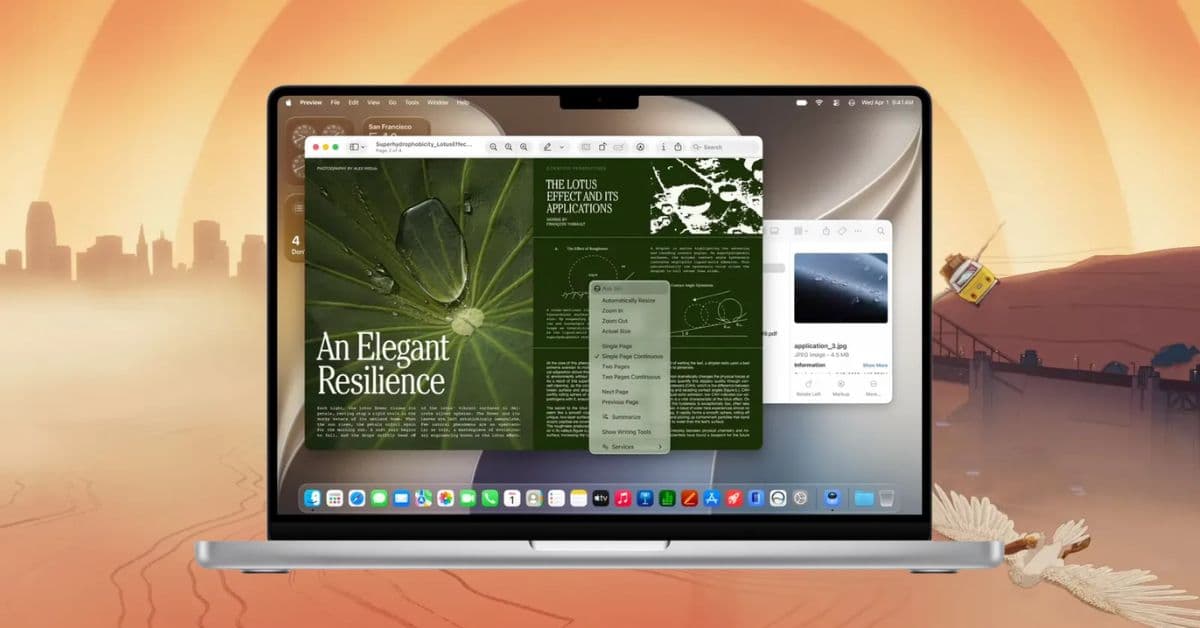
Apple has officially released macOS 27 Golden Gate, bringing a mix of new AI features, design changes, and useful updates to the Mac. The biggest addition is Siri AI, which can understand personal context, work with what’s on your screen, and perform tasks across supported apps.
Along with Siri, macOS 27 adds Visual Intelligence, improves Liquid Glass, brings new features to Safari and Photos, and makes everyday tasks like searching, managing files, and using multiple displays easier. Here’s everything new in macOS Golden Gate, including the features I think are actually worth trying.
Liquid Glass gets a much-needed refinement
Last year’s Liquid Glass redesign was Apple’s biggest visual change to macOS in years. Golden Gate doesn’t throw it away. Instead, Apple gives me more control over it and fixes some of the things that made the original design feel inconsistent.
A new Liquid Glass slider in System Settings > Appearance lets me adjust the interface’s transparency. I can choose between an ultra-clear interface that lets more of the background show through, a more opaque tinted appearance for better readability, or something in between.
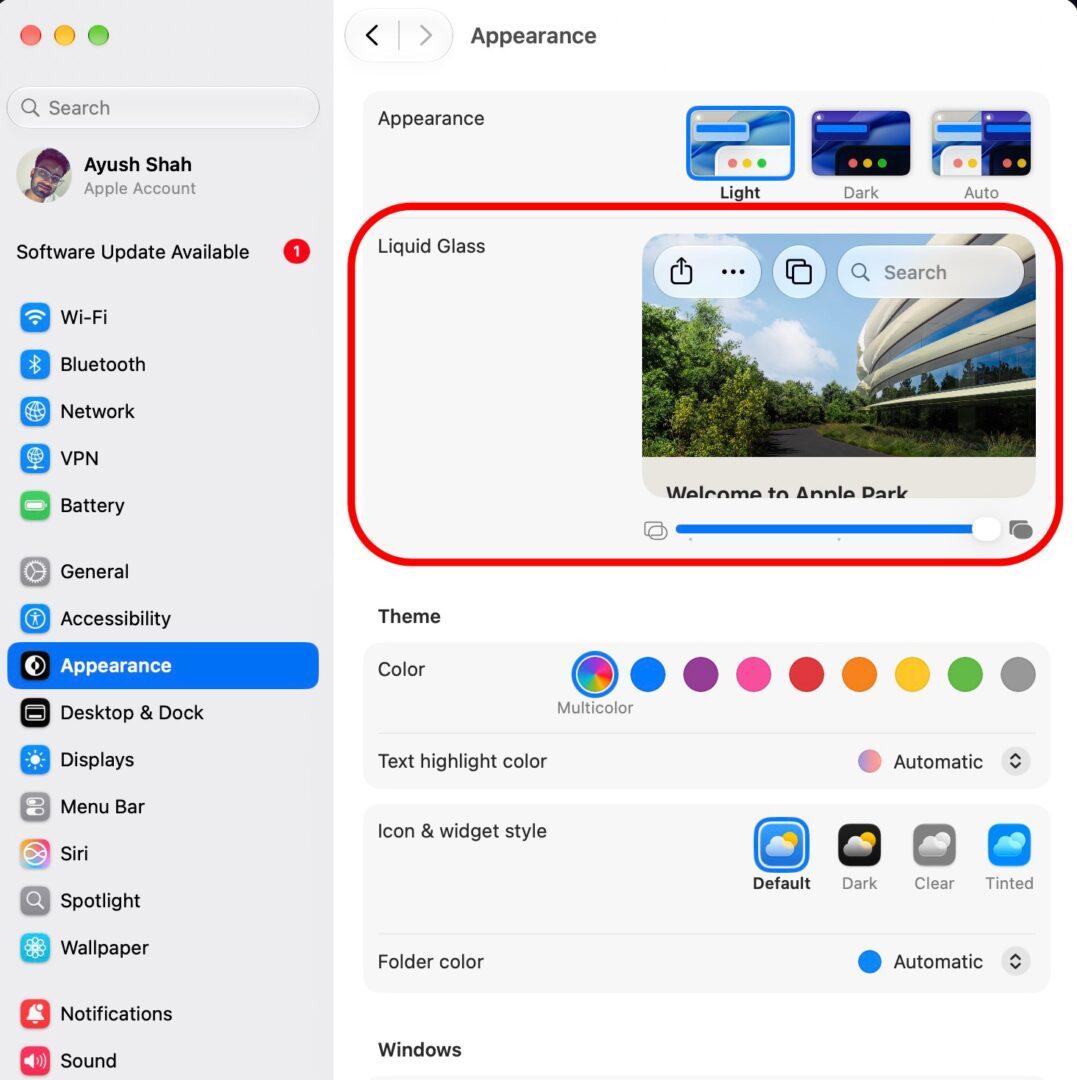
Apple has also changed how Liquid Glass handles complicated backgrounds. Transparency now diffuses complex content more effectively, while darker edges, brighter highlights, and updated window shadows make it easier to distinguish the active window.
Other changes include:
- Standardised toolbars across apps, making headings and groups of controls easier to read.
- Window corners also look more consistent and aren’t as dramatically rounded as they were in Tahoe.
- Sidebars no longer float inside the windows; instead, they extend edge-to-edge.
- Apple has also brought back colored sidebar icons, which disappeared with Tahoe.
- App icons use additional Liquid Glass layers for more detail and sharpness across light, dark, tinted, and clear modes.
Apple is also using HDR to add more depth to the interface and has introduced new Golden Gate wallpapers and screen savers, giving the release its own visual identity.
Siri AI brings a new way to use your Mac
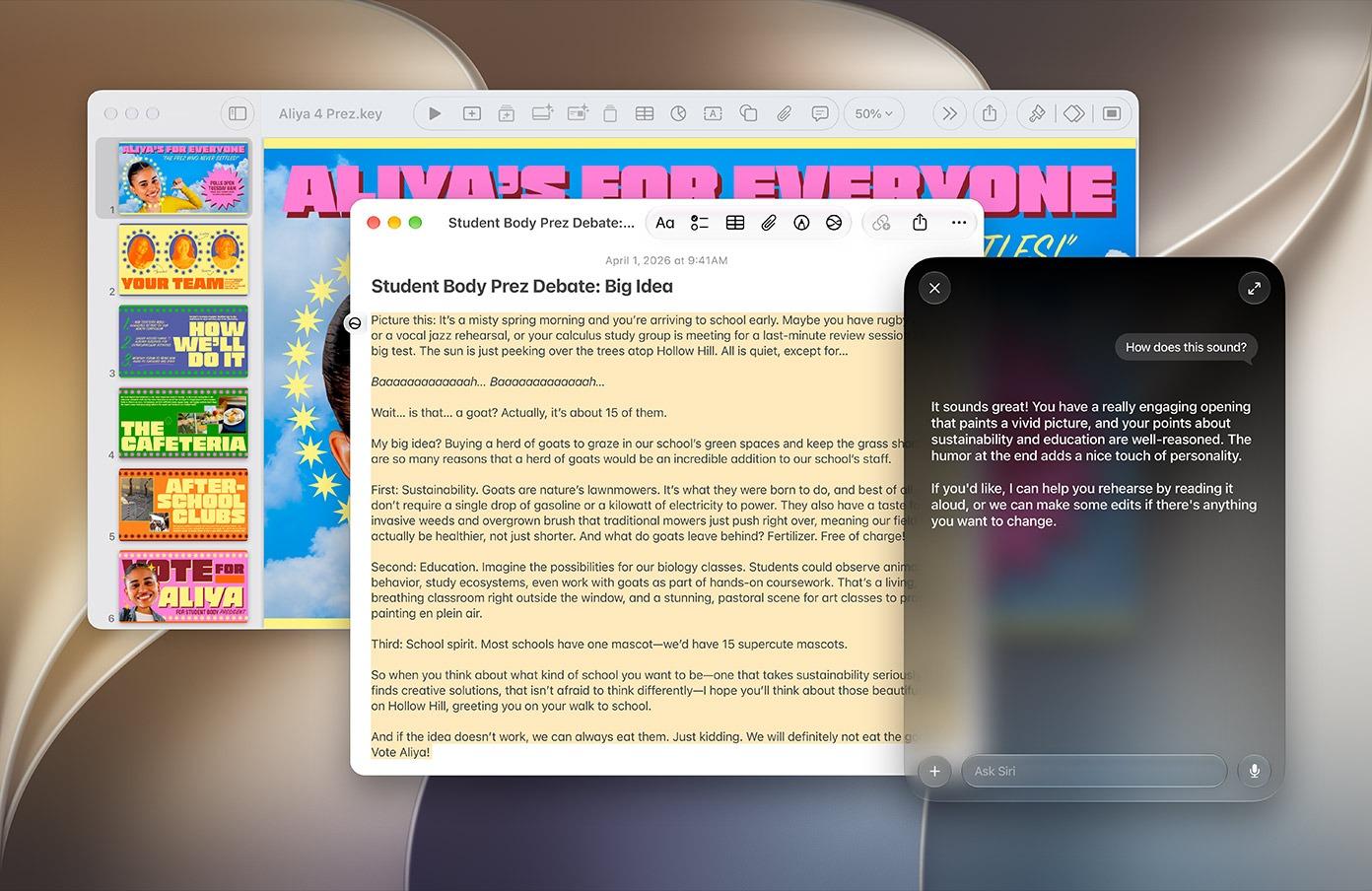
This is the biggest change in Golden Gate, and it goes far beyond the old Siri I was used to.
Apple has rebuilt Siri around its newer Apple Intelligence models to provide the following features:
- Personal context: Siri can search across information from Mail, Messages, Notes, Reminders, Calendar, Photos, and Files. Apple’s semantic search index allows Siri to understand what that information means rather than looking for exact keywords.
- Onscreen awareness: Siri can understand what I’m currently looking at. For example, if you see an unfamiliar image in Safari, you can right-click it and ask Siri what it is or search for more information.
- App Actions: It can perform actions in supported apps, including creating Calendar events, working with Reminders, drafting messages, and performing other app actions. You can also combine multiple tasks in one request.
- Search or Ask in Spotlight: Spotlight has become Siri’s home on the Mac. Press Command + Space to search on Mac, or use the Search or Ask interface to ask Siri a question. Siri responses can be expanded and support follow-up questions.
- Write with Siri: It can draft text from scratch, rewrite something, change the tone, shorten text, turn bullet points into paragraphs, correct grammar and spelling, and give feedback on your writing.
The dedicated Siri app
macOS 27 also gets a standalone Siri app.
In the app, you can start new conversations, revisit previous chats, and search your Siri history. The best part is it lets me pin conversations I want to return to.
The Siri app syncs conversations across compatible Apple devices, so I can start a conversation on one device and continue it elsewhere.
Custom Siri voice and better dictation
On Macs with an M3 chip or later and at least 12GB of memory, Apple offers a more powerful on-device model to adjust Siri voice’s pace and expressivity.
The same on-device model also improves systemwide dictation, with better natural-language understanding and fewer mistakes with spelling, punctuation, and capitalisation.
Siri AI is initially available in English, with additional languages planned. Mac users in the European Union can also access Siri AI.
Visual Intelligence finally comes to the Mac
Visual Intelligence was already useful on the iPhone, but I think it makes even more sense on a Mac because so much of my day is spent looking at documents, webpages, images, charts, and schedules.
Apple gives macOS 27 dedicated shortcuts for Visual Intelligence, including Command + Shift + Space. You can also use the screenshot interface to select an area of your display. Once selected, Siri can summarise or translate text and answer questions about what you’re seeing.
There are some particularly useful new capabilities too. Visual Intelligence can extract multiple events from a schedule, import contact details from a business card, turn a barcode in an image into a Wallet pass, and provide nutritional insights from a photo of food. Bill splitting is also supported in the U.S.
Apple Intelligence is now woven throughout macOS
Siri and Visual Intelligence are the stars, but Golden Gate’s bigger story is how deeply Apple Intelligence has been woven into individual apps.
Photos gets much better AI editing
The Clean Up tool gets a major upgrade. It can now handle more complicated backgrounds and reconstruct missing areas more effectively. It has three new modes: Fast, High Quality, and Auto.
Extend lets me expand the borders of a photo using generative AI, whereas Reframe goes further by using spatial information captured with compatible photos to adjust the perspective of a person or object.
The new Photos app features also add one-click video-frame saving, one-to-five-star ratings, slideshows from any album or collection, better Shared Albums with full-resolution sharing, Android and Windows contributions, and emoji reactions.
Safari can organise my browser chaos
Safari uses Apple Intelligence to organise open tabs into topics. If I’m researching a new laptop while also planning a trip, Safari can group the relevant pages into separate groups instead of leaving me with one enormous collection of tabs.
Then there’s Create an Extension. You can describe the Safari extension you want, and Apple Intelligence can generate it. Safari also gets Notify Me, which can monitor a website for changes. I can tell Safari what to watch for, such as concert tickets going on sale or a product coming back in stock, and choose how often it checks.
Mail gets smarter
Mail’s search has been rebuilt to rank results by relevance and intent, rather than simply matching keywords and recency. So if you search for a retailer because you want to find an order, Mail can prioritise the order email instead of showing a pile of promotional messages.
Smart Replies can also better reflect my writing style, while contextual suggestions can be provided to third-party apps. Mail can surface actions for Calendar, Maps, and Wallet based on information inside messages.
Shortcuts finally become approachable
I’ve always thought Shortcuts was powerful but unnecessarily intimidating for casual users. Golden Gate addresses that with Describe a Shortcut.
Instead of assembling actions manually, you can tell Shortcuts what you want in normal language. For example, I tried this prompt: “Every morning, show me my first meeting, today’s weather, and my Reminders.”
Apple Intelligence selects the necessary actions and builds the workflow. You may use Describe a Change to refine it through additional instructions or manually edit the finished Shortcut.
Home, Passwords, Calendar, and more
The Home app can now provide a summary of all the events detected by the camera, including recognising faces, pets, vehicles, packages, grouping similar events from multiple cameras together, and natural language searching through the recording history.
Supported HomeKit Secure Video cameras can also record in up to 4K, while energy-monitoring accessories can display consumption in Home. Apple’s AI-powered Home features require a 2TB iCloud+ plan or higher.
The Passwords app can use Safari and Apple Intelligence to automatically update eligible weak or compromised passwords.
Calendar and Reminders understand natural-language descriptions, with Reminders automatically extracting details such as dates, times, and locations.
Genmoji and Image Playground become more flexible
Genmoji gets an improved creation interface. You can start with text, an existing emoji, a photo, or a person, then use Describe a Change to modify individual elements instead of starting over. The result is more consistent, and the best part is that I can change the style from the default 3D cartoon appearance to something like a drawing or sketch.
Image Playground is also much more flexible. It can now generate images in virtually any style, including photorealistic images, and I can select specific parts of an image to modify using natural language.
Golden Gate also makes everyday Mac tasks faster and easier
Some of my favourite changes are the ones that don’t require me to learn anything new.
Messages gets less flashy but very practical improvements. Failed messages can retry automatically, photos and videos can continue sending after a connection problem, and Tapback notifications are also consolidated. Apple Music gets improved AutoMix transitions and refreshed artist pages.
Apple Notes app gains trackpad handwriting and sketching, Markdown copy and paste, divider lines, and Section Links. Maps gets more detailed Flyover imagery, Podcasts gets a better video experience with Picture-in-Picture and downloads, and the Phone app gets Call Context, which can surface relevant information from Mail when I’m calling a business.
iPhone apps running through iPhone Mirroring can now be resized larger. External-display handling is more consistent, with macOS able to restore window positions, Spaces, and display assignments when switching between monitors.
AirDrop transfers are faster, network file browsing is quicker, and Shortcuts actions and app intents are indexed more quickly so they can launch faster from Spotlight.
If you use an iPad as a Mac display through Sidecar, you get better touch support, including tapping controls, scrolling, and system gestures. Apple has also added a swipe-down-to-refresh gesture to Safari, Mail, News, Podcasts, and Calendar.
macOS 27 adds more serious parental controls
Apple has expanded new parental controls across Mac, iPhone, and iPad.
Parents can choose which apps children can access, approve downloads through Ask to Buy, and use Ask to Browse to require approval before a child visits a new website. There are also controls for who children can communicate with through Messages, FaceTime, and Phone.
Communication Safety now expands its protection to blur graphic violence and gore in Messages and FaceTime for users under 18.
Time Allowances let parents set limits for categories such as Entertainment, Games, and Social Media, while Daily Schedules control which apps are available at particular times.
Screen Time now gives parents insight into usage time and allows them to make instant changes.
macOS 27 compatibility and release date
Apple has made macOS 27 Golden Gate available to the public since September 14, 2026. It is available through System Settings > General > Software Update.
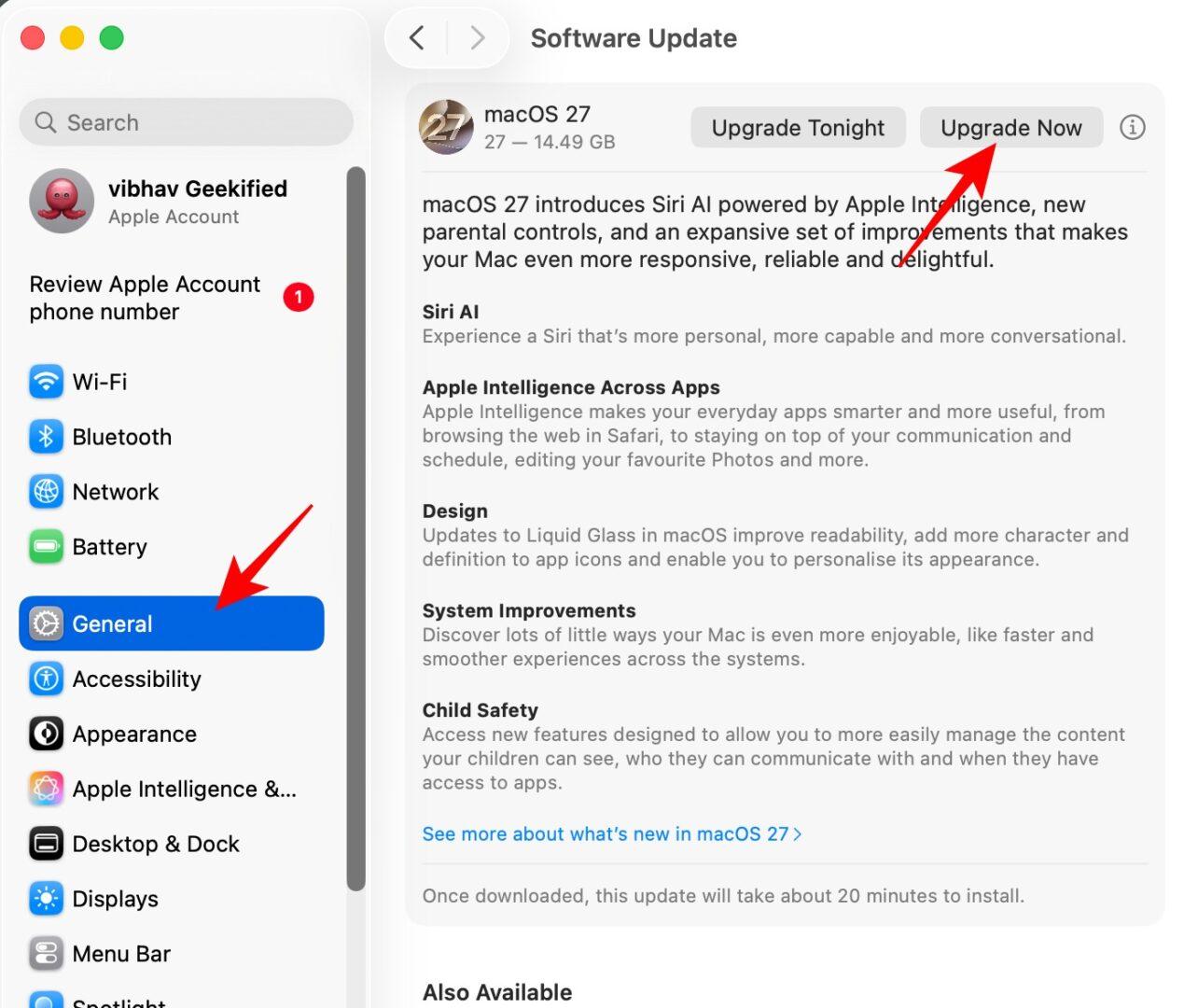
There is one major compatibility change: Intel Macs are no longer supported.
Golden Gate works on Apple Silicon Macs, including:
- MacBook Neo (2026)
- MacBook Air with Apple Silicon (2020 and later)
- MacBook Pro with Apple Silicon (2020 and later)
- iMac with Apple silicon (2021 and later)
- Mac mini with Apple silicon (2020 and later)
- Mac Studio (2022 and later)
- Mac Pro with Apple silicon (2023)
macOS Golden Gate is also the last version with full Rosetta 2 support, so developers still relying on Intel-based Mac software have another reason to move toward native Apple silicon versions.
My take on macOS 27 Golden Gate
The easiest way to describe Golden Gate is that Apple isn’t just making the Mac look different; it’s trying to make the Mac understand more.
Siri can understand personal context and take actions. Visual Intelligence can understand what’s on my screen. Spotlight can be a place to ask questions rather than simply find files. Safari can organise my research and monitor websites. Photos can reconstruct parts of an image. Shortcuts can turn plain-English instructions into automation.
But I don’t think the smaller changes should get lost underneath all the AI headlines.
Better Mail search, faster AirDrop, improved network file browsing, more reliable external-display setups, better Messages syncing, swipe-to-refresh, improved Sidecar touch controls, and smarter file naming are exactly the kind of features that can make a Mac feel better every day without demanding my attention. That’s what makes macOS 27 Golden Gate interesting to me.
Which macOS 27 feature are you most excited to try first?