Meta has launched Muse, a new AI image generation feature that adds a fun twist to creating images. The one feature that caught my attention is that Muse lets you generate AI images featuring your Instagram friends simply by tagging their usernames in your prompt.
However, the more I looked into it, the more I realized there was an important detail many people might miss. If your Instagram account is public, your posts, including your photos, profile picture, and Reels, may be eligible for this AI feature by default. That made me check my own settings right away. And the good news is you can turn it off at any time.
In this guide, I’ll show you how to stop Meta’s Muse AI from using your data and protect your Instagram privacy.
What is Meta’s new Muse Image AI, and how does it work?
Muse Image is Meta’s new AI image generator from Meta Superintelligence Lab that lets you create and edit images using simple text prompts. It uses the new Muse Spark AI system, replacing the older Llama AI models.
Some of its key features include:
- Create AI images from text prompts in the Meta AI app.
- Generate new images featuring public Instagram accounts by @-mentioning their usernames. The original Instagram photos are not simply copied into the final result.
- Edit photos by sketching or selecting the area you want to change.
- Combine multiple photos into a single AI-generated image.
- Use built-in prompt presets for invitations, posters, social posts, and more.
- Generate images directly in WhatsApp and access 30+ AI effects in Instagram Stories. Facebook and Messenger support is coming soon.
The feature getting the most attention is its ability to use public Instagram photos, videos, and audio to create new AI-generated content. What concerns me is that Meta does not notify you if someone tags you to use your photos.
Can Meta Muse AI use your Instagram photos?
The short answer is yes, but only if your account and content meet the eligibility requirements.
If your Instagram account is public and you’re over 18, your publicly visible content may be available for this AI image feature unless you change your settings. Private Instagram accounts are not included.
| Instagram account | Affected? |
|---|---|
| Public Personal account | Yes |
| Public Creator account | Yes |
| Public Business account | Yes |
| Private account | No |
If you’re a creator, influencer, or business owner, this update is especially important because public visibility is often necessary for growth.
How to stop Meta Muse AI from using your Instagram photos
If you’d rather not allow your public Instagram photos and reels to be used for AI image generation, here’s what I recommend.
- Make sure you’re using the latest version of the Instagram app.
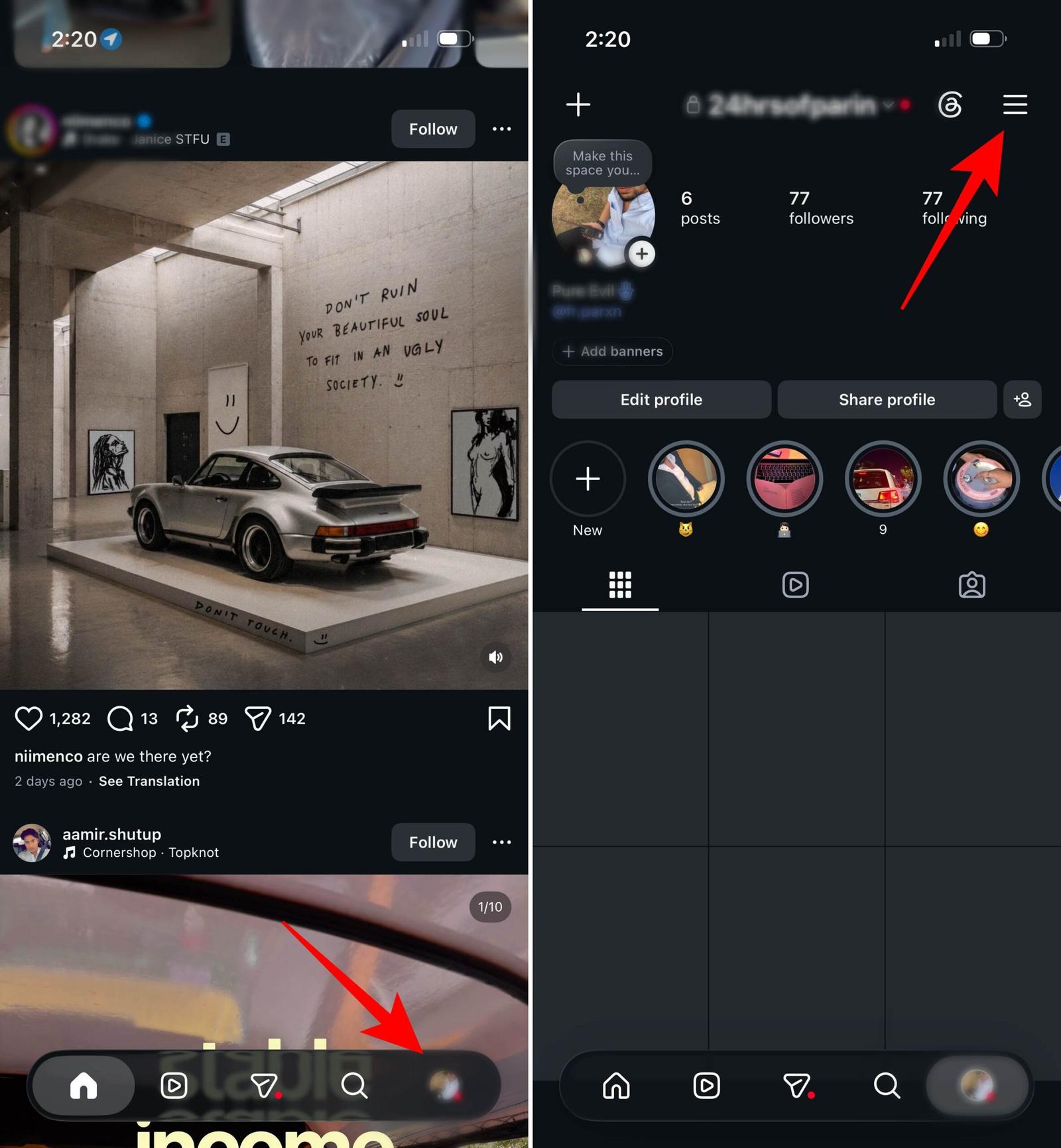
- Launch Instagram and tap your profile picture.
- Tap the three-line menu in the upper-right corner. It will open your account settings.
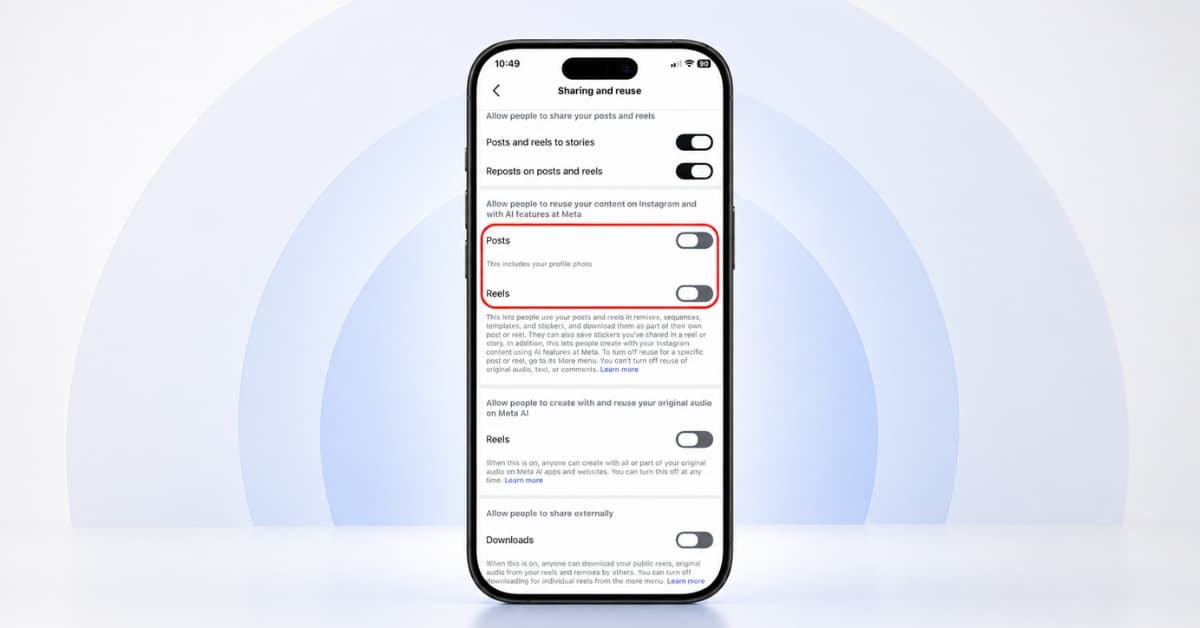
- Scroll down and select Sharing and reuse.
- Now, toggle off Post and Reels under the Allow people to reuse your content on Instagram with AI features at Meta. Also, disable the option below to prevent reusing your Reel’s original audio.
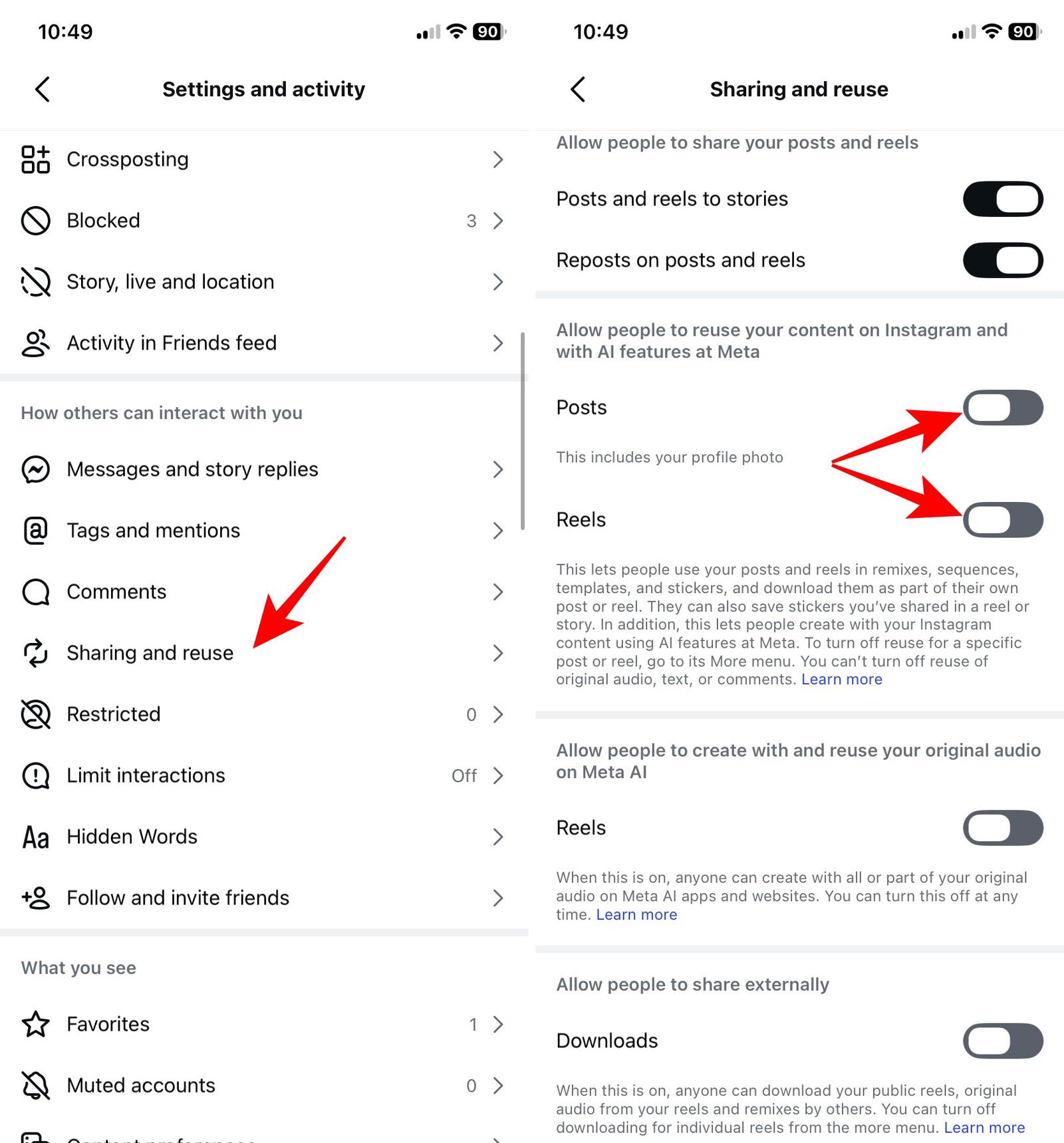
- Tap the back button at the top to save the setting.
Now that you have turned the feature off, it affects future AI image generation. But I realized it doesn’t automatically remove AI-generated images that may have already been created using your photos before you changed the setting.
Note:
Meta has not announced whether these opt-out settings will come to Facebook and other Meta platforms when Muse Image launches there.
Should you make your Instagram account Private instead?
Making your account private is the simplest way to increase privacy, but it isn’t the right choice for everyone.
| Public Account | Private Account |
|---|---|
| Better discoverability | Followers only |
| Ideal for creators | Better privacy |
| Eligible for this AI feature | Not eligible |
| Easier audience growth | More control over visibility |
Meta says every image generated with Muse Image includes an invisible “Content Seal” watermark to help identify AI-generated content. The company also says it uses safeguards to block harmful and explicit content.
But for personal accounts, I suggest switching to private to ensure the highest level of control over who can view your photos.
Can’t find the Muse AI setting? Here’s why
Don’t assume you’ve missed it.
There are several common reasons why the option may not appear yet.
- Your Instagram app needs updating.
- Meta is rolling out the feature gradually.
- The setting has a different name in your region.
- The feature hasn’t reached your account yet.
If you’ve updated the app and still can’t find it, check again after a few days.
Final thoughts
Whenever Instagram introduces a major feature, I make it a habit to review my privacy settings. Most updates don’t require any action, but this one is different because it changes how eligible public content can be used for AI-generated images.
Whether you decide to leave the feature enabled or turn it off is entirely your choice. And taking five minutes today can help you avoid surprises later.
What do you think about the Muse Image? Share your opinion in the comments below!
Also read: