Instagram just launched a new feature called First Draft that can automatically turn your video clips into a Reel. Instead of manually trimming every clip and removing awkward pauses, you can let Instagram create a rough edit for you.
I tried it to see how well it actually works and whether it can save time without taking the creative control out of my hands. Here’s how to create Reels with Instagram First Draft.
What exactly is Instagram’s First Draft, and how does it work?
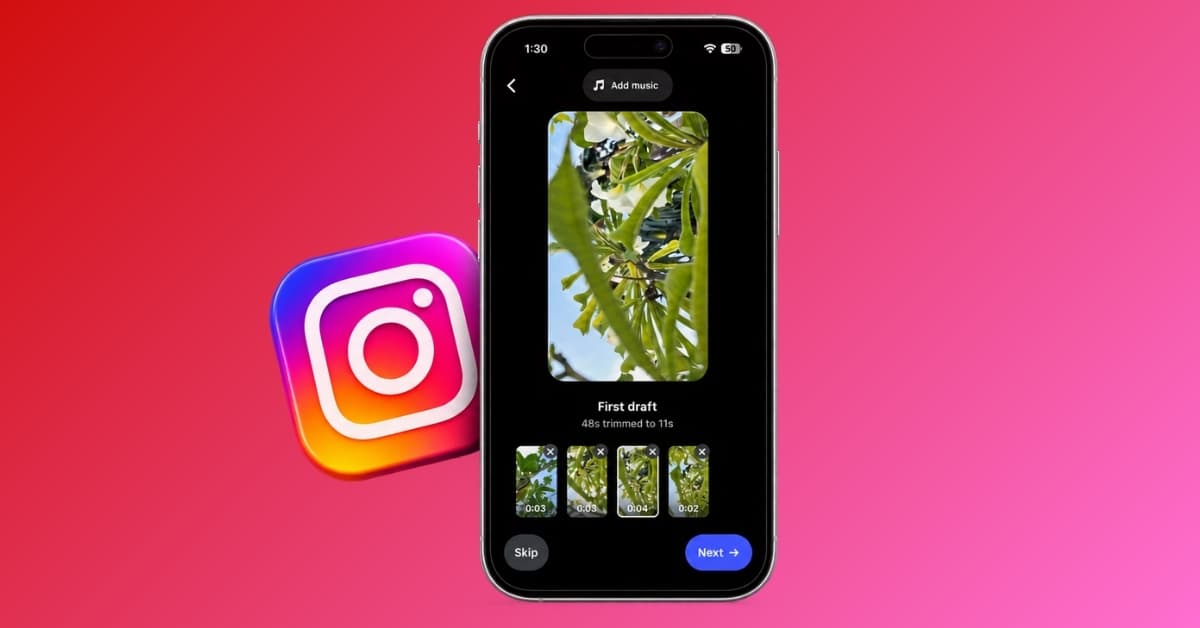
Instagram’s First Draft is essentially an automatic Reel editing tool built directly into the Instagram app. The concept is quite simple. Give Instagram your footage, and with a single tap, it can trim the clips, remove pauses, and assemble them into a first cut for a Reel.
However, the result isn’t the finished video. The feature is deliberately called a First Draft—a starting point that you can change before publishing. You can continue into Instagram’s full Reel editor, adjust clips, reorder them, add music, text and effects, or undo the automatic edits.
Instagram says the feature is designed to handle the tedious early editing work. It can pull together useful portions of multiple videos, perfect for talking-head videos, day-in-the-life content, and multi-clip montages.
Note:
At first glance, First Draft certainly looks like an AI video editing feature. It analyzes footage, decides which portions to keep, and automatically assembles a shorter video. But it’s not an AI feature, according to Instagram spokesperson Nicole Rechtszaid.
How to auto-edit Reels using First Draft
Using First Draft is almost comically straightforward. There are currently two ways to start.
Method 1: Use videos already on your iPhone
- Open Instagram and tap the plus sign at the top. Move to the Reels section.
- Select one or more video clips from your gallery.
- Look for the First Draft option.
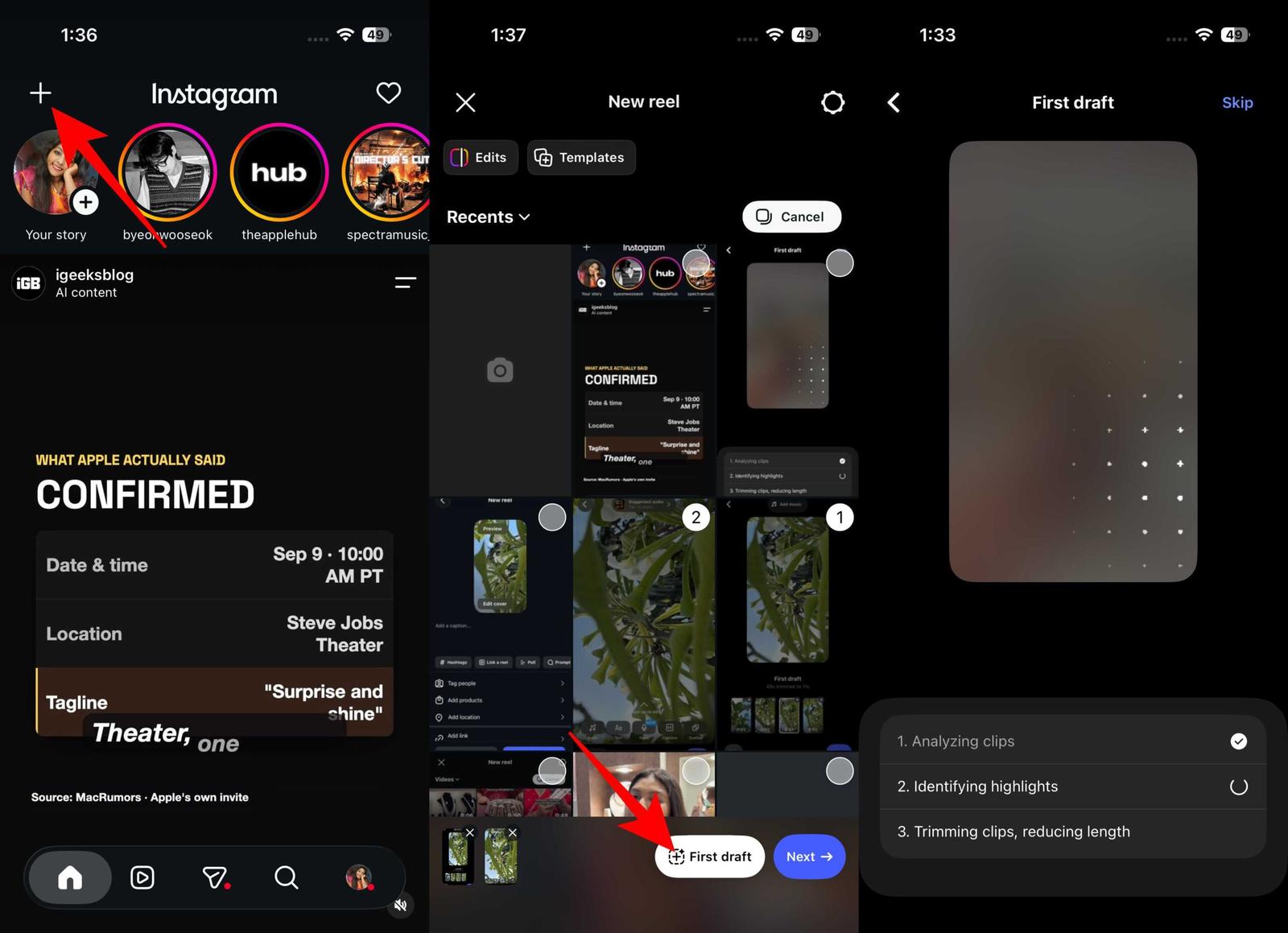
- Tap it and let Instagram create the initial edit.
- Review the automatically edited Reel. Tap Add music to choose a suitable song.
- Tap Next to continue.
- Add text, effects, or voiceover before publishing. Tap Edit video to open the full editor if you want to make other changes or download the Reel.
- Finally, tap Next, write a caption, and share your Reel.
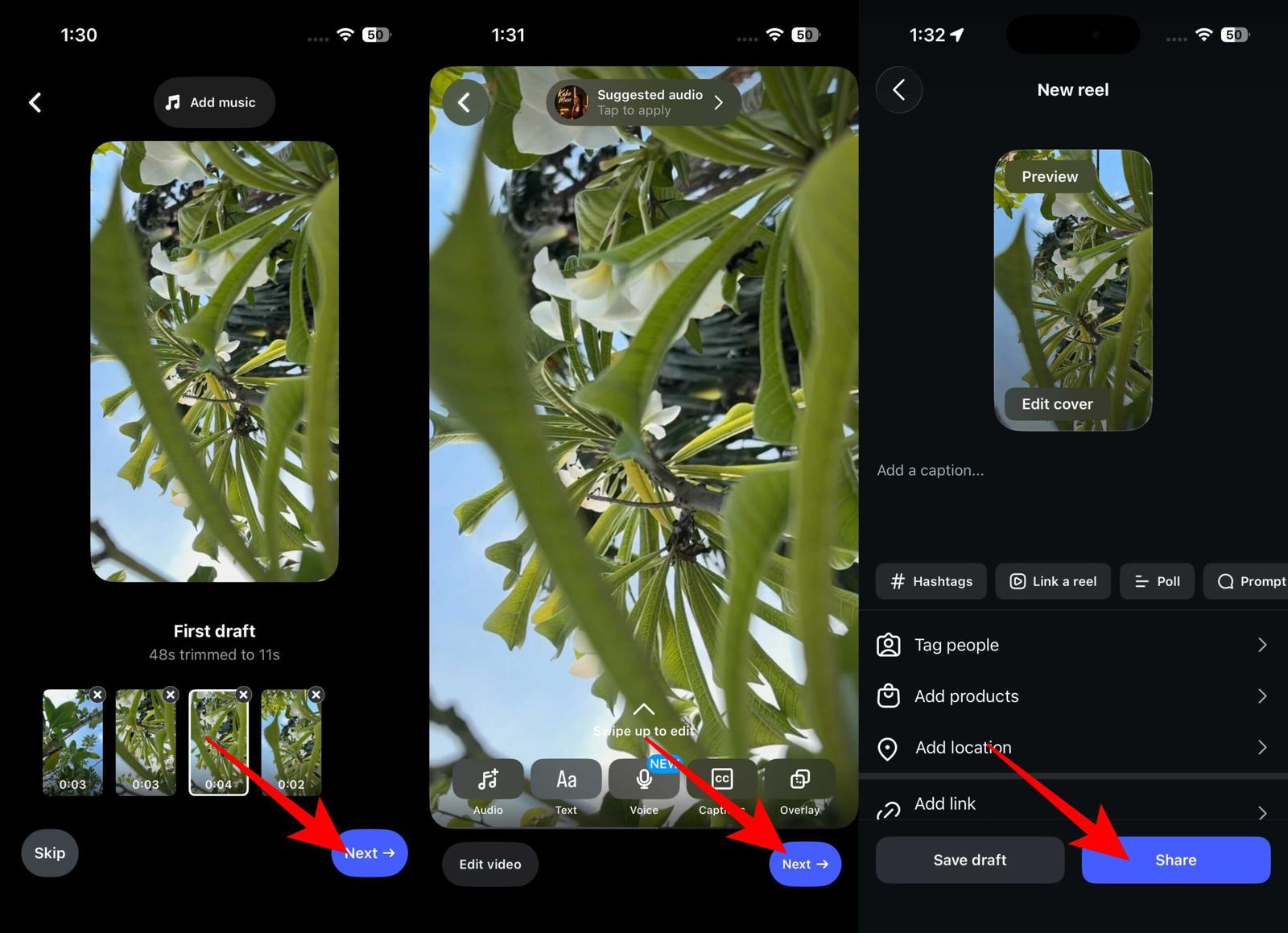
Instagram says the automatically generated edit is reversible, so you aren’t surrendering control over your footage.
Method 2: Record your Reel first
You can also use First Draft immediately after filming.
- Go to Instagram, swipe right to open the camera, and move to the Reels section.
- Now, tap and hold the shutter to record your clips.
- Tap Next, then select First Draft to generate the initial version.
- From there, you can review the edit and continue into the normal Reel editor.
- Once satisfied, share your reel.
The important thing is not to think of that first result as your finished Reel.
My experience with Instagram’s new editing feature
The biggest benefit of First Draft isn’t that it creates a Reel. It’s that it gets you out of the blank timeline. That’s a much bigger deal than it sounds.
When you’re editing manually, there’s always that annoying first stage where you have to figure out what belongs in the video at all. You watch the same clip, drag the handles, remove the silence, move to the next clip, and repeat.
First Draft attacks exactly that part of the process.
What Instagram got right
The first thing Instagram got right is the friction. There’s virtually no learning curve. You don’t need to understand timelines, cuts, or complicated editing controls to get an initial Reel.
What I like is reversibility. It is important to note that automatic editing may be wrong, as many aspects of video creation are rather subjective. Instagram can decide that a pause is unnecessary; I might think that pause makes the moment feel natural.
Meta also appears to be deliberately positioning the feature as a way to handle technical production while leaving the creative decisions to the creator. That’s also why the feature feels less threatening than some of the more aggressive AI video tools appearing elsewhere.
Where First Draft falls short
Here’s my biggest complaint: automatic trimming is not the same thing as good editing.
Removing a pause can make a talking-head Reel tighter. But sometimes a pause is the shot, or the awkward second is the joke, or the five seconds Instagram thinks are unnecessary are exactly what gives a clip personality.
That’s the fundamental limitation of First Draft. It can make decisions about footage, but a good Reel isn’t simply a collection of the “best” moments. It’s a story, rhythm, context, and when not to cut.
So I wouldn’t hand First Draft a folder of clips and blindly publish whatever comes back. That defeats the point of being a creator. Instead, I’d use it as an aggressive first pass, and then take control again.
First Draft vs. Instagram’s Edits app
This is where I think Instagram has created an interesting problem for itself. Meta already has Edits, its dedicated video-editing app. So why put an automatic Reel editor inside Instagram instead of making it an Edits feature? It’s a fair question.
First Draft currently lives inside Instagram, where the entire process, from filming to editing to publishing, can happen without leaving the app. That’s incredibly convenient for casual creators.
But Edits is meant for serious video creation. It already includes AI video generation tools. So, First Draft would arguably make even more sense there. Interestingly, creators have already questioned why First Draft wasn’t launched in Edits. And Meta said it could make the feature available in both apps if creators wanted it.
But for now, the winner is Instagram in terms of convenience. If I’m already inside Instagram with my clips ready to go, having to open another app just to make a rough cut would be ridiculous. First Draft removes that extra step.
Who should actually use it?
I don’t think First Draft is for everyone.
- Casual Instagram creators: If you normally avoid making Reels because video editing feels like too much work, this is perfect for you. Simply shoot a handful of clips and get a usable starting point without learning an editing app.
- People who post frequently: Do you produce several Reels a week? First Draft can handle the repetitive trimming while you spend your time on the hook, story, captions, music, and final pacing.
However, if you already know your way around CapCut, Premiere Pro, Final Cut Pro, or another editor, First Draft isn’t going to suddenly replace your workflow. It may become the rough-cut machine.
Last but not least, creators whose videos have a distinct editing style should use this function with caution. For content that depends heavily on timing, comedic pauses, storytelling, or highly specific pacing, First Draft can accidentally remove what makes your video yours.
Final verdict
After trying Instagram’s First Draft, I think it’s a useful shortcut rather than a complete Reel-making solution. It does a good job of creating a quick starting point, but I’d still want to make the final cuts myself.
If you regularly make Reels and want to spend less time on basic trimming, First Draft is worth trying. Just think of it as your first edit, not your final one.
What do you think about the Instagram First Draft feature? Let me know in the comments below!
Missed this? Check it out: