
How to update your AirTag to the latest firmware
Since its launch in April 2021, AirTag has received two firmware updates; one in July and the other in August. But has your AirTag been privy to these updates? Unfortunately, downloading the latest firmware is not as easy as tapping an update button.
In a way, it is much easier. Confused? Don’t be; here is an in-depth guide on how you can get the latest AirTag firmware update. But first, let’s check the features.
Features to expect: Shh! It’s a secret
The latest AirTag firmware version is 1.0.3011 with a build number 1A301. However, Apple hasn’t been forthcoming with what changes the firmware entails, so we might have to wade through the storm until we know more.
The previous versions brought some enhancements in the anti-stalking feature. Plus, Apple is also working on an Android app to help users detect a nearby AirTag. So, the consensus around the town is that the firmware has some related secrets hidden under its hood.
Enough speculations! Now let’s see which firmware you have and how you can update it.
How to check the firmware version of any AirTag
- Launch Find My and go to the Items tab.
- Select your AirTags from the list.
- Tap the battery icon to see the serial number and firmware version of the AirTag.
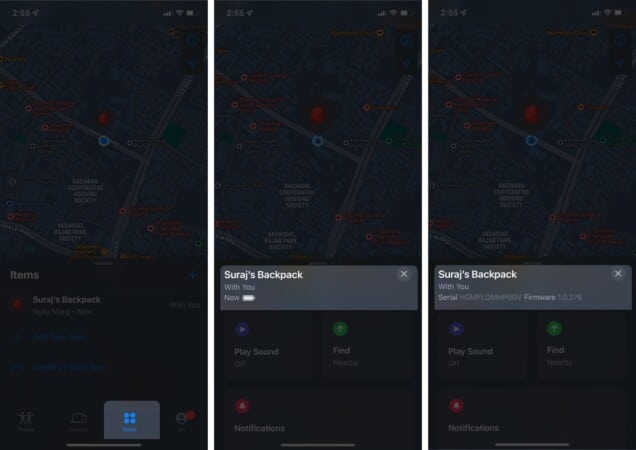
If you have the latest version, sit back and enjoy! And if you notice some significant changes, share them with us in the comment section below.
If your AirTag didn’t get the latest firmware update, read on.
How to get the latest AirTag firmware: It might test your patience!
Like the AirPods firmware updates, you don’t get an update menu to manage the download process. It happens over the air through your paired iPhone, and everything is automatic.
However, there is one thing you can surely do; take out the AirTags from your bag, wallet, or other places and keep them near your iPhone for some time. Usually, the firmware update takes around 15-20 mins.
However, there is no guarantee or hacks to quicken this process. So, you might have to be patient with it and keep trying until you succeed.
Most of the time, Apple is thoughtful and insightful with its OS and devices, and I love it for this. But at times like these, the tech giant misses. Why can’t we force an update or at least receive a notification if a firmware update is available?
What are your thoughts on the matter? Do you think Apple should incorporate such a feature for AirTags? Let me know in the comment section below.
Not well versed with the superpowers of Apple’s Find My App, read these to crack them:
Topics

Written by
Arshmeet KaurA self-professed Geek who loves to explore all things Apple. I thoroughly enjoy discovering new hacks, troubleshooting issues, and finding and reviewing the best products and apps currently available. My expertise also includes curating opinionated and honest editorials. If not this, you might find me surfing the web or listening to audiobooks.
View all posts →More from How-to
How to Turn Off Location on Snapchat (Step-by-Step Guide)
Want to stop sharing your location on Snapchat? This guide explains how Snapchat location sharing works and shows simple ways to turn off your location using Ghost Mode or phone settings. Stay in control of your privacy in just a few steps.
 VikhyatMarch 5, 2026
Snapchat Parental Controls: How to Set Up Family Center and Keep Your Teen Safe
Snapchat’s Family Center lets parents monitor their teen’s friend activity and screen time without reading private messages. Here’s how to set it up and what to expect.
VikhyatMarch 3, 2026
How to Block and Unblock Someone on Instagram
Instagram lets you block or unblock someone in seconds. Follow these simple steps to take full control of your privacy and online peace.
 Ava BiswasMarch 2, 2026