I’ve seen plenty of phone AI features that looked great in a demo but didn’t change how I used my device every day. Gemini Intelligence feels different because Google is wiring it into every aspect of Android and across other devices. If Google gets this right, your phone may stop being a screen full of apps and become a personal AI agent that can actually do things.
Here’s everything you need to know about Google’s new Gemini Intelligence AI features, along with its release date, supported phones and devices, and how you can use it.
What is Gemini Intelligence?
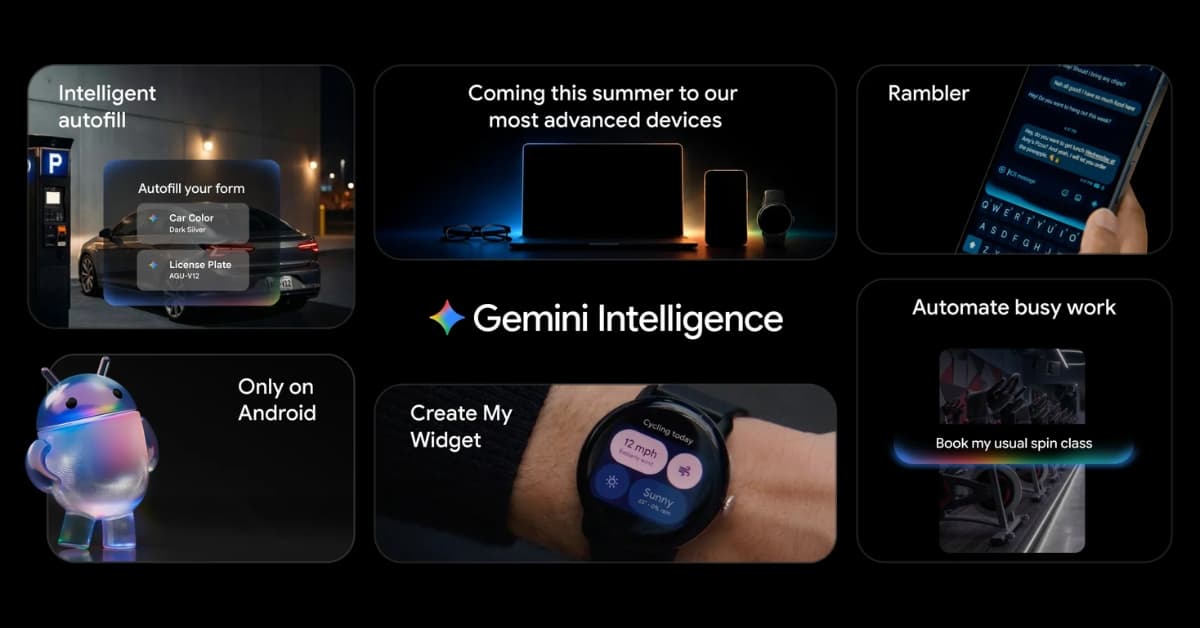
Gemini Intelligence is Google’s umbrella name for a new agentic AI system coming to Android and other Google-powered devices. It includes things like complex task automation across selected apps, smarter autofill, Gemini inside Chrome, custom AI-generated widgets, better voice typing with Gboard’s Rambler, and much more.
The Gemini app can already answer questions, write text, analyze images, help with planning, and work with voice or camera input. But Gemini Intelligence goes deeper. According to Google, it’s smarter and more proactive. It can understand context from the screen and help you do things using natural language. No need to open or switch apps!
Gemini Intelligence vs Google Assistant: What actually changes?
Google Assistant was useful, but it was mostly a command machine. It was good at simple requests, but it rarely felt like it understood the bigger task. But Gemini Intelligence is different. Instead of only responding to commands, it can understand what is on the screen, what task I’m trying to finish, and which app or service might help.
Here’s the practical shift:
| Area | Google Assistant | Gemini Intelligence |
|---|---|---|
| Main behavior | Follows direct commands | Understands context and helps complete tasks |
| Best use | Timers, weather, calls, smart home, quick answers | Multi-step tasks, form filling, browsing, widgets, app actions |
| Input style | Mostly voice and text | Voice, text, screen, apps, forms, webpages, visual context |
| App interaction | Limited app commands | Selected app automation with user control |
The difference with Apple Intelligence is also important. Apple Intelligence is deeply tied to Apple’s private, on-device-first positioning and its own app ecosystem. It is designed to make iPhone, iPad, and Mac feel smarter through writing tools, summaries, image features, Siri upgrades, and personal context.
Gemini Intelligence feels more aggressive in a different way. Google is pushing toward task automation across Android, Chrome, app partners, cars, watches, laptops, and XR devices to keep the experience consistent.
In Depth comparison: Gemini vs Google Assistant
Best Gemini Intelligence features coming to Android
Here. I have listed all the announced features of Gemini Intelligence.
1. Automate multi-app tasks with Gemini
This is the feature that could change Android the most.
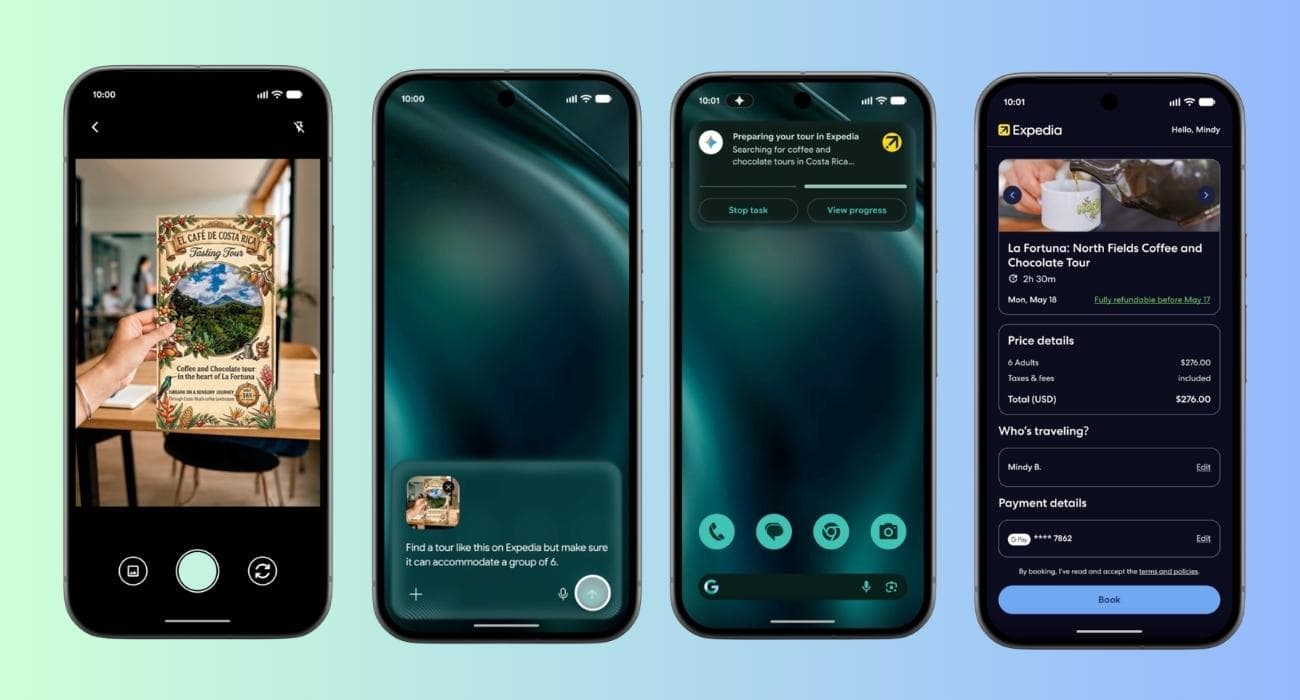
Gemini Intelligence will expand Gemini’s ability to automate tasks across selected apps. The feature is already available on Galaxy S26 and Pixel 10 for some food and rideshare apps. So, you can order from a cafe or turn a grocery list into a notes app into a shopping cart only using prompts.
The key phrase here is that it works on behalf of the user. I do not want Gemini randomly buying things or booking rides without approval. So, Google lets you monitor the progress in real time through alerts and terminates Gemini when the activity is finished. You need to confirm the action to proceed.
If Google gets this right, Android could become less app-driven. I would not need to think about which app to open first. I would tell Gemini what I want done, review the result, and approve it.
2. AI-Powered Autofill saves you from repetitive forms
Forms are still awful on phones. Travel forms, job applications, hotel check-ins, warranty pages, event registrations — they all ask for information that already exists somewhere in my Google account, Gmail, calendar, contacts, or saved details.
Google says Gemini Intelligence will simplify form-filling across apps and Chrome webpages. It’s built on Gemini’s Personal Intelligence system. So, you need to switch apps or re-enter the same details into tiny fields, saving time and effort.
But this feature also needs strong privacy controls. That’s why Google has kept the Autofill feature strictly opt-in. If you don’t feel comfortable letting it access your private info, you can disable the Gemini connection.
3. Gemini in Chrome turns browsing into smart action
Chrome is where Gemini Intelligence could become genuinely practical.
In mobile browsing, we still perform many actions manually: search, open tabs, scroll pages, read information, compare data, and sometimes miss the important detail buried halfway down a page. Gemini Intelligence promises to help with the research and summarization of the web content.
You can simply open a website and ask Gemini to find the earliest available appointment next week or reserve a parking spot for the event. So, you will spend less time hunting and more time deciding.
4. “Create My Widget” makes Android more personal
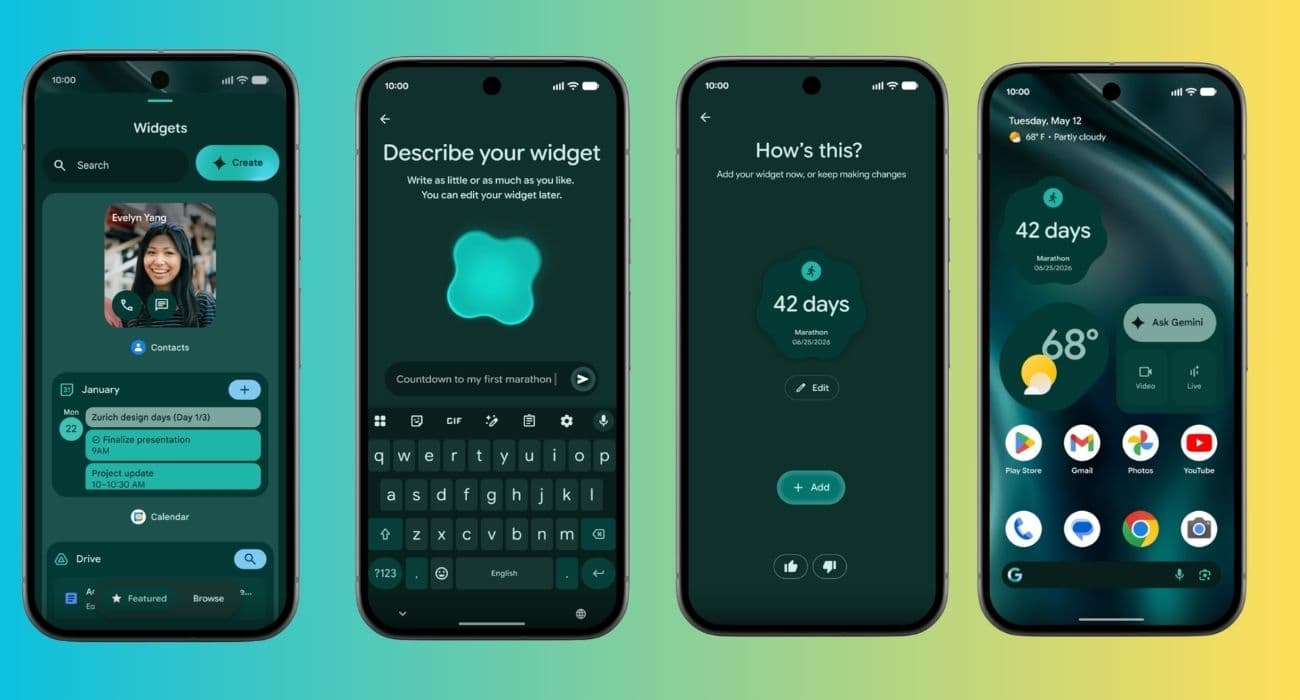
“Create My Widget” could make Android Home Screen customization fun. Gemini Intelligence includes the ability to generate custom widgets using natural language. That is interesting because widgets are usually limited by what app developers provide. If an app does not offer the exact widget I want, I’m stuck.
With Gemini, I could ask for something more personal, such as “create a widget with my next meeting, commute time, and weather” or “create a fitness widget with the stats of my steps, sleep, and workout for today.” Thus, you would be able to glance at all the details at once without opening multiple apps.
The best part is that this feature does not require users to understand launchers, automation apps, or complicated widget settings. They just describe what they want. Gemini builds it.
5. Gboard got Rambler for better voice typing
Gboard’s Rambler sounds like a small feature, but I think it could quietly become one of the most-used Gemini Intelligence tools.
According to Google, Rambler is a Gboard feature connected to Gemini Intelligence that improves voice typing and polishes the message before sending. This matters because voice typing has always had one annoying problem: it is fast, but messy.
When I dictate a message, I often get filler words, awkward punctuation, and repeated phrases. However, Rambler will only keep the most useful things and write sentences coherently. The best part is that it will work across different languages. So, you can talk in English with a bit of Spanish in a single message, and it will appear as it is.
6. Enjoy Gemini across phone, watch, car, laptop, and glasses
Gemini Intelligence is not stopping at phones. Google says it is coming soon to phones, watches, laptops, and cars to offer a better continuity. Google also describes that Gemini Intelligence will update the UI using Material 3 Expressive.
On a Wear OS watch, you can build custom widgets, automate tasks, and get contextual assistance. In an Android Auto car, Gemini can handle hands-free tasks, summarize chats, help with routes, and reduce screen distraction.
The AI system can boost productivity massively for work. That’s why Google launched the Googlebook laptop to begin a new era of AI-focused laptops. Additionally, XR glasses, the long-term vision is even more obvious: real-world context, directions, translation, reminders, messages, and visual assistance without constantly pulling out a phone.
When will Gemini Intelligence launch, and which devices support it?
Gemini Intelligence was officially unveiled at Android Show 2026 on May 12, 2026. It is slated to debut on the Pixel 10 and the Samsung S26 series lineup. By late 2026, it will become available on more Android-based devices, such as watches, Android Auto, smart glasses, and Googlebook laptops.
As for the features, the multi-step task automation is expected to be available on beta in the U.S. and Korea. Additionally, the Gemini for Chrome is scheduled for late June 2026. Android 17 will also bring the majority of the new features after the June release.
There is also the subscription question. Google already offers Google AI Pro and Google AI Ultra plans for higher access to advanced Gemini features. So, I would not be surprised if the most advanced agentic or high-limit Gemini Intelligence features eventually sit behind a paid tier.
Final verdict: I am excited for Gemini Intelligence
In my opinion, Gemini Intelligence ranks among the most innovative Android ideas that Google has introduced in many years. With Gemini Intelligence, the phone becomes less app-centric and more intent-oriented.
I do not need to open five apps to complete one action. Instead, I simply tell it what I want. Then it selects the appropriate app, retrieves the necessary context, prepares the action, and prompts me to confirm. That could genuinely change how people use phones. However, the reality will be clear after the feature drops, and I will actually use them in daily life.
Which feature are you looking forward to the most? Let me know in the comments below!
Read More: