When Google rolled out Personal Intelligence inside Gemini, I expected something like saved preferences or better recommendations. What I got instead felt closer to an AI that quietly studies you and then removes the need for you to explain yourself.
Gemini wasn’t just responding to my prompts; it was anticipating my intent, shaping answers around my habits, and quietly adapting to how I think. The shift is subtle, but once you notice it, you can’t unsee it. Here’s what Google Gemini Personal Intelligence is and how to create AI images using personal photos.
What Personal Intelligence actually means
At a surface level, Google describes Personal Intelligence as Gemini, using the information on your preferences, interests, and related apps (Google Photos, Gmail, YouTube, and so forth) to come up with results tailored to you.
What I’ve experienced feels like this:
- Gemini builds a context layer about you
- That context becomes the default starting point
- Prompts become lighter because the AI fills in the gaps
Earlier, generating something “personal” entailed creating prompts that were extremely detailed and painful to write. Now, Gemini can infer those details automatically using your connected data and history. That’s a fundamental shift.
So, now I can directly ask, “I want to replace my car tires, which ones are the perfect fit?” That’s all! Gemini pulls information and lists the options based on my needs.
Key features of Gemini’s Personal Intelligence
Let’s break down the features the way they actually behave in real use.
1. Context from your digital life
This is the core engine. Gemini connects to apps like Gmail, Google Photos, YouTube, and Search, and then “connects the dots” between them to answer your queries. So, the outputs reflect your actual life, not generic assumptions.
But here’s what most people miss: It doesn’t just dump all your data into the model. It provides relevant context according to each query you make.
For example, if I ask: “Plan my next trip.”
Gemini can:
- Check booking confirmations in Gmail
- Look at past travel photos
- Factor in places I’ve searched or watched
And then produce something that feels shockingly aligned with my preferences, like finding restaurants of my favorite cuisine or tourist spots I may enjoy exploring.
2. No more over-explaining prompts
Google explicitly points out that Personal Intelligence removes the need for long, detailed prompts by letting Gemini “fill in the blanks” automatically.
Even when using short prompts, I’ve noticed:
- Tone adaptation (formal vs casual)
- Preference awareness (what I usually like or reject)
- Relevance filtering (what matters to me, not average users)
Google also introduced Skills in Chrome, which lets you save Gemini prompts. So, you don’t need to repeat yourself.
3. Deep integration with Nano Banana 2

Behind the scenes, Gemini AI image generator is powered by Gemini’s image model, Nano Banana 2. So, integrating it with Personal Intelligence makes the images feel biographical instead of generic outputs.
I prompted it to generate an image of my family and me in a Pixar-style scene. Gemini automatically included real people from my Google Photos and created the image based on my interests. It’s quite similar to Apple’s Image Playground, where you can choose a person to create their avatar.
4. Built into the ecosystem (No setup friction)
Once your apps are connected, the whole process happens in the background.
There was no need to upload images or documents, repeat contexts, and switch back and forth between different apps to provide prompts. I felt like my existing digital life just became queryable and actionable.
Moreover, you can ask Gemini to summarize previous discussions, carry forward from earlier conversations, and take previous chats into account. I have shared my interests and preferences, including work, hobbies and life goals for more context.
5. You stay in Control
All of this is optional and adjustable.
You can:
- Choose which apps Gemini can access
- Turn personalization on/off
- Manage or delete your data anytime
That control matters because, without it, this level of personalization would feel uncomfortable.
How to use Personal Intelligence on Gemini
To use Personal Intelligence, you should be above 18 years old and have a personal Google account. It’s not available for Workspace Business, Enterprise or Education users. Additionally, Google has not rolled out the feature in South Korea, Australia, the European Economic Area, Switzerland, the United Kingdom, and Nigeria.
Here are the steps I followed during my testing:
- Open Gemini on your Android or iPhone.
- On the chat screen, tap the tools icon below the text box. Here, ensure Personal Intelligence is turned on.
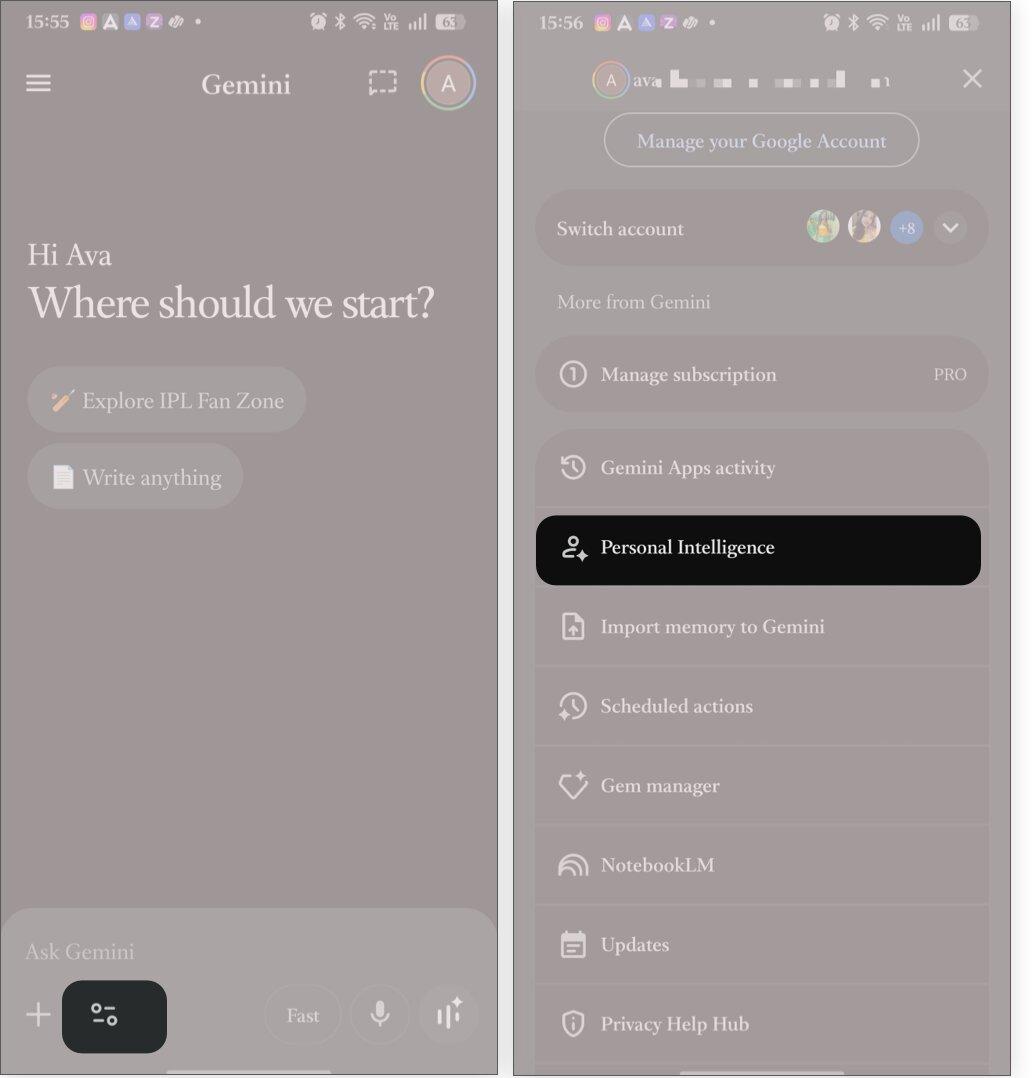
- Now, tap your profile picture and select Personal Intelligence.
- Tap Connected apps and toggle on Google Workspace to connect your Gmail, Calendar, Drive, etc., then Google Photos, Search services, YouTube, and more.
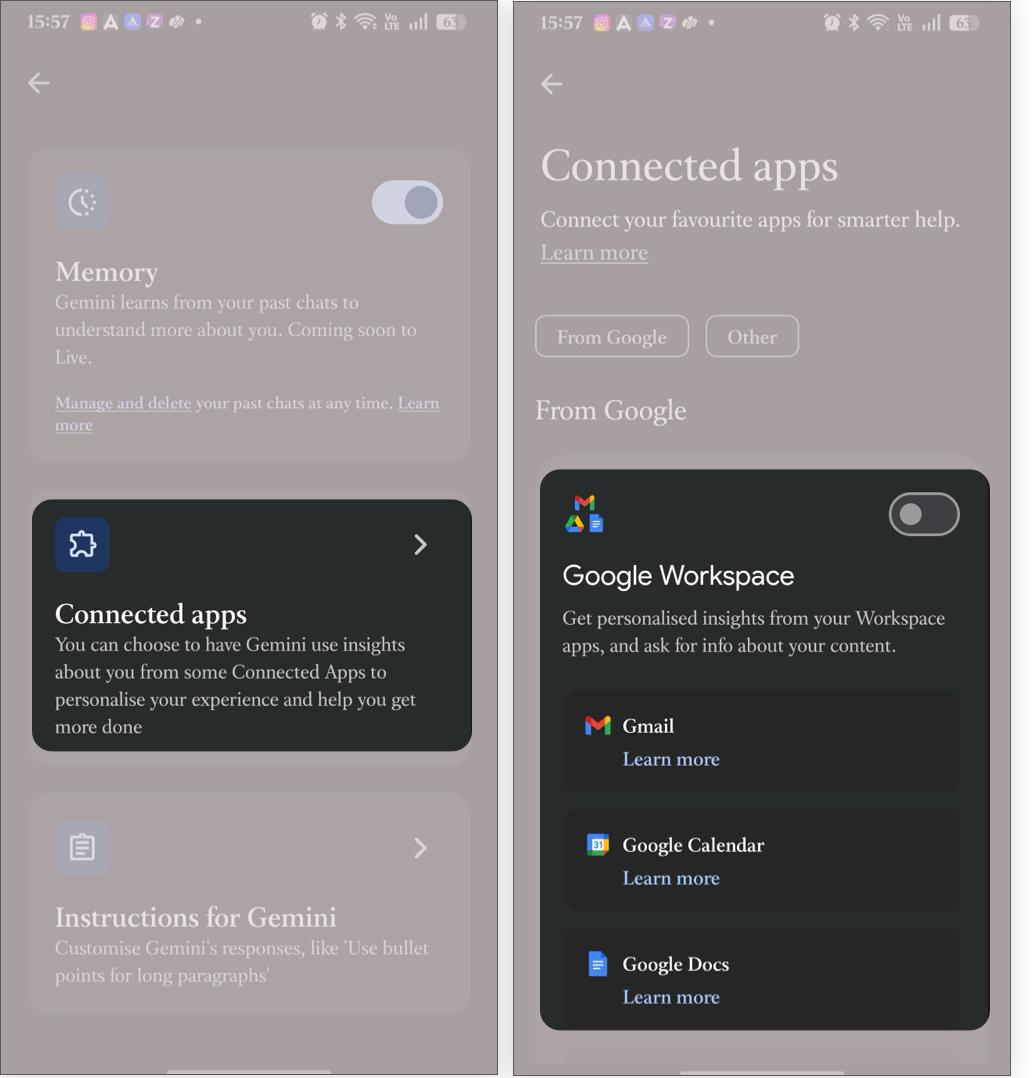
Once it’s enabled, you can access the feature across the web, Android, iOS, and macOS Gemini app. Now, based on your connections, you can ask simple prompts. For example, “Suggest a few books I might enjoy” instead of “I love horror with sci-fi touch…” You can also refine the responses without rebuilding prompts from scratch.
Note:
If you can’t find the Personal Intelligence toggle, worry not. It’s still in the beta phase and may not have been rolled out in your region yet. Wait for a few days and keep the Gemini app updated.
Why does this feel different
I’ve used a lot of AI tools. Most of them impress you once and then flatten out. But Gemini doesn’t.
Because Personal Intelligence introduces something new:
- AI starts with you, not from zero: In traditional AI, every prompt means a fresh start. But Gemini depends on continuity from previous chats.
- It removes prompt friction: You had to “engineer” results before. Now, you just express intent.
- Outputs feel less generic: Results are more aligned with your taste, contextually right and less template-driven.
Privacy and trust concerns
Let’s not ignore the uncomfortable part.
To achieve that level of understanding, Gemini requires access to all your information, pictures, searches and behaviors, in other words, your digital footprint.
Google emphasizes that:
- It’s opt-in
- Your data will not be used for model training
- You can control connections
But while measures are taken, there’s one thing to consider: how much AI should know about you.
Because once an AI understands your preferences, predicts your intent, and shapes outputs around you, it can influence.
Google Gemini is becoming your guide!
I went in expecting a feature. What I found was the early version of something much bigger: AI that builds a working model of you and uses it in real time.
Personal Intelligence isn’t perfect yet. It still depends heavily on connected data, and sometimes it over-assumes. But the direction is unmistakable
And that raises a question most people aren’t ready to answer yet. If your AI truly understands you, who’s shaping who?
What do you think about Gemini’s Personal Intelligence feature? Let me know in the comments below!