FaceTime Like a Pro
Get our exclusive Ultimate FaceTime Guide 📚 — absolutely FREE when you sign up for our newsletter below.

FaceTime Like a Pro
Get our exclusive Ultimate FaceTime Guide 📚 — absolutely FREE when you sign up for our newsletter below.


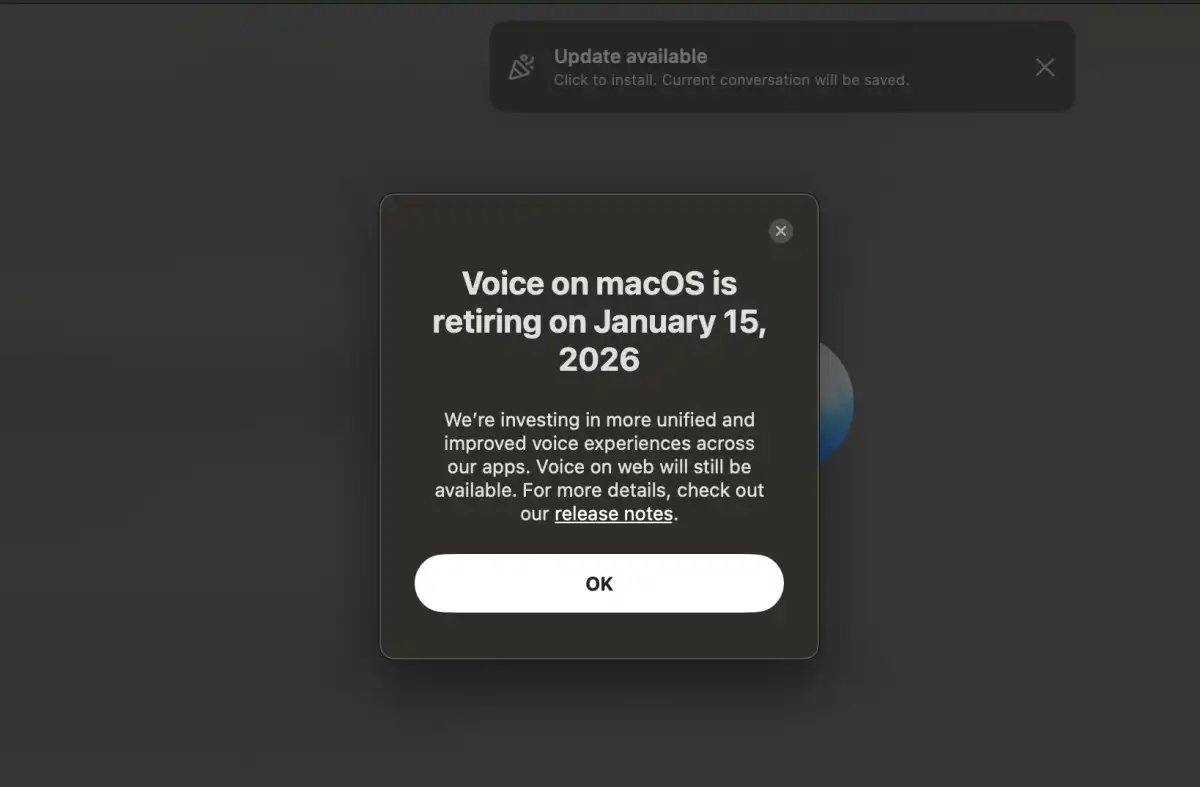
OpenAI has confirmed that the ChatGPT Voice feature will be removed from the Mac app on January 15, 2026. Users will need to switch to web, mobile, or Windows apps to keep using Voice.


If speaking to ChatGPT on your Mac has become second nature, brace yourself for an upcoming change that might disrupt your routine. OpenAI has announced that the Voice feature in the ChatGPT macOS desktop app will be discontinued on January 15, 2026. After this date, using Voice through the Mac app will no longer be an option.
For those who rely on Voice for daily interactions with ChatGPT, this small update note carries significant consequences.
OpenAI included a clear message in the release notes for the ChatGPT Mac app, stating:
To clarify, this is not about shutting down the entire Mac app or altering ChatGPT as a whole. It is specifically the end of the Voice feature in the native macOS app.
It is crucial to understand that this is not an abrupt shutdown. It is a planned phase-out.
Once that date arrives:
OpenAI also stresses that this change does not signal the decline of the Mac app itself. Other macOS features will remain untouched, meaning text-based chats and the core app experience will continue as usual.
Although Voice is leaving the Mac app, OpenAI confirms the feature is staying active elsewhere. Voice will continue to be available on:
If you prefer speaking instead of typing, or enjoy conversational voice responses, you can still do that. You will just need to use one of these supported platforms instead of the macOS desktop app.
OpenAI says the decision is driven by a desire for consistency. The company wants to build more unified and improved voice experiences across all its apps.
While OpenAI has not shared technical details or confirmed whether Voice could return to the Mac app in the future, the wording suggests this is more of a restructuring than a rejection of voice interaction. Voice features work best when they feel familiar and reliable across devices, and that level of consistency often requires changes behind the scenes.
Also read: New ChatGPT for Mac Update Adds Game-Changing Record Mode and Cloud Drive Access
If Voice plays a role in how you use ChatGPT on a Mac, some preparation can help avoid frustration later:
While removing a single feature from one app may sound minor, it can feel disruptive when it affects established habits. Still, OpenAI is keeping Voice available in several other places and frames this move as part of a broader effort to improve the overall voice experience rather than eliminate it.