After years of being limited to messaging only, WhatsApp Web is starting to support voice and video calls. The long-awaited feature is now rolling out to some users, as first reported by WABetaInfo, marking a major step forward for the browser version of the popular messaging service.
This update brings WhatsApp Web closer to feature parity with its mobile and desktop apps, which have supported calling for years.
Calls Are Rolling Out First to Beta Users
Voice and video calling on WhatsApp Web is currently available to users enrolled in the platform’s beta program. The rollout has started gradually, and more users are expected to gain access over the coming weeks.
At this stage, the feature is limited to one-on-one conversations. Users can place calls directly from their browser without downloading or installing a desktop app. Once enabled, the calling option appears inside individual chats, making it easy to start a voice or video call in just a few clicks.
How Calling Works on WhatsApp Web
Using calls on WhatsApp Web feels familiar. The interface closely matches what users already see on the Windows and Mac desktop apps. From a chat window, users can start either a voice call or a video call using the call controls at the top of the screen.
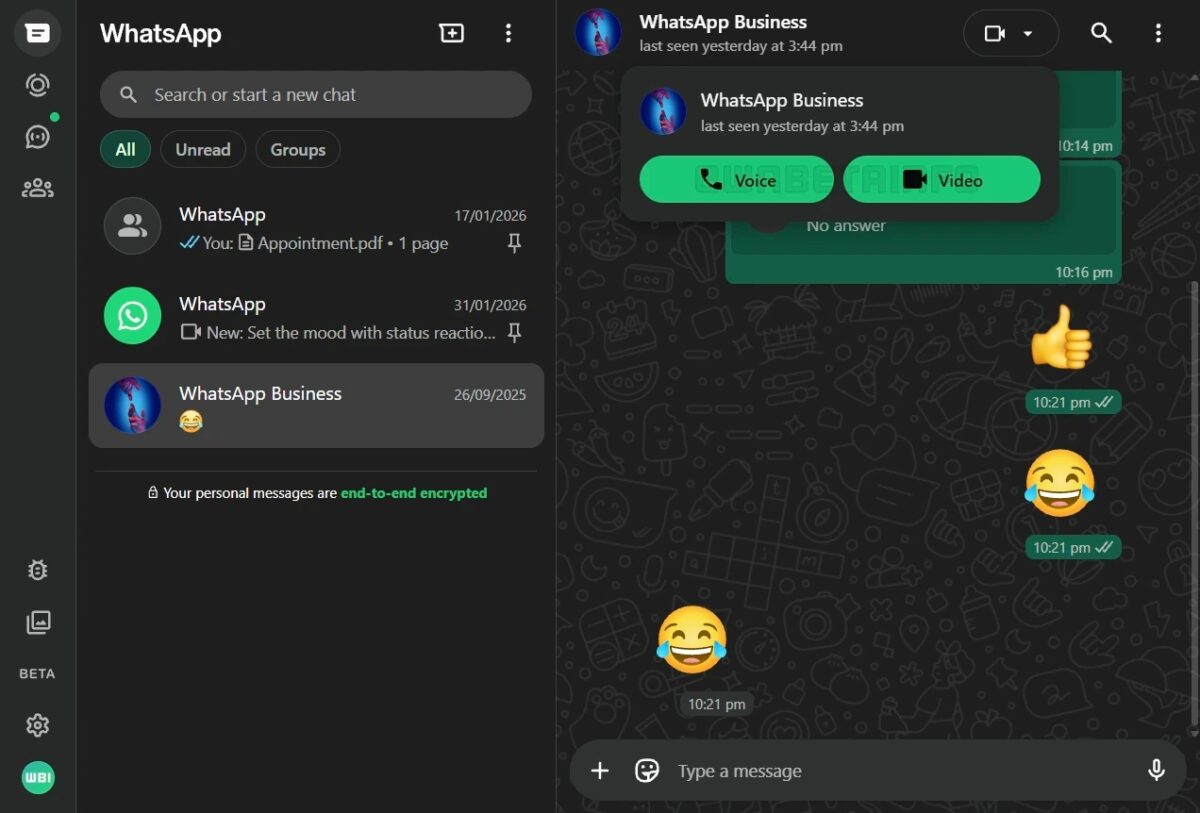
Video calls also support screen sharing. This allows users to show documents, presentations, or other on-screen content during a call. The experience is designed to be simple and consistent with WhatsApp’s existing calling tools.
Security Stays the Same as on Mobile
Calls made through WhatsApp Web are protected with end-to-end encryption. The same security model used on mobile devices and desktop apps applies here as well.
This encryption relies on the Signal protocol, which ensures that only the people on the call can hear or see the conversation. Neither WhatsApp nor its parent company Meta can access the content of these calls. No special settings are required, as encryption is enabled by default.
Group Calls Are Coming Later
Group voice and video calls are still under development for WhatsApp Web. When they do arrive, they are expected to support up to 32 participants, along with features like call links and scheduled calls.
For now, WhatsApp appears to be focusing on stability and performance before expanding calling support to group chats. This phased approach helps ensure the web experience matches the reliability users expect.
A Big Win for Web and Linux Users
The addition of calling is especially important for users who rely heavily on WhatsApp Web. This includes people on systems where official desktop apps are limited or unavailable.
With voice and video calls now possible directly in the browser, WhatsApp Web becomes a much more complete communication tool. It no longer feels like a stripped-down companion to the mobile app, but a fully capable platform in its own right.
As the rollout continues beyond beta users, WhatsApp Web calling is set to become a standard part of how millions of people stay connected online.