I can’t count how many times I’ve called an airline only to hear, “Can I have your booking reference?” That’s usually the exact moment I start searching my inbox, scrolling through messages, and opening different apps while trying not to keep the support agent waiting.
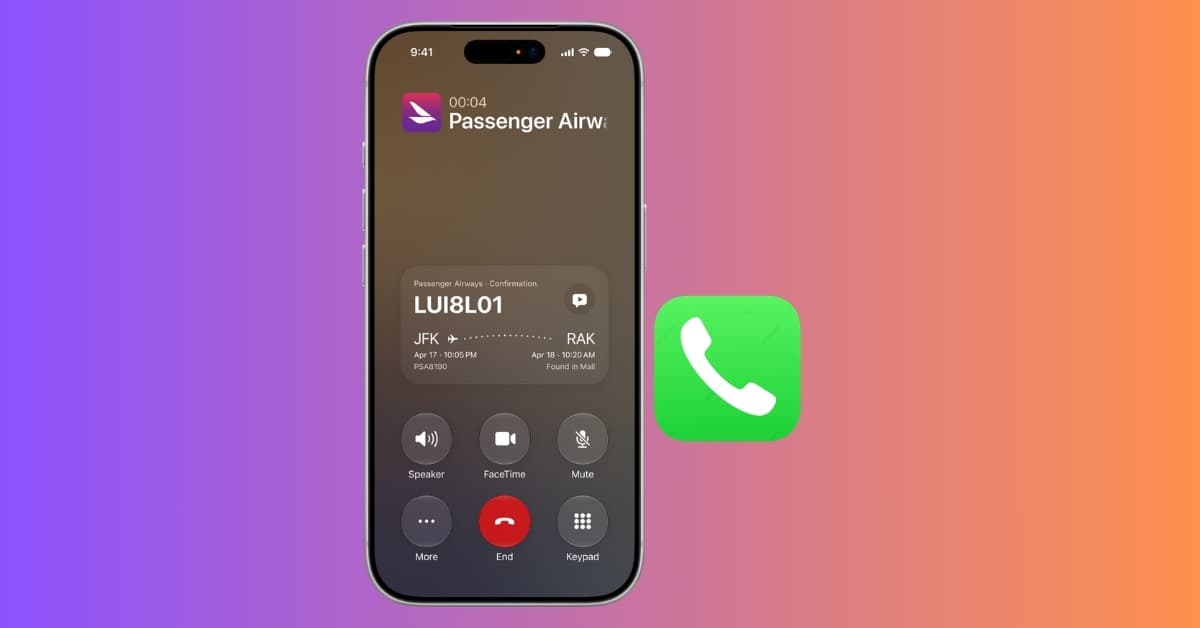
Apple seems to have noticed this everyday frustration and introduced Call Context in iOS 27. It’s a new Phone app feature that automatically surfaces information you need, like booking confirmations, order numbers, tracking IDs, and reservation codes, right inside the call screen.
It isn’t the flashiest iOS 27 feature, but after seeing how Apple designed it, I think it has the potential to save more time than many headline AI features. Here’s how to enable Call Context on your iPhone and use it during business calls.
What is Call Context in iOS 27?
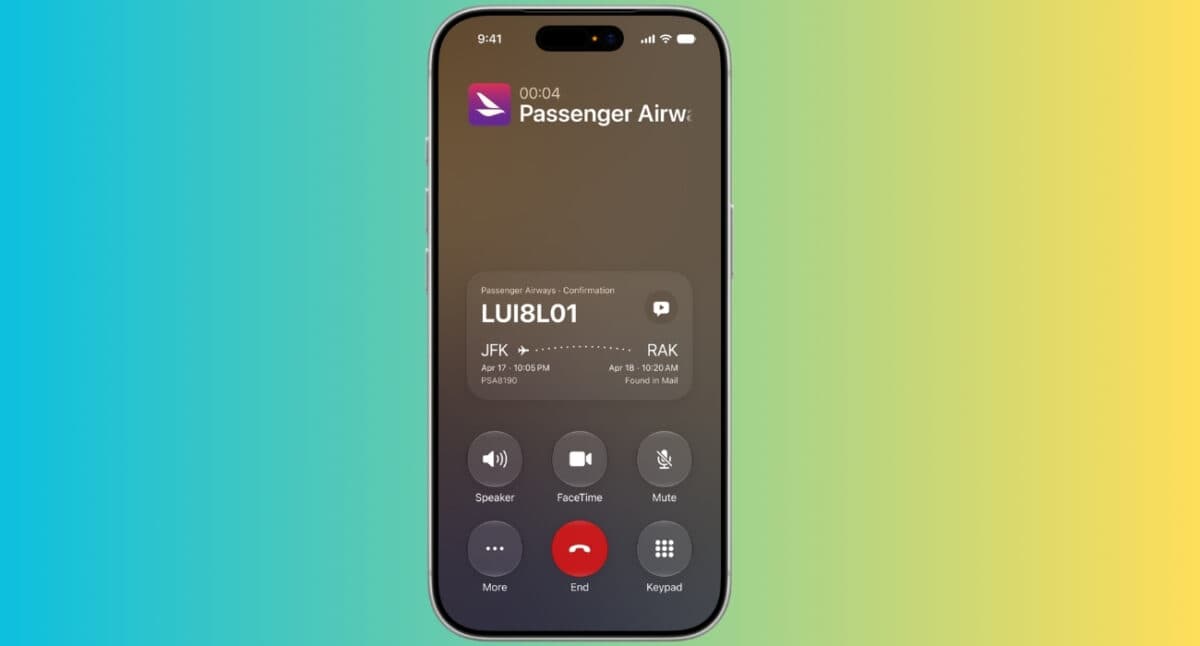
Call Context is a new Apple Intelligence feature in iOS 27 that automatically displays relevant information while you’re calling a business. Suppose you’re calling an airline. Instead of manually searching your inbox for your flight confirmation number, your iPhone recognizes that you’re calling the airline and proactively shows your booking code during the call.
The same works for hotels, restaurants, doctor’s appointments, online orders, service centers, and other businesses where confirmation numbers are commonly required. So, I no longer need to remember where my booking IDs are saved.
And the best part is everything happens privately on your device, with no data shared externally.
How Call Context finds your booking codes
The feature works by combining the Phone app with Apple Intelligence.
When you place a call to a supported business, iOS 27 identifies the organization you’re contacting and checks whether you’ve previously interacted with them. It goes through information already available on your iPhone Mail app, as per Apple’s WWDC 2026 announcements.
If Apple Intelligence finds something relevant, the information appears right in the call screen so you can see it without switching between the apps. That may sound like a small improvement, but it’s exactly the kind of feature I want in daily life.
I hope Apple extends the feature to other apps, as many reservation and booking details are shared on Messages and third-party apps. Imagine you have an event scheduled in Calendar or saved a purchase receipt in Photos; right now, Siri may not surface them.
Requirements to use Call Context
You’ll need a few things before Call Context works:
- An iPhone that supports Apple Intelligence
- iOS 27 installed
- Siri AI and Apple Intelligence enabled
- Relevant booking or confirmation information stored in supported apps like Mail or Messages
Availability may also depend on your language and region as Apple gradually expands Apple Intelligence support.
How to use Call Context during a call on iPhone
One thing I like about Call Context is that there’s almost nothing to configure.
Here’s how I tested it:
- Update your iPhone to iOS 27 and make sure Siri AI and Apple Intelligence are enabled.
- Open the Phone app.
- Call a supported business.
- If your iPhone finds relevant information, Call Context automatically displays it on the call screen.
- Read the confirmation code directly to the customer support representative.
There’s no need to launch Siri, search your inbox, or switch between apps. If matching information exists, everything happens automatically.
When Call Context is most useful
Apple demonstrated the feature using common customer support scenarios, and they’re surprisingly relatable.
- Airline Support: Call Context can surface your flight reservation details as soon as you call the airline, making check-ins, cancellations, or schedule changes much smoother.
- Hotel Reservations: Hotels almost always ask for a reservation number. Instead of opening your email every time, your booking information is already available on the call screen.
- Online Shopping: I have tried this when returning a package. My iPhone displayed the purchase information quickly, helping me complete the refund requests much faster.
- Food Delivery: Missing delivery? Rather than searching your order history, the Phone app can present your recent order information while you’re speaking with customer support.
Tips to improve Call Context results
Follow these tips to help Call Context find your information faster:
- Keep booking confirmation emails instead of deleting them immediately.
- Avoid archiving important reservation mails too quickly.
- Use the same email address for your bookings whenever possible.
- Try to store all order information in Mail.
- Keep Mail synced on your iPhone.
- Update to the latest version of iOS 27.
The more organized your booking history is, the better the feature can match relevant information.
Does Call Context listen to your phone calls?
This is probably the first question many people will ask. Apple says Call Context does not analyze what you’re saying during the conversation to generate suggestions.
Instead, it uses contextual information, such as the business you’re calling, and surfaces relevant information already stored on your device.
Apple also says the feature is powered by Apple Intelligence, with privacy remaining a core part of its design. Much of the processing happens on-device whenever possible, reducing the need to send personal information to the cloud.
A smarter way to handle customer support calls
Call Context isn’t trying to reinvent phone calls. Instead, it fixes one of the most common annoyances we’ve all experienced.
Whether you’re calling an airline, checking into a hotel, tracking an order, or requesting a refund, having your confirmation number automatically appear at the right moment feels like a genuinely practical use of AI.
If Apple expands support to banks, utilities, healthcare providers, and more third-party apps, and works smoothly as Apple has demonstrated, Call Context could quietly become one of the Phone app’s most valuable features.
What do you like about this upgrade? Share your opinion in the comments below!
You may like to read: