
How to find AirPods case without AirPods inside

- If you own AirPods Pro 2, you can find the AirPods case even without the AirPods inside – thanks to U1 technology and Precision Finding.
- To find AirPods Pro 2 case: Launch the Find My app on iPhone > Go to Devices > Choose your AirPods > Case > Select either Play Sound or Find.
- If you have any other AirPods, you can attach an AirTag to the case and locate the same in Find My.
The other day, I plugged in my AirPods and went out for a jog, leaving the AirPods case behind. On returning, I couldn’t find the charging case and started looking for it everywhere. Eventually, I figured out there’s a way to find the AirPods case even without the AirPods inside, but there’s a catch.
If you’ve been through something similar and need a solution, you’re in the right place. In this article, I’ll explain everything you need to know about finding an AirPods case, even if it is separated from the AirPods stems.
Can I find my AirPods case without AirPods in it?
As of writing, only the AirPods Pro (2nd gen) facilitates a search for the case, even when the AirPods are not in it. This particular AirPods case has U1 technology that uses Precision Finding to locate it in the Find My app.
To track any other AirPods case, you need at least one bud inside the case. So, you might wonder if there’s a workaround you can use. The good news is – yes, there is!
As a workaround, you can track any AirPods case after attaching an AirTag to it. I suggest you read our article on how to use AirTags to find your belongings in case you’re unfamiliar with this procedure.
And if you are the lucky one with an AirPods Pro 2, keep reading to find your lost charging case!
How to find AirPods case using Find My on iPhone
Please note that even with the hardware support on AirPods Pro 2, you need to ensure you have added the device to your Find My list. The steps below are of help only if you have done that before losing your charging case.
- Launch the Find My app on your paired iPhone.
- Navigate to the Devices section.
- Identify and choose your AirPods from the list.
If you have attached an AirTag to the case, you may pick that. - Tap the option labeled Case.
- At this point, you can select one of the following actions:
- Play Sound – Plays a mild, alarming sound.
- Find – Provides you an idea of how far or close the device is.
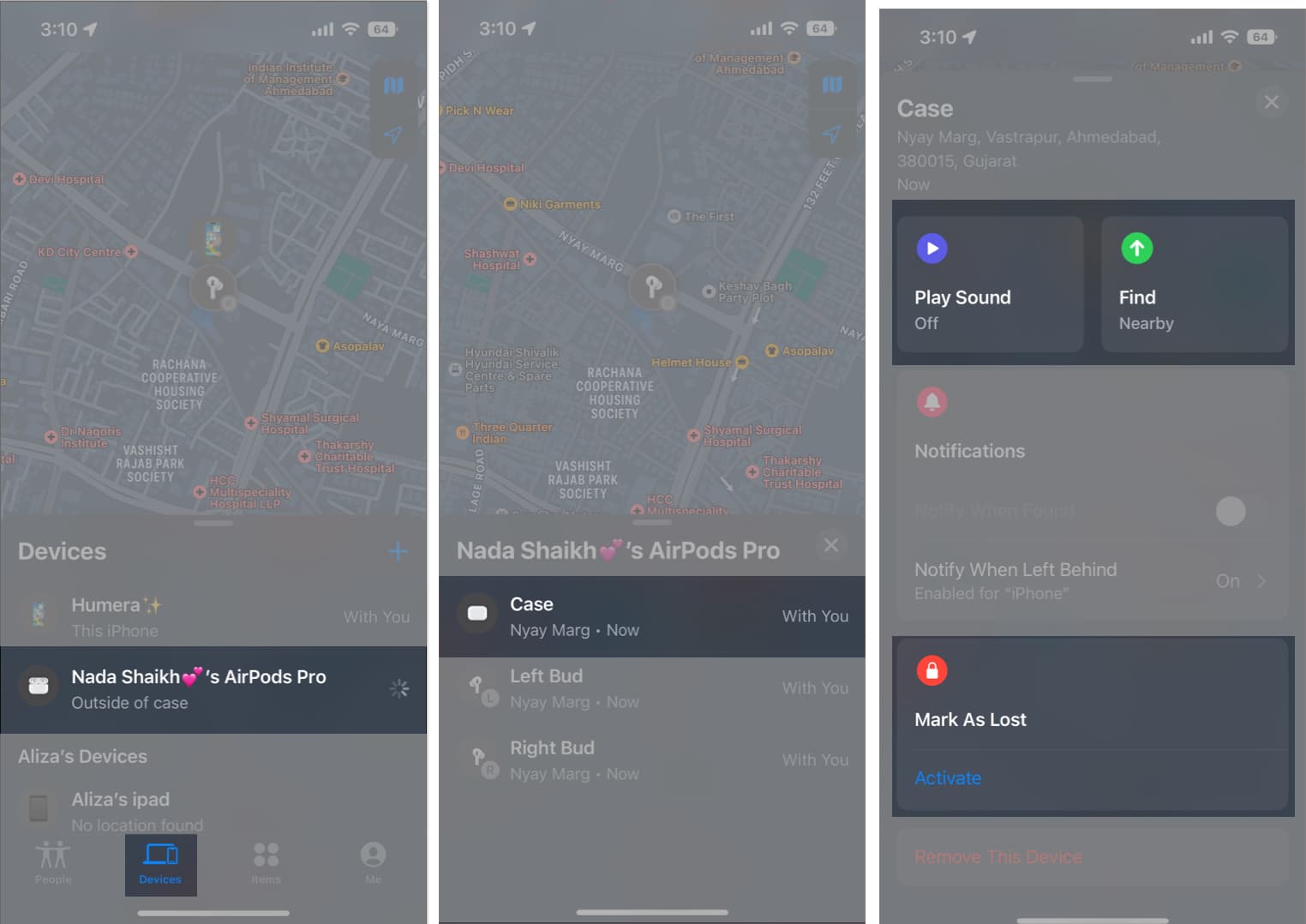
- Moreover, if needed, you also have the option to mark the device as lost by tapping the Activate button next to Mark As Lost.
That’s about it!
Yes, you can buy an AirPods case replacement directly from Apple or from licensed retailers. Before buying a replacement AirPods case, be sure to confirm compatibility with your specific model.
The Find My app might not be able to locate your AirPods case if it is completely dead. For the app to detect the case’s location, the latter needs to have enough juice left in it.
Currently, Apple does not provide a specific tracking service based on the serial number or IMEI of the AirPods case.
Track your AirPods!
In addition to the methods mentioned earlier, I suggest you take a moment to go back in your mind and remember where you last had or saw your AirPods case. It could also be useful to check familiar places like your pockets, bags, or nearby surfaces where you might have accidentally left them.
Did you find this guide helpful? Do share your thoughts in the comments below.
Read more:
Frequently Asked Questions
Topics

Written by
Jibin JosephJibin Joseph is an editor at iGeeksBlog and has excellent attention to detail. He is a voracious reader, with interests ranging from philosophy and history to geopolitics and tech. When not reading or correcting grammar, you’d find him engaging in discussions about football. You can follow him on Twitter and Instagram at @4ibin.
View all posts →More from AirPods
AirPods Flashing Orange? What It Means and How to Fix It
Confused by the orange flashing light on AirPods? Find its meaning and quick troubleshooting steps that actually work.
 VikhyatJanuary 30, 2026
How to Fix AirPods Battery Drain Issues: Step-by-Step Guide
AirPods draining too fast or dying overnight? This step-by-step guide explains why it happens and shows you how to fix AirPods battery drain issues before replacing them.
 Mahit HuilgolJanuary 19, 2026
How to Update Your AirPods to the Latest Firmware Version
Make sure you enjoy the latest features on your AirPods.
 Ankur ThakurJanuary 16, 2026