
How to see Most Recent posts in Facebook on iPhone
Want to see your Facebook posts in chronological order? No issues, follow this simple tutorial and ensure that you see the Most Recent Facebook posts on your iPhone.
How to access the Most Recent feed in the Facebook iPhone app
- Open Facebook app.
- Tap Menu located at bottom right.
- Tap See more → Most Recent OR Recent and favourites.
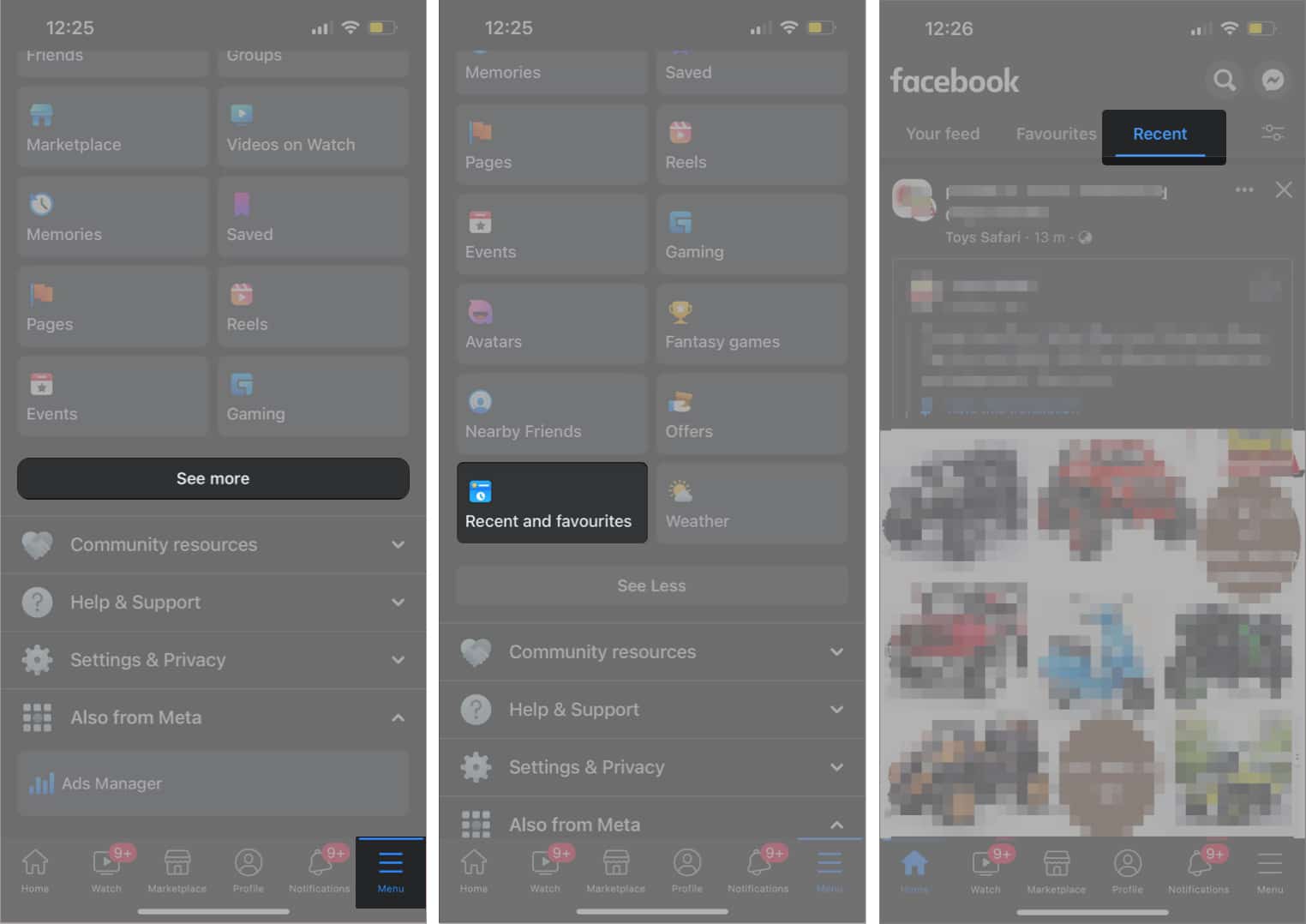
Head back to the News Feed and now, it should load the most recent feed on the app.
It makes sense to check out the most recent status updates, photo updates and other shares from your friends and pages you’ve liked/subscribed to. I don’t know why Facebook wants to change this default behavior to something that’s not so “current.”
In other things that have changed, the Facebook app now lets you edit updates before you post them. This includes viewing and removing suggested links based on your status update/link share.
The other feature is offline posting: you can now use and post your status updates/shares to Facebook even when you are offline (Airplane mode / no data etc.). Facebook will post the update whenever your iPhone connects to a network.
Download the new Facebook app here. If you already have the app installed, go to the App Store → Updates section to update the Facebook.
You may also like to read:
Topics

Written by
Nidhi BohraA tech-aficionado whose superpower lies in blabbering interminably about new technologies. After 4+ years and 4500+ content pieces that helped diverse companies grow, I followed my passion and made iGeeks Media my home. When not gushing over technology, you will find me immersed in a fictional world, either reading or creating one.
View all posts →More from How-to

Snapchat Parental Controls: How to Set Up Family Center and Keep Your Teen Safe
Snapchat’s Family Center lets parents monitor their teen’s friend activity and screen time without reading private messages. Here’s how to set it up and what to expect.
 VikhyatMarch 3, 2026
How to Block and Unblock Someone on Instagram
Instagram lets you block or unblock someone in seconds. Follow these simple steps to take full control of your privacy and online peace.
 Ava BiswasMarch 2, 2026
Apple Watch Not Responding? 8 Fixes That Actually Work
Is your Apple Watch unresponsive or stuck on a black screen? Here are 8 proven fixes to help you unfreeze it and get it working again quickly.
VikhyatMarch 3, 2026