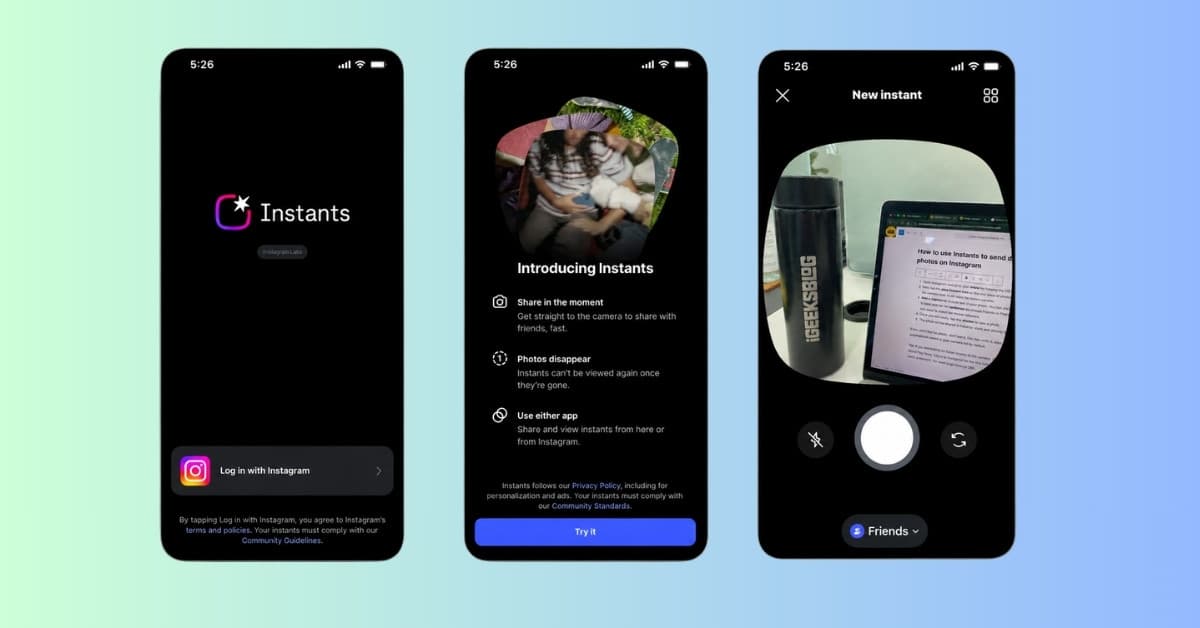
Meta has introduced a new Instagram feature and standalone app called Instants. On the surface, it might look like Meta’s attempt to mimic Snapchat. But after trying it, I think there is more to the story.
Instants is built for quick, unedited photos that you send in the moment. There are no polished feed posts, over-designed Stories, or pressure to make your life look better than it is. You open the camera, capture something, send it, and move on.
That is what makes Instants interesting. Here’s everything you need to know about Meta’s new Instagram Instants app, the features it offers, and how to use it to send disappearing photos.
What is Instagram Instants?
As we previously covered, Instants is a new way to share quick, unedited moments with close friends and mutual followers through Instagram. The idea is simple: open the camera, take a photo, send it, and move on. Once the recipient views it, the photo disappears.
That sounds basic, but it matters because Instagram has become painfully polished. A Story often needs music, text, stickers, or some kind of context. A Reel needs effort. A feed post feels almost formal now.
Instants goes the other way. It is designed for the everyday photos you would normally send to a friend and forget about.
Right now, Instants appears inside Instagram’s inbox and is also available as a separate app connected to Instagram in supported regions.
Must Read: Instagram Plus is coming: New features, price, and everything we know so far
Instagram Instants vs Snapchat vs BeReal: What’s different?
Instants feels familiar because it borrows from habits users already understand. It has Snapchat‘s disappearing-photo format, BeReal‘s raw quality, and Instagram’s existing social graph. But it is not exactly the same as any of them.
| Feature | Instagram Instants | Snapchat | BeReal |
|---|---|---|---|
| Main idea | Quick disappearing photos through Instagram | Send disappearing photos and videos | Post an unfiltered daily moment |
| Social space | Instagram inbox / Instants app | Snapchat friends | BeReal friend feed |
| Editing | No | Filters, lenses, stickers, effects | Mostly raw |
| Pressure level | Low | Depends on streaks and friends | Daily prompt pressure |
| Best for | Private Instagram sharing | Playful photo messaging | Authentic daily check-ins |
The Snapchat comparison is obvious, but Snapchat still has a stronger camera culture. It has lenses, streaks, Bitmoji, Snap Map, and years of user behavior built around visual messaging.
Instants feels simpler. It is less playful than Snapchat, but more convenient if your friends already use Instagram.
Who should use Instagram Instants?
Instants is not for creators trying to grow, brands looking for reach, or people who already think Instagram is too crowded.
If you already send Reels, reply to Stories, use Close Friends, and chat with your close friends on Instagram, Instants will probably feel natural.
It is best for:
- Quick photo updates
- Inside jokes
- Casual selfies
- “Look at this” moments
- Close Friends sharing
- People who like Snapchat’s idea but do not want another app
The simplest way I can put it is this: Stories are for your audience. Instants are for your people. And if you prefer keeping your inbox less cluttered, Instagram also gives users ways to control or hide Instants in Instagram DMs.
How to use Instagram Instants to send disappearing photos
Using Instants is intentionally simple.
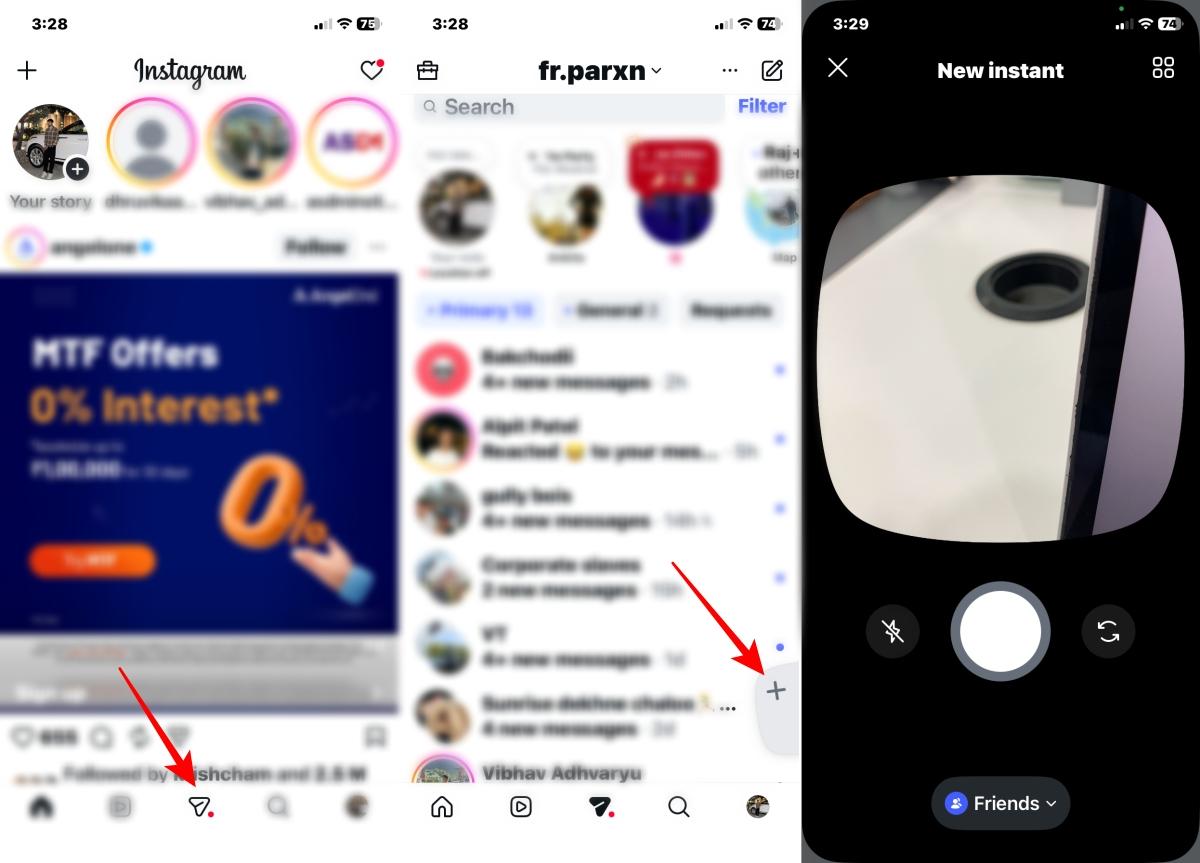
- Open Instagram and go to your inbox by tapping the DM button at the bottom.
- Tap the plus Instant icon or the mini stack of photos in the right corner and select the camera icon. It will open the Instant camera.
- Add a caption to include text in your photo. You can also switch the camera from front to back and set the audience as Closed Friends or Friends at the bottom. For Friends, you need to select the mutual followers.
- Once you are ready, tap the shutter to take a photo.
- The photo will be shared in Instants’ stack and directly to the selected friend’s inbox.
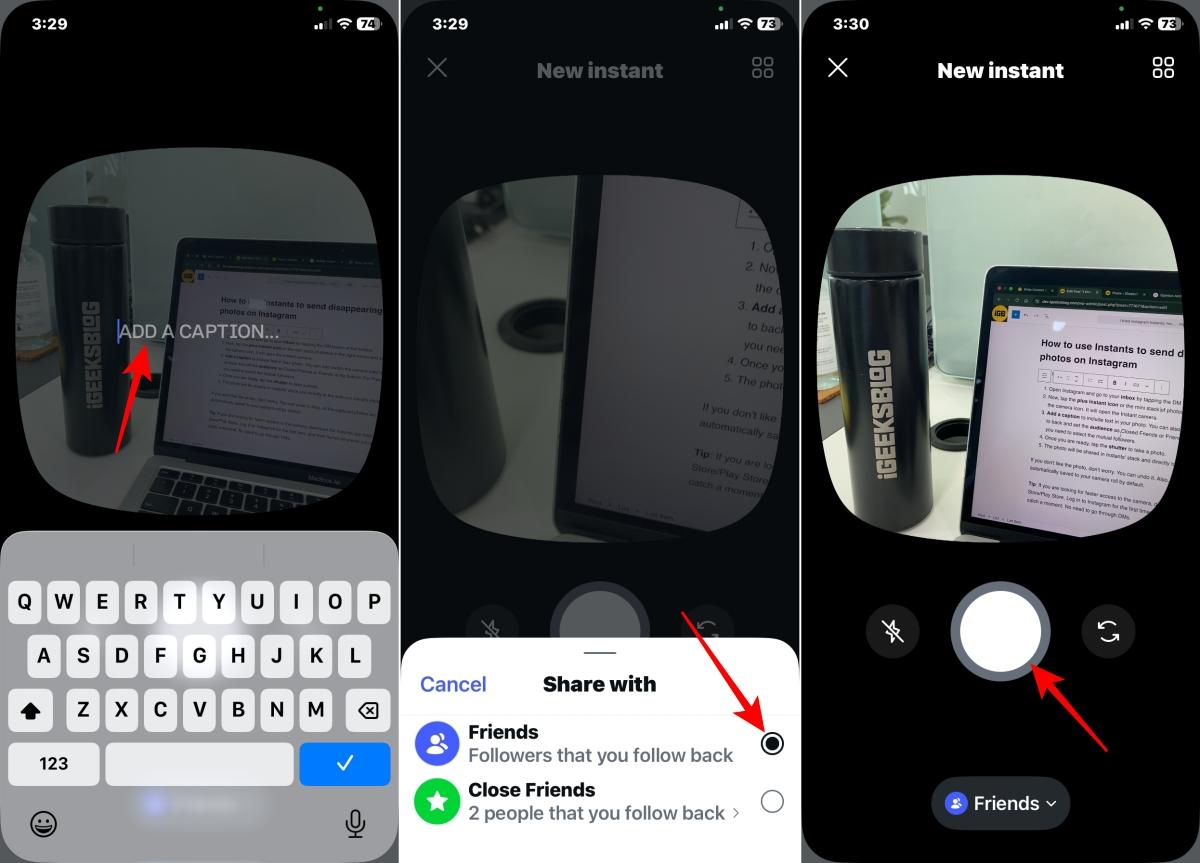
If you do not like the photo, you can undo it. Also, all captured photos are automatically saved to your camera roll by default.
Tip:
If you want faster access to the camera, download the Instants app from the App Store or Google Play Store. Log in with your Instagram account once, then launch the app whenever you want to capture a moment. This way, you do not need to open DMs first.
What happens after you send an Instant?
After you send an Instant, it works similarly to a Snap. The photo is available to view for 24 hours, and once your friend views it, it disappears.
To view others’ Instants:
- Open the Instagram DM. You will see a preview of a photo with a numbered badge in the top right corner.
- Tap it to view the instants of your friends.
- You can send a reaction like love or reply to an instant. Your friends will get a notification and receive your reply in their DM.
You can also manage your own Instants after sending them. According to Instagram, your instants are saved in your archive for up to a year, so you can look back at what you shared later. It’s similar to Story Archives.
To manage your Instagram Instants archive
- Go to the Instant previews in your Instagram DM.
- Tap the four-square icon at the top to open your archive. Here you will find all the photos you have shared categorized by Today, This Week, This Month, etc.
- Select a photo to view its info, such as the date you shared it, the friends list, and who reacted to it. However, there is no way to know who has viewed your instants.
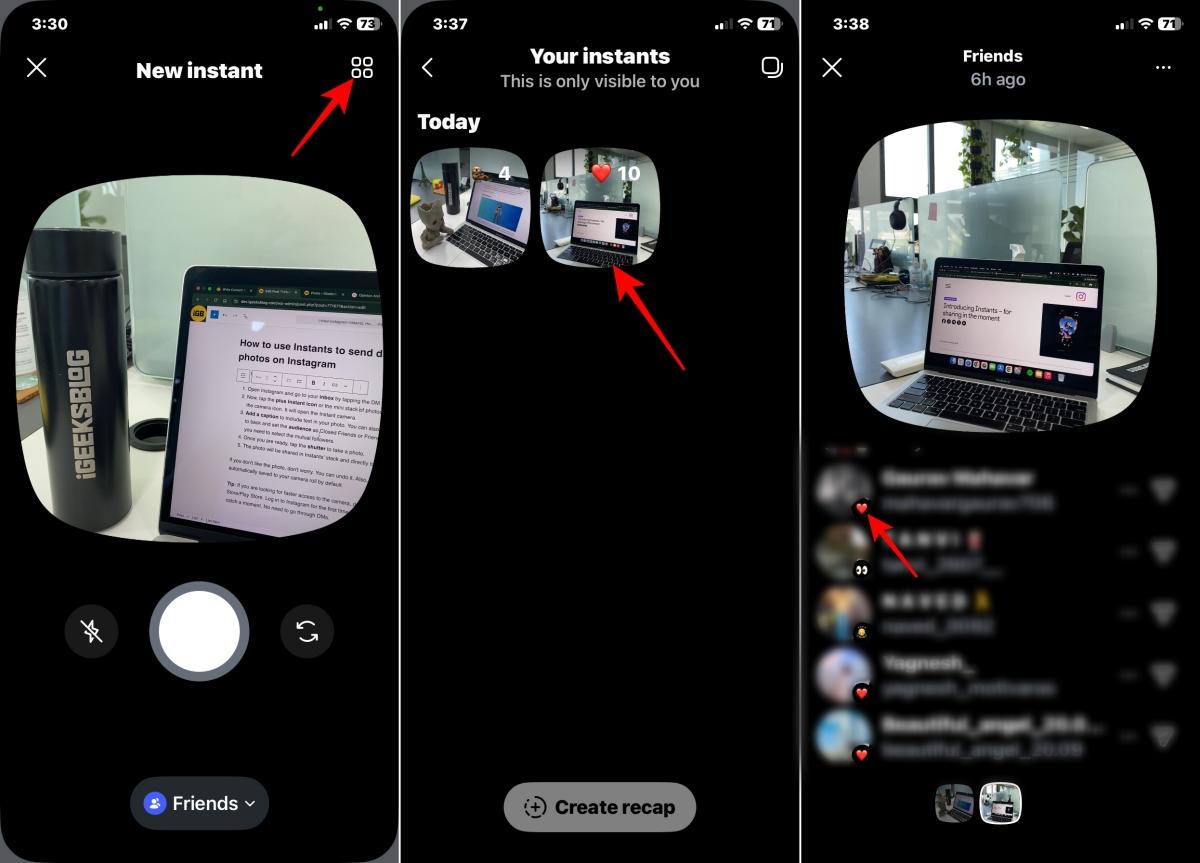
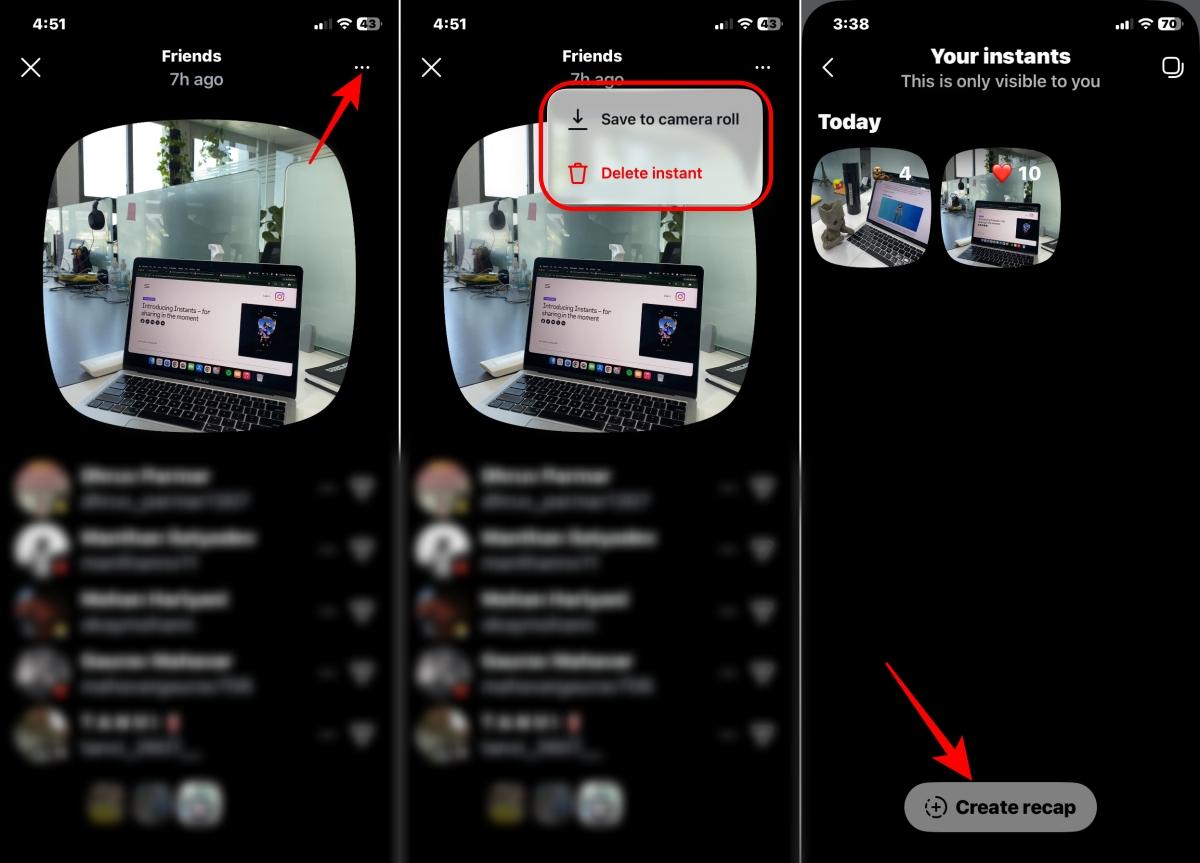
- Tap the three-dot icon to save or delete the photo from your archive.
- You can also post those quick moments to your Story. Tap Create recap at the bottom.
Instagram Instants privacy and safety features
Instants are built to feel casual, but Instagram has added a few safety controls around them.
Viewers cannot screenshot or screen record Instants, which makes them feel more private than a regular Story. However, someone can still capture the photo using another device. So, I would avoid sharing overly personal or sensitive content.
If you have previously blocked, restricted, or muted someone on Instagram, those settings will still apply to the Instants feature and standalone app.
If you use a teen account, settings like time limit, Sleep Mode, and Instagram’s other parental controls and supervision features will also work with Instants.
Why Instagram Instants matters for Meta
Instagram Instants matters because it shows where Instagram is heading. The old Instagram was built around public identity. The new Instagram is increasingly built around private sharing.
People still post, but a lot of real activity now happens in smaller spaces: DMs, Close Friends, Instagram Maps, group chats, reel reposts, Story replies, and Notes.
Instants fits directly into that shift. This is not just Meta copying Snapchat. It is Meta trying to own another behavior before users leave Instagram for it.
The pattern is familiar:
- Reels keep TikTok-style videos inside Instagram.
- Threads keeps text conversations inside Meta’s ecosystem.
- Edits targets mobile video creators.
- Instants targets casual disappearing photo sharing.
Is Instagram Instants worth using?
Yes, but only if you already live in Instagram DMs.
After trying Instants, I do not think it is a Snapchat killer. Snapchat still has a stronger identity as a camera-first messaging app. I also do not think Instants has the cultural clarity that made BeReal interesting.
But Instants has one unfair advantage: your Instagram friends are already there. That makes it useful.
I would use Instants for quick, low-stakes moments like a funny sign, a messy desk, a pet photo, a random street scene, or a “you had to be there” snapshot.
Will you use Instagram Instants? Share your opinion in the comments below!
You may like to read: