
How to zoom in Instagram profile picture on iPhone (2 Tricks)

Want a closer look at someone’s profile picture on Instagram? You can, of course, pinch with two fingers to zoom in like on any other app. But this gesture does not work to zoom in on Instagram profile pictures or captions under images. That’s why we’ve got two simple tricks you can try. The first one involves changing a setting on your iPhone while the other is taking a screenshot. Keep reading to learn how to zoom in on Instagram profile pictures on iPhone.
2 Tricks to zoom in someone’s profile pic on Instagram
1. Use Accessibility setting on iPhone
- Open the Settings app on your iPhone.
- Tap Accessibility.
- Then, tap Zoom and just turn it on.
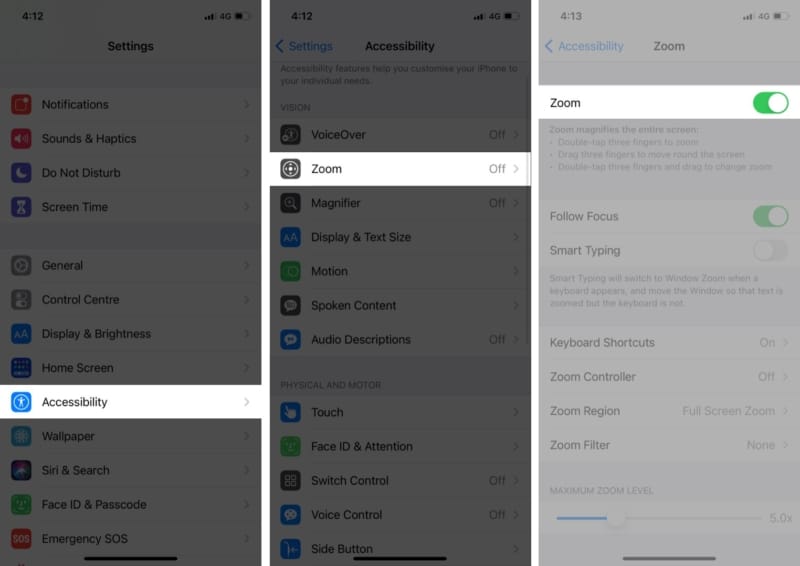
Go to the Instagram app and simply double-tap three fingers in order to zoom in a profile picture.
Tips to use Zoom on iPhone
- Double-tap three fingers in order to zoom.
- Drag three fingers in order to move around the screen.
- Double-tap three fingers and drag to change zoom.
- Tap on the handle (controller) to have more options like Zoom out, choose a region (like Full-screen zoom or Window zoom), resize lens, choose a filter (like Inverted, Greyscale, Greyscale Inverted and Low Light) and Show/Hide Controller. Make the best use of these features to view photos and videos more vividly.
If you want to completely turn off zoom, head over to Settings → Accessibility → Zoom and turn it off.
2. Taking screenshot on iPhone
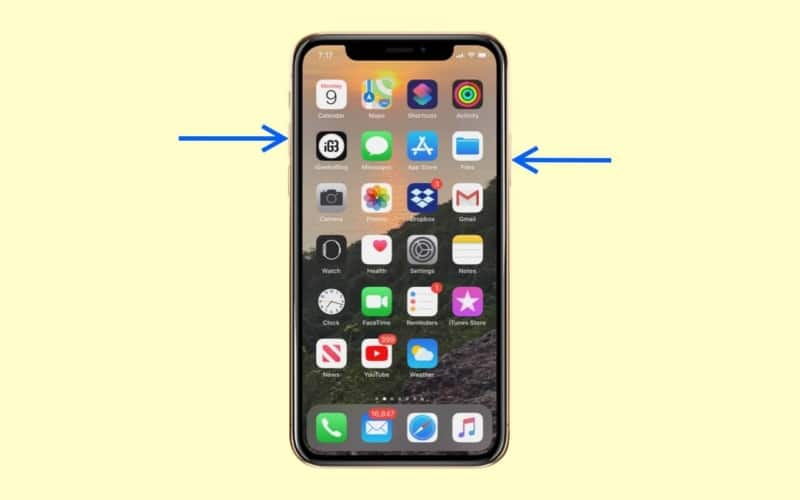
In the above trick of zoom-in Instagram profile picture, you have to play with your iPhone’s settings. But if you don’t want to do it, you can snap a screenshot of your Instagram feed by pressing the Side button from the right side and the Volume Up button from the left side at the same time.
Next, Go to the Photos app to view the screenshot, at which point you can pinch with two fingers to zoom in a photo.
Read more:
Topics

Written by
Dhvanesh AdhiyaThe founder of iGeeksBlog, Dhvanesh, is an Apple aficionado, who cannot stand even a slight innuendo about Apple products. He dons the cap of editor-in-chief to make sure that articles match the quality standard before they are published.
View all posts →More from How-to

Snapchat Parental Controls: How to Set Up Family Center and Keep Your Teen Safe
Snapchat’s Family Center lets parents monitor their teen’s friend activity and screen time without reading private messages. Here’s how to set it up and what to expect.
 VikhyatMarch 3, 2026
How to Block and Unblock Someone on Instagram
Instagram lets you block or unblock someone in seconds. Follow these simple steps to take full control of your privacy and online peace.
 Ava BiswasMarch 2, 2026
Apple Watch Not Responding? 8 Fixes That Actually Work
Is your Apple Watch unresponsive or stuck on a black screen? Here are 8 proven fixes to help you unfreeze it and get it working again quickly.
VikhyatMarch 3, 2026