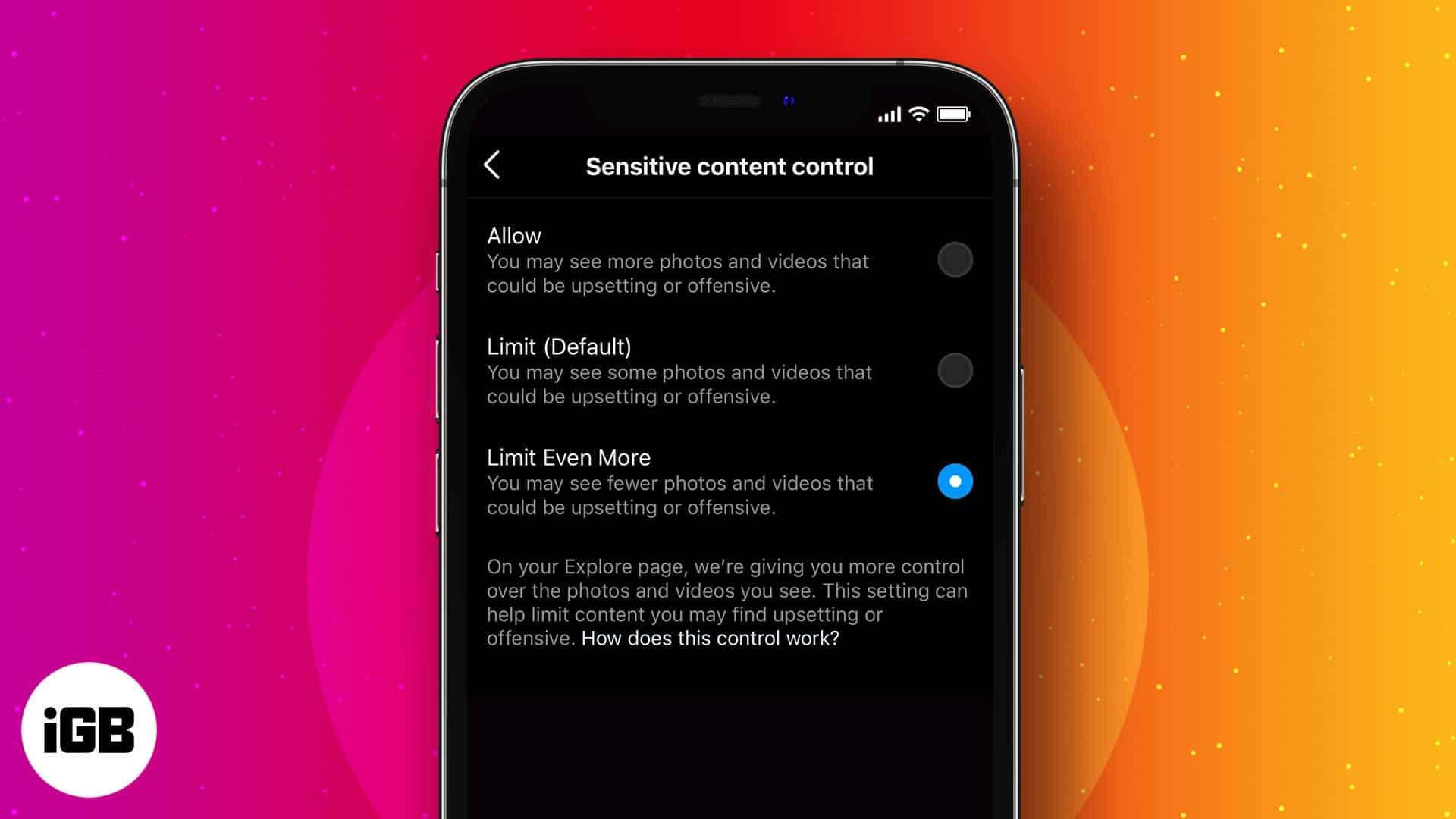
- What is Sensitive Content?: Sensitive content on Instagram is material that doesn’t violate rules but may be upsetting or inappropriate, such as suggestive or violent posts from other users.
- The Control Feature: Instagram’s “Sensitive Content Control” feature lets you manage how much potentially upsetting content you see in areas like Explore, Search, and suggested posts.
- How to Adjust It: In your settings, you can choose between “Standard,” “More,” or “Less.” Selecting “Less” will show you the fewest posts with sensitive content from others.
- Impact of a Change: Limiting sensitive content only affects posts from accounts you don’t follow; it does not impact what you see from the people you already follow.
- The Main Benefit: Adjusting this setting helps create a safer and more predictable Browse experience, which is especially beneficial for younger users or those seeking a calmer feed.
Instagram is one of the most popular social media apps today. But with endless content flowing in, some posts can be upsetting or inappropriate. To give users more control, Instagram offers a Sensitive Content Control feature that lets you manage how much of this content appears in your feed.
In this guide, I’ll show you how to control sensitive content on Instagram and explain why such content might be showing up in your feed in the first place.
What is sensitive content on Instagram?
Sensitive content includes photos or videos that don’t violate Instagram’s Community Guidelines but could be considered disturbing or inappropriate by some users.
According to Instagram, this includes:
- Sexually suggestive material such as people in see-through clothing, even if not explicit.
- Graphically violent content, such as images or videos of injuries or fights.
- Content promoting regulated substances such as vaping, drugs, alcohol, and weapons.
- Posts with triggering subjects, like mental health challenges or destructive action.
- Images or videos that illustrate or advertise cosmetic surgery.
- Content that could be used to market goods or services with health-related claims, such as an advertisement for a weight-loss pill.
Instagram uses Recommendation Guidelines to filter such content, especially for younger users. Still, some posts might slip through. Let’s find out why
Why you’re seeing sensitive content on Instagram
Sometimes, your Explore tab may show stuff that makes you go, “Whoa, didn’t sign up for this.” Most of the time the culprit is the Instagram algorithm glitches. Recently, many users reported a surge in sensitive and NSFW content popping up in the Reels tab and feed. Later, Meta acknowledged the system error and fixed it.
Rather than this, here are some common reasons why sensitive content might be showing up in your feed or Explore page:
- Your sensitive content settings allow it: If your settings are on Standard or More, Instagram will show you a mix of regular and possibly sensitive content. We will discuss these filter levels later in the post.
- Your following: The accounts you follow also affect what you see. If you follow people or pages that often post edgy, bold or adult content, Instagram may also begin to show you other users posting similar kinds of content.
- Your activity on Instagram: Instagram tracks your previous actions, such as the posts you like, save or comment on, to figure out what types of content to show you. If you’ve interacted with posts deemed sensitive, Instagram may presume you’re fine to see that type of content.
- Explore, Reels, and Suggested Posts: Sensitive content is more likely to show up in these areas rather than in your regular feed. There Instagram tries to show you new content you might like, even from people you don’t follow.
The good news is that Instagram gives you the choice to manage your own experience and make it more comfortable and enjoyable.
Understanding Instagram’s Sensitive Content Control
Sensitive Content Control allows you to manage the level of sensitive content you see in:
- Explore
- Search
- Reels
- Suggested Posts
- Accounts You Might Like
- Feed Recommendations
However, it does not affect the content of the people you follow.
Instagram gives you three levels of control:
- Standard (Default): Filters out some sensitive content but not all.
- More: Allows more sensitive content to appear.
- Less: Blocks most sensitive content—ideal for avoiding mature or triggering posts.
If you’re under 18, Instagram automatically sets this to Less and disables the “More” option.
How to limit sensitive content on Instagram
You can adjust your Sensitive Content settings through the mobile app or a web browser.
On iPhone and Android
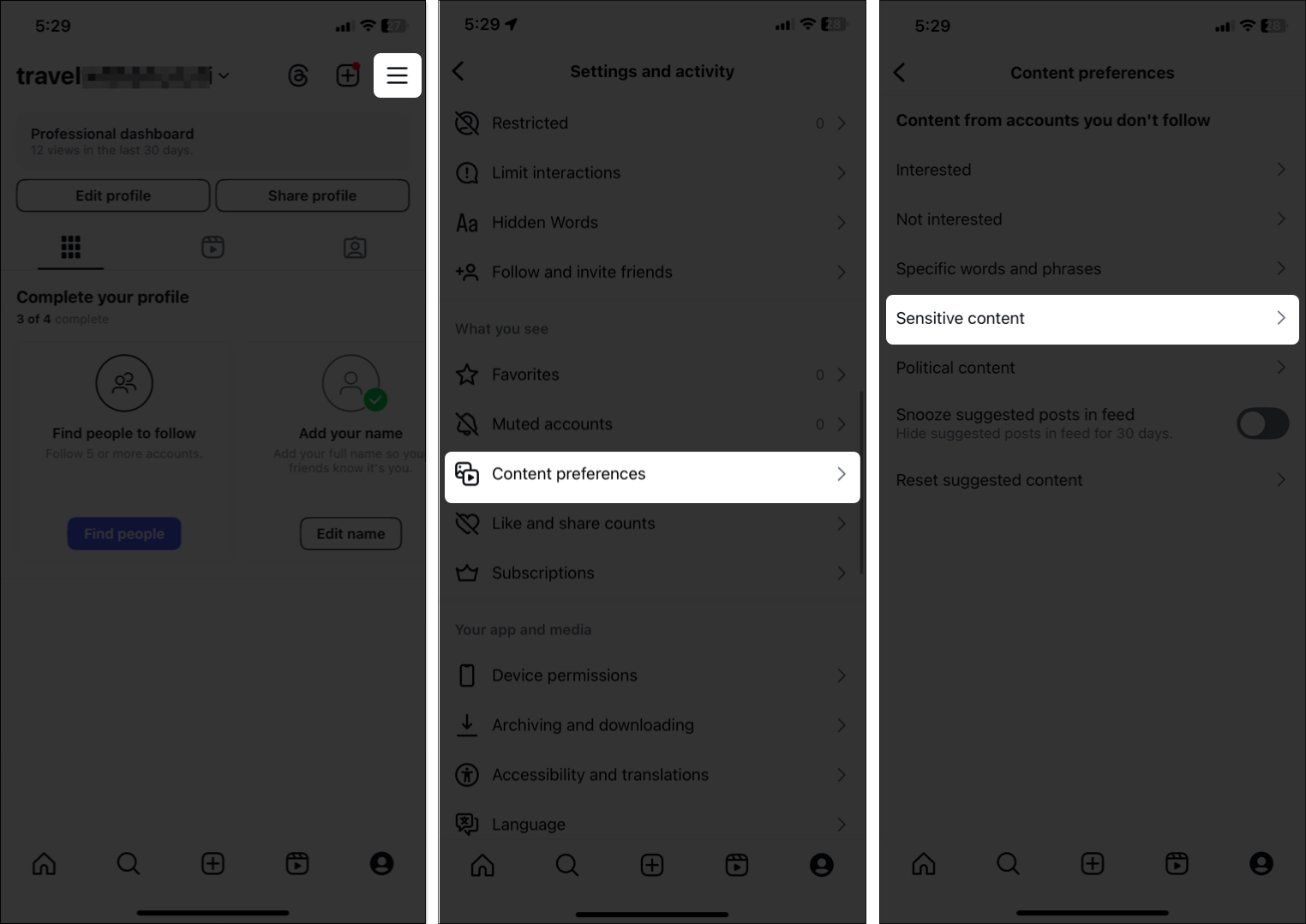
- Open the Instagram app and tap your profile picture.
- Tap the menu (☰) at the top right.
- Go to What You See → Content preferences → Sensitive content.
- Select Less, then tap Confirm.
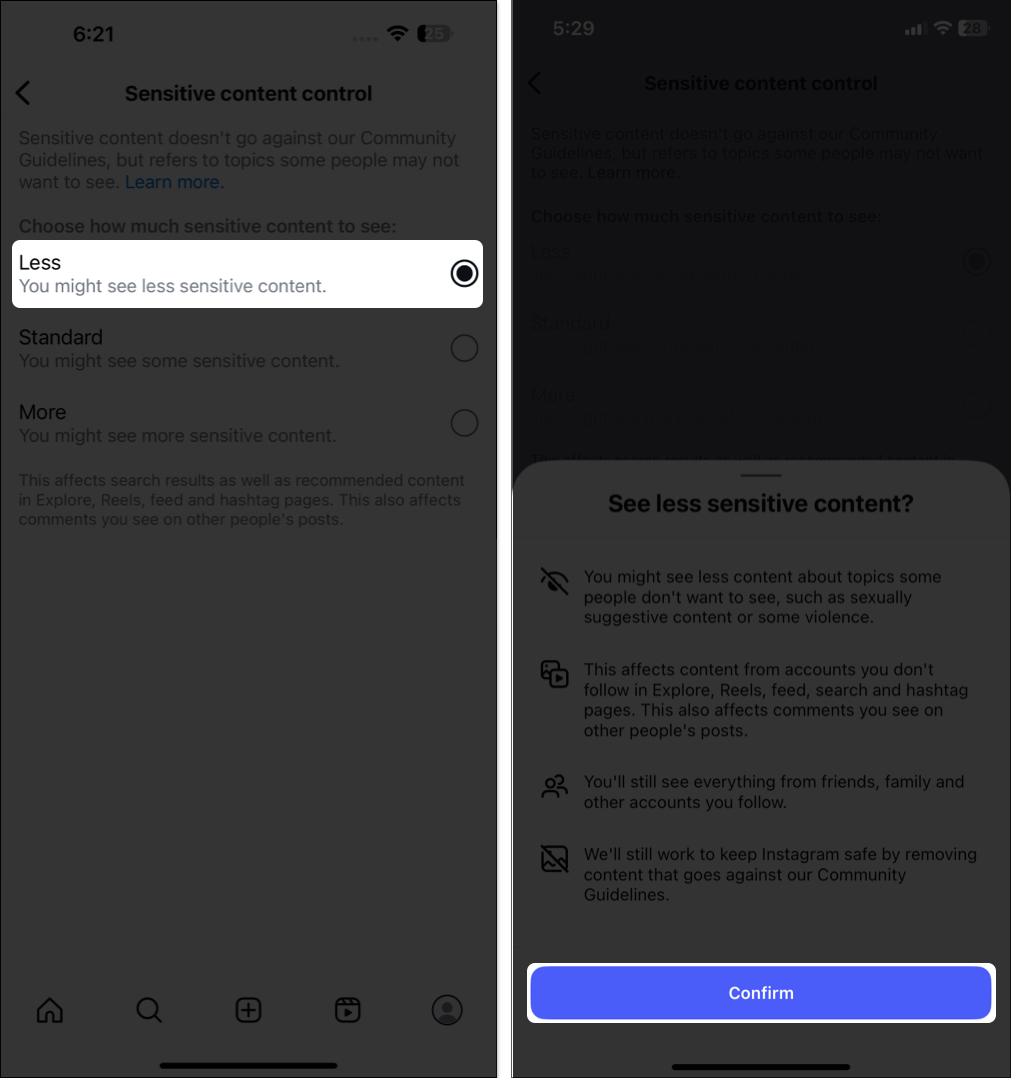


That’s all! The change kicks in right away—though I suggest restarting the app just to be sure. You may also clear the Instagram cache on your iPhone to get rid of old search history and pre-loaded media.
Using a web browser
- Visit instagram.com and log in.
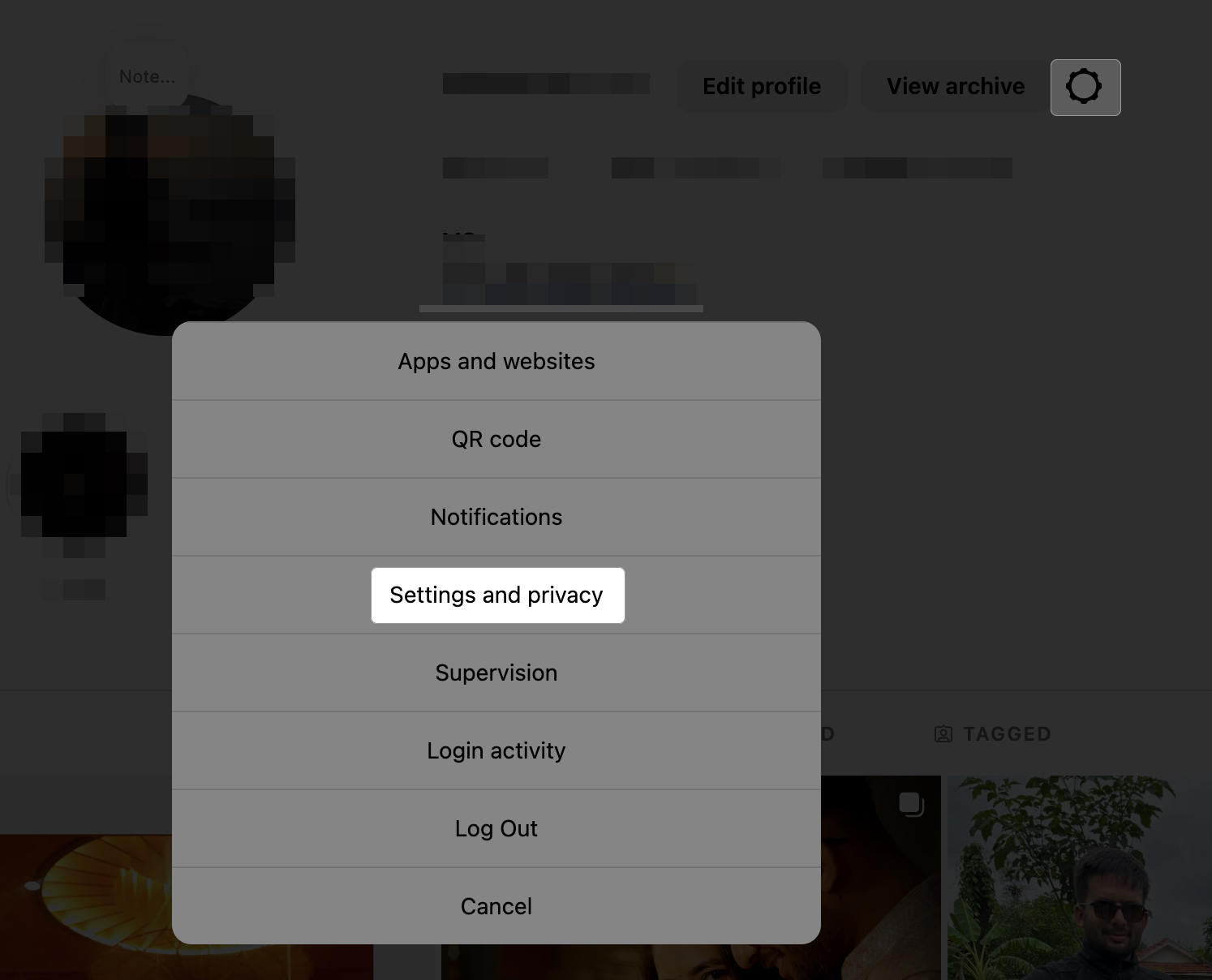
- Click your profile picture → Settings (gear icon) → Choose Settings and Privacy.
- Select Content preferences, and click Sensitive content from the right side.
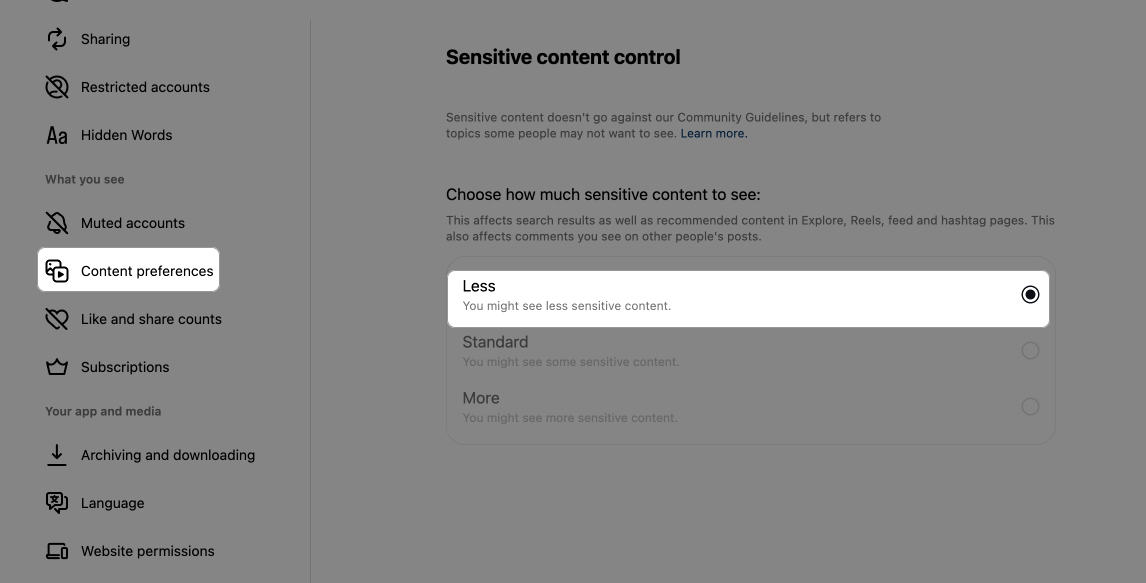
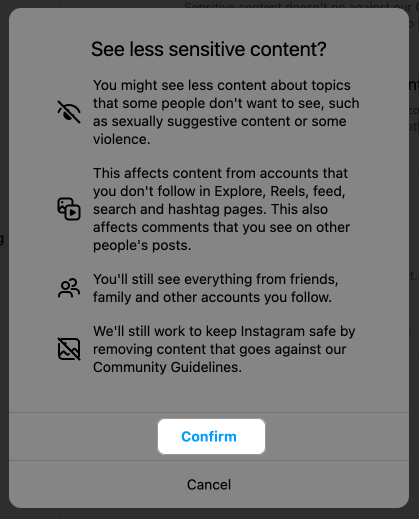
- Select Less and confirm.


Even after restricting sensitive content, if you are still unhappy with your feed, you can fix it. Check out our detailed guide to learn how to reset the Instagram algorithm.
What happens when you limit sensitive content on Instagram?
Limiting sensitive content on Instagram simply tells the app that you don’t want to view posts that you may find upsetting, disturbing or inappropriate. This doesn’t eliminate all sensitive content, but it minimizes your exposure to it—particularly from people or pages that you don’t follow.
Here’s what happens when you tweak your settings:
- If you select the Less option in your Sensitive Content Control settings, Instagram will seek to not show you posts that feature topics I mentioned before. It has an impact on Explore, Search results, Reels, and Suggested posts in your main feed from people you don’t follow.
- Sensitive Content Control only applies to accounts you don’t follow. So, if one of the people you follow shares something offensive, it can still appear in your feed or stories. You may report those inappropriate posts, or you can unfollow, mute or block the account.
- Restricting sensitive content can create a healthier and more peaceful Instagram feed. This is particularly good for young users, users who want to avoid certain topics, and users who want safer browsing.
Keep in mind that while this feature limits your exposure to your content, it doesn’t necessarily guarantee the removal of every piece of sensitive material. That being said, you can reset your Instagram Explore page to customize it as you like.
Signing off
That’s how you can limit sensitive content on Instagram. It’s a powerful way to create a browsing experience that aligns with your comfort level and preferences. If you’ve been feeling overwhelmed by unwanted posts, give this setting a try—and let me know if it made a difference!
More helpful Instagram content: