
How to Silence Unknown Callers in WhatsApp on iPhone
WhatsApp recently experienced a data breach that affected 500 million users, leading to increased fraud and scam calls. WhatsApp responded promptly by introducing a helpful feature within the app that allows you to silence unknown callers on iPhone. Here’s how to do it.
How to enable silence Unknown Callers in WhatsApp on iPhone
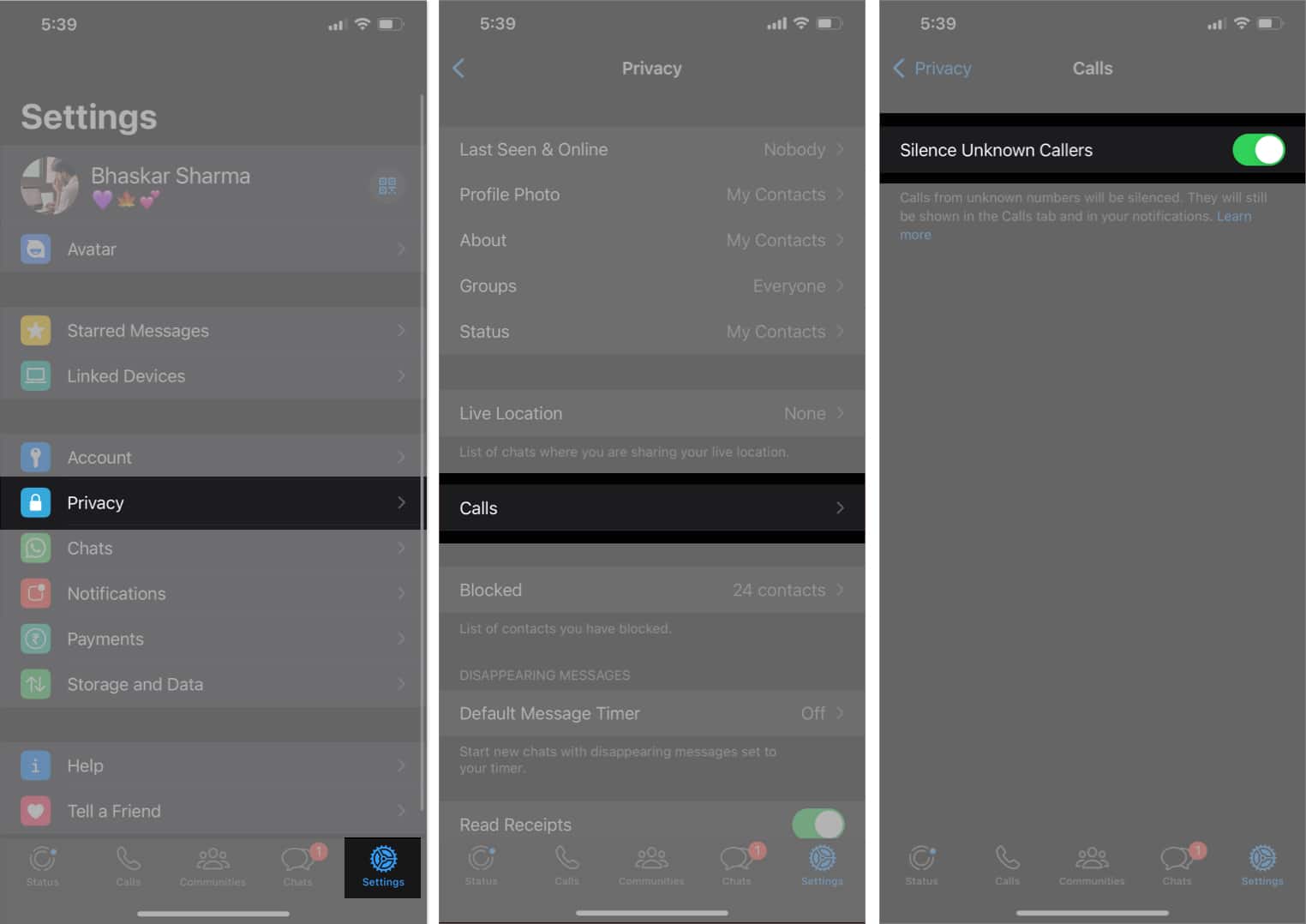
- Launch the WhatsApp app on iPhone.
- Head to the Settings tab → Tap Privacy.
- Select Calls → Toggle on Silence Unknown Callers.
Why should you silence unknown callers on iPhone?
Using the Silence Unknown Callers feature in WhatsApp, you can take precautions to protect yourself from potential risks or nuisances. Here are some of the reasons to do so.
- Avoid spam and telemarketing calls
- Protect against scams and fraud
- Maintain your privacy
- Prevent harassment or unwanted communication
- Preserve focus and productivity
Additionally, you can learn our guide on how to block no caller ID calls on iPhone, which can be a helpful step in enhancing your overall call security and experience.
How to view silenced calls on WhatsApp on iPhone
When you enable the Silence Unknown Callers feature on WhatsApp, it disables the ringtone for unknown numbers on your iPhone. You only receive a notification when the call ends. But what if you miss calls from your new friend, who is not your contact yet? Every silenced call is registered as a missed call.
- Open WhatsApp → Go to the Calls menu.
- Shift to the Missed tab.
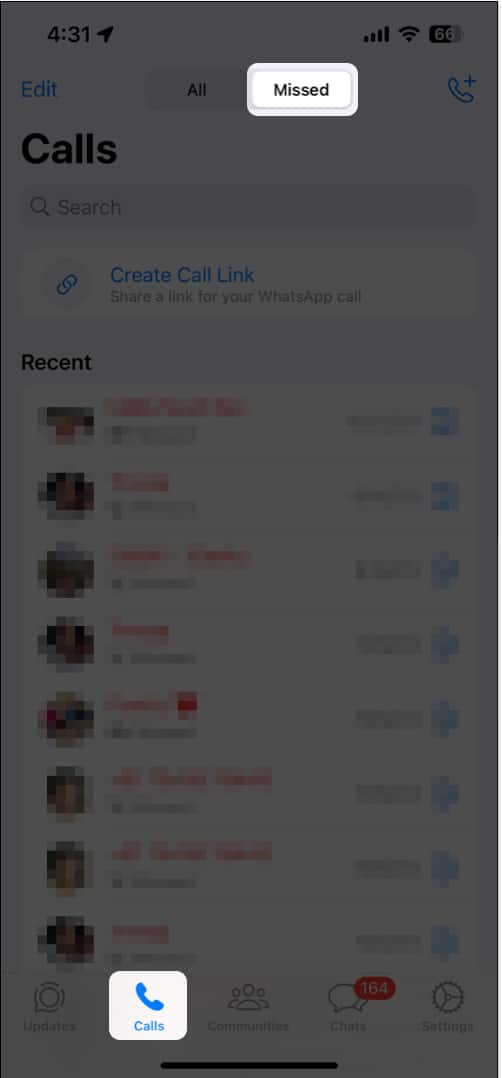
Here, you will see all the calls you received from unknown numbers. Tap the info icon next to the number to get additional details about the person. You may also ring back them by tapping Audio.
Stay protected!
Keeping our personal information safe is crucial. Even though the previously mentioned method can’t completely guarantee the security of your data, it can significantly reduce your risk of getting into trouble.
What other measures can we take to protect our private WhatsApp data? Share your suggestions in the comments below.
Frequently Asked Questions
Topics

Written by
Ava BiswasAva is a die-hard Apple aficionado and seasoned writer with a knack for breaking down complex tech concepts into easily digestible content. Having honed her writing and editing skills over 4 years at renowned media houses like TechBurner, Ava crafts informative and engaging articles including troubleshooting guides, product reviews, editorials at iGeeksBlog. When not typing, you can find her exploring the latest Apple releases or pondering the future of tech innovation.
View all posts →More from How-to
How to Turn Off Location on Snapchat (Step-by-Step Guide)
Want to stop sharing your location on Snapchat? This guide explains how Snapchat location sharing works and shows simple ways to turn off your location using Ghost Mode or phone settings. Stay in control of your privacy in just a few steps.
 VikhyatMarch 5, 2026
Snapchat Parental Controls: How to Set Up Family Center and Keep Your Teen Safe
Snapchat’s Family Center lets parents monitor their teen’s friend activity and screen time without reading private messages. Here’s how to set it up and what to expect.
VikhyatMarch 3, 2026
How to Block and Unblock Someone on Instagram
Instagram lets you block or unblock someone in seconds. Follow these simple steps to take full control of your privacy and online peace.
Ava BiswasMarch 2, 2026