
The 7 Easiest Methods to Hide Contacts on iPhone
Quick ways to hide certain contacts on your iPhone from others.
Privacy matters more than ever, especially when sensitive messages, call history, or contact names can pop up on your screen at the wrong moment. Whether your iPhone is often in someone else’s hands or you just like keeping certain details private, you may want to hide specific contacts.
But here’s the truth: iOS 26 still doesn’t offer a built-in hide option. So, here are some workarounds that let you protect private contacts without deleting them or breaking iCloud sync.
Why People Hide Contacts on iPhone
People hide contacts for many reasons, and understanding these helps you choose the right method:
- Protecting personal relationships: You may not want certain names to appear on your screen when others are around.
- Avoid Lock Screen exposure: Notifications, missed calls, and message previews sometimes show more than they should.
- Reducing clutter: Some contacts don’t need to live in your main address book.
- Safety: When harassment or unwanted attention is a subject, concealing a contact adds an additional layer of privacy.
- Preventing Siri exposure: Siri Suggestions, Share Sheet shortcuts, and Spotlight often surface interacted contacts recently.
Each motivation lines up with different hiding methods. Some focus on organization, others on privacy or restricting access.
7 Ways to Hide a Contact on iPhone Without Deleting It
Here are 8 proven methods, from built-in, completely free tricks to secure third-party options for hiding contacts on an iPhone.
1. Lock the Phone App
This is the best way to keep your contacts, call history, and voicemails off limits. Let’s say you often hand your phone to others to show photos, videos, or documents, but you’re worried they might snoop around in your contacts. The good news is you can avoid this by locking the Phone app.
- Tap and hold the Phone app icon on your iPhone Home Screen.
- Now, select the Require Face ID option and confirm it by tapping Require Face ID on the prompt.
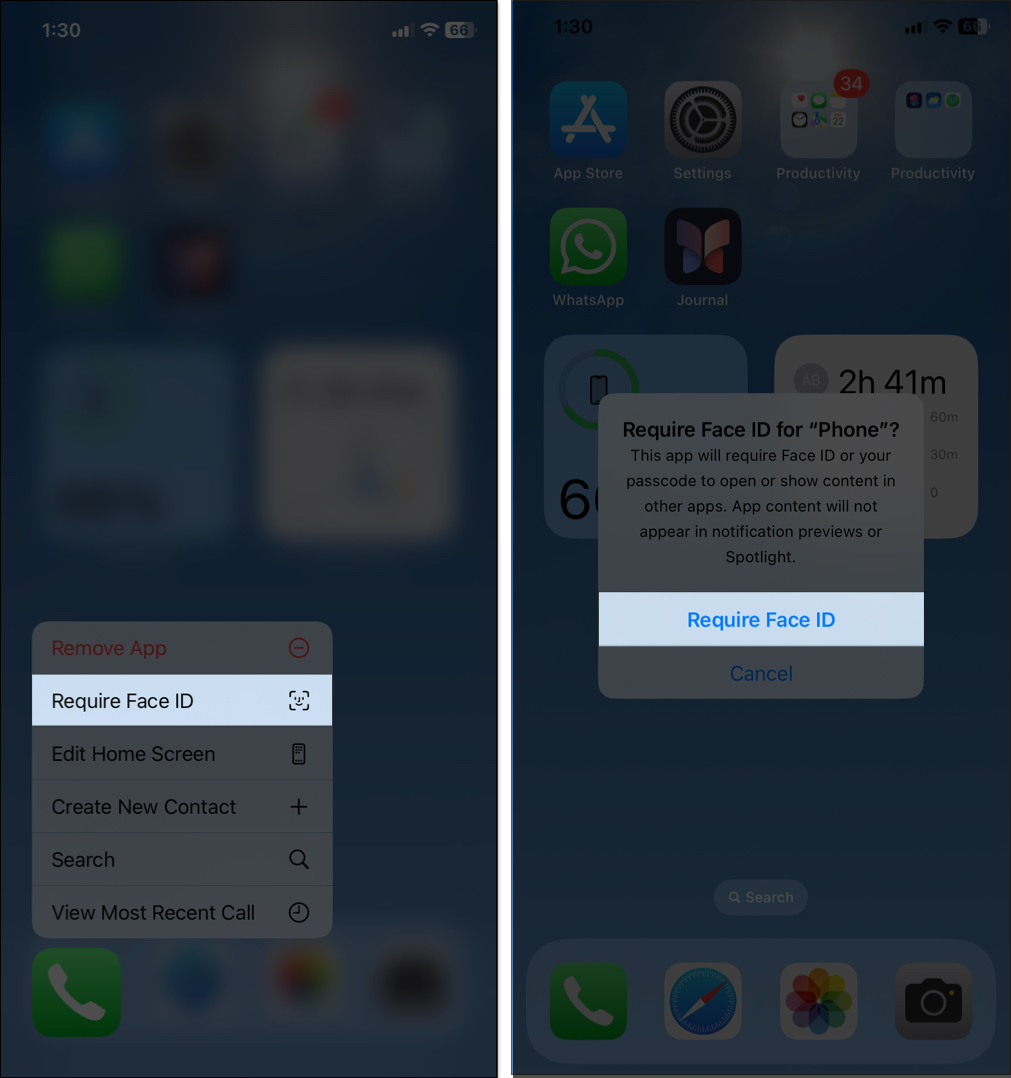
- Your iPhone will authenticate your Face ID to enable the feature.
Now, no one can access your saved numbers and call logs except people who have registered Face ID on your iPhone.
Tip:
2. Use a Contact Group
This method doesn’t hide contacts from the Phone app, but it helps hide them from your main contact lists across apps.
- Open the Phone app and move to the Contacts tab.
- Tap the left arrow icon at the top. It will show you all your contact lists.
- Now tap the Add List button, then select Gmail.
- Enter a list name, then tap the tick icon on the keyboard.
- Tap the list > Add Contacts, or tap the plus sign, and choose the contacts you want to hide.
It will sync your contacts with your Gmail account. Next, you need to remove those contacts from your main address book. For that:
- Go to Settings, tap Apps, and select Mail.
- Tap Mail Accounts and select Gmail.
- Toggle off Contacts, then confirm it by tapping Delete from My iPhone in the pop-up.
3. Save the Contact With a Nickname
You may prevent access to your contacts, but what if the contact calls or texts you? Each time, their full name or Contact Poster will appear on your screen. If you don’t want others to recognize it, rename their contact or give them a nickname.
- Open the Contacts app, select the contact, and tap Edit at the top right corner.
- Now, scroll down, tap add field and select Nickname.
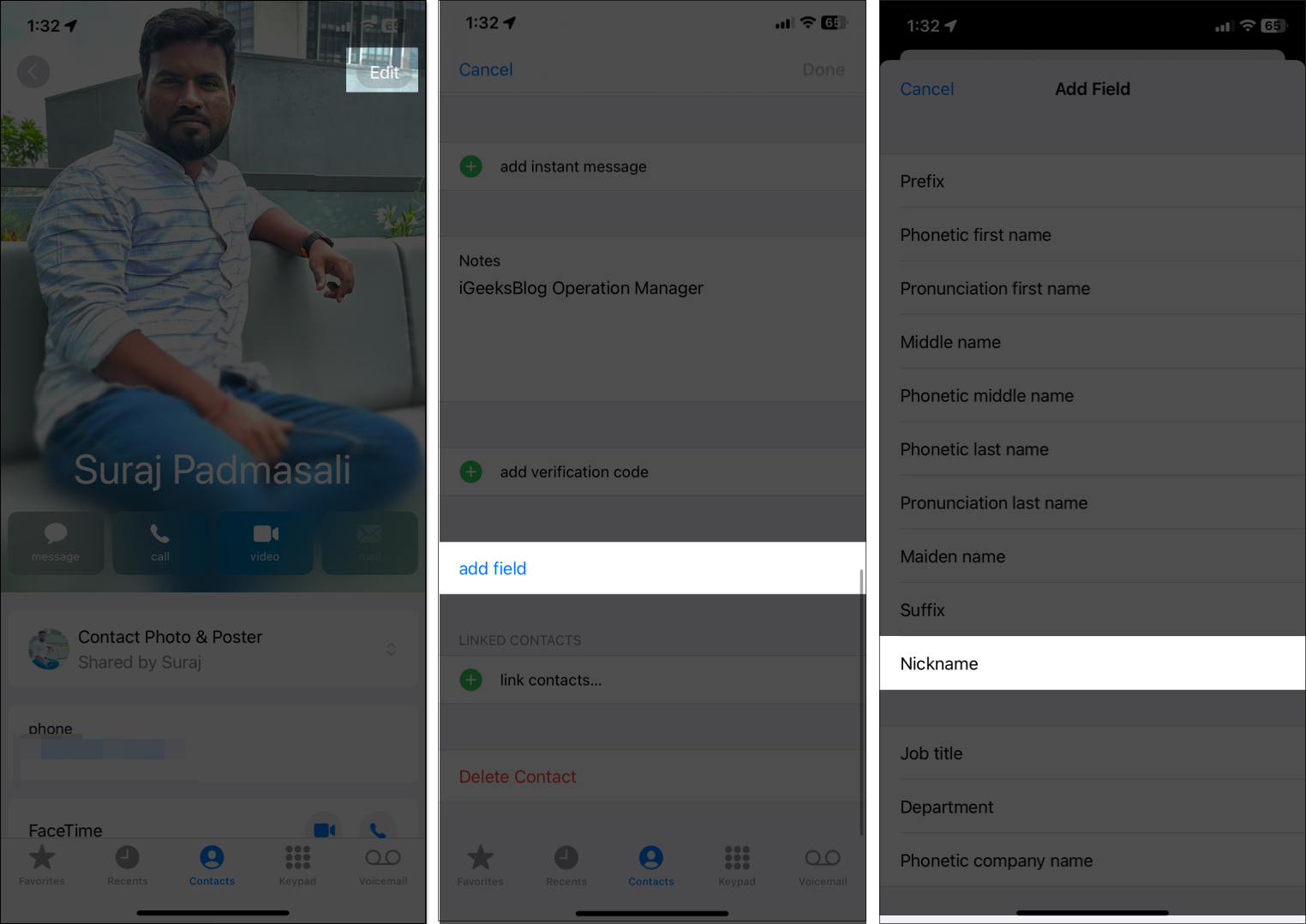
- Enter a vague nickname for that contact and tap the checkmark to save it.
- Next, go to Settings > Apps > Contacts.
- Here, toggle on Short Name and Prefer Nicknames.
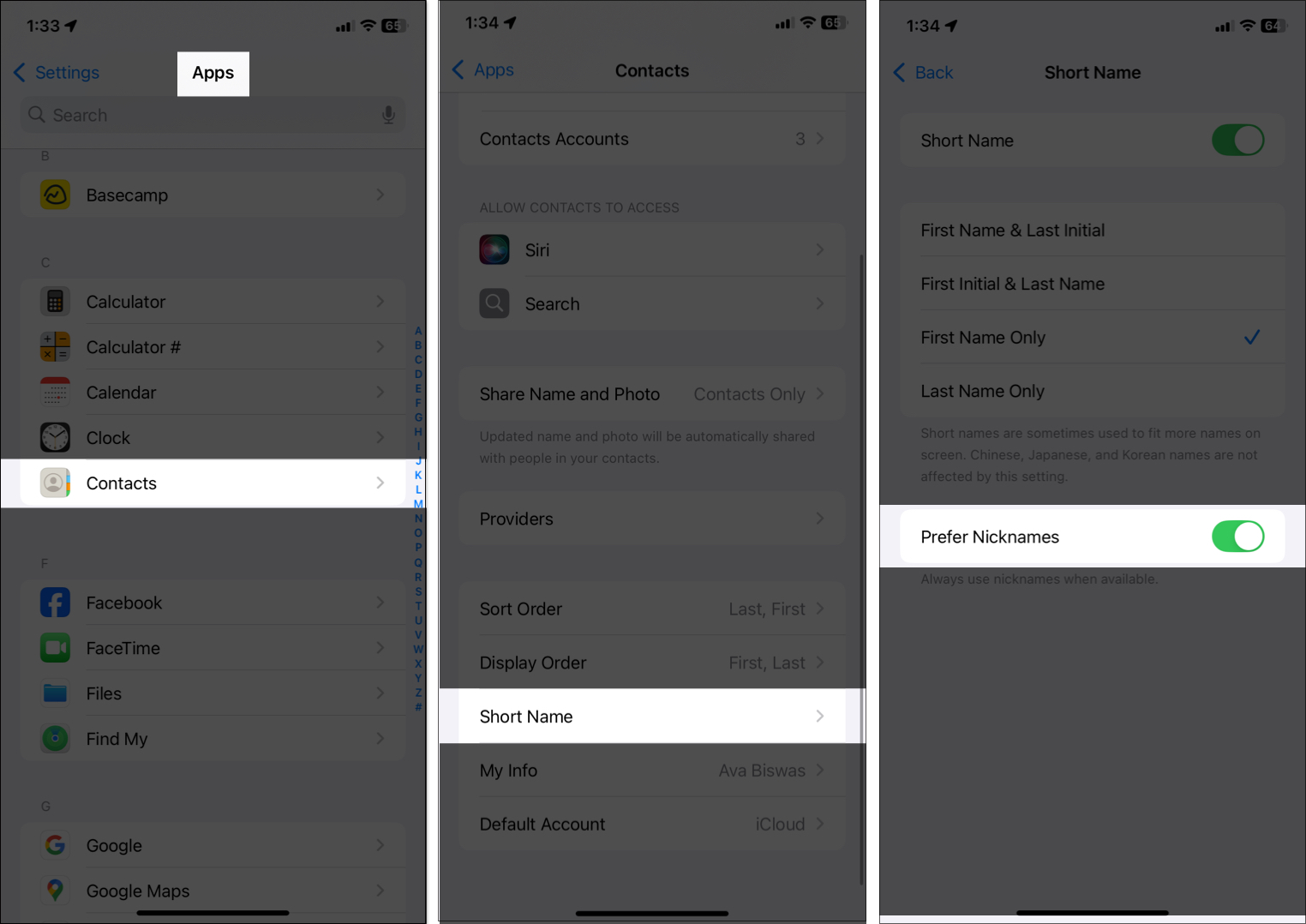
Now, whenever they call you, their nickname will be shown. If you are bothered by their photo appearing in full-screen incoming calls, open the contact, tap Contact Photo & Poster, and select Custom Photo. Then choose a Monogram as their Poster and Avatar.
4. Hide Contacts Using Notes (Password-Protected)
You can store sensitive contact details in a locked Note instead of in Contacts or the Phone app. This ensures that even if someone accesses your phone, they won’t find anything in your address book.
- Go to the Notes app and tap the pen icon at the bottom right corner to create a new note.
- Add the contact’s name, phone number, and any other relevant details in the note.
- Now tap the three-dot icon at the top, then select Lock. Authenticate your Face ID to secure the note.
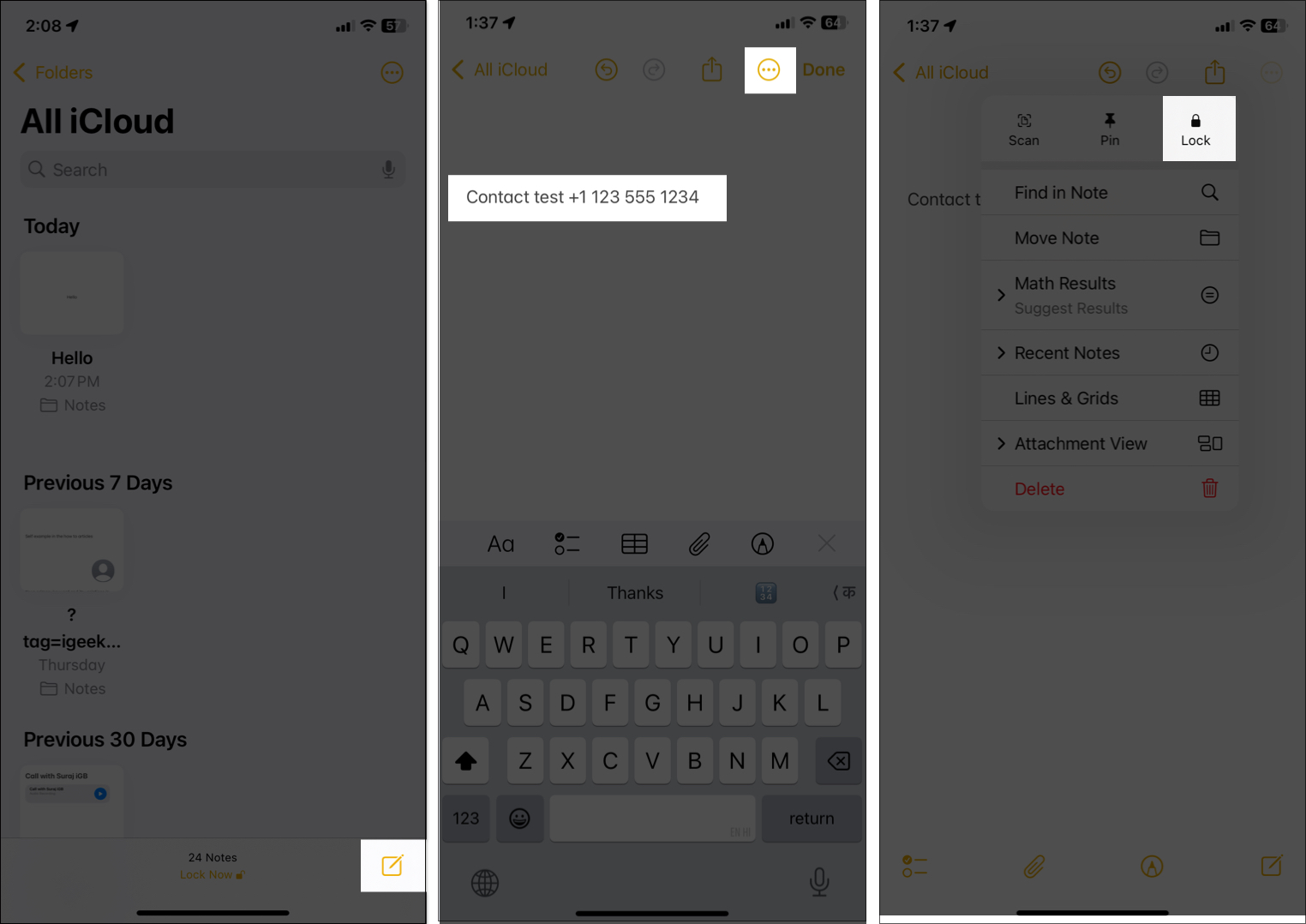
- Finally, delete the contacts from your Contacts list.
Pro Tip:
5. Hide From Spotlight, Look Up, and Siri Suggestions
If someone types a few letters into your iPhone’s search bar, related contacts might pop up as suggestions. Similarly, Siri can suggest contacts based on your activity, potentially compromising your privacy.
You can turn that off:
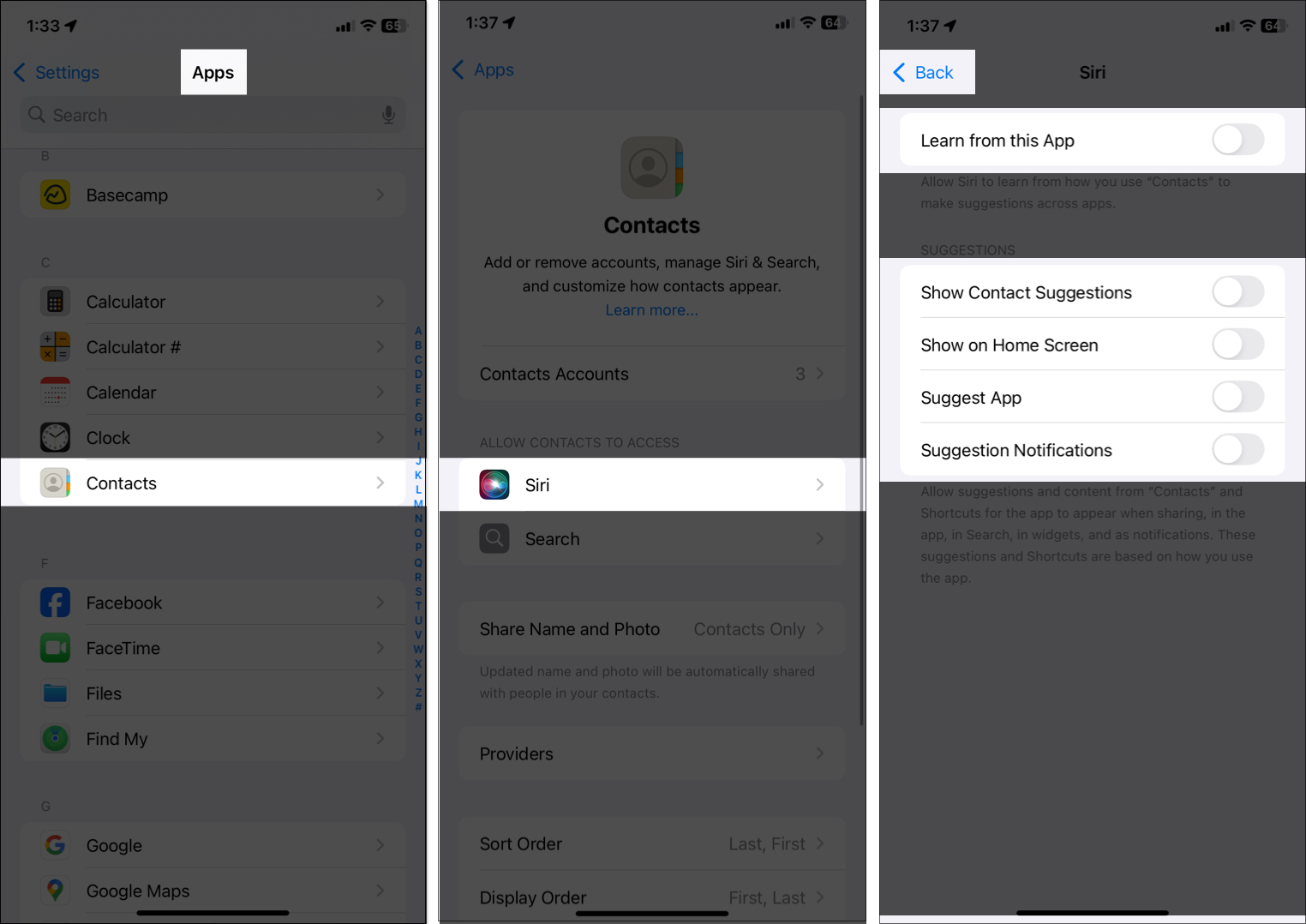
- Open Settings > Apps > Contacts. If you have deleted the Contacts app, select Phone.
- Now, tap Siri and toggle off Learn from this App, Show Contact Suggestions, Show on Home Screen, Suggest App, and Suggest Notifications.
- Next, tap the left arrow at the top.
- Here, select Search and toggle off the Show App in Search option.
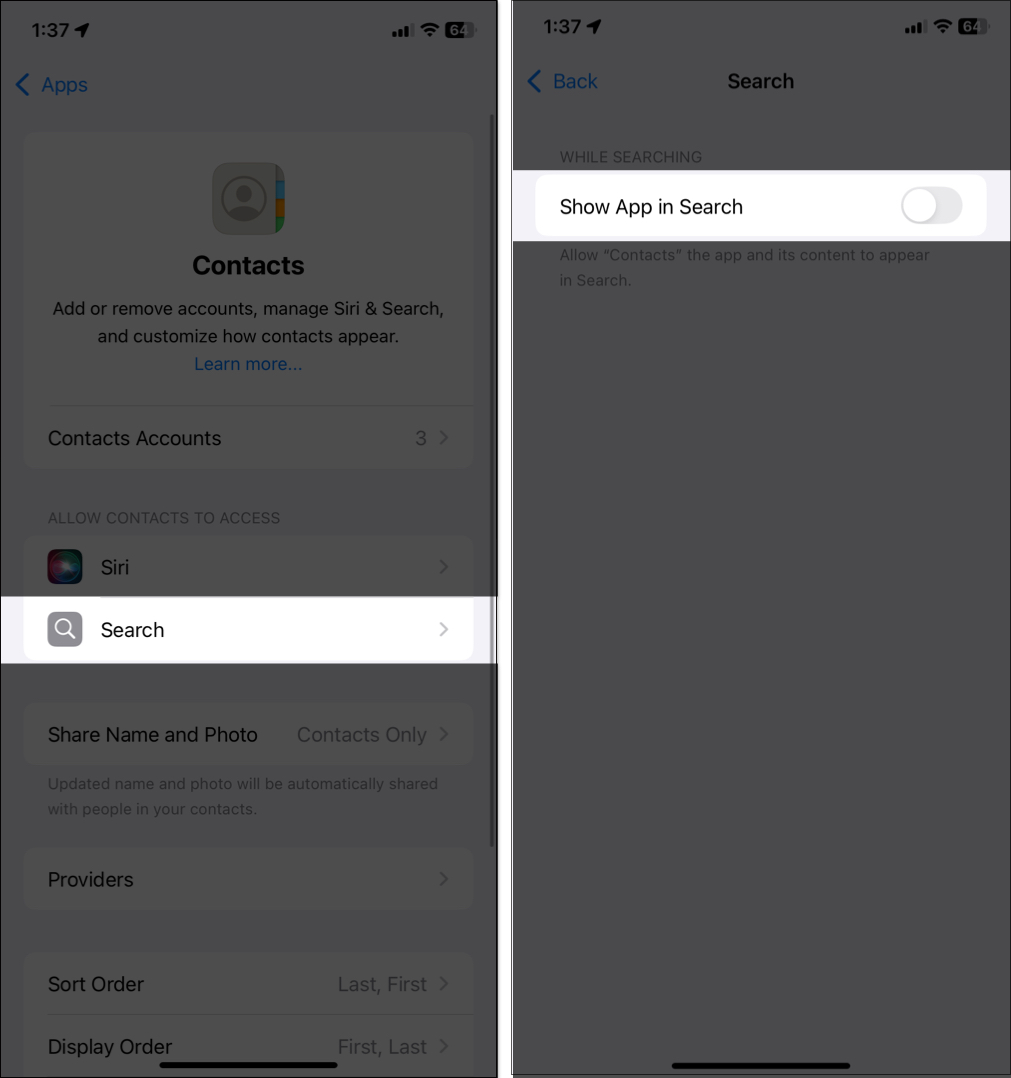
By doing this, your contacts won’t appear in search answers, widgets, and notifications.
6. Archive Sensitive Contacts on Google
If you use Gmail, you can store contacts only in Google Contacts, not in iCloud. It offers a built-in hide option.
- Open Google Contacts on your iPhone using a preferred browser.
- Here, tap the plus icon to add the contacts.
- Then tap and hold a contact, then choose the ones you want to hide.
- Tap the three-dot icon in the top-right corner, then select Hide from contacts.
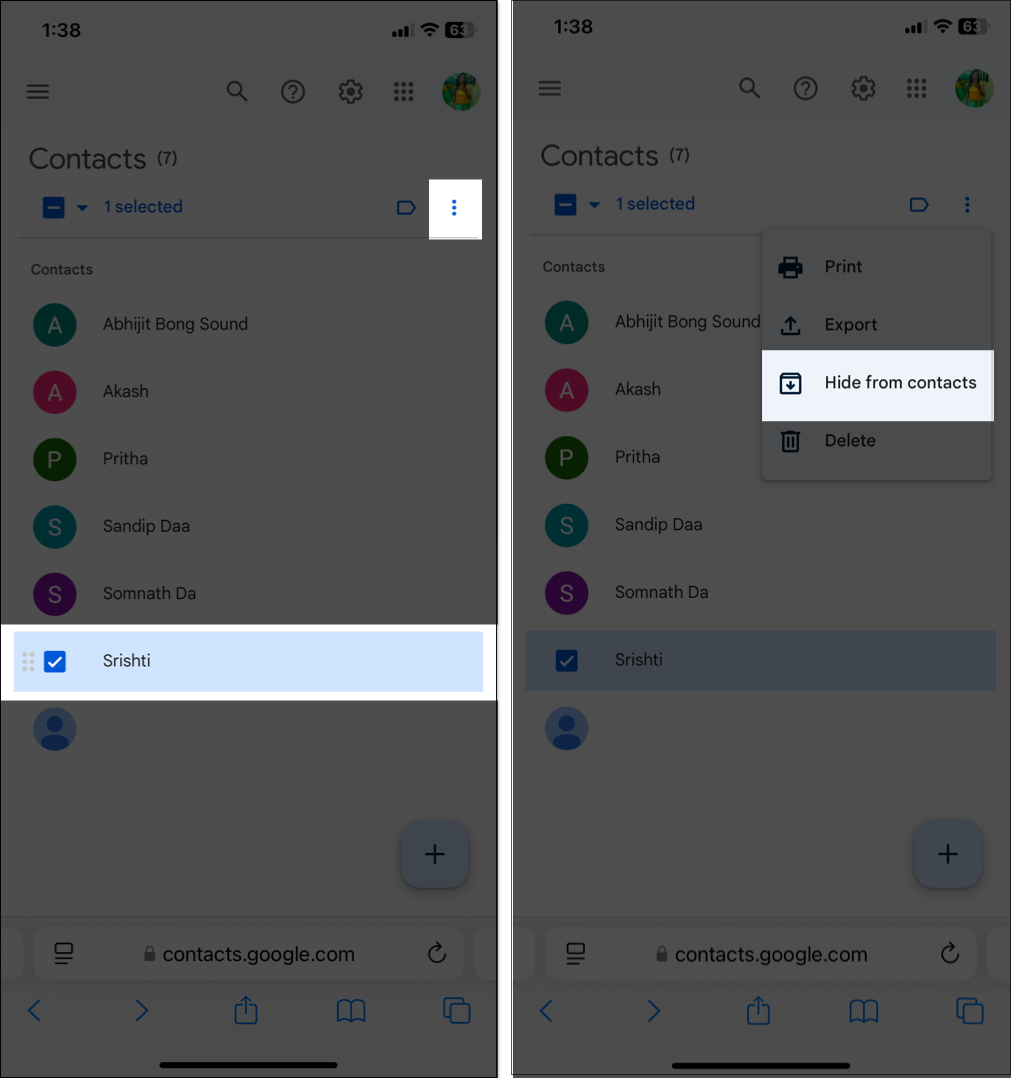
- Now, simply delete the contact from your iPhone.
Whenever you want to access the hidden contact, go to Google Contacts and find it in the Other Contacts section. The contact data stays online and accessible.
7. Use Third-Party Apps to Store Private Contacts
Apps like GhostContact offer a separate contact list for sensitive contacts.
- Download the GhostContact app and enable its required permissions.
- Tap New, then add the contact’s name and phone number. Repeat this step for each contact.
- Now, get back to your App Library. Tap and hold the app icon, select Require Face ID > Hide and Require Face ID.
The numbers you have saved in the app won’t appear in your Phone or Contacts app. And hiding it adds an extra layer of privacy.
Tip:
Mistakes to Avoid When Hiding Contacts
- Relying on renaming alone: Nicknames help, but don’t stop Siri or Spotlight from revealing info.
- Forgetting Favorites & Recents: Contacts still appear in the Phone app’s Recents or Favorites section unless cleared.
- Sync break: Disabling iCloud or Google Contacts might cause data loss or duplication.
- Using unsafe third-party apps: Stick to trusted apps with encryption.
- Not clearing Siri and Share Sheet suggestions: Your device may still suggest names you’ve recently interacted with.
Protect Your Private Contacts!
Even though iOS 26 doesn’t have a built-in “Hide Contact” feature, you can still protect sensitive names, conversations, and call history using smart workarounds. Use the options above to build a setup that keeps your iPhone contacts organized, secure, and aligned with your comfort level.
Have you tried hiding your contacts? Let us know in the comments below!
Frequently Asked Questions

Written by
Ava BiswasAva is a die-hard Apple aficionado and seasoned writer with a knack for breaking down complex tech concepts into easily digestible content. Having honed her writing and editing skills over 4 years at renowned media houses like TechBurner, Ava crafts informative and engaging articles including troubleshooting guides, product reviews, editorials at iGeeksBlog. When not typing, you can find her exploring the latest Apple releases or pondering the future of tech innovation.
View all posts →More from How-to
How to Turn Off Location on Snapchat (Step-by-Step Guide)
Want to stop sharing your location on Snapchat? This guide explains how Snapchat location sharing works and shows simple ways to turn off your location using Ghost Mode or phone settings. Stay in control of your privacy in just a few steps.
 VikhyatMarch 5, 2026
Snapchat Parental Controls: How to Set Up Family Center and Keep Your Teen Safe
Snapchat’s Family Center lets parents monitor their teen’s friend activity and screen time without reading private messages. Here’s how to set it up and what to expect.
VikhyatMarch 3, 2026
How to Block and Unblock Someone on Instagram
Instagram lets you block or unblock someone in seconds. Follow these simple steps to take full control of your privacy and online peace.
Ava BiswasMarch 2, 2026