Google just rolled out new milestone sharing, usage statistics, and its most requested feature for pronunciation practice on the Android app as part of celebrating 20 years of Google Translate. The app is already excellent for translating copy-pasted text and real-world scanned words and saying the translation out loud.
Now with the new AI-powered pronunciation coach, you can actually learn how to speak the language and hold a conversation. And this sounds like what Duolingo has been doing for years. So, I put both of them in the test. Here’s how to use Google Translate’s pronunciation coach, and whether it is better than Duolingo for speaking.
First impressions (Hands-on setup)
First of all, I noticed that Google Translate doesn’t feel like a learning app. There’s no onboarding flow telling you what level you are or a cheerful owl nudging you to complete a lesson.
It throws you right into the Practice session. You choose the language, your level, and the purpose, and then start speaking the language immediately. Within just a few seconds of the practice session, I started getting my performance reviewed in detail, where I could improve.
What surprised me most was how personalized it gets early on. It asks what you want to use it for, like travel, work, or casual conversation, and creates realistic scenarios accordingly. That makes practice feel contextual instead of generic.
How Google’s AI pronunciation coach actually works
Currently, the Google Translate speaking practice is being rolled out for English, Spanish, French, German, Portuguese, and Hindi in the US and India.
Here’s exactly how it works when you use it:
- Open the Google Translate app and tap on Practice at the bottom.
- Tap Get started and choose your interface language for instructions.
- Select the language you want to practice speaking and tap Next
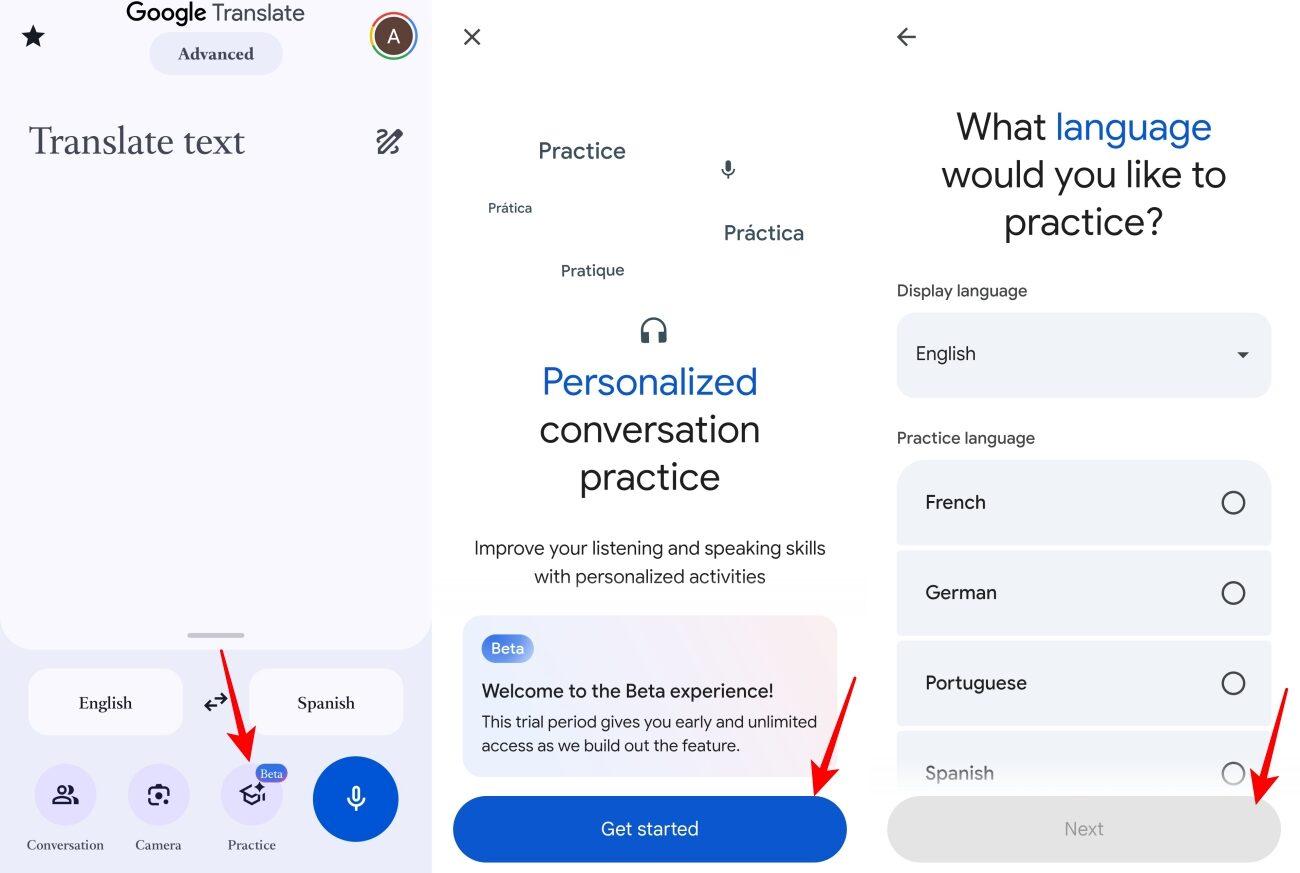
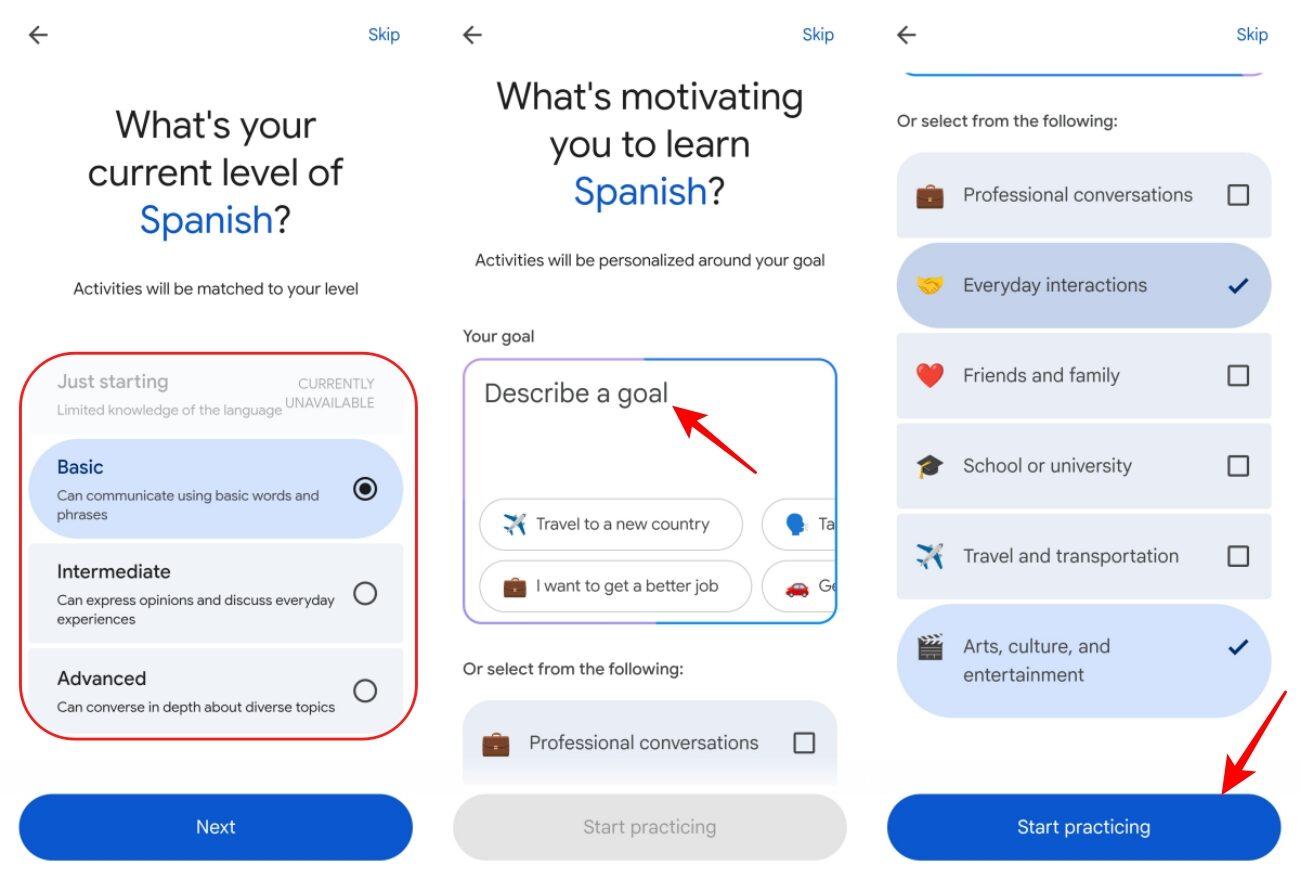
- Choose your proficiency level between Basic, Intermediate, or Advanced.
- Tell the AI your motivation (travel, work, relationships, etc.), or pick from suggestions.
- Now, tap Start practicing to get AI-generated scenarios tailored to your level and goals.
- Pick between Listen and Roleplay activities for each scenario and tap Start.
- In Roleplay mode, tap the mic button to actively converse with the AI. You can see your tasks and hints.
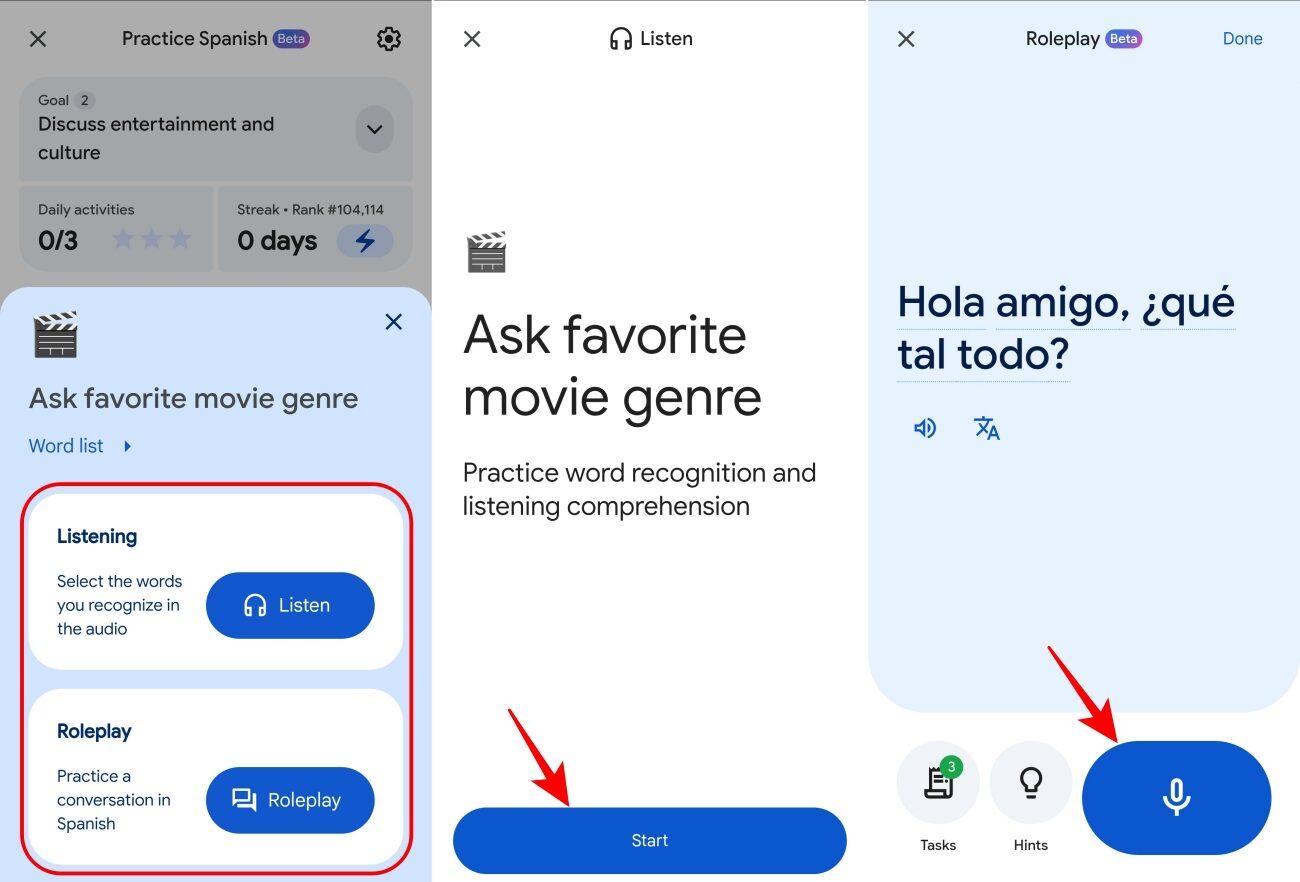
- The system evaluates how you pronounce words and phrases in real time, gives immediate feedback, and highlights where you went wrong. Listen to the phrase again and retry multiple times.
- You can adjust the difficulty dynamically (make it harder or easier) after each round.
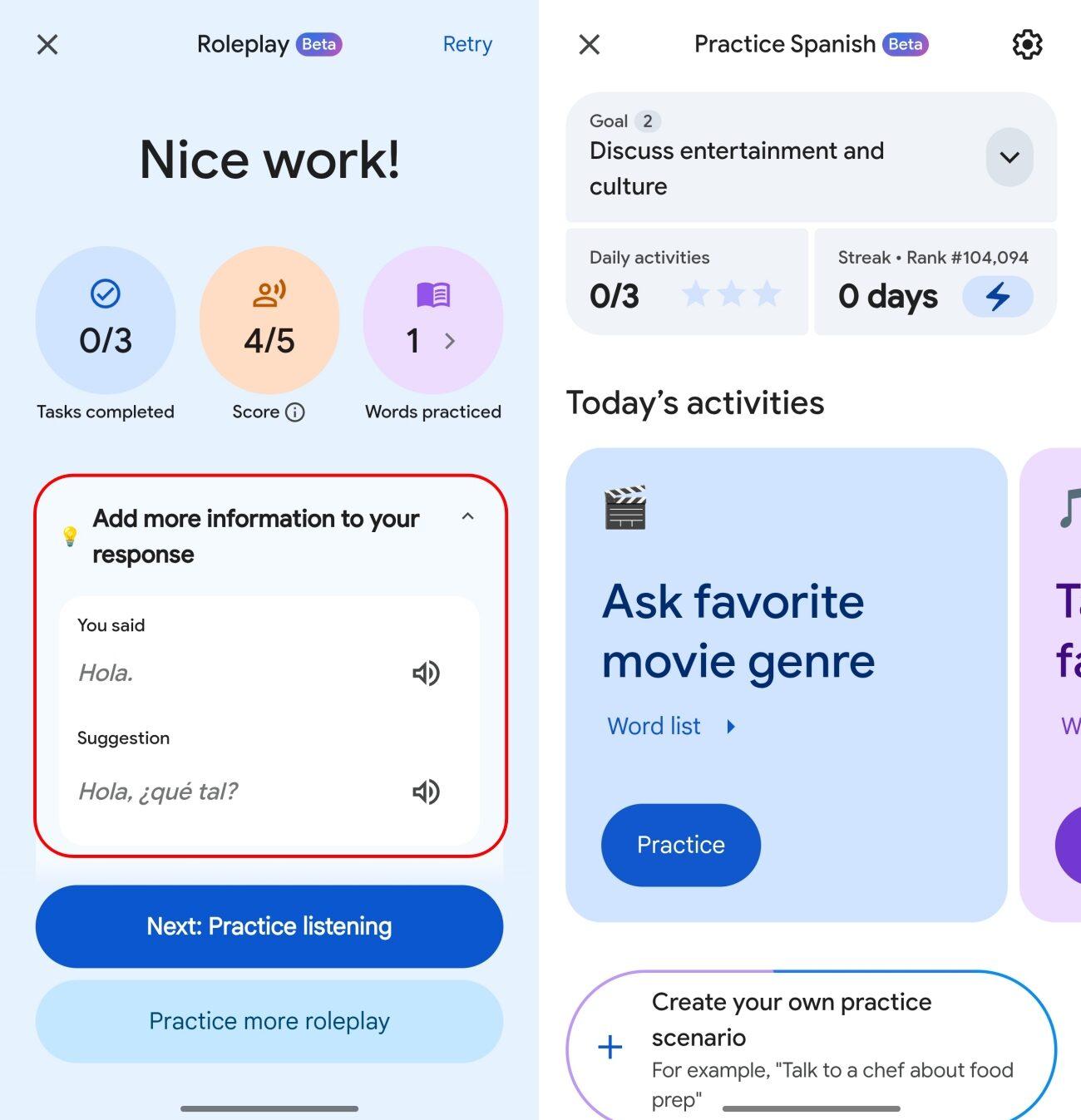
The best part is Google Translate’s AI coach blends pronunciation with conversation, instead of treating them separately. You can browse different scenarios like music, books, visit a museum, etc. and even create your own practice scenarios.
Duolingo’s pronunciation: What it does well (and where it fails)
I’ve spent a lot of time with Duolingo, so I didn’t go into this comparison blindly. And to be fair, Duolingo gets a lot right.
It lowers the barrier to entry, makes language learning feel manageable, and most importantly, it keeps you coming back. That consistency is something very few platforms achieve.
When it comes to pronunciation, Duolingo does include speaking exercises, and for beginners, they’re engaging and helpful. You get used to forming sounds, repeating phrases, and building confidence.
But after testing it right next to Google Translate, I noticed that Duolingo often accepts answers that are close enough. That’s great when you’re starting out. But over time, it creates a false sense of accuracy.
Google Translate AI Coach vs Duolingo: side-by-side comparison
After going back and forth between both for a while, the contrast became hard to ignore.
- With Google Translate, every session felt like practice for a real-world conversation. It pushed me to refine how I speak, not just what I say. You can track your daily activities, day streaks, and current ranking among other users for a feel of accomplishment, progress, and motivation. I have also enabled notifications to stay disciplined.
- The Duolingo experience felt broader but less precise. I was learning words, building sentences, and maintaining a routine, but not necessarily improving how I sound at a deeper level. It offers a more gamified version to make the learning fun.
In terms of feedback accuracy, Google Translate clearly felt more strict and more reliable. It didn’t let things slide. Duolingo, on the other hand, often prioritized flow over precision. For learning style, Google Translate is best when you already have intent and want to fix something specific. Duolingo guides you step by step.
Who should use which
If you’re just starting out with a new language, Duolingo appears to be better because it provides a structured way to build up your knowledge from scratch. Without that foundation, Google Translate’s pronunciation tool won’t be nearly as useful right now, as the Just Starting level is not available in beta.
So, if you’re at an intermediate level or simply want to improve the way you sound, Google Translate becomes extremely useful. Firstly, it saves time for targeted training, provides highly accurate feedback, and is aimed only at your pronunciation.
That said, Duolingo still wins in motivation, structure, and long-term progression, which are things Google Translate has started to build.
In my own workflow, I didn’t replace one with the other. I use Duolingo to learn and Google Translate to refine. That combination worked better than relying on either one alone.
Final Verdict
If you’re looking for a single winner, you’re going to be disappointed because that’s not how this plays out.
Google Translate’s AI pronunciation coach is better at one very specific thing: making you sound right. And in that category, it’s not just slightly better than Duolingo, it’s significantly sharper, more focused, and more honest.
But Duolingo still dominates the bigger picture of language learning. It gets you started, keeps you going, and builds the foundation you need.
What do you think about Google’s new AI pronunciation coach? Let me know in the comments below!