Planning a quick shopping spree at Walgreens, but forgot your wallet or cards? Worry not, as you can pay using your iPhone or Apple Watch thanks to their Apple Pay support in their app, website, drive-thru pharmacy, and 8000+ walk-in stores. Here, I have shared how to use Apple Pay at Walgreens and a few things I learned along the way.
Does Walgreens Accept Apple Pay?

Yes, Walgreens accepts Apple Pay for:
- In-store and drive-thru purchases (including pharmacy and photo services)
- Online orders (except Photo purchases)
- Purchases through the Walgreens app and walgreens.com
Most Walgreens locations support contactless payments, so Apple Pay works at their checkout counters, self-checkout kiosks (where available), pharmacy registers, and drive-thru pharmacy.
How to Use Apple Pay at Walgreens
To start using Apple Pay for payment at Walgreens—whether in-store or online—or any other purchase store, you’ll need to set up Apple Pay on your iPhone first.
Open the Wallet app on your device, tap the Add button at the top right, pick Debit or Credit Card, and hit Continue. Then, follow the on-screen prompts to finish the setup, and you’re good to go.
If you’ve already got Apple Pay set up, skip all that and let’s jump straight into how to use it for easy and fast payments at Walgreens.
Use Apple Pay Online at Walgreens
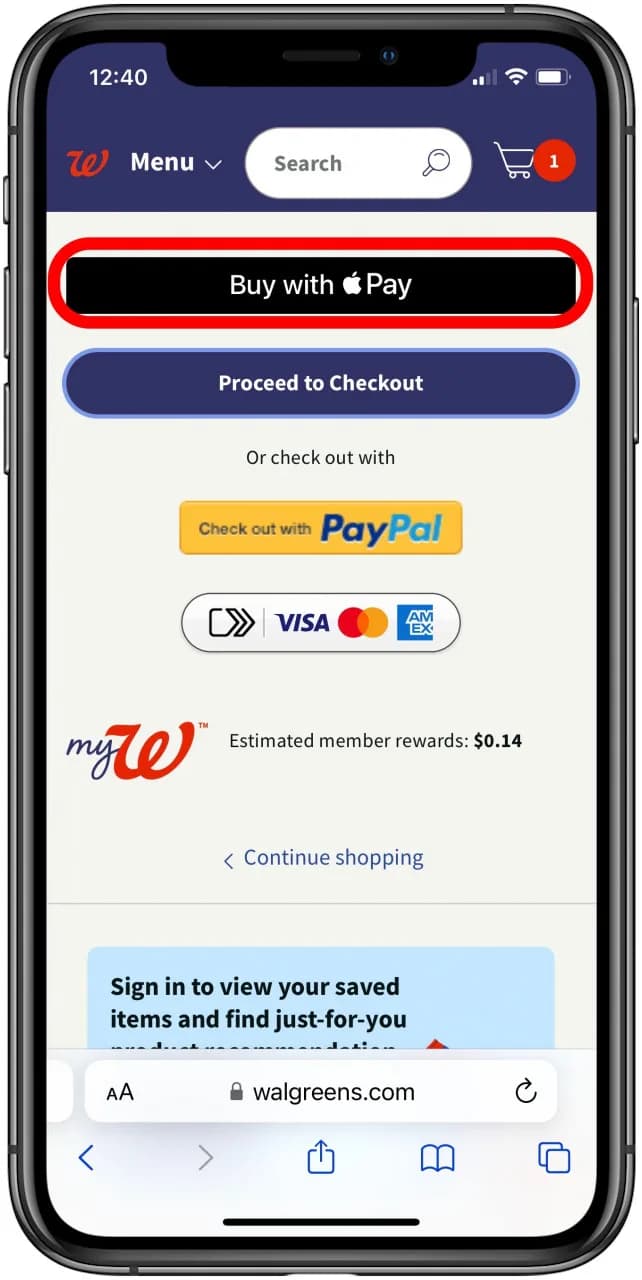
To pay for your Walgreens purchases online using Apple Pay, follow these steps:
- Open the Walgreens app or website on your Apple device where Apple Pay is set up.
- Select the items you want and add them to your cart.
- After reviewing your cart, tap Proceed to Checkout.
- When you reach the payment screen, choose Apple Pay as your payment method.
- Authenticate the payment with Face ID, Touch ID, or your device passcode to complete your purchase.
Use Apple Pay in-store at Walgreens
You can use Apple Pay to check out in-store at Walgreens by following these steps:
- Open the Wallet app on your iPhone or Apple Watch and select the card you want to use for the payment.
- Hold your iPhone or Apple Watch near the terminal or NFC card reader in the store.
- Double-click the side button and authenticate the payment using Touch ID, Face ID, or your passcode when prompted.
- Keep your device near the terminal until the payment is complete and shows as Done.
My Experience Using Apple Pay at Walgreens
I tested Apple Pay at a Walgreens checkout, and honestly, it’s one of the smoothest retail experiences. The payment was completed in under 2 seconds. No PIN, no signature, no awkward waiting!
Things I noticed:
- The terminal recognized Apple Pay instantly
- Even the pharmacy counter accepted it
- Receipts still worked normally
- However, some items in online purchases may not show Apple Pay on the payment page.
I try to use Apple Pay for Walgreens purchases for the Apple Card cashback. Also, Apple Pay is privacy-focused. It uses tokenization, so your card details aren’t shared directly. Instead, a unique token is used, protecting your actual card information.
What payment methods does Walgreens take?
Aside from Apple Pay, you can pay for your Walgreens orders with a debit card, Visa, MasterCard, Discover Network, American Express, PayPal, PayPal Credit, or Walgreens Gift Cards.
In stores, they also accept cash, checks, gift cards, debit cards, Visa, MasterCard, Discover Network, American Express, CareCredit, and Apple Pay.
Walgreens also supports other contactless payment methods, including tap-to-pay credit cards and Google Pay.
Check out instantly at Walgreens with Apple Pay!
While Walgreens offers multiple payment options, Apple Pay offers a smoother and more secure checkout experience. After using it multiple times, I can confidently say, it works flawlessly. If you’re already using Apple Pay, you can rely on it, especially for quick pharmacy runs or late-night Walgreens purchases.
Also read: