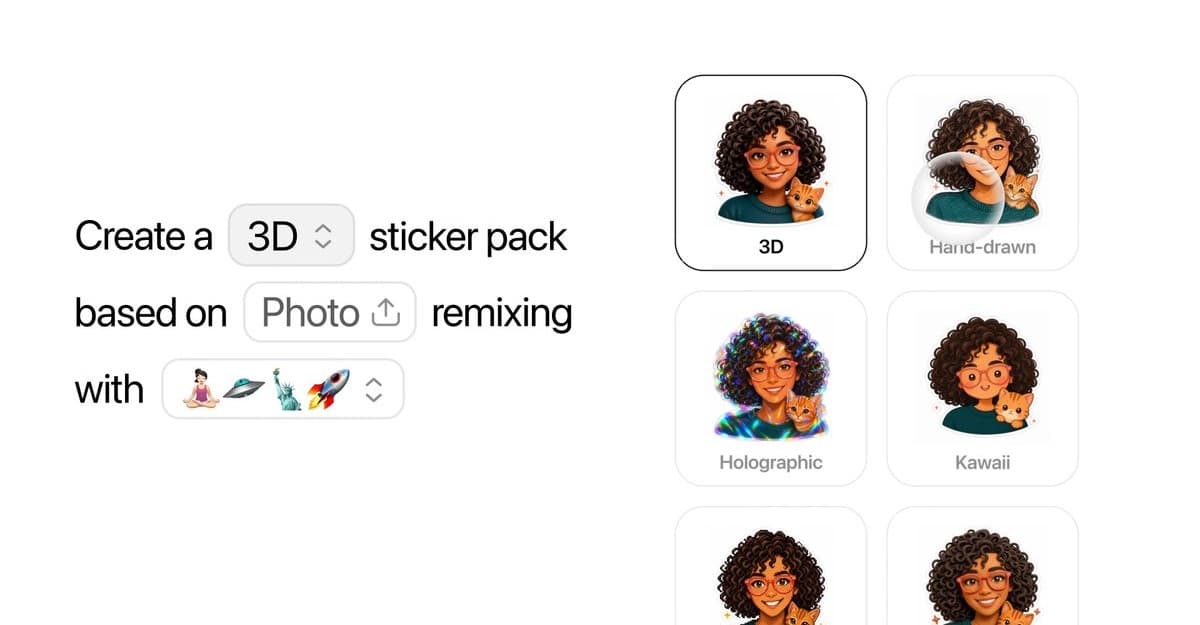
OpenAI has added a sticker tool to ChatGPT Images. According to OpenAI’s announcement, you can upload a photo, describe the result you want, and export the finished sticker to iMessage or WhatsApp. ChatGPT can also create a transparent background, so the subject is ready to place in a message without a manual cutout.
ChatGPT can build a sticker pack from your images
The tool lives inside Images > Stickers in the ChatGPT sidebar. You can start with one image or several, then ask ChatGPT to turn each one into a sticker or remix them into a set. You can also add or remove parts of the image, or borrow a style from another picture or a text prompt.
The export step comes after you finish editing:
- Open ChatGPT and select Images, then Stickers.
- Upload one or more images and describe the sticker or changes you want.
- Tap Add to chat apps after ChatGPT generates the result.
That makes the tool useful for more than cutting a person or pet out of a photo. You can turn a few pictures into a matching pack, change the mood of the artwork, or create a sticker from an idea instead of a saved image.
WhatsApp has one export requirement
The Add to chat apps menu currently supports iMessage, WhatsApp, and Save to Photos. WhatsApp exports need at least three stickers at a time. 9to5Mac notes that Meta sets this requirement, rather than ChatGPT itself.
In the same test, the finished sticker appeared in a dedicated ChatGPT section inside the Messages sticker carousel. A simple prompt could also create a transparent asset and extend a subject that was cropped in the original photo.
ChatGPT takes a different route from Apple’s built-in stickers
The iPhone already lets you create Live Stickers from photos by lifting the subject in the Photos app or Messages. ChatGPT’s approach is more flexible when you want to change the source image, combine several photos, or create a consistent style across a pack.
If the original photo needs a quick cleanup before you upload it, these iPhone photo editing tools can handle the basic crop, color, and background work. ChatGPT then takes over for the sticker-specific edits and export.