
Best wireless mouse for Mac in 2026
iGeeksBlog is supported by its readers. When you buy through links on our site, we may earn an affiliate commission. This doesn't affect our editorial independence.
Boost your productivity. Discover the best wireless mice for Mac for ergonomic comfort, precision, and seamless connectivity.

A wireless mouse adds a new level of comfort to using your Mac. It makes it easier to scroll and click your way through things without tiring out your fingers on the trackpad. It’s a great companion to have with your wireless keyboard for an ergonomic work setup. There is a range of options to consider, and your choice should depend on your needs. Take your pick from these best wireless mouse for Mac.
Top 6 wireless mouse for Mac
1. Apple Magic Mouse 2
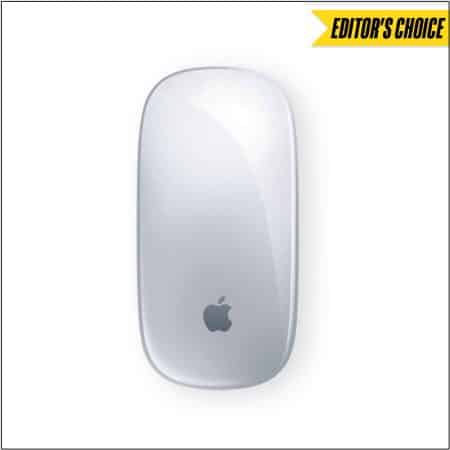
You can’t go wrong with an Apple accessory for your Mac, and the Magic Mouse 2 has many tricks to offer. It’s lighter, has fewer moving parts, and boasts an optimized foot design. This makes the Magic Mouse 2 track faster and moves with less resistance.
Further, the Multi-Touch surface allows you to perform simple gestures such as swiping between web pages and scrolling through documents. The built-in battery is completely rechargeable, so eliminates the need for traditional batteries. This makes it incredibly convenient.
- Rechargeable battery
- Gesture support
- Sleek design
- Fast and smooth
- A bit pricey
2. Logitech MX Anywhere 2S – Hyper-Fast Scrolling
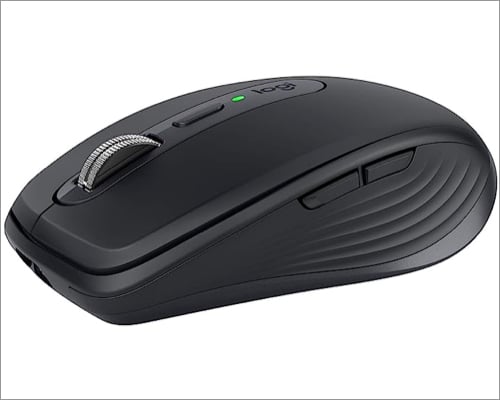
Here’s a super handy mouse that boasts hyper-fast scrolling. You can use it with up to three Mac or Windows computers via the included unifying receiver or Bluetooth Smart wireless technology.
Further, you can also press the wheel and shift to click to click mode for precise navigation. The rechargeable battery offers up to 70 days of power on a single charge. And the 4000 dpi dark field sensor tracks virtually anywhere.
- Superfast speed
- Long-lasting battery
- Dual-connectivity
- No wheel click button
3. SteelSeries Rival 650 Mouse – Best for Gamers
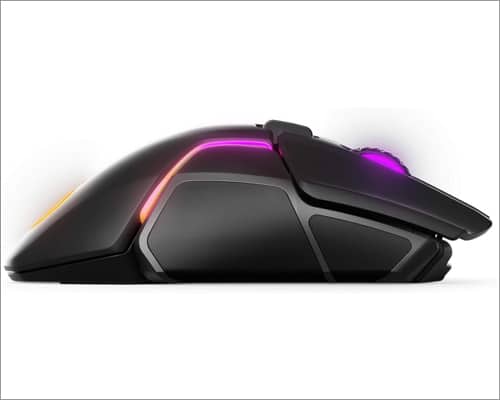
If you enjoy gaming on your Mac, here’s the perfect mouse for you. Quantum wireless technology allows accurate, reliable, lag-free performance. You will get a 24+ hour battery life on a full charge or 10 hours from a 15-minute rapid charge.
Moreover, it boasts the most advanced optical sensor that provides true 1 to 1 tracking, while a secondary depth sensor adjusts the lift-off distance to control movement with precision and accuracy.
- Great accuracy
- Personalized configurations
- Rapid charging battery
- Build quality could be better
4. Logitech MX Vertical – For Wrist Pain

If wrist pain is getting you down, check out this vertical mouse that places your hand in a natural handshake position using a unique 57-degree angle. It prevents your forearm from twisting, which is effective at reducing muscle pain.
The high precision sensor provides precise tracking that requires 4x less hand movement than a traditional mouse with a 1000 DPI sensor. Further, you can use it with up to three Windows or Mac computers.
- Reduces wrist pain
- High-precision tracker
- Three ways to connect
- Build quality could be better
5. Logitech MX Master – Best Power Management
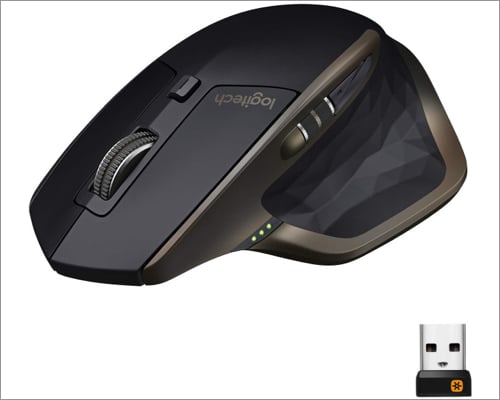
This wireless mouse features advanced power management. It offers up to 40 days of power on a single charge. Moreover, you can get enough power for a full day of usage in only 4 minutes, with no downtime while recharging.
Further, it’s got a unique thumb wheel for horizontal navigation and advanced gestures. It connects easily to multiple computers: via the included unifying receiver or Bluetooth smart wireless technology.
- Great power management
- Easy connection with multiple computers
- Unique thumb wheel
- Quite big and heavy
6. TENMOS Wireless Mouse – Most Versatile
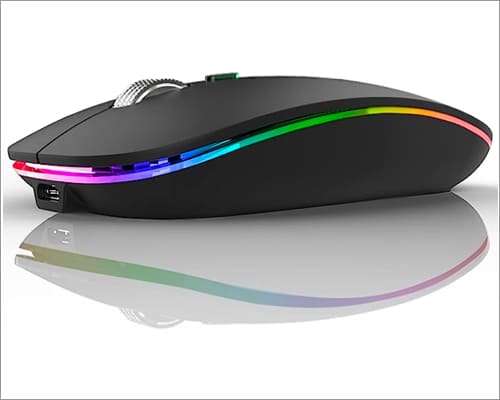
Here’s a mouse with universal compatibility and Bluetooth 5.1. The USB Type-C adapter makes it convenient to plug and play with your MacBook. The dual-mode connection lets you seamlessly switch between two devices.
Further, it features seven different coloured LED lights that change randomly while in use. This offers a soothing and funky atmosphere for work and play. The clicks are quiet, and you can also adjust the DPI levels among 800, 1200, and 1600 to meet different needs.
- USB-C type adaptor
- Attractive look
- Adjustable DPI
- Colour options
- Lights might be distracting.
Wrapping up!
Which wireless mouse for Mac best fits your needs? Let us know in the comments below. You can also check out how to use your iPhone as a mouse for your Mac.
Read more:
Topics

Written by
Mehak SiddiquiMehak has a master’s degree in communication and over ten years of writing experience. Her passion for technology and Apple products led her to iGeeksBlog, where she specializes in writing product roundups and app recommendations for fellow Apple users. When not typing away on her MacBook Pro, she loves being lost in a book or out exploring the world.
View all posts →More from Accessories
Best iPhone 17e Cases You Can Buy Right Now
Discover the best iPhone 17e cases that combine protection, style, and smart features, so your phone stays safe and looks great every day.
 Ava BiswasMarch 3, 2026
Best iPhone 17e Screen Protectors You Can Buy Now
The iPhone 17e carries Apple’s signature premium DNA, even though it sits at the more accessible end of the lineup. However, its competitive price does not translate into a compromised display experience. The high-quality 6.1-inch panel delivers sharp resolution, accurate colors, and excellent brightness levels suitable for both indoor and outdoor use. To keep that […]
 VikhyatMarch 3, 2026
Best USB-C Hubs for iPad You Can Buy
Looking for the best USB-C hubs for iPad? We compared top picks for Pro, Air, and Mini with HDMI, Power Delivery, and more.
Ava BiswasFebruary 23, 2026