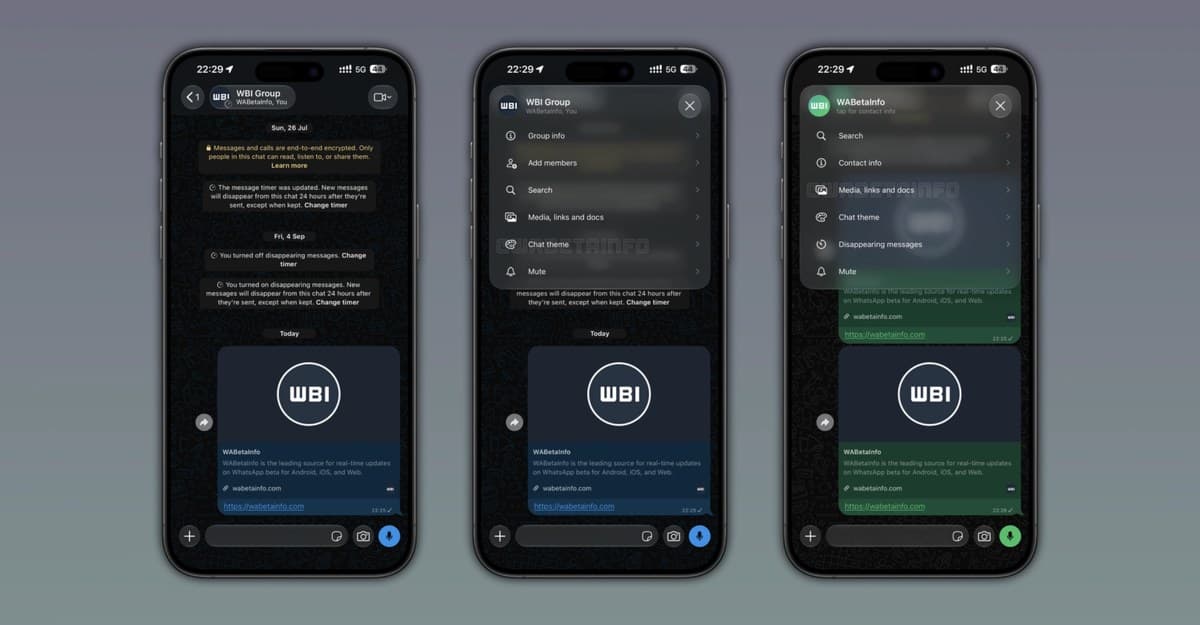
WhatsApp is rolling out a new control at the top of iPhone chats that opens a shortcut menu for common conversation settings. The button shows a contact’s photo, name, and online status or last seen, and uses Liquid Glass styling to keep the text readable over different chat wallpapers.
WABetaInfo spotted the feature in WhatsApp for iOS version 26.39.75, which is available on the App Store. It is reaching some users whose accounts already have WhatsApp’s Liquid Glass chat interface, with a broader rollout continuing over the coming weeks.
The new button opens shortcuts inside a chat
Tapping the header button opens a pop-up menu from the top of the conversation. For one-to-one chats, it includes Search, Contact info, Media, links and docs, Chat theme, Disappearing messages, and Mute. Group chats add a shortcut to add members, while business chats get a similar set of options.
The menu gives users a quicker way to reach common chat tools without opening the full contact or group info screen. Search is one of the shortcuts, building on WhatsApp’s new way to search messages on iPhone. The menu acts as a quick-access layer; it does not remove the existing contact and group information pages.
The shortcuts cover both quick lookups and conversation settings. Search can help when you remember part of a message but not where it appeared, while Chat theme and Disappearing messages let you adjust a thread without searching through its info screen. The update does not add new tools to WhatsApp; it shortens the route to options already in the app.
This change is limited to the header inside an open conversation. It does not replace WhatsApp’s bottom tabs or move channels into the Chats tab.
Liquid Glass styling helps with busy wallpapers
The contact name in a transparent chat header can be hard to read when it sits over a busy wallpaper. The new control gives the text a Liquid Glass background that adapts to the image behind it, and the pop-up menu uses the same style.
The update also makes the header do more than identify the person or group. Users can see a contact’s online status or last seen and open common controls from one tap. For groups, the extra add-members option can help admins get to a frequent task faster.
The feature is rolling out gradually, so installing the compatible version does not guarantee the new button will appear immediately. WABetaInfo says some beta testers also have access, but WhatsApp has not announced when it will reach everyone.
WABetaInfo’s rollout notes do not describe a manual setting for the button. If it is missing, users can keep WhatsApp updated and wait for the feature to reach their account.