I never paid much attention to my Instagram Following list until friends would mention accounts I followed for fun. Then I realized even people I barely knew might be snooping on my list. That curiosity led me to look for a way to hide my Instagram Following list.
Initially, I expected there should be an option to make it private. But after doing some research and experimenting with various methods, there was no easy way to do that. If you’re hoping to make your Instagram Following list private, here’s what I learned and the privacy changes that genuinely made a difference.
Can you actually hide your Instagram Following list?
Let’s clear up the biggest misconception first. No, Instagram does not currently let you completely hide your Following list.
There’s no hidden setting that suddenly makes your Following list invisible. Instead, Instagram gives you something different: control over who can access your account. That’s an important distinction.
Here’s how it actually works:
- If your Instagram account is public, almost anyone can visit your profile and see the accounts you follow.
- For private accounts, only people you’ve approved as followers can see your profile details, including your Following list.
That doesn’t mean your Following list disappears. It simply becomes visible to a much smaller audience.
Honestly, I think Instagram designed it this way on purpose. Followers and Following lists help people discover mutual friends, creators, and communities. While that improves engagement, it also means privacy isn’t as flexible as many users would like.
Would I love a dedicated Hide Following List option? Absolutely. But until Instagram adds one, the smartest approach is reducing who can see your profile.
Why I wanted my Following list to be more private
Everyone has different reasons for wanting more privacy.
Mine wasn’t about hiding anything. It was about creating healthier boundaries. As I started using Instagram more, I noticed that people started treating Following lists like a sort of investigation process. Instead of engaging with someone’s content, they’d scroll through who that person followed.
I have seen cases where people have been judged due to following a competitor, friendships questioned over a single follow, and even people make assumptions about someone’s interests based on a handful of accounts.
Social media has normalized investigating everyone else’s network, and I think that’s unhealthy. Just because someone follows an account doesn’t automatically mean they endorse every opinion, product, or post from that creator. Eventually I decided to make my account feel like my space again.
4 ways to make your Instagram Following list more private
After trying nearly every recommendation on Instagram’s Help Center, I narrowed everything down to four methods that actually improved my privacy.
1. Switch your account to private
A private Instagram account reduces who could browse your profile. Instead of anyone opening my account and exploring my Following list, people now had to send a follow request first.
That single step added an important layer of control. I could decide who gets access to my profile.
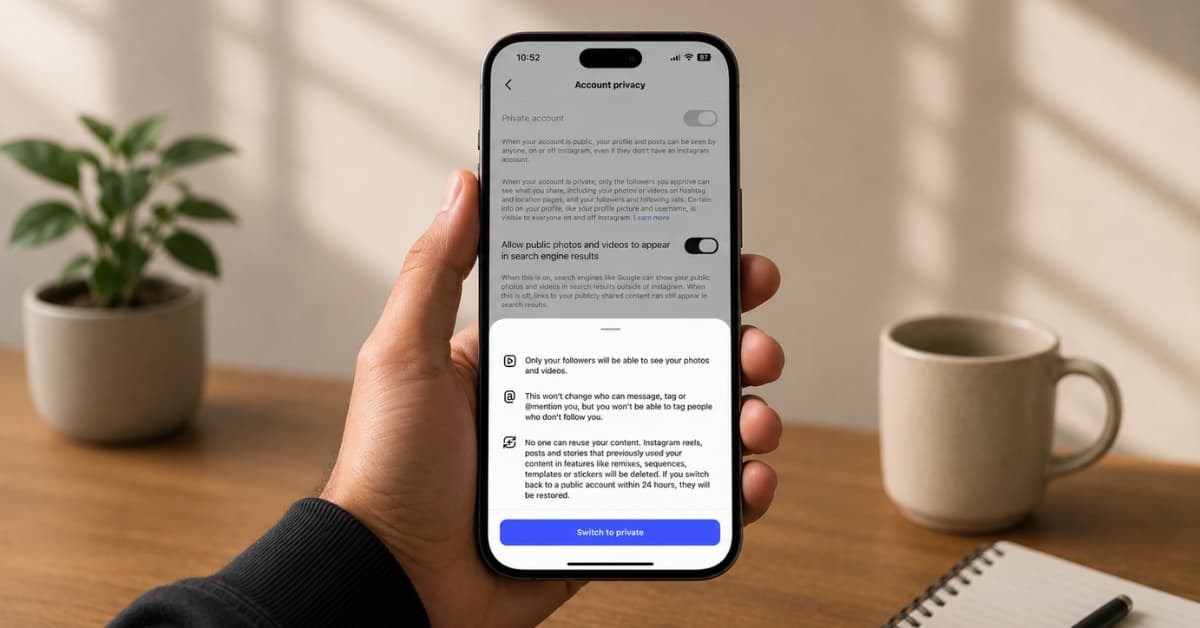
How to make your Instagram account private:
- Open Instagram.
- Tap your profile picture at the bottom.
- Open the hamburger menu in the top-right corner. It will open Settings and activity.
- Select Account privacy.
- Toggle on Private account and confirm your choice by tapping Switch to private.
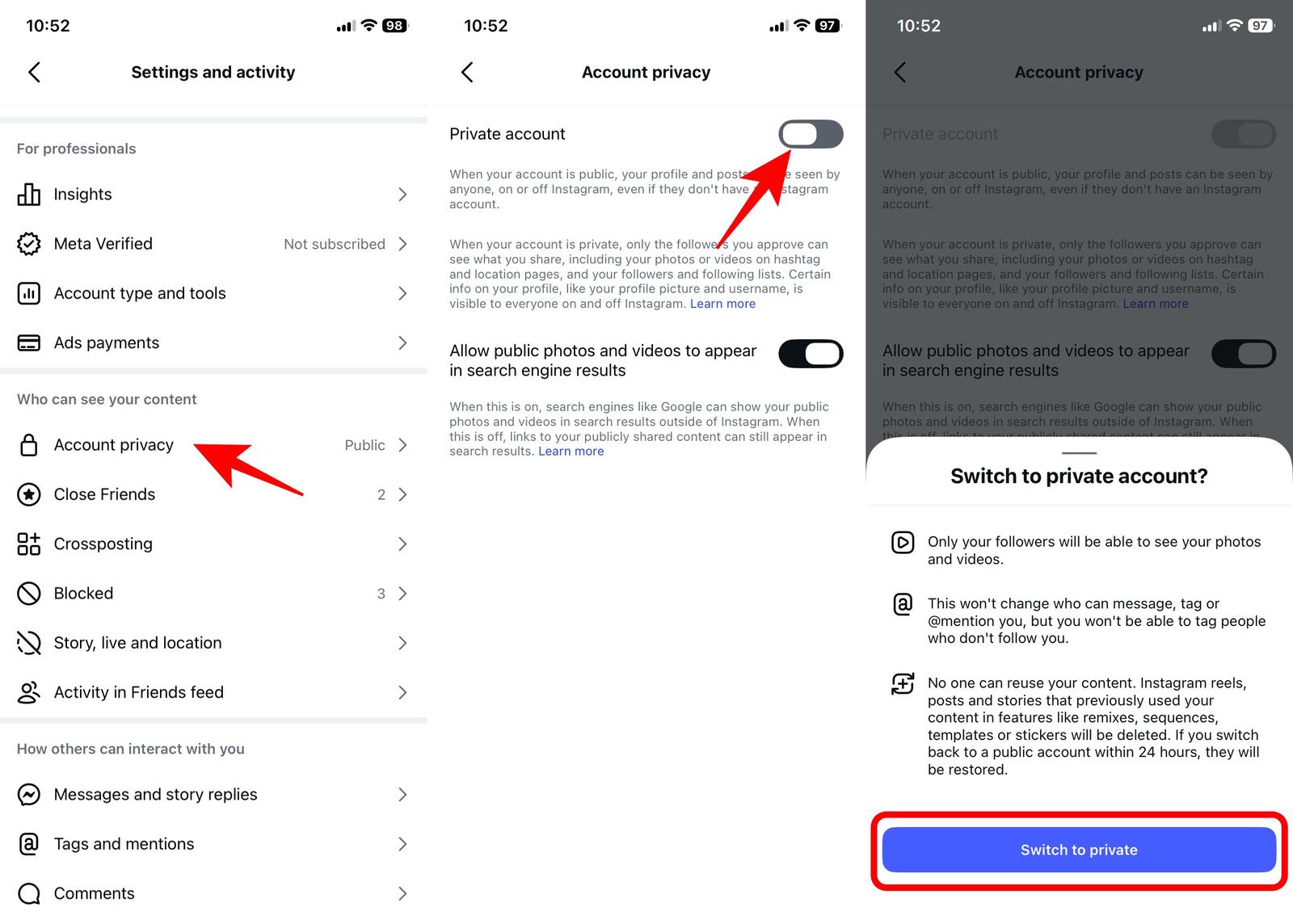
That’s it. From that point forward, new visitors can’t automatically view your profile unless you approve them.
One thing I appreciate is that existing followers don’t suddenly disappear. However, they do continue to have access to your Following list. That’s why switching to private is only the beginning, not the complete solution.
2. Remove unwanted followers
This was the step I resisted the longest.
Removing followers felt awkward. What if someone noticed, or they asked why? Eventually, I realized something important. My Instagram account exists for me—not for everyone who’s ever clicked the Follow button.
For this reason, I spent about fifteen minutes going through my followers and found inactive profiles, people I couldn’t even remember, spam accounts, and old connections I’d completely lost touch with. I removed them.
- Open your profile on Instagram.
- Tap on Followers to view the list.
- Scroll down and tap the x icon next to the follower you want to remove.
- Select Remove to confirm.
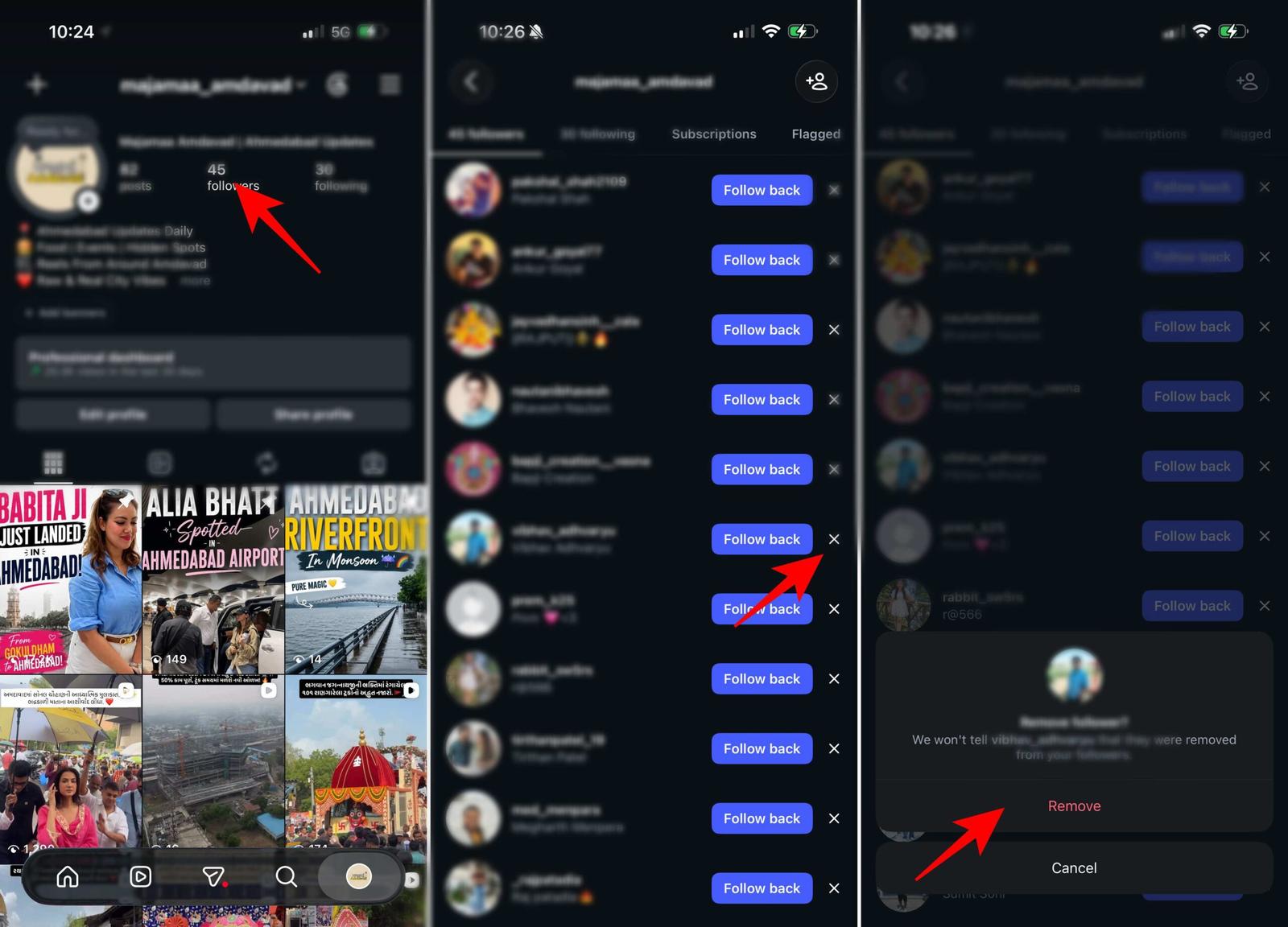
Worry not; Instagram doesn’t send any notifications to those users.
3. Block specific people
Making my account private helped a lot, but there were still a few people I didn’t want checking my profile. If someone is making you uncomfortable or repeatedly stalking your profile, you may block them on Instagram.
Once you block someone, they can’t :
- Find your profile while logged into their account.
- See your posts, Stories, followers, or Following list.
- Message or interact with your account.
Simply go to the Instagram profile of that user, tap the three-dot icon, and select Block.
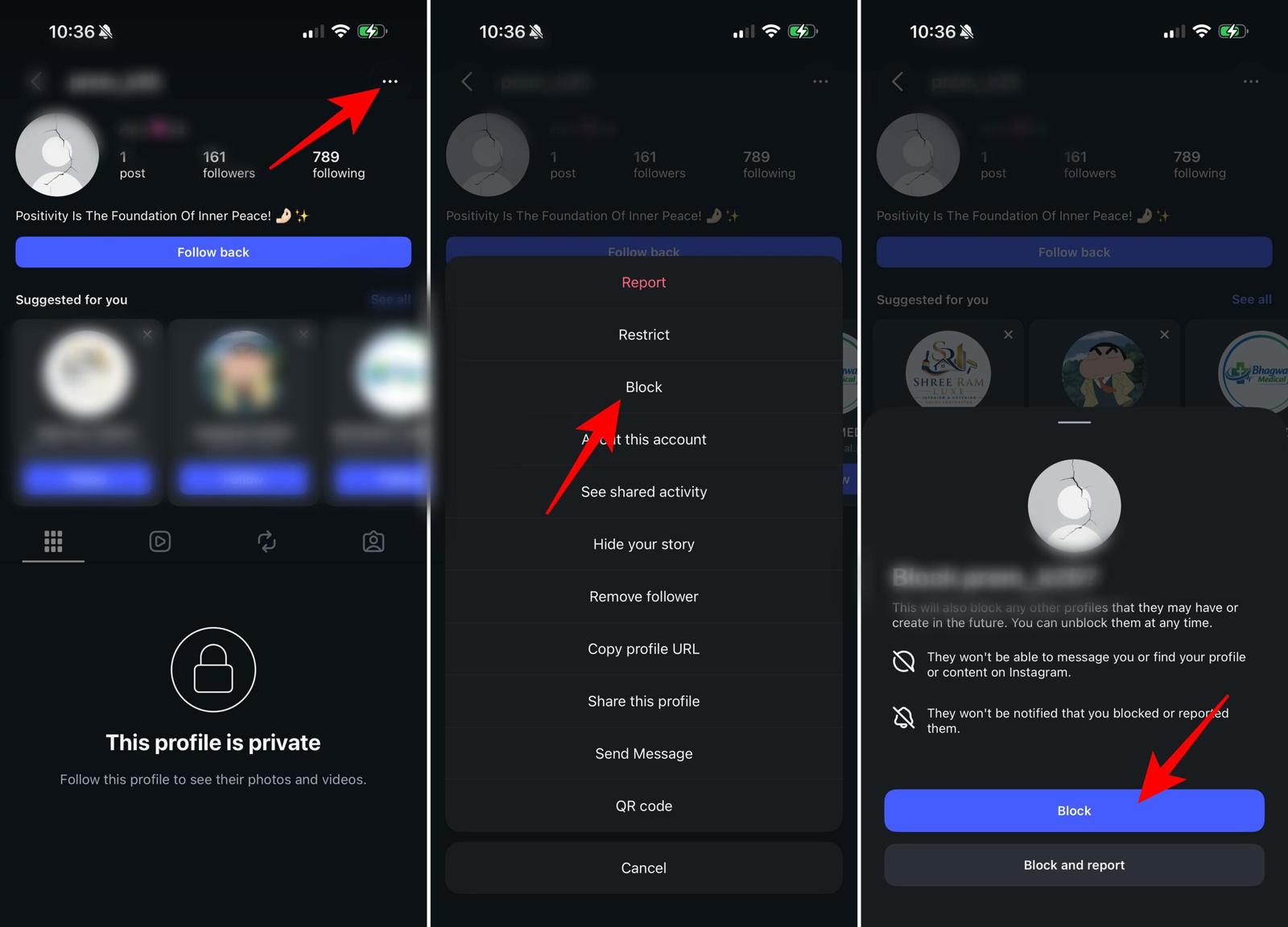
Blocking might seem like a big step, but sometimes it’s the simplest way to protect your privacy. There’s no reason to keep giving someone access if they’ve crossed your personal boundaries.
4. Reviewing my followers regularly
One habit that has made a bigger difference than I expected is reviewing my followers every few months. It’s easy to accept follow requests and forget about them. With time, you will find your followers’ list full of people you do not know or inactive accounts.
Now, I make it a point to scroll through my followers occasionally and ask myself a few simple questions:
- Do I know this person?
- Do I still feel comfortable sharing my content with them?
- Would I approve their follow request today?
If the answer is no, I remove them.
This isn’t about being unfriendly. It’s about remembering that a private Instagram account works best when your follower list actually reflects people you trust.
What didn’t work (Common myths)
While researching ways to hide my Instagram Following list, I came across plenty of advice that sounded convincing, but simply wasn’t true. Here are the biggest myths I found.
Myth 1: Third-party apps can hide your Following list
Some apps claim they can unlock extra Instagram privacy features. In reality, they can’t change how Instagram works.
Many of these apps ask for your Instagram login credentials, which can put your account at risk. Even if an app promises to hide your Following list, it has no control over Instagram’s privacy settings. It’s simply not worth the risk.
Myth 2: Browser extensions add extra privacy
Several browser extensions claim that they can either hide your followers or your list of Following.
What they actually do is change how Instagram looks on your own screen. Other people still see your profile normally, so these extensions don’t provide any real privacy.
Myth 3: Switching back to a personal account hides your Following list
Changing between a Creator, Business, or Personal account doesn’t affect who can see your Following list.
The setting that matters most is whether your account is public or private.
My best tips for keeping an Instagram profile more private
While these privacy settings don’t hide your Following list, they make your overall Instagram experience noticeably more private.
- Hide your Activity Status: I disabled Activity Status almost immediately. People don’t need to know exactly when I’m online.
- Use Close Friends more often: Instead of posting everything publicly, I began using the Close Friends option for my personal posts. This trick really helped me feel more comfortable while posting Stories.
- Limit comments and messages: Instagram lets you control who can comment, mention you, tag you, and send message requests. These settings reduce unwanted attention across your account.
- Review tagged photos: I also enabled manual approval for tagged posts. That way nothing appears on my profile unless I approve it first.
- Be selective about follow requests: Don’t feel pressured to accept every request. It’s okay to ignore or decline requests from people you don’t know.
After trying different privacy settings and testing what actually works, these are the habits I’ve decided to stick with.
Protect your Instagram connections!
While Instagram doesn’t let you completely hide your Following list, you can still make it much more private by using the settings that are available. Switching to a private account, removing followers you don’t recognize, and blocking people when necessary are the most effective ways to control who can see your profile.
What really matters is sticking to what you can control, rather than trying to make something impossible happen. A couple of easy-to-follow privacy tips will help you use Instagram with more confidence.
Don’t miss these related reads: