
How to Know Which Apple Watch You Have (2026 Edition)
A complete guide to quickly identify any Apple Watch model using the model number.

- Check the back of your Apple Watch: The case back lists the series name, size, material, water resistance, and depth rating, helping you quickly confirm your model.
- Check the original box for model number and specs: The box label shows your Apple Watch’s series, serial, IMEI, region, and band variant, offering the most accurate identification.
- Use iPhone settings to identify your Apple Watch: Open Settings > Apple ID > your Apple Watch to see the model, serial, and version for quick verification.
- Confirm if your Apple Watch is original: Enter your serial number on checkcoverage.apple.com to verify authenticity, warranty status, and purchase details.
- Check if your Apple Watch is refurbished: The model number prefix reveals its status—M for new, F for refurbished, or N for an Apple replacement.
Unless you compare them side by side, almost all the latest Apple Watch models look nearly identical at first glance. That’s why when you’re buying new bands, selling a pre-owned watch, upgrading to watchOS 26, or troubleshooting, you may wonder: “Which Apple Watch do I have?”
This guide shows you three simple ways to identify your Apple Watch model, plus a bonus tip to verify if your Apple Watch is original. Let’s dive in.
How Do I Know Which Apple Watch I Have?
Here are three reliable methods: the first two are fast, the third gives the full technical breakdown about model number, case size, origin, and more (useful for accessories, trade-in, repair, etc).
1. Check the Back of Your Apple Watch
Flip over your watch and look for the engraving on the case back. Most models will have:
- Series name (e.g., “Watch Series 11”, “Watch Ultra”, “Watch SE”)
- Case size (e.g., 42 mm, 46 mm, 49 mm)
- Materials (Aluminum, Stainless Steel, Titanium)
- Connectivity type (GPS or GPS + Cellular)
- Water resistance rating
- Maximum depth

So if you see a 49 mm Titanium case and “Watch Ultra” on the back, you’re likely dealing with “Ultra” model (and could be the new Ultra 3 or earlier Ultra). For Series 11 you’ll see that series name rather than “Series 10”.
With this information, you will be able to find the right Apple Watch accessories, software, and services for your wearable.
2. Check the Original Box for the Model Number & Specs
If you still have the original packaging, the back label is very informative. You’ll find:
- Series name & case size
- Model number (starts with “Axxxx”)
- Serial number, IMEI/EID if Cellular model
- Band size/type
- Region / variant information

Once you have the model number, you can compare it to the reference list below to identify exactly which Apple Watch variant (region, GPS vs Cellular, size) you have.
- Apple Watch Series 11:
- A3331: 42 mm (GPS); North America, Europe, Asia Pacific
- A3450: 42 mm (GPS); China mainland
- A3333: 46 mm (GPS); North America, Europe, Asia Pacific
- A3451: 46 mm (GPS); China mainland
- A3335: 42 mm (GPS + Cellular); North America, Europe, Asia Pacific
- A3452: 42 mm (GPS + Cellular); China mainland
- A3337: 46 mm (GPS + Cellular); North America, Europe, Asia Pacific
- A3453: 46 mm (GPS + Cellular); China mainland
- Apple Watch Ultra 3:
- A3281: 49 mm (GPS + Cellular); North America, Europe, Asia Pacific
- A3282: 49 mm (GPS + Cellular) China mainland
- Apple Watch Ultra 2:
- A2986: 49 mm (GPS + Cellular); North America, Europe & Asia-Pacific
- A2987: 49 mm (GPS + Cellular); China mainland
- Apple Watch Series 9 models:
- A2978: 41 mm (GPS)
- A2980: 45 mm (GPS)
- A2982: 41 mm (GPS + Cellular); North America, Europe & Asia Pacific
- A2983: 41 mm (GPS + Cellular); China mainland
- A2984: 45 mm (GPS + Cellular); North America, Europe & Asia Pacific
- A2985: 45 mm (GPS + Cellular); China mainland
- Apple Watch Ultra:
- A2622: 49 mm (GPS + Cellular); North America
- A2684: 49 mm (GPS + Cellular); Europe & Asia-Pacific
- A2859: 49 mm (GPS + Cellular); China mainland
- Apple Watch Series 8 models:
- A2770: 41 mm (GPS)
- A2771: 45 mm (GPS)
- A2772: 41 mm (GPS + Cellular); North America
- A2773: 41 mm (GPS + Cellular); Europe & Asia Pacific
- A2857: 41 mm (GPS + Cellular); China mainland
- A2774: 45 mm (GPS + Cellular); North America
- A2775: 45 mm (GPS + Cellular); Europe & Asia Pacific
- A2858: 45 mm (GPS + Cellular); China mainland
- Apple Watch Series 7 models:
- A2473: 41 mm (GPS)
- A2474: 45 mm (GPS)
- A2475: 41 mm (GPS + Cellular); North America
- A2476: 41 mm (GPS + Cellular); Europe, Asia Pacific & China
- A2477: 45 mm (GPS + Cellular); North America
- A2478: 45 mm (GPS + Cellular); Europe, Asia Pacific & China
- Apple Watch Series 6 models:
- A2291: 40 mm (GPS)
- A2292: 44 mm (GPS)
- A2293: 40 mm (GPS + Cellular); North America
- A2375: 40 mm (GPS + Cellular); Europe, Asia Pacific & China
- A2294: 44 mm (GPS + Cellular); North America
- A2376: 44 mm (GPS + Cellular); Europe, Asia Pacific & China
- Apple Watch Series 5 models:
- A2092: 40 mm (GPS)
- A2093: 44 mm (GPS)
- A2094: 40 mm (GPS + Cellular); North America
- A2156: 40 mm (GPS + Cellular); Europe, Asia Pacific & China
- A2095: 44 mm (GPS + Cellular); North America
- A2157: 44 mm (GPS + Cellular); Europe, Asia Pacific & China
- Apple Watch Series 4 models:
- A1977: 40 mm (GPS)
- A1978: 44 mm (GPS)
- A1975: 40 mm (GPS + Cellular); North America
- A2007: 40 mm (GPS + Cellular); Europe, Asia Pacific & China
- A1976: 44 mm (GPS + Cellular); North America
- A2008: 44 mm (GPS + Cellular); Europe, Asia Pacific & China
- Apple Watch Series 3 models:
- A1858: 38 mm (GPS)
- A1859: 42 mm (GPS)
- A1860: 38 mm (GPS + Cellular); Americas
- A1889: 38 mm (GPS + Cellular); Europe & Asia Pacific
- A1890: 38 mm (GPS + Cellular); China
- A1861: 42 mm (GPS + Cellular); Americas
- A1891: 42 mm (GPS + Cellular); Europe & Asia Pacific
- A1892: 42 mm (GPS + Cellular); China
- Apple Watch Series 2 models:
- A1757: 38 mm (GPS)
- A1758: 42 mm (GPS)
- A1816: 38 mm (GPS) Apple Watch Edition
- A1817: 42 mm (GPS) Apple Watch Edition
- Apple Watch SE 3:
- A3324: 42 mm (GPS); North America, Europe, Asia Pacific
- A3391: 42 mm (GPS); China mainland)
- A3325: 46 mm (GPS); North America, Europe, Asia Pacific
- A3392: 46 mm (GPS); China mainland
- A3326: 42 mm (GPS + Cellular); North America, Europe, Asia Pacific
- A3327: 42 mm (GPS + Cellular); China mainland
- A3328: 46 mm (GPS + Cellular); North America, Europe, Asia Pacific
- A3329: 46 mm (GPS + Cellular); China mainland
- Apple Watch SE (Second Generation)
- A2722: 40 mm (GPS)
- A2723: 44 mm (GPS)
- A2726: 40 mm (GPS + Cellular); North America
- A2725: 40 mm (GPS + Cellular); Europe & Asia Pacific
- A2855: 40 mm (GPS + Cellular); China
- A2727: 44 mm (GPS + Cellular); North America
- A2724: 44 mm (GPS + Cellular); Europe & Asia Pacific
- A2856: 44 mm (GPS + Cellular); China
- Apple Watch SE:
- A2351: 40 mm (GPS)
- A2352: 44 mm (GPS)
- A2353: 40 mm (GPS + Cellular); North America
- A2355: 40 mm (GPS + Cellular); Europe, Asia Pacific & China
- A2354: 44 mm (GPS + Cellular); North America
- A2356: 44 mm (GPS + Cellular); Europe, Asia Pacific & China
3. Use iPhone Settings to Identify Your Apple Watch
Similarly to the Watch app, the Settings app on your iPhone provides access to essential information regarding your Apple Watch.
- Launch the Settings app →Tap your Apple ID or profile.
- Scroll down and select your paired Apple Watch.
Even here, you can find the name of the Watch series. Take the next step for more details. - Under DEVICE INFO, you will find important parameters of your Apple Watch, such as Model, Version, Serial Number, and IMEI.
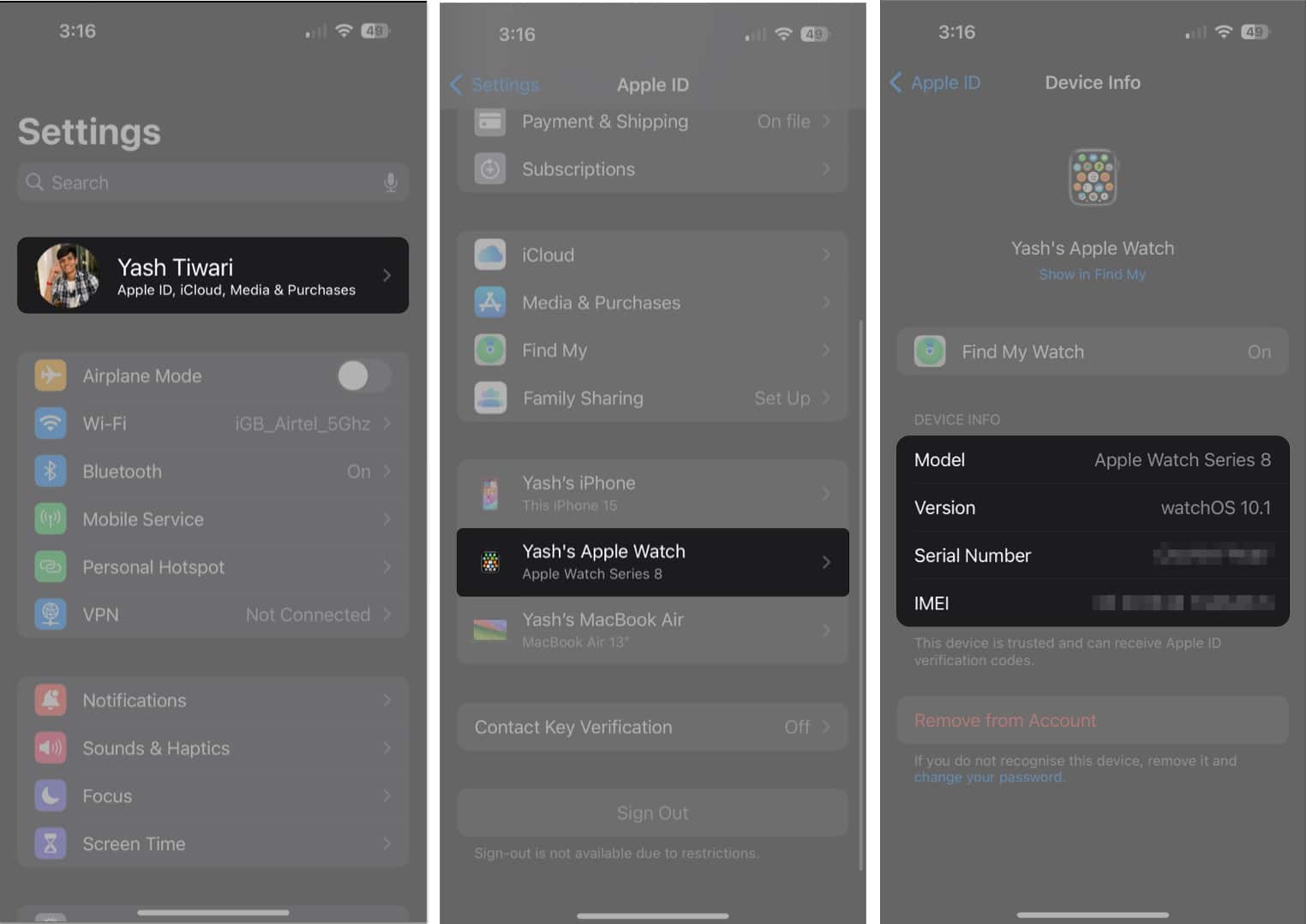

You can use the serial number displayed here to confirm whether your Apple Watch is original, the steps for which are mentioned below.
How to Know If Your Apple Watch is Original
One of the main reasons why many of you might be searching for your Apple Watch serial number is to ensure that it’s authentic. Here’s how you can check if your Apple Watch is original or not:
- Visit the official page of checkcoverage.apple.com.
- Enter your Apple Watch serial number.
- Now, enter the code displayed on your screen.
- Hit Submit.
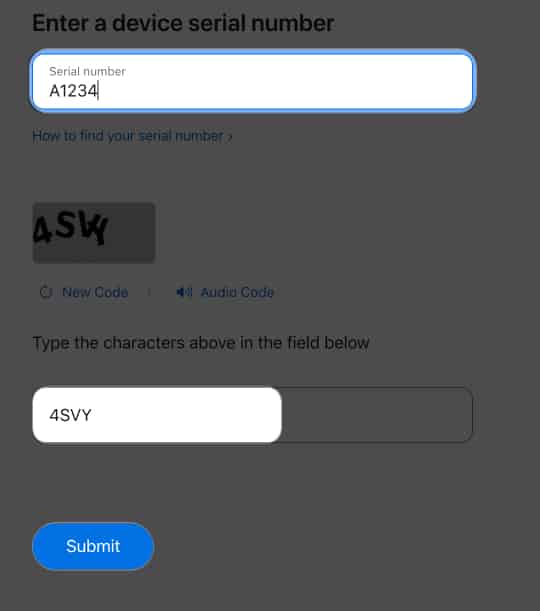
- If your Apple Watch is authentic, you will be able to view its details like purchase date, warranty status, eligibility for AppleCare etc.
- However, if nothing comes up, you’re probably carrying a fake Apple Watch.

Also, while you are at it, you may even check if your iPhone is original or not.
Find Out Who Your Wrist Buddy is!
I hope these straightforward methods help you stay informed about your Apple Watch no matter where you go. One or the other, this information may come in handy.
Which method did you find the easiest? Please let me know in the comments below.
Frequently Asked Questions
More interesting reads to check out:

Written by
Jibin JosephJibin Joseph is an editor at iGeeksBlog and has excellent attention to detail. He is a voracious reader, with interests ranging from philosophy and history to geopolitics and tech. When not reading or correcting grammar, you’d find him engaging in discussions about football. You can follow him on Twitter and Instagram at @4ibin.
View all posts →More from Apple Watch

Apple Watch Not Responding? 8 Fixes That Actually Work
Is your Apple Watch unresponsive or stuck on a black screen? Here are 8 proven fixes to help you unfreeze it and get it working again quickly.
 VikhyatMarch 3, 2026
How to Mirror Your Apple Watch on Your iPhone: A Simple Guide
Want to control your Apple Watch using your iPhone? This guide explains how to turn on Apple Watch Mirroring, use it easily, and fix common issues.
 Arshmeet KaurFebruary 27, 2026
How to Restore Apple Watch From a Backup
Need to reset or switch iPhones? Here’s how to restore your Apple Watch from a backup, what data comes back, and how to make sure everything syncs properly.
VikhyatFebruary 23, 2026