
How to Know If Someone Has Blocked You on Telegram (All Signs Explained)
Here’s the real signs to find if someone have blocked you on Telegram and how to tell the difference between a block and normal app behavior.

Ever sent a message on Telegram and suddenly things feel… different? Your messages stay on a single tick or their profile photo disappears on Telegram. It can leave you wondering whether it’s a glitch or whether the person has blocked you.
Telegram doesn’t send a direct notification if you’re blocked, but there are several clear signs you can look for. In this article, you’ll learn how to know if someone has blocked you on Telegram.
What Happens When Someone Blocks You on Telegram
When someone blocks you, Telegram quietly limits how you can interact with them. You can still see your old chat history, but new communication basically stops working the way it normally would.
Here’s what changes behind the scenes:
- Your new messages don’t get delivered
- You can’t see their online activity. Telegram won’t show their last seen.
- Their profile picture disappears and displays only initials.
- Telegram calls do not connect
- You won’t be able to add them to groups
Telegram does this to protect user privacy, which is why it doesn’t openly confirm the block.
However, no single sign proves a block 100%. Sometimes a person just changed privacy settings, deleted their account, or lost internet access. But when several signs happen together, there’s a good chance you’ve been blocked.
How to Tell If Someone Has Blocked You on Telegram
There’s no official confirmation, but these signs together can strongly suggest you’ve been blocked.
Sign 1: Your Messages Show Only One Check Mark
On Telegram:
- One check mark = Message sent
- Two check marks = Message delivered
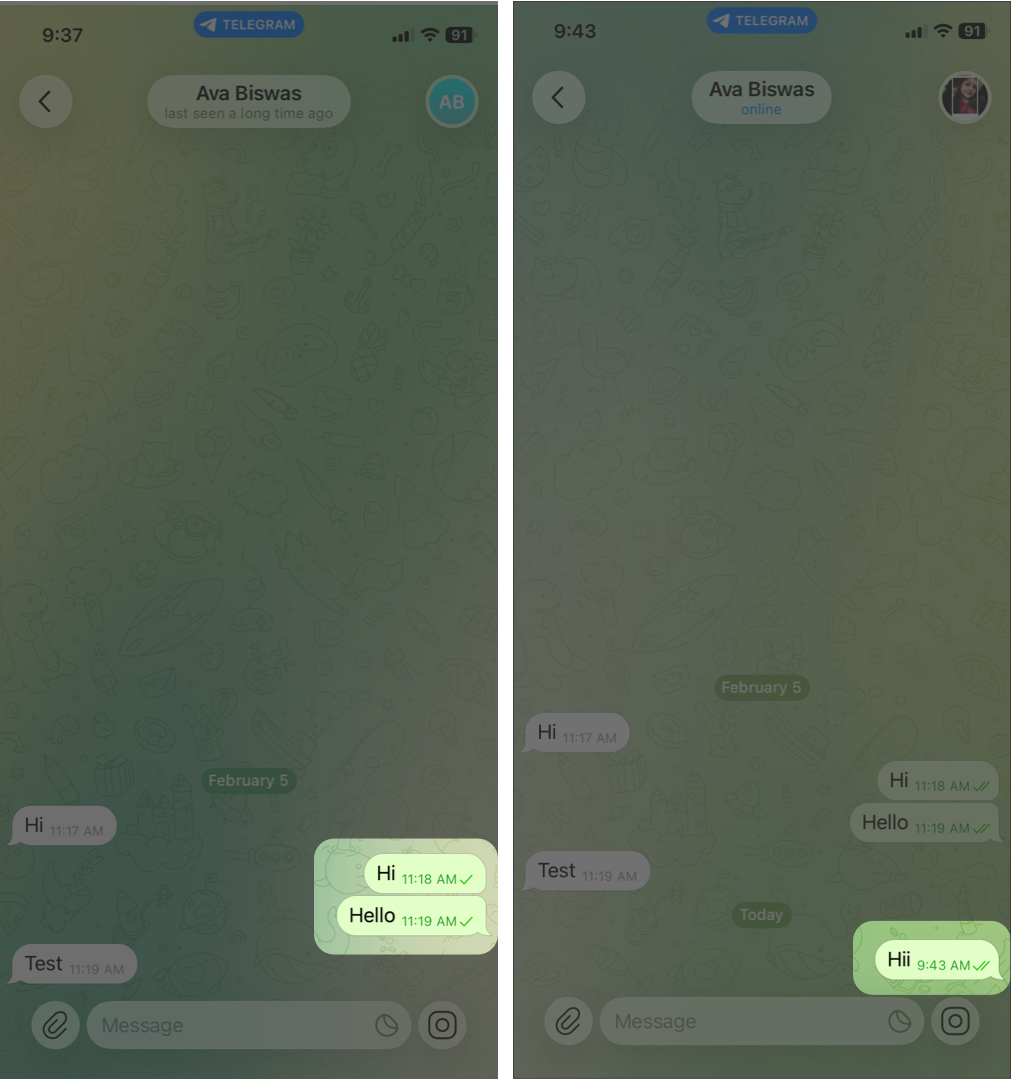
If every message you send stays stuck on one check mark for a long time (days, not minutes), it may mean the messages aren’t reaching them, which is a common sign of being blocked. And even if they unblock you later, those messages won’t ever be delivered.
But remember: they could also just have no internet, not opened Telegram in a while, or deleted the app.
Sign 2: You Can’t See Their Last Seen or Online Status
Normally, you can see when someone was last active (unless they changed privacy settings) under the contact name when you open their chat.
If you used to see their last seen time and now it suddenly shows “Last Seen a long time ago” and stays that way, it could be a sign you’re blocked.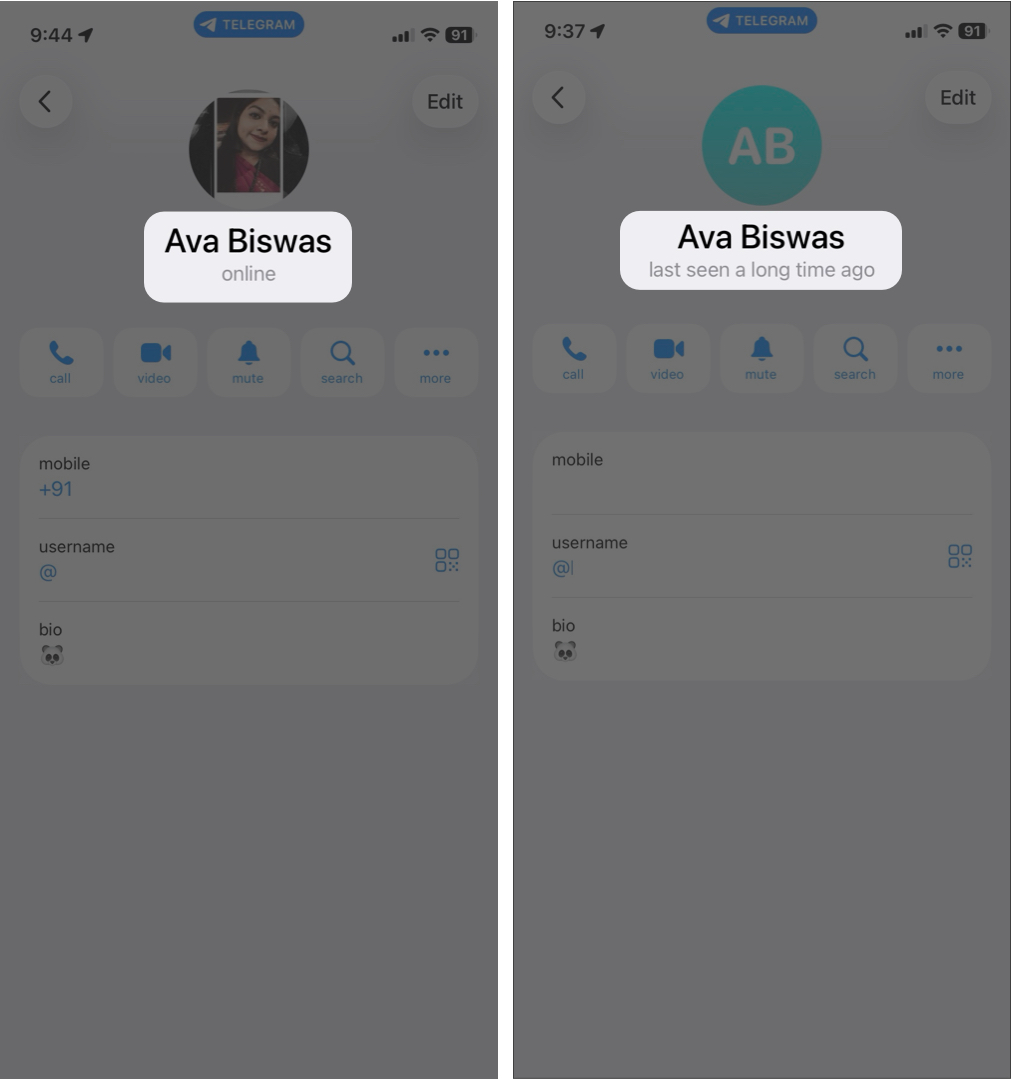
However, when a contact doesn’t open Telegram for 30 days, their last seen also shows the same. Additionally, users can hide their online status from everyone in settings. Therefore, this sign alone doesn’t prove anything.
Sign 3: Their Profile Picture Disappears
If a contact’s profile photo suddenly turns into the default blank avatar with initials, it might mean:
- They removed their photo
- They changed privacy settings
- Or they blocked you
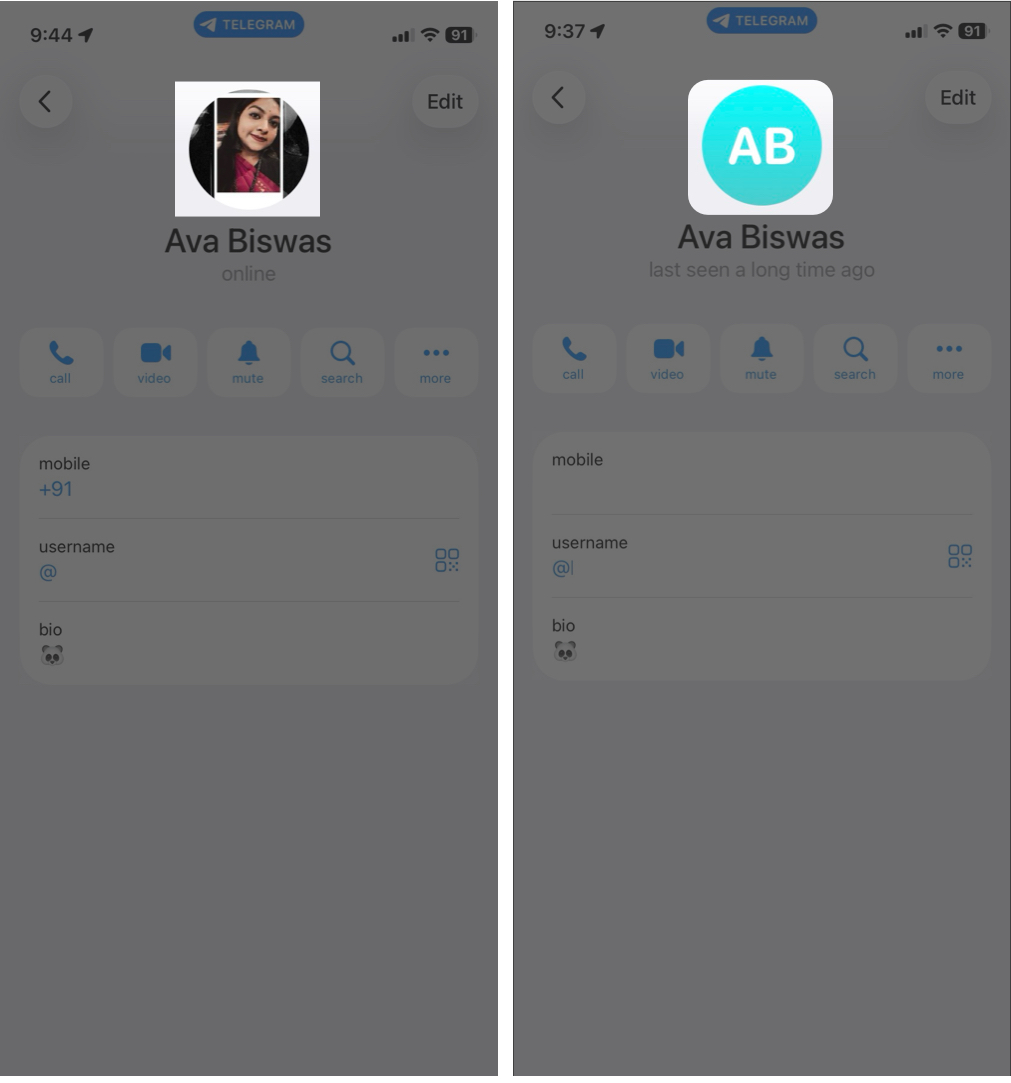
If this happens together with other signs like last seen status and message delivery issues, the chances go up.
Note:
If the contact has deleted their account, you will see a ghost emoji in their profile photo. Also, the contact name appears as Deleted Account.
Sign 4: Voice and Video Calls Don’t Go Through
Another strong clue is what happens when you try calling them on Telegram. If someone has blocked you, your voice and video calls usually won’t connect at all.
- Go to Telegram and open the chat.
- Tap the contact’s name at the top.
- Now, tap the Call or Video option.
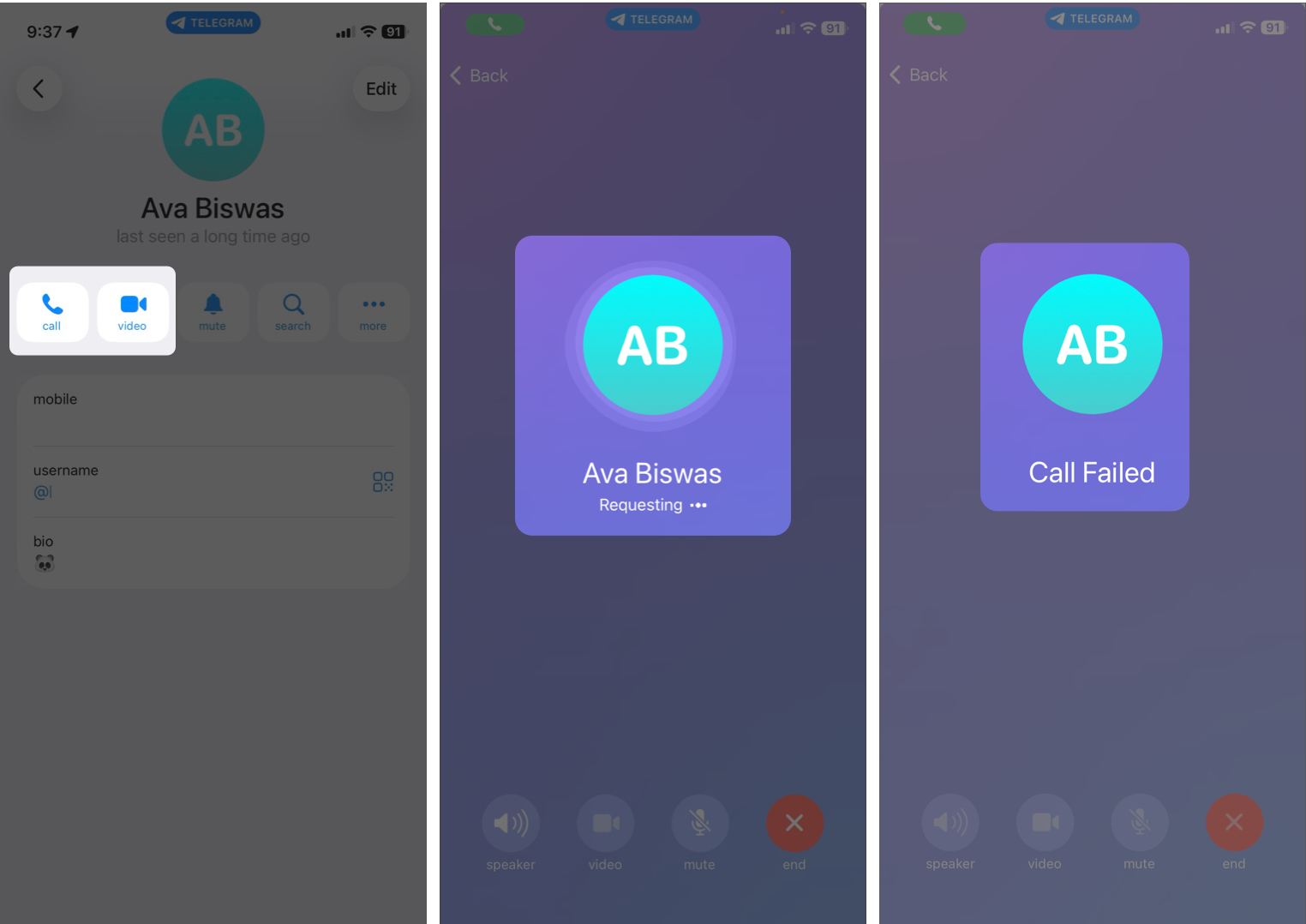
Normally, when you place a call, you’ll see it “ringing” and eventually either connect or show that the person declined. But if you’ve been blocked, you will see a “Call Failed” message immediately.
The key here is consistency. One failed call doesn’t mean much. They could be busy, have no internet, or have their phone turned off. However, if every Telegram call attempt behaves the same way, especially combined with other signs, it becomes a much stronger indication that you’ve been blocked.
Sign 5: You Can’t Add Them to a Group
Trying to add the person to a group chat can reveal another important clue. On Telegram, if someone has blocked you, you typically won’t be able to add them to a group you create or manage.
- On Telegram, open the group chat where you wish to add the contact.
- Tap the group name at the top.
- Now, tap Add Members above the members and select the contact.
- Hit Done to add them.
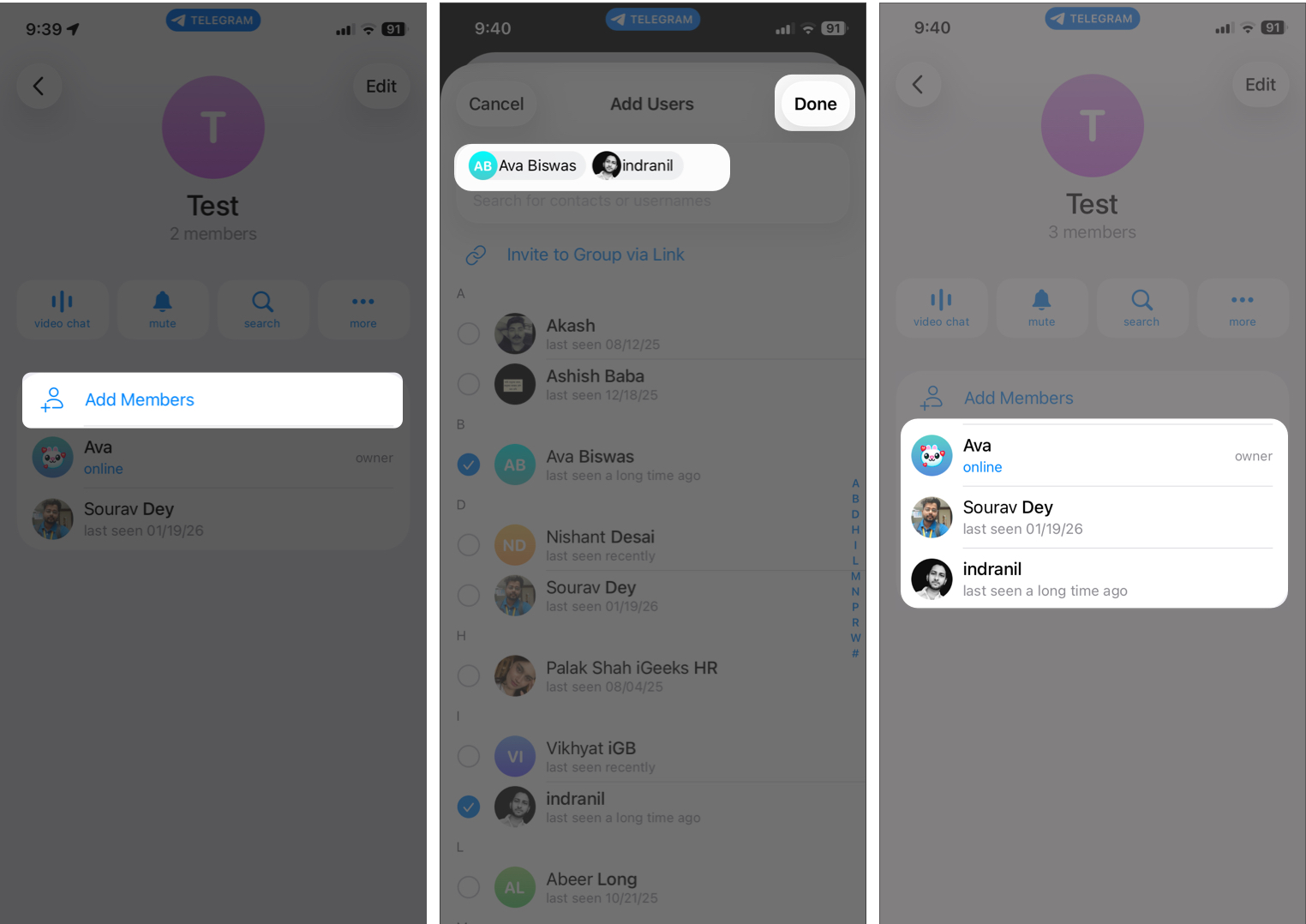
However, you will see that their name will not appear in the members list.
There are a few exceptions to keep in mind. Their privacy settings might restrict who can add them to groups, or they may only allow invites from contacts. But if you were able to add them before and suddenly can’t, it’s a strong sign of blocking.
Sign 6: You Can’t Start a Secret Chat
Secret chats on Telegram are designed for end-to-end encrypted, device-specific conversations.
- Go to the chat on Telegram and tap the contact name to see their profile.
- Tap the three-dot icon and choose Start Secret Chat.
- Select Start on the prompt.
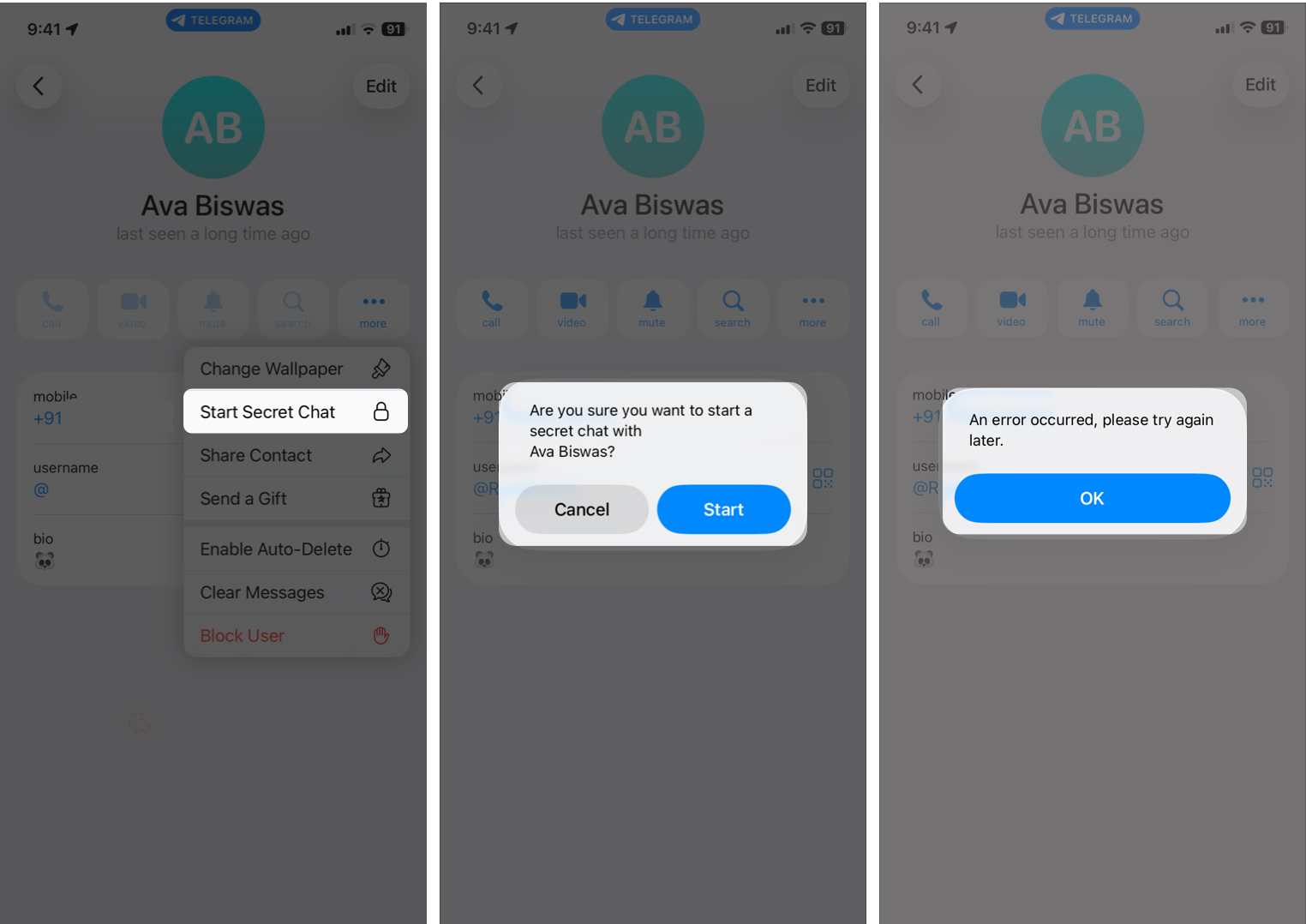
Normally, it will launch a new chat window without any issue. But if they’ve blocked you, a dialog box appears stating, “An error occurred, please try again later.”
Technical glitches, outdated app versions, or temporary connection problems can also interfere with secret chats. But if you consistently can’t start a secret chat with this one person, while it works fine with others, it adds more weight to the block possibility.
Signs That Do NOT Mean You’re Blocked on Telegram
Don’t jump to conclusions too quickly. These do not necessarily mean a block, but they can look like one:
- They haven’t replied to your messages
- They were online but didn’t open your chat
- They muted or archived your chat
- They disabled notifications
- Their phone is off or they deleted the app
Silence does not automatically mean you’ve been blocked.
What to Do If You Think Someone Has Blocked You on Telegram
Realizing or even just suspecting that someone blocked you on Telegram can feel awkward or upsetting. Before reacting, it helps to slow down and handle the situation calmly.
- Don’t jump to conclusions immediately: Connection issues, privacy settings, or app glitches can sometimes look like blocking. Double-check the other signs first and give it a little time.
- Respect their space: If the signs strongly point to a block, the healthiest move is to accept it.
- Avoid workarounds to reach them: Creating new accounts or asking friends to message them for you usually crosses boundaries.
- Reflect before reacting: If this is someone important to you, think about whether there was a misunderstanding or conflict that led to this.
- Focus on what you can control: You can’t force communication, but you can control how you respond.
Being blocked isn’t always about you; sometimes it’s about the other person’s comfort, boundaries, or personal situation.
Final Thoughts
Figuring out whether someone has blocked you on Telegram can be confusing, especially since the app doesn’t send any direct notification. Instead, you have to rely on small clues discussed in this article.
The important thing to remember is that no single sign proves anything on its own. It’s only when several signs appear together, consistently over time, that blocking becomes a likely explanation.
Frequently Asked Questions
Topics

Written by
Ava BiswasAva is a die-hard Apple aficionado and seasoned writer with a knack for breaking down complex tech concepts into easily digestible content. Having honed her writing and editing skills over 4 years at renowned media houses like TechBurner, Ava crafts informative and engaging articles including troubleshooting guides, product reviews, editorials at iGeeksBlog. When not typing, you can find her exploring the latest Apple releases or pondering the future of tech innovation.
View all posts →More from How-to

Snapchat Parental Controls: How to Set Up Family Center and Keep Your Teen Safe
Snapchat’s Family Center lets parents monitor their teen’s friend activity and screen time without reading private messages. Here’s how to set it up and what to expect.
 VikhyatMarch 3, 2026
How to Block and Unblock Someone on Instagram
Instagram lets you block or unblock someone in seconds. Follow these simple steps to take full control of your privacy and online peace.
Ava BiswasMarch 2, 2026
Apple Watch Not Responding? 8 Fixes That Actually Work
Is your Apple Watch unresponsive or stuck on a black screen? Here are 8 proven fixes to help you unfreeze it and get it working again quickly.
VikhyatMarch 3, 2026