
How to Turn Off Active Status on Instagram and Stay Hidden
Want to browse Instagram without anyone knowing you’re online? Here’s how to turn off your Active Status, stay hidden, and keep your activity completely private.
- Instagram’s Active Status explained: Active Status shows when you’re online or recently active, marked by a green dot or “Active now” tag in Direct Messages.
- Who can see your Active Status: Only people you follow or have messaged can view it, not all your followers or random users.
- Implications of turning off Active Status: Turning it off hides your online status from everyone, but also stops you from seeing others’ activity; it’s a universal setting.
- How to disable Active Status: On mobile, open your profile menu, choose “Messages and story replies,” and toggle off “Show activity status.” On desktop, do this under Settings.
Instagram’s Active Status shows your friends and contacts when you’re online or were last active. While this feature helps make conversations feel more instant, it can also feel intrusive or lead to unwanted messages.
The good news is, you’re in full control. Instagram lets you choose whether or not people can see when you’re online. In this guide, I’ll show you exactly how to turn off your Active Status on Instagram, what it means, who can see it, and what limitations to keep in mind, so you can browse Instagram privately and stress-free.
What Does “Active Status” Mean on Instagram?
The Active Status feature displays your online presence or the last time you were active in the app. You might notice it in places like:
- A green dot on your profile photo in the Direct Messages (DM) section.
- Labels like “Active now” or “Active X minutes ago” in your chats.
- A green dot next to your name in your message list.
This makes it easy for friends to see when you’re around—but not everyone likes that level of visibility.
Who Can See Your Active Status?
Your Active Status is visible only to people you follow or those you’ve messaged. It’s not public and isn’t shown to everyone.
For example, if you and your friend Sam follow each other and have exchanged DMs, you’ll both be able to see when the other is online. But if someone follows you and you haven’t followed them back or chatted with them, they won’t see your activity.
Before Turning Off Active Status: Things to Know
- All-or-Nothing Privacy Setting: When you turn off your Active Status, it applies to everyone. You can’t hide it from just one person. Once disabled, you’ll also lose the ability to see when others are online.
- Feature Availability: Instagram’s settings menus occasionally change with updates. If you can’t find a setting mentioned here, update your app first—it might just not have rolled out to your version yet.
How to Turn Off Active Status on Instagram
Want to browse in peace without anyone knowing you’re online? Here’s how to do it.
On iPhone and Android
- Open the Instagram app.
- Tap your profile picture in the bottom right corner.
- Tap the three-line menu (☰) in the top right.
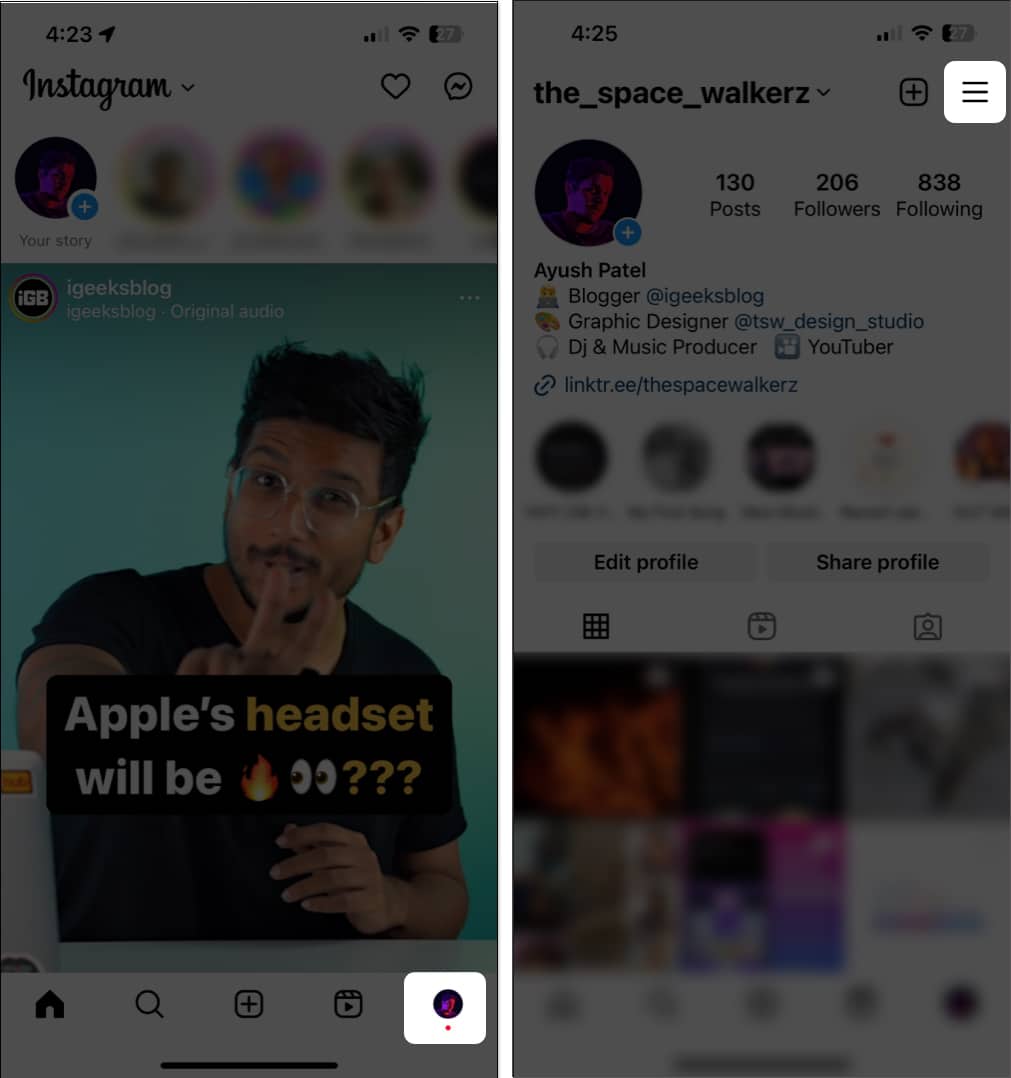
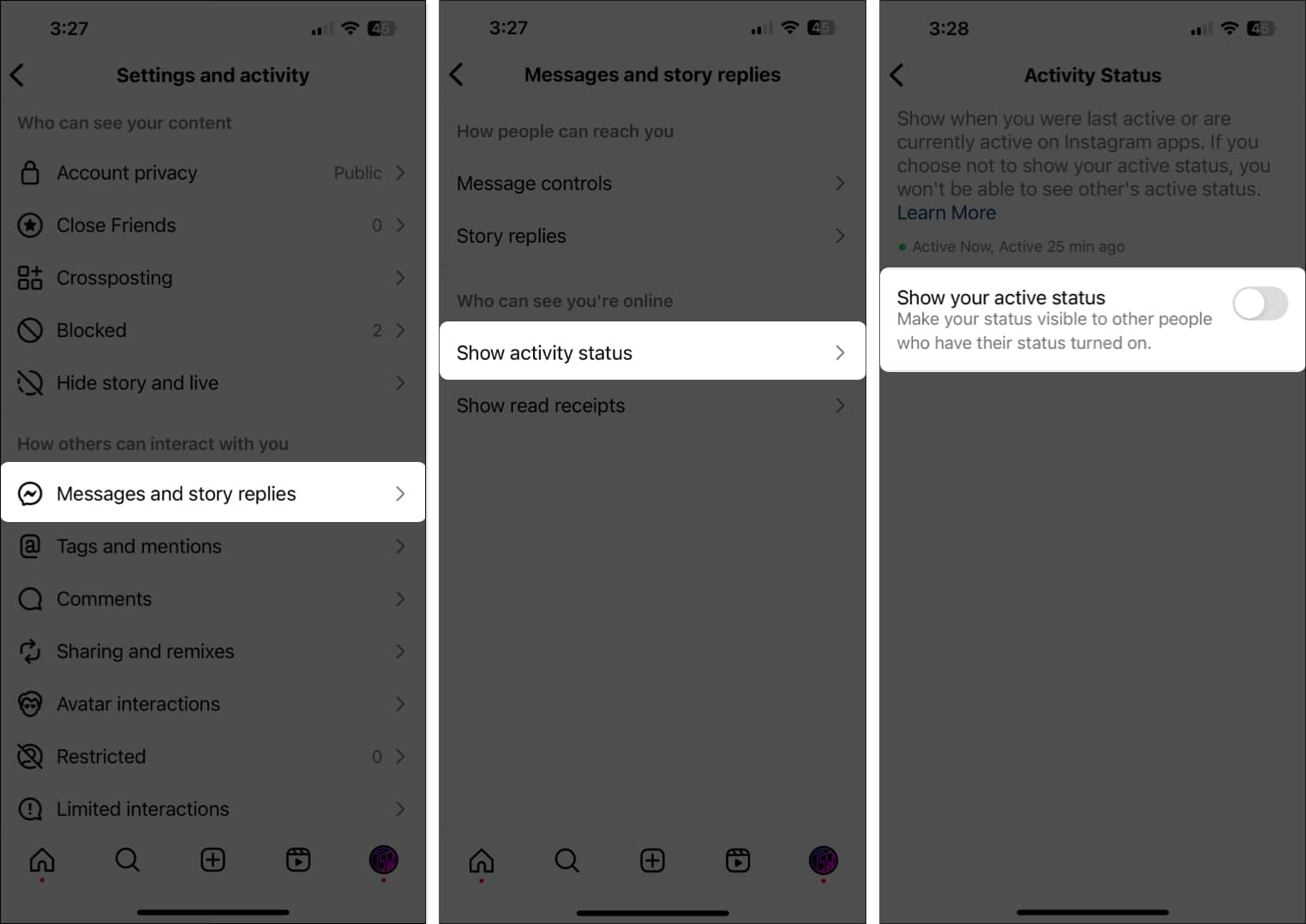
- Go to Messages and story replies.
- Tap Show activity status.
- Toggle off Show your active status.
On Desktop (Web Browser)
- Visit instagram.com and log in.
- Click the three-line “More” menu at the bottom left.
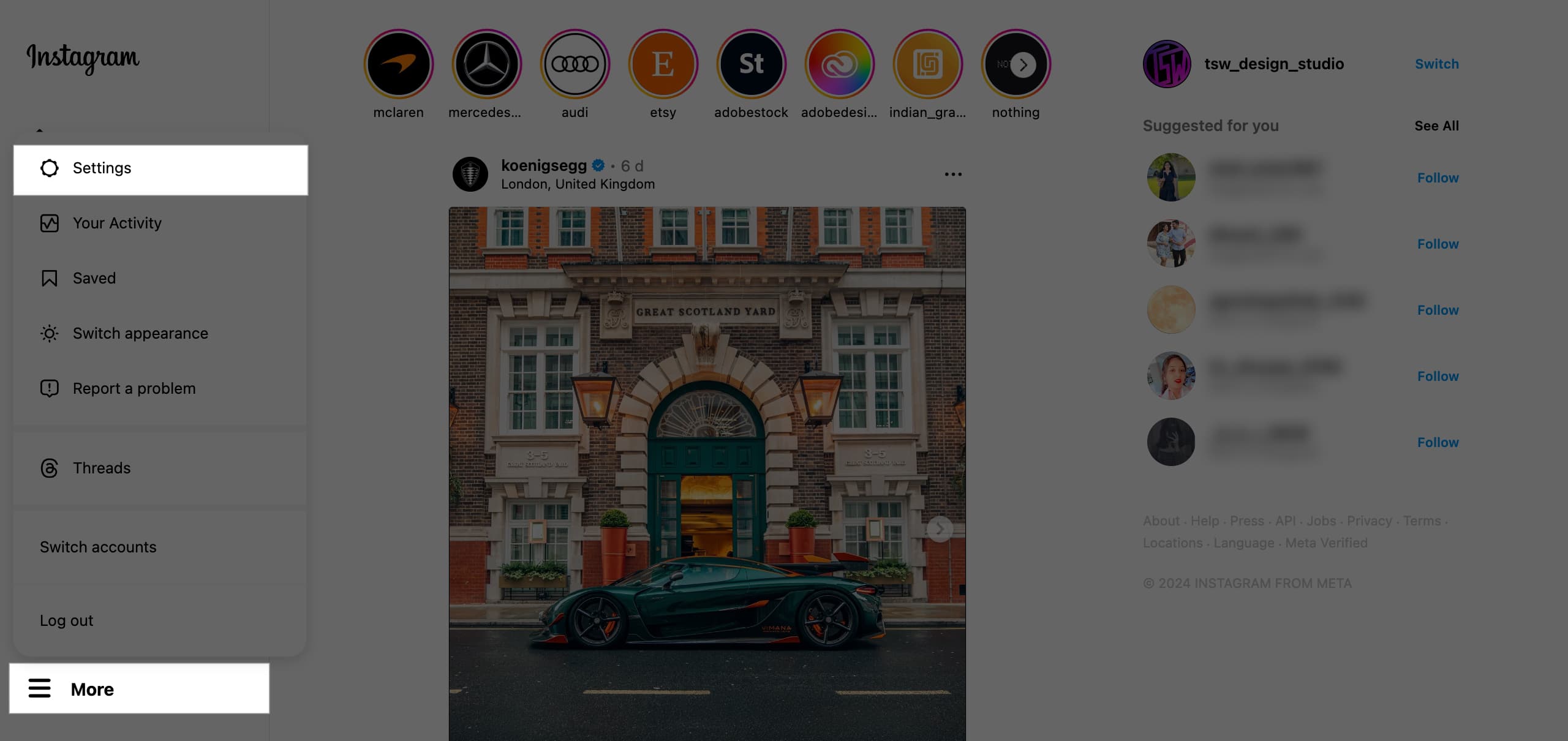
- Select Settings.
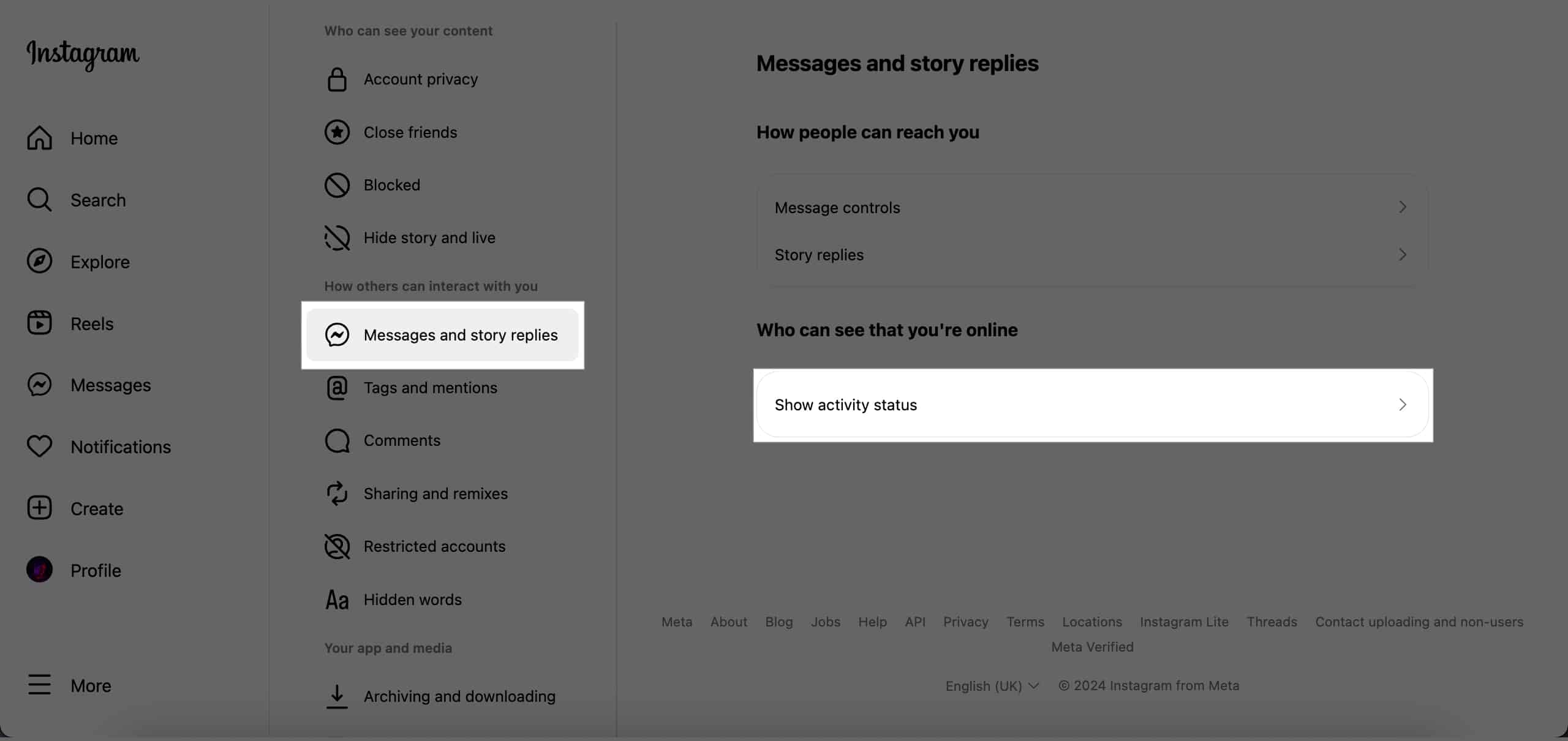
- Go to Messages and story replies.
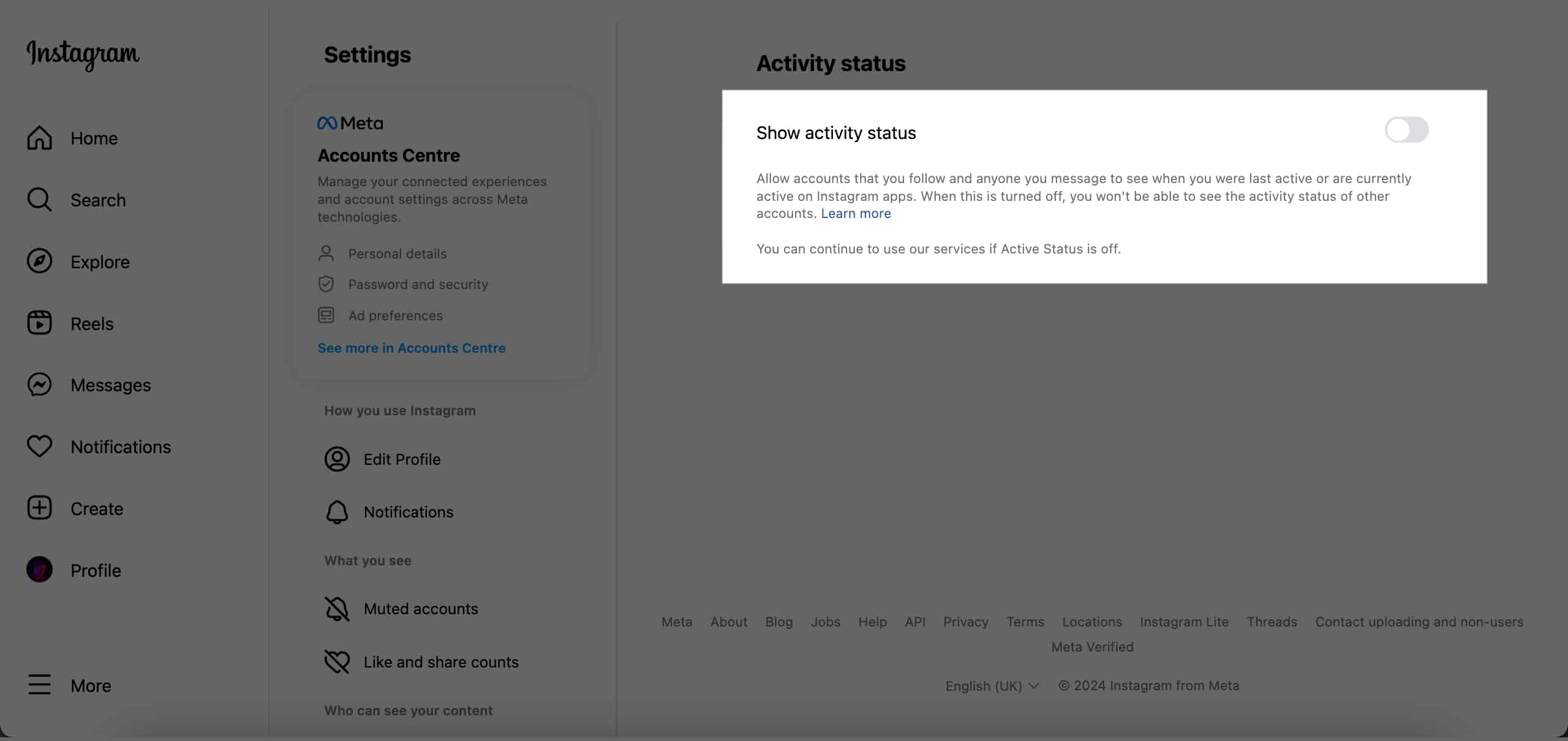
- Click Show activity status.
- Toggle off Show active status.
How Quickly Does the Change Take Effect?
It’s instant. As soon as you turn off your Active Status, Instagram immediately hides your visibility.
However, you might still appear online briefly due to:
- Sync delays (Instagram may need a few minutes to update)
- App cache issues (clearing your cache can help)
What Happens When You Turn Off Active Status on Instagram?
When your Active Status is disabled:
- Others won’t see the green dot showing you’re online
- Your last active time disappears
- You also won’t see anyone else’s status
It’s a clean trade-off for a quieter, more private experience.
Can You Hide Your Active Status from Certain People?
Unfortunately, no. The Active Status toggle affects everyone.
If you want to hide your activity from a specific person, the only workaround is to restrict them. Restricted users can’t see your active status or when you’ve read their messages, and their comments on your posts require your approval. But restricting someone also limits other interactions, so use it carefully.
What’s Still Visible After Turning Off Active Status?
Turning off Active Status only hides when you’re online or last active. It doesn’t hide your:
- Likes
- Comments
- Story views
These remain visible to your followers (or to everyone if your account is public). If you want deeper privacy, check your overall account privacy settings too.
Keep Your Instagram Activity Truly Private
Disabling your Active Status on Instagram is a simple but powerful privacy move. It lets you browse freely without pressure or constant visibility. While you’ll lose the ability to see others’ statuses, you’ll gain more peace of mind and control over your digital space.
If you have questions or run into issues, feel free to drop a comment below. I’m happy to help.
Frequently Asked Questions
Related Instagram Privacy Tips
Topics

Written by
Jignesh PadhiyarJignesh Padhiyar is the co-founder of iGeeksBlog.com, who has a keen eye for news, rumors, and all the unusual stuff around Apple products. During his tight schedule, Jignesh finds some moments of respite to share side-splitting content on social media.
View all posts →More from How-to

Snapchat Parental Controls: How to Set Up Family Center and Keep Your Teen Safe
Snapchat’s Family Center lets parents monitor their teen’s friend activity and screen time without reading private messages. Here’s how to set it up and what to expect.
 VikhyatMarch 3, 2026
How to Block and Unblock Someone on Instagram
Instagram lets you block or unblock someone in seconds. Follow these simple steps to take full control of your privacy and online peace.
 Ava BiswasMarch 2, 2026
Apple Watch Not Responding? 8 Fixes That Actually Work
Is your Apple Watch unresponsive or stuck on a black screen? Here are 8 proven fixes to help you unfreeze it and get it working again quickly.
VikhyatMarch 3, 2026