I used to think every USB-C cable was basically the same. Nevertheless, in the process of purchasing a new USB-C cable for my iPhone 17, I discovered that there are significant differences in speed, reliability, performance, and even convenience.
Some cables are built only for charging, while others can transfer 10Gbps files, connect an external monitor, or survive years of daily use. After comparing the latest options, these are the USB-C cables I’d confidently recommend for different types of iPhone users.
Whether you own an iPhone 15, iPhone 16, or the latest iPhone 17 series, this guide will help you choose the right cable instead of wasting money on one that won’t meet your needs.
How I chose these USB-C cables
The biggest truth is that the most expensive cables aren’t always the best ones. Many cables promise ultra-fast charging or massive 240W power delivery, but most iPhone users will never come close to using that much power. Instead of chasing marketing claims, I focused on the features that actually make a difference in everyday use.
Here’s what I paid the closest attention to before recommending these cables.
I picked cable length based on real-world use
One thing I underestimated was how much cable length changes the overall experience.
- 3 ft (1 m) cables are my go-to for desks, travel, and power banks because they stay tidy and don’t leave extra cable hanging everywhere.
- 6 ft (2 m) cables are what I’d recommend for most people. They’re long enough to comfortably use your iPhone from the couch or bed while charging.
- 10 ft (3 m) cables can be incredibly convenient if your outlet is far away, but longer cables may introduce a slight drop in charging performance depending on the cable’s quality.
Rather than calling one length “best,” I chose cables that fit different lifestyles.
Build quality matters more than fancy marketing
A charging cable gets bent, twisted, packed in a backpack, and tied up almost every day. That is why I paid more attention to durability over flashy packaging.
The cables on this list include features like:
- Braided nylon exteriors
- Reinforced strain relief near the connectors
- Metal connector housings
- High bend-life ratings, often between 10,000 and 30,000 bends
These details may not sound exciting, but they’re usually what separates a cable that lasts for years from one that frays after a few months.
I didn’t get distracted by 240W claims
You’ll see USB-C cables advertised with 60W, 100W, or even 240W charging support. While those numbers look impressive, they’re not the deciding factor for an iPhone.
Current iPhones top out at roughly 40-30W of charging, so even a 60W cable has plenty of headroom. I still included cables of higher rating because they could charge not only an iPhone, but also an iPad or MacBook, or other USB-C devices, making them a smarter long-term investment if you want one cable for everything.
Data speed is where USB-C cables really differ
This was probably the biggest surprise during my research. Two USB-C cables can look identical but perform very differently.
- USB 2.0 cables max out at 480 Mbps and are perfectly fine if you only charge your iPhone.
- USB 3.2 cables can transfer data at up to 10 Gbps, making them much better for moving photos and videos.
- USB4 and Thunderbolt 4 cables reach 40 Gbps and are designed for creators who work with external SSDs, ProRes video, or high-resolution monitors.
If you regularly transfer large files from your iPhone Pro or use external storage, investing in a faster cable is well worth it. Otherwise, a standard USB 2.0 cable will do the job just fine.
I only considered trusted brands
Finally, I avoided no-name cables with vague specifications. Every recommendation in this guide comes from a reputable brand that includes important safety features like E-marker chips, intelligent power management, and thermal protection.
Such measures help to control power delivery, prevent overheating, and keep your iPhone’s battery safe for a long period. Saving a few dollars on an uncertified cable simply isn’t worth the potential risk.
At the end of the day, I wasn’t looking for the cable with the highest specs on paper. Instead, I chose cables that offer the best combination of reliability, durability, charging performance, and long-term value for the way most people actually use their iPhones.
Best USB-C cables for iPhone I’d recommend in 2026
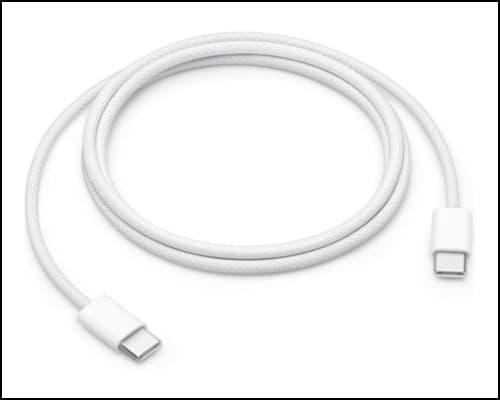
1. Apple USB-C charge cable: Best for reliable everyday charging
- Charging: 60W and 240W
- Length: 1m (3 ft) or 2m (6.6 ft)
- Data Transfer: USB 2.0 (480Mbps)
Apple’s own cable is still the safest choice if you simply want dependable charging without worrying about compatibility. It feels premium, supports standard high power delivery, and works perfectly with every USB-C iPhone.
What I like most is the 2-meter length. It’s long enough that I wouldn’t feel tethered to the wall while using my iPhone on the couch or in bed. Apple also replaced its older rubber coating with a woven braided exterior, which should hold up much better against everyday bends, twists, and the inevitable trips into backpacks and desk drawers.
But I wouldn’t buy this cable if fast file transfers are a priority. Despite the premium price, it still tops out at USB 2.0 (480 Mbps), so moving large ProRes videos or photo libraries will take noticeably longer.
For me, this cable is all about peace of mind. If I wanted one dependable cable that works seamlessly across my iPhone, iPad, AirPods, and MacBook without wondering about compatibility or build quality, Apple’s own cable would still be near the top of my list.
- Official Apple accessory with guaranteed compatibility
- Durable woven braided design
- Long 6.6 ft (2 m) cable is ideal for bedside charging
- Supports up to 240W USB-C Power Delivery for future-proofing
- Slow USB 2.0 transfer
- Costs more than many equally durable third-party alternatives
Best for: If you want a dependable, long-lasting USB-C cable for everyday charging and don’t need ultra-fast data transfer.
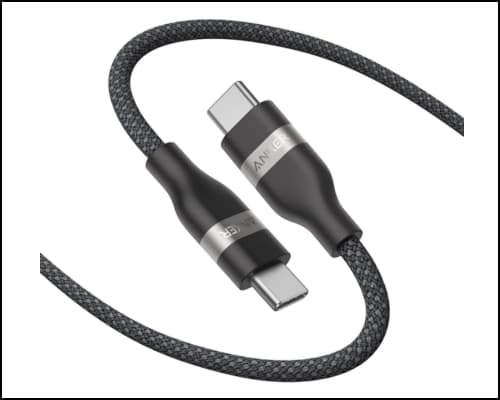
2. Anker Nano USB-C Cable: The one I’d recommend to almost everyone
- Charging: Up to 240W
- Length: 1ft, 3ft, 6ft, and 10ft
- Data Transfer: USB 2.0
If I had to recommend just one cable to most people, it would be the Anker Nano.
Anker has always done a great job balancing quality and price, and the Nano USB-C Cable offers a great balance of durability, flexibility, and long-term value. What immediately stands out is how soft and flexible the cable feels. Anker also rates it for up to 30,000 bends, and the recycled nylon exterior is designed to handle daily wear while staying tangle-resistant.
The 240W Power Delivery support is honestly more than an iPhone will ever need, but that’s exactly why I like it. You can keep one cable for your iPhone, iPad, MacBook, CarPlay, gaming handheld, or almost any USB-C device. Moreover, the USB-IF certification ensures zero damage. The only compromise is the 480 Mbps data speed.
- Soft, flexible braided design that’s easy to carry
- Supports CarPlay
- Includes a silicone cord organizer for neat wrapping
- Beautiful color options
- Expensive
- Overkill if you only ever charge an iPhone
Best for: Anyone looking for one durable USB-C cable that can charge an iPhone today and still handle more demanding USB-C devices in the future.
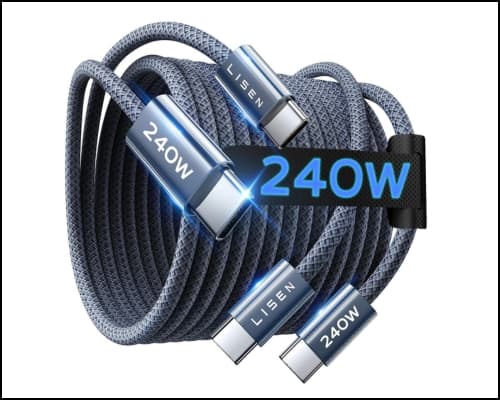
3. LISEN USB-C to USB-C Cable: The budget pick that doesn’t feel cheap
- Charging: Up to 240W
- Length: 1.6 ft, 3.3 ft, 6.6 ft, 10 ft
- Data Transfer: USB 2.0
When I’m shopping for a charging cable on a budget, I’m usually skeptical. Most inexpensive cables either feel flimsy or have loose connectors. The LISEN 240W USB-C Cable is one of the few exceptions.
What impressed me most is that LISEN didn’t cut corners where it matters. It has a braided 48-strand military-grade nylon exterior that is rated to withstand 40,000 bends and remain tug-resistant. Additionally, the reinforced connectors ensure reliable charging and support for up to 240W Power Delivery, which handles all your Apple gear.
You can choose up to a 10 ft length to comfortably reach from a wall outlet to your bed, couch, or desk without feeling restrictive. Of course, there are a few compromises. Like many charging-focused USB-C cables, it only supports USB 2.0 data transfer speeds.
- Excellent value for the price
- Supports up to 240W fast charging
- Durable braided nylon construction
- Long length options
- Limited data speed
- Design is more functional than premium
Best for: If your goal is simply fast, reliable charging without spending a premium, this is one of the strongest value picks
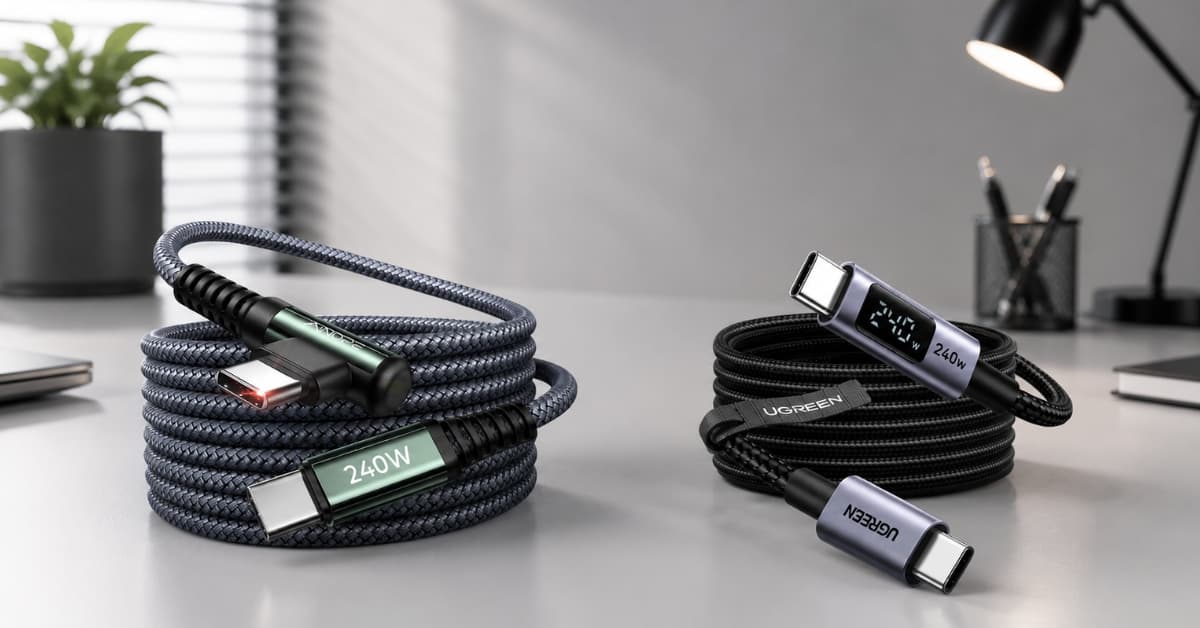
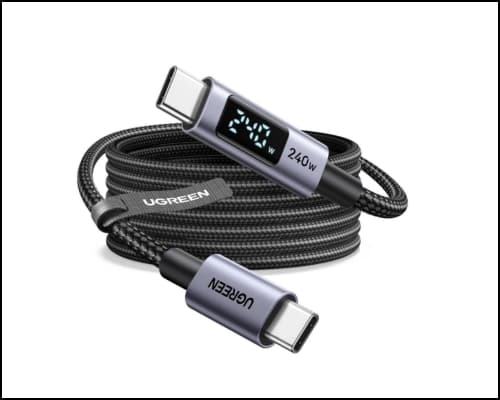
4. UGREEN USB-C Cable with Display: See what’s happening behind
- Charging: Up to 240W
- Length: 3.3 ft, 6.6 ft, 10 ft
- Data Transfer: USB 2.0
Most USB-C cables leave you guessing whether your phone is actually fast charging. The UGREEN Digital Display Cable removes that guesswork with a small LED screen built into the connector that cycles through real-time wattage, voltage, and current.
I liked how this cable combines a genuinely useful feature with premium construction. The 24-strand braided nylon jacket, aluminum connector housing, built-in E-Marker chip, and 240W PD 3.1 support make it feel like a cable that’s built to last. However, you should use a high-wattage power adapter to enjoy the fastest speeds.
The only thing I’d keep in mind is that this is still a USB 2.0 cable, so its 480 Mbps data speed is aimed at charging rather than moving massive video files. Also, because the display stays lit while charging, I find it a little too bright for a bedside setup.
- Built-in LED display shows wattage, voltage, and current
- Supports PD 3.1 fast charging for all modern USB-C devices
- Built-in E-Marker chip for safe, stable charging
- Great conversation starter for any desk setup
- No color option
- Display isn’t essential for everyone
Best for: Power users and tech enthusiasts who want to monitor their charging speed in real time.
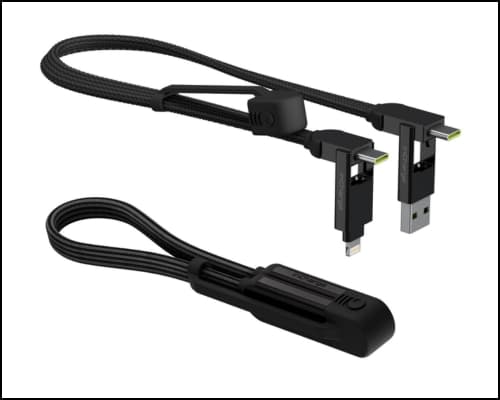
5. Rolling Square inCharge XL Multi Charging Cable: Best for traveling
- Charging: Up to 100W
- Length: 1 ft
- Data Transfer: USB 2.0
If I could only throw one charging cable into my backpack before a trip, this would probably be it.
What makes the Rolling Square inCharge XL different is its versatility. Instead of carrying separate cables for an iPhone, AirPods, older accessories, or a laptop, this single cable combines six different connection combinations. You get USB-C and USB-A inputs along with USB-C, Lightning, and Micro-USB outputs.
It supports up to 100W USB-C Power Delivery, enough to fast-charge an iPhone, iPad, MacBook Air, or many laptops. Moreover, I tried its OTG phone-to-phone charging. The cable uses a braided nylon exterior, silicone protective cap, reinforced copper wiring, and even includes strong magnets that keep it snapped together when it’s not in use.
- Extremely portable and clever design
- Six connection combinations in one cable
- Premium braided construction with magnetic cable management
- Perfect for travel, commuting, and shared charging setups
- More expensive
- Not ideal as a permanent desk cable
Best for: Travelers, remote workers, and anyone who wants one cable that can charge almost every device they carry without filling their bag with adapters.
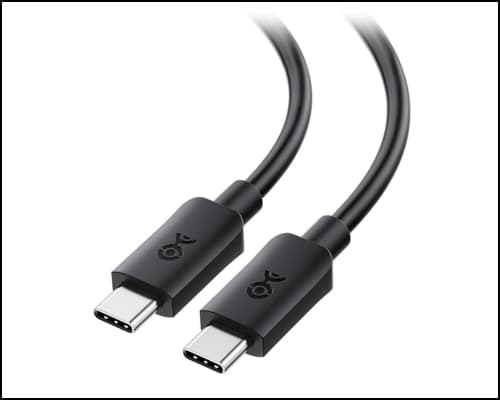
6. Cable Matters USB4 Cable: The one I’d buy for ProRes, external SSDs, and future-proofing
- Charging: Up to 240W
- Length: 3 ft, 6 ft, 8.2 ft
- Data Transfer: USB-C 3.2 Gen 2 (Up to 20Gbps)
- Monitor Support: Yes (up to 8K)
If your USB-C cable is only for charging an iPhone, this is probably more cable than you’ll ever need. But if you transfer large files, work with external SSDs, connect to a monitor, or use a USB dock, this is the cable I’d spend extra money on.
With 20Gbps bandwidth, it can transfer massive video projects in seconds instead of minutes, while also supporting DisplayPort Alt Mode for connecting to external monitors at resolutions up to 8K. It also supports 100W USB Power Delivery, making it capable of charging everything from an iPhone to a MacBook with a single cable.
I also appreciate that Cable Matters doesn’t cut corners on certification. This cable is USB-IF certified. That gives me more confidence when using it with expensive devices or external storage. The only downside is that this cable feels noticeably thicker and stiffer.
If you only charge your iPhone overnight, you’re paying for features you’ll probably never use. But if your iPhone is part of a professional workflow, this cable quickly justifies its price.
- Lightning-fast 20Gbps USB4 data transfe
- Supports external displays up to 8K via DisplayPort Alt Mode
- USB-IF certified for reliability and compatibility
- Backward compatible with USB-C, USB 3.2, and Thunderbolt devices
- Costs significantly more than standard charging cables
- Thicker and less flexible than everyday USB-C cables
- Overkill if you only use your cable for charging
Best for: Creators, photographers, videographers, and iPhone Pro users.
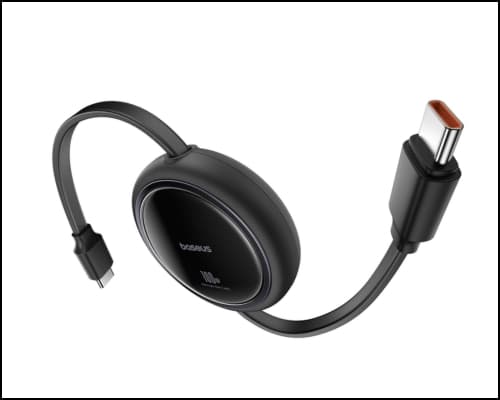
7. Baseus Retractable USB-C Cable: It finally fixed my desk clutter
- Charging: Up to 100W
- Length: Adjustable up to 6.6ft with 4 preset lengths
- Data Transfer: USB 2.0
After looking at dozens of USB-C cables, I realized one thing: performance isn’t always the biggest annoyance. Cable clutter is.
That’s exactly why the Baseus Retractable USB-C Cable caught my attention. Instead of leaving a loose cable stretched across your desk or tangled inside your backpack, it retracts neatly into a compact housing. I could simply pull it to the four preset lengths as required and give it another gentle pull to retract it back inside.
Despite the retractable mechanism, Baseus says it’s been tested for 50,000 pull cycles, which is reassuring. Of course, this isn’t a cable built for professional work. It only supports 480 Mbps data transfers. Still, if your biggest frustration is constantly untangling charging cables or dealing with a messy desk, I think this is one of the smartest designs on this list.
- Retractable design keeps desks and bags clutter-free
- Four adjustable cable lengths for different situations
- Compact and travel-friendly
- Rated for thousands of retraction cycles for long-term durability
- Retractable housing is bulkier than a standard cable
Best for: Anyone who values a clean workspace or travels frequently and wants a USB-C cable that’s easy to store without sacrificing fast charging.
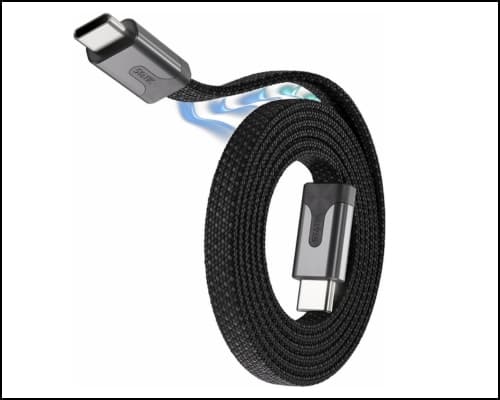
8. Statik MagStack magnetic USB-C Cable: The smartest cable for keeping your desk organized
- Charging: Up to 100W
- Length: 3.3 ft, 6.6 ft
- Data Transfer: 480 Mbps
Another cable that solves the tangling and clutter problem. Instead of relying on Velcro straps or cable ties, the Statik MagStack has built-in magnets running through the cable, allowing it to snap together automatically into a neat coil.
It stays organized in my backpack, wraps around a charger in seconds, and even sticks to metal surfaces like a desk frame or filing cabinet. Statik also uses a reinforced nylon braid and aluminum connectors, giving the cable a premium feel while improving durability.
What I appreciate most is that this cable solves an everyday problem. In case your office table keeps getting cluttered with charging cables or your travel bag becomes a knot of wires, the magnetic design genuinely makes life easier.
- Built-in magnets automatically keep the cable neatly coiled
- Durable braided nylon construction
- Easy to organize in backpacks, desks, and cable drawers
- Premium pricing
Best for: Anyone who hates tangled charging cables and wants the easiest cable to organize at home, in the office, or while traveling.
9. AINOPE Right Angle USB-C Cable: Best for gaming & CarPlay
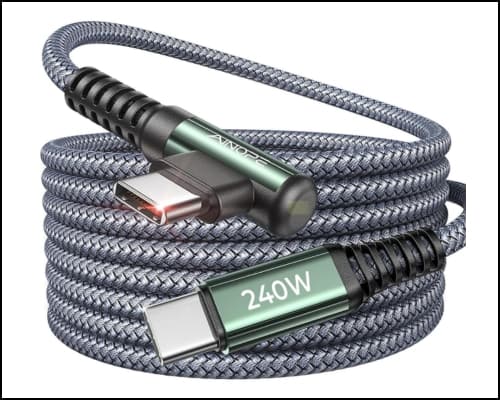
- Charging: Up to 240W
- Length: 1.5 ft, 3.3 ft, 6.6 ft, 10 ft, and 15 ft
- Data Transfer: USB 2.0
Out of all the cables on this list, this is probably the one with the most practical design. I tried it out of curiosity, but the 90-degree right-angle connector completely changed how comfortable the cable feels when I am watching YouTube, scrolling social media, or playing games while it’s charging, or using wired Apple CarPlay.
A regular straight connector sticks out from the bottom of the phone and often gets in the way of your hand. The AINOPE cable routes the wire to the side instead, putting less strain on both the connector and the charging port while making the phone much easier to hold.
In terms of performance, this cable is compatible with up to 240W USB PD 3.0/PD 3.1 and QC 3.0, providing fast charging for your iPhone as well as all USB-C devices. Other notable features include a double-braided nylon jacket, reinforced strain relief, laser-welded connectors, and an integrated E-Marker chip for safe power negotiation.
- Durable double-braided nylon construction
- Reinforced strain relief
- Excellent for gaming, streaming, Apple CarPlay, and everyday use
- Right-angle design may not suit every charging setup
Best for: Gaming and in-car charging.
Things I learned about testing these USB-C cables
The biggest surprise was how different USB-C cables have become.
A few lessons stood out:
- Expensive doesn’t always mean better.
- Most people don’t need a 240W cable.
- Braided cables generally last longer than basic plastic ones.
- If you only charge your iPhone, USB 2.0 cables are perfectly fine.
- USB4 cables are worth buying only if you regularly transfer huge files or use external storage.
- Convenience features like retractable cables, magnetic storage, or power displays make charging your device more convenient on a day-to-day basis.
Choosing the right cable is more about your daily habits than chasing the highest specifications.
Which cable should you buy?
Here’s my recommendation based on different needs:
| If You Need… | Recommended Cable | Why I Recommend It |
|---|---|---|
| Best Overall | Anker Nano USB-C Cable | The best balance of durability, fast charging, flexibility, and value. |
| Best Budget | LISEN 240W USB-C Cable | Delivers reliable fast charging without spending much. |
| Official Apple Cable | Apple USB-C Woven Charge Cable | Perfect compatibility and premium build quality for Apple users. |
| Best for Creators | Cable Matters USB4 Cable | 40Gbps data transfer, external display support, and ideal for ProRes workflows. |
| Best for Travel | Rolling Square inCharge XL | One cable with multiple connectors for charging almost any device. |
| Best Smart Cable | UGREEN Digital Display Cable | Built-in display shows real-time charging wattage. |
| Best for a Clean Desk | Baseus Retractable Cable | Retractable design keeps your workspace clutter-free. |
| Best Magnetic Cable | Statik MagStack Cable | Self-coiling magnetic design makes storage effortless. |
| Best for Gaming & CarPlay | AINOPE Right-Angle Cable | Comfortable 90° connector reduces cable strain while using your phone. |
Get the right Type-C cable for your iPhone!
USB-C has finally simplified charging across devices, but choosing the right cable still matters. A well-made cable can last for years, charge more reliably, and even unlock faster data transfers if you need them.
For most iPhone owners, the Anker Nano USB-C Cable strikes the best balance between price, durability, and everyday performance. If you need something more specialized—whether it’s a USB4 cable for professional workflows, a retractable option for a tidy desk, or a travel-friendly all-in-one solution—there’s a cable here that fits the job.
Is there a USB-C cable you think deserves a spot on this list? Share your recommendation in the comments below!
Read more: