
Here are all the Apple Arcade games that support controllers
Find the best Apple Arcade games that support Controllers.
Apple Arcade features a wide variety of games, many of which support external controllers to enhance your gaming experience. Using a controller makes gameplay significantly smoother and more immersive, especially in action or high-precision games. In this article, we will explore how to find Apple Arcade games that are compatible with controllers.
How to find out if a game has controller compatibility
Many of Apple Arcade’s titles support controllers, but others use only touch or motion controls. The simplest way to verify whether a game supports controllers is to check its page in the App Store. Apple uses a controller icon for games that support external gaming pad. To find this:
- Open the App Store on your iPhone, iPad, Mac, or Apple TV.
- Search for the game you’re interested in. You will see an Apple Arcade label on it.
- Tap on the game, scroll down, swipe left on the game information and look for a controller icon or a Controller Supported note.
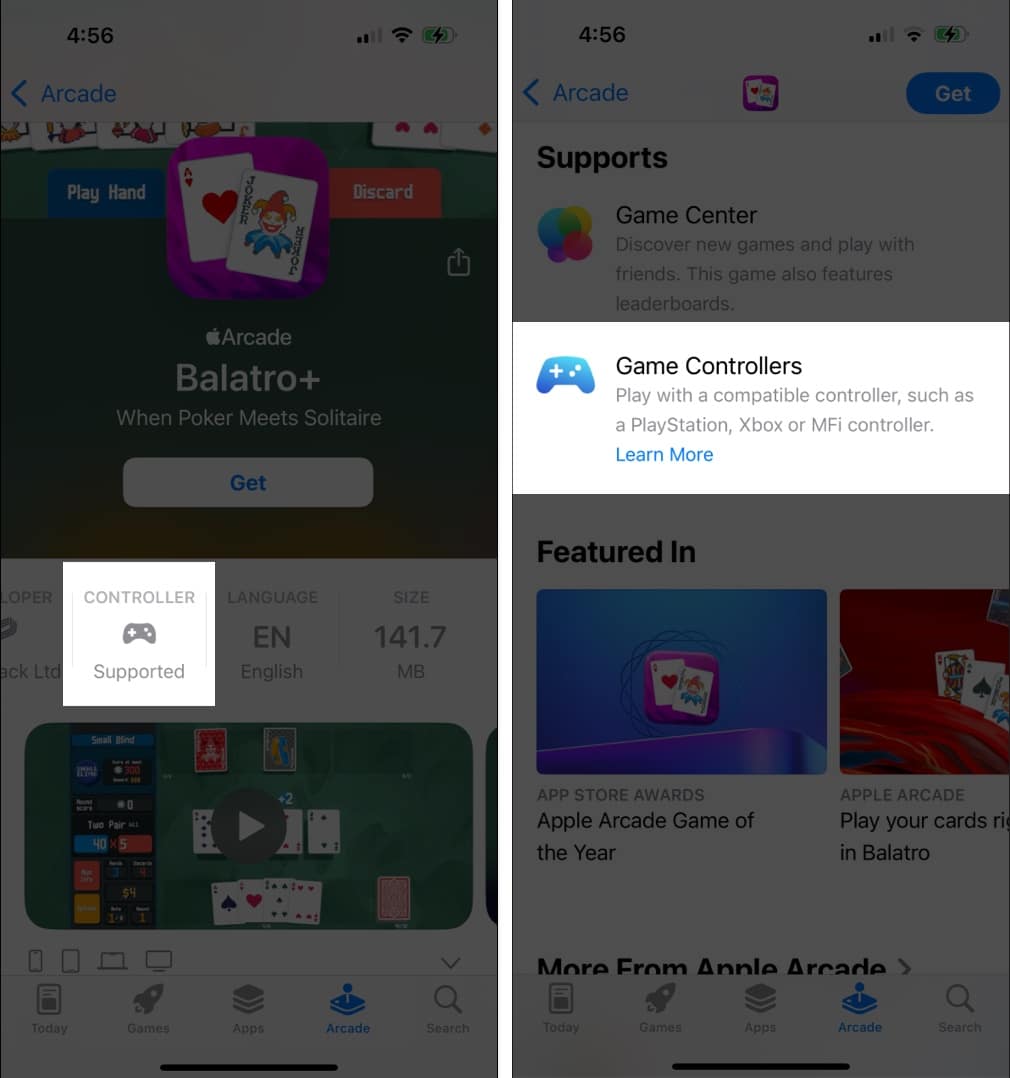
If the icon is missing, the game likely relies on touchscreen or motion controls. For the existing games on your device, you can check its in-game settings to find controller options. Also, ensure you use a compatible controller with your iPhone, iPad, Apple TV, or Mac.
Note:
Best Apple Arcade games that support controllers
Here’s a list of some of the best controller-supported games available on Apple Arcade:
Action & Adventure
Racing games
Platformers & Puzzle games
Sports & Fighting games
However, some recently launched games do not support controllers as they are designed exclusively for touch or motion controls. Some popular titles include Temple Run: Legends, Balatro+, Return to Monkey Island+, Cut the Rope 3, Cityscapes: Sim Builder, Iron Marines+, Temple Run+, Pocket Card Jockey: Ride On!, GRIS+, etc.
Filter games based on Controller support
You can also filter games based on controller support by following these steps:
- Open the App Store on your iPhone or iPad.
- Go to the Arcade section.
- Tap the All Games tile.
- Tap the filter icon in the top-right corner.
- Select Controller Support from the filter options.
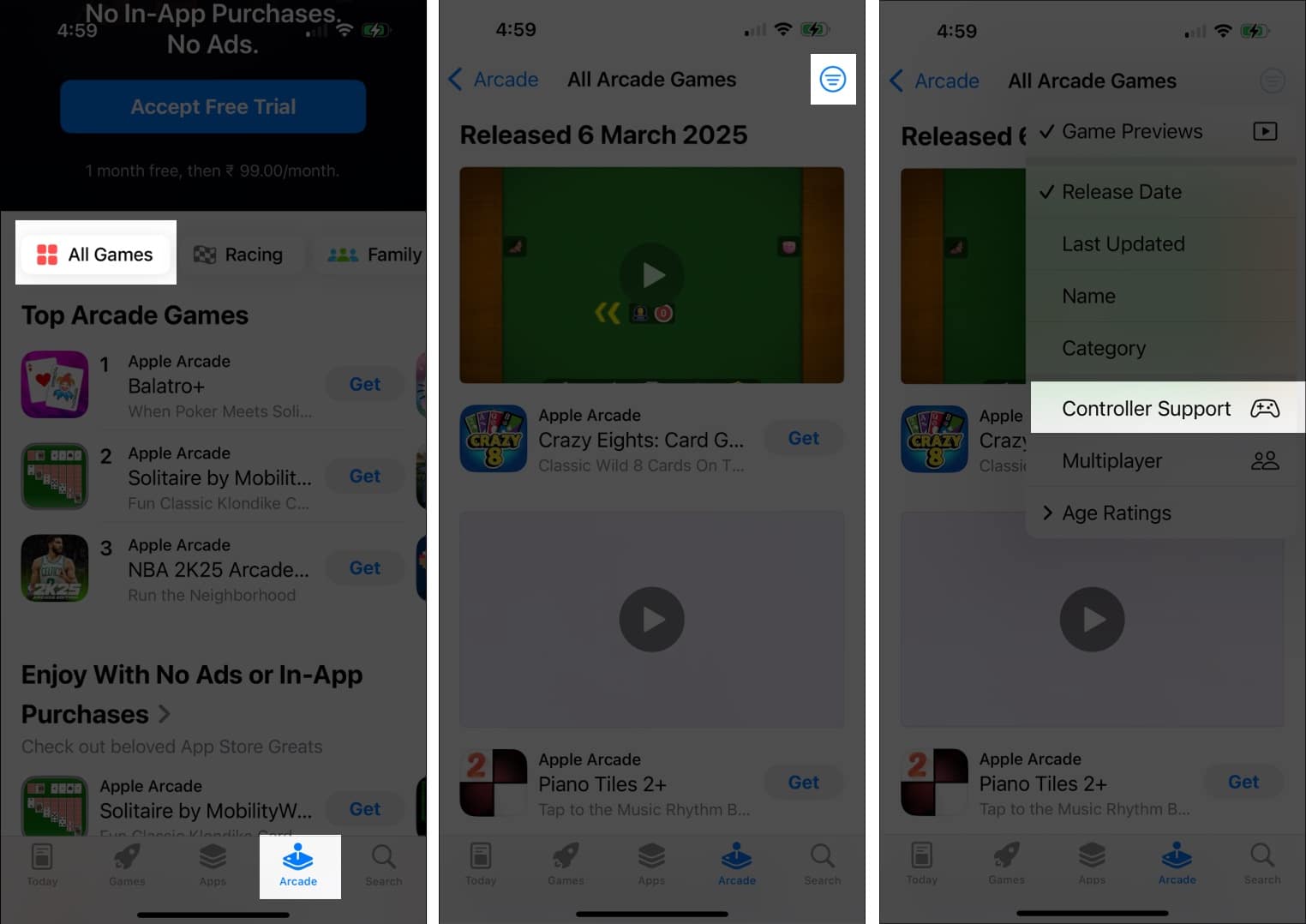
The App Store will now display a list of games that are compatible with controllers.
Signing off
If you love playing Apple Arcade games, exploring those with controller support can provide a more comfortable and immersive experience. Keep an eye out for new releases, as Apple continues expanding its library of controller-friendly titles. Also, ensure your device runs the latest software version for optimal performance.
What’s your favorite Apple Arcade game? Let me know in the comments below!
Recommended for You:

Written by
Arshmeet KaurA self-professed Geek who loves to explore all things Apple. I thoroughly enjoy discovering new hacks, troubleshooting issues, and finding and reviewing the best products and apps currently available. My expertise also includes curating opinionated and honest editorials. If not this, you might find me surfing the web or listening to audiobooks.
View all posts →More from Games
Garden Horizons Codes (March 2026)
Redeem active Garden Horizons codes for free Shillings, seeds, sprinklers, and exclusive rewards to grow your garden faster.
 Ravi Teja KNTSMarch 5, 2026
Anime Eternal Codes (March 2026)
Looking for the latest Anime Eternal codes? Here’s a complete list of working and expired codes.
Ravi Teja KNTSMarch 5, 2026SpongeBob Tower Defense Codes (March 2026)
Looking for the latest SpongeBob Tower Defense codes? This guide has you covered with all working codes.
Ravi Teja KNTSMarch 3, 2026