Update:
Verified the latest Weak Legacy 2 Codes on October 01, 2026
Weak Legacy 2 codes are free promo codes released by the developers to give players spins, clan rerolls, race resets, and breathing or blood art resets. These rewards directly affect your build, progression speed, and overall experience, especially in a game where RNG plays a big role.
Codes are usually tied to updates, milestones, reworks, or bug fixes, and many of them expire quickly or only work in new or private servers. This guide keeps things simple and accurate. You’ll find the current working codes, a clear list of expired ones, exact redemption steps, common fixes, and official places to track new codes.
All Working Weak Legacy 2 Codes
- 500KLIKES!: 2 Crystal essence, 25 Spins, and 1 Fate Spin NEW
- HAPPYEASTER!: 20 Spins and 5 Fate Spins NEW
- BLOODV2UPDGORARRRT: Reset breathing/ art potion NEW
- HPPYSAINTPATRICKS: 100k Yen and Reset potion
- SENIORISTHEGOAT: Reset Breathing or 1 Art Potion
- ENTDISTRICTUPD: 100k Yen, 15 spins, and 1 Crystal essence
- ENTDISTRICTUPD2: Reset race potion and 5 fate spins
- ENTDISTRICTWHEN?: 25 Normal spins, Reset Breathing/Bda Potion, and Reset Race Potion
- sorry4bugs!: 10x Fate rerolls
- isbeastbreathingreal: 1x Reset breathing or Art potion
- 2weekupdate: 10x Mystery ores
- sorry4bugs
All codes: 500KLIKES!, HAPPYEASTER!, BLOODV2UPDGORARRRT, HPPYSAINTPATRICKS, SENIORISTHEGOAT, ENTDISTRICTUPD, ENTDISTRICTUPD2, ENTDISTRICTWHEN?, sorry4bugs!, isbeastbreathingreal, 2weekupdate, sorry4bugs
Check out the latest Anime Final Quest codes, Parkour Champions codes, and Dungeon Hunters codes for free rewards and bonuses.
Expired Weak Legacy 2 Codes
10KLIKESRESETRACE, 15SPINS200KLIKES, 15SPINS350KLIKES, 1KLIKES25AURASPINS, 1MVISITS50SPINS, 2026HYPE, 25SPINS250KLIKES, 25SPINS300KLIKES, 25SPINS50KLIKES, 25SPINS5KFOLLOWERS, 25SPINS75KLIKES, 25SPINS85KLIKES, 25SPINSANNIVERSARY, 25SPINSFLAMEV2, 25SPINSINSECTUPD, 25SPINSMISTUPD, 25SPINSMOONUPDATE, 25SPINSMUGEN, 25SPINSPATCH2UPDATE, 25SPINSSICKLES, 25SPINSSORRYFORDELAY, 25SPINSSORRYFORTHEBUGS, 25SPINSUPD5, 35KFAVORITESRESETRACE, 35KLIKES25SPINS, 400KLIKESRESETRACE, 40KLIKESRESETBREATHINGORART, 450KLIKESRESETRACE, 45KLIKESRESETBREATHINGORART, 50SPINSHALLOWEENEVENT, 50SPINSPATCHUPDATE, 50SPINSUPDATE1, 5KLIKESRESETBREATHINGORART, 60KLIKESRESETRACE, 65KLIKES25PINS, 75SPINS100KLIKES, 75SPINS150KLIKESANDSORRYFORTHEBUGS, 75SPINSSORRYFORBUGS, ANNIVERSARYRESETBREATHING, ANNIVERSARYRESETRACE, DUNGEONREWORK, FIXES15SPINS, FLAMERESETRACE, FLAMEV2RESETBREATHINGORART, INSECTUPDERESETRACE, INSECTUPDRESETBREATHINGORART, MISTUPDERESETRACE, MISTUPDRESETBREATHINGORART, MOONUPDATERESETBREATHINGORART, MOONUPDATERESETRACE, MUGENERESETRACE, MUGENRESETBREATHINGORART, RESETRACE115KLIKES, SERPENTTIME, SICKLESRESETBREATHINGORART, SICKLESRESETRACE, SNAKESNAKE, SORRY4DELAY, SOUNDREWORK, UPD5ERESETRACE, UPD5RESETBREATHINGORART, UPDATE1CRYSTALESSENCE, UPDATE1RESETBREATHINGORART, UPDATE1RESETRACE, UPDATE2RESETBREATHINGORART, UPDATE2RESETRACE, XMASHYPE
What Are Weak Legacy 2 Codes and Why They Matter
In Roblox games, promo codes are developer-issued rewards used to support players and celebrate updates or milestones. In Weak Legacy 2, they matter more than usual because clans, breathing styles, and demon arts are all luck-based.
Codes let you reroll builds, fix bad RNG, and test different playstyles without restarting or grinding for hours. For new and mid-game players, they significantly reduce friction and make progression smoother.
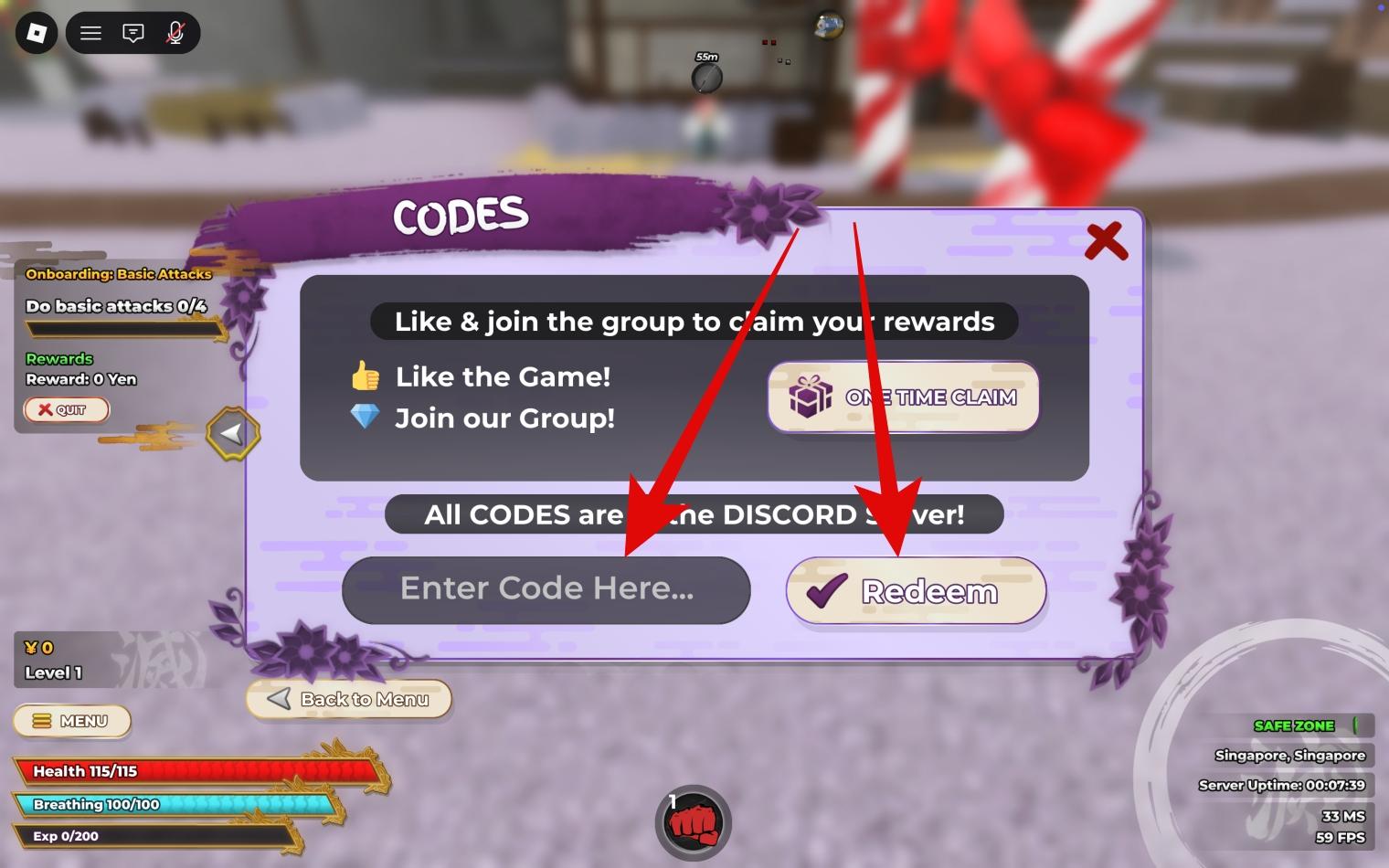
How to Redeem Weak Legacy 2 Codes
Redeeming codes works the same across PC and mobile and only takes a few seconds.
- Launch Weak Legacy 2 on Roblox.
- Press M to open the menu.
- Locate the Code input section.
- Enter a working code exactly as shown.
- Press Enter or Redeem to claim the reward.
Weak Legacy 2 Codes Not Working? Common Fixes
If a code fails, it’s usually due to one of these reasons:
- The code has expired or was disabled
- The code was typed incorrectly or with wrong capitalization
- The server hasn’t refreshed after an update
- The code was entered in the wrong menu
To fix this, try joining a new server, restarting Roblox, or logging out and back in before redeeming again.
Best Practices for Using Weak Legacy 2 Codes
Use codes deliberately. Redeem them as soon as they release, but avoid spending rerolls immediately unless you understand the current meta.
Resets are best used after testing builds in combat. This approach is especially effective for new and mid-game players who want flexibility without losing progress.
When to Spend Rerolls and Resets
Early game is best for experimenting and learning mechanics. Mid game is where optimization matters most. Late game focuses on refining and min-maxing a strong build.
Avoid impulsive rerolling early, as it often leads to wasted rewards.
Boost Timing: Using Codes with Events and Play Sessions
Redeem codes before long grinding sessions so rewards are used efficiently. Codes pair well with update weekends and major events.
Avoid redeeming codes right before logging off, since most rewards are meant to be used immediately.
Where to Find New Weak Legacy 2 Codes Fast
New codes are usually announced through official channels during updates or milestones.
- Weak Games official Discord server
- Roblox game page description
- Developer YouTube uploads and social posts
- Update logs and announcement posts
Conclusion
Weak Legacy 2 codes are a reliable way to progress faster, correct bad RNG, and experiment with builds without grinding or spending Robux.
Redeem codes quickly, enter them accurately, and check back often for updates. If you find a new working code, sharing it helps the entire community stay ahead.
Related articles worth reading