
Best Reminder Apps to Manage Tasks and Stay Organized
iGeeksBlog is supported by its readers. When you buy through links on our site, we may earn an affiliate commission. This doesn't affect our editorial independence.
Stay organized with these best reminder apps for iPhone and Android that help track tasks and reminders easily.
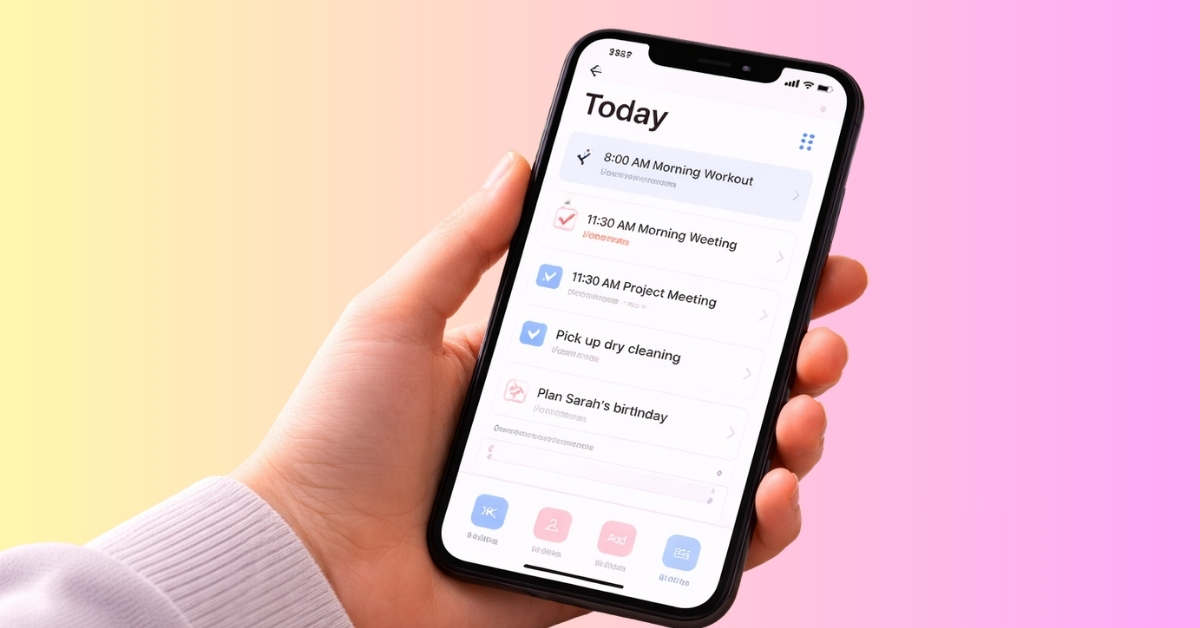
Modern life moves fast. Between work deadlines, meetings, personal tasks, and daily responsibilities, it’s easy to forget important things, leading to missed tasks, forgotten appointments, and unnecessary stress. This is where reminder apps become incredibly useful.
Reminder apps help you capture tasks the moment they come to mind and notify you exactly when you need to act. They combine task management, smart reminders, collaboration tools, calendar views, and cross-device syncing to help you manage your life more efficiently.
In this guide, we’ll explore the best reminder apps for iPhone and Android that help you stay organized, remember important tasks, and improve your productivity.
What Makes a Great Reminder App in 2026
There are several reminder apps out in the market. Some focus on simple notifications, while others provide full productivity systems. When choosing the best reminder apps for this guide, several important features stood out.
Smart Notifications
A good reminder app must send notifications at the right time. This includes:
- Time-based reminders
- Recurring reminders
- Location-based reminders
- Persistent notifications until the task is completed
These features ensure you never miss important tasks even if you are traveling across different time zones.
Cross-Platform Sync
Most people switch between devices throughout the day. A great reminder app should work smoothly across iPhone, Android, and desktop apps.
Cloud syncing keeps all tasks up to date everywhere.
Easy Task Creation
If adding a task takes too long, people stop using the app. The best apps allow you to quickly add reminders using:
- Natural language typing
- Voice input
- Quick add buttons
- Widgets
Moreover, you should be able to reschedule the tasks in seconds and build automations for daily activities, saving time and effort.
Task Organization
A reminder app becomes much more powerful when it can organize tasks effectively. Helpful organization features include lists and folders, subtasks, tags or labels, and priority flags. Also, the latest apps use AI to automatically sort tasks and suggest reminders based on your past activities.
These features help you manage both simple reminders and complex task lists.
Integration With Other Tools
Many reminder apps integrate with productivity tools such as calendars, email services, and collaboration apps. This allows your reminders to fit smoothly into your workflow, especially useful for teams and families.
How We Tested and Chose the Best Reminder Apps
To find the best reminder apps for 2026, we tested each app across several key criteria.
- Ease of Use: The first thing we looked at was how simple the app is to use. A reminder app should feel intuitive from the first moment. Users should be able to add reminders within seconds without navigating complicated menus.
- Notification Reliability: A reminder app is useless if notifications fail. We tested whether reminders appeared consistently and on time across both iPhone and Android devices.
- Feature Set: We checked the depth of features such as recurring reminders, voice reminders, task lists, calendar view, collaboration tools, and smart scheduling. Apps that offered useful productivity features without becoming overwhelming ranked higher.
- Cross-Device Support: Since many users work across multiple devices, we checked whether each app supports syncing between mobile, desktop, and web platforms.
- Free vs Paid Value: Some apps offer powerful free versions, while others require subscriptions. We considered whether the premium plans actually provide meaningful additional value.
After evaluating these factors, the following apps stood out as the best reminder apps for staying organized.
Best Reminder Apps on iOS and Android
Here, we have listed the top 6 reminder apps catering to different needs and requirements. Let’s explore each one and see which one fits your routine.
1. TickTick: To-Do List & Calendar
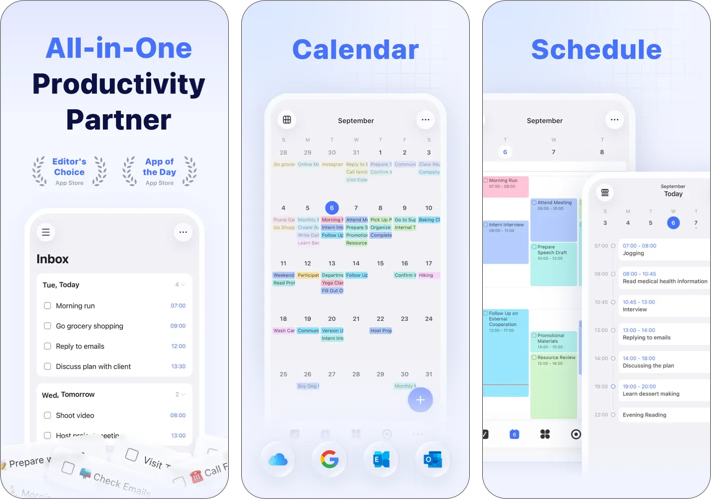
TickTick is one of the most complete reminder apps available today. It combines a simple task manager with powerful productivity features, including a built-in calendar, habit tracker, event countdowns, and a Pomodoro timer.
The interface is clean and easy to navigate, which makes it suitable for both beginners and productivity enthusiasts. You can quickly create tasks and add attachments, notes, and comments to them. Each task supports up to 5 reminders. You can dismiss, snooze, and mark reminders as done directly from their notification banner.
The app integrates well with your calendar apps and lets you add tasks via email. Moreover, you can create task lists and checklists and share them with others for collaboration. The priority levels and different sorting options ensure the most important tasks are always in your view.
Key Features
- Smart recurring reminders based on location and time
- Calendar view for visual task planning
- Habit tracking system
- Built-in Pomodoro focus timer
- Subtasks and priority levels
- Cross-platform syncing via cloud
- Excellent feature set
- Clean and intuitive design
- Powerful free version
- Great productivity tools
- The interface may feel feature-heavy for simple users
- No AI features
Pricing: Free. Premium plan available via subscription ($3.99/month)
Best For: Users who want a complete productivity and reminder system in one app.
2. Todoist: To Do List & Calendar
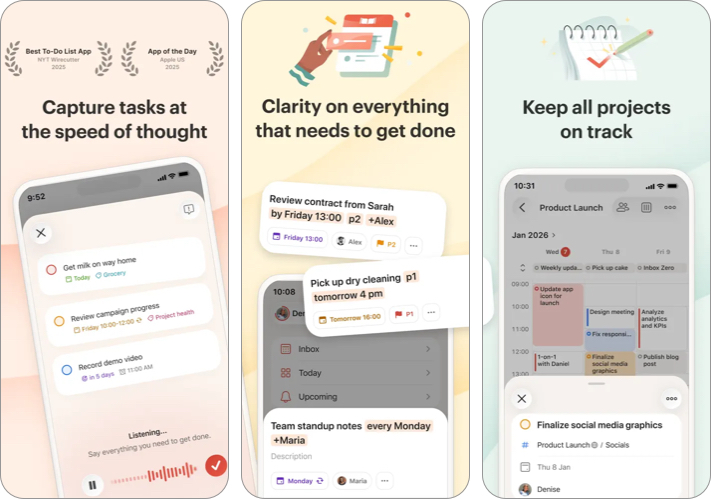
Todoist has long been one of the most popular task management apps, and it remains a top choice in 2026. It excels at helping users manage both personal tasks and collaborative projects. You can quickly add tasks, set deadlines, assign priorities, and break big goals into smaller steps.
The app lets you add new tasks using natural language input. For example, saying or typing “Submit report tomorrow at 10am in School” automatically schedules the reminder in the right project. The clean interface and powerful organization tools have a minimal learning curve.
With features like sub-tasks, sections, labels, and calendar views, Todoist helps you stay focused on what matters and plan your day efficiently. You can also sync your tasks across devices and collaborate with others, making it useful for both personal and team productivity.
Key Features
- Natural language reminders
- Task priorities and labels
- Project-based organization
- Flexible recurring reminders for habit building
- Productivity tool integrations, such as Google Calendar, Outlook Calendar, Zapier, Slack, and Dropbox.
- Team collaboration tools
- Clean and minimal interface
- Extremely reliable reminders
- Strong cross-platform support
- Great collaboration features
- Advanced features, like custom reminders and calendar view. etc., are locked behind the premium plan
- You can’t store documents
Pricing: Free. Paid premium plan starts at $6.99/month.
Best For: Professionals, students, teams, and GTD practitioners seeking structured task management with reminders and notifications.
3. Google Keep – Notes & Lists
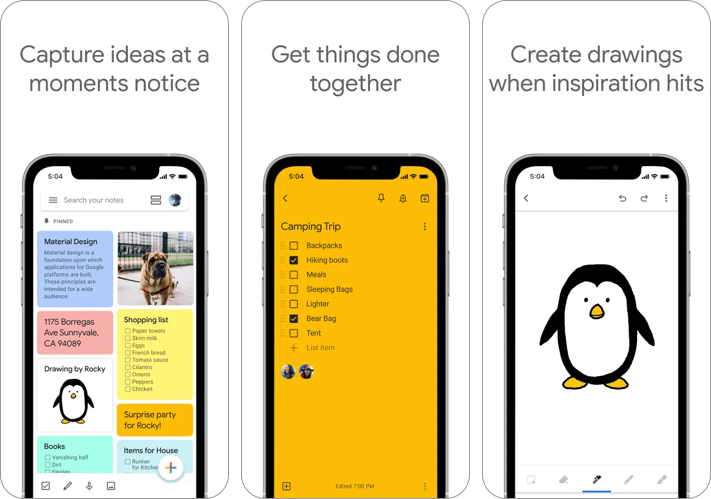
Google Keep is a lightweight reminder and note-taking app designed for simplicity. It’s perfect for people who want quick reminders without complex productivity systems. Everything syncs automatically with your Google account. So, the tasks appear in your calendar and Google Assistant.
The app allows users to create notes, checklists, and reminders in seconds and arrange them visually using labels, pins, colors, and drawings. You can even attach voice memos to the reminder. Google Keep also supports location-based reminders that notify you when you arrive at a specific place.
Key Features
- Simple notes and checklists
- Time and location-based reminders
- Voice notes
- Color-coded organization
- Google account syncing
- Extremely simple and easy to use
- Completely free
- Works well with Google services
- Fast reminder creation
- Limited task management features
- You can’t create recurring tasks
- No advanced project organization
Pricing: Free
Best For: Beginners who need a simple reminder app for day-to-day tasks without any complexity.
4. Any.do: To Do list & Planner
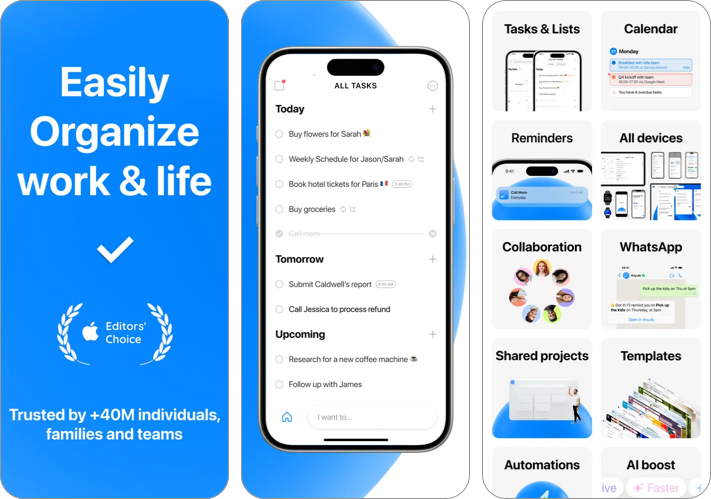
Any.do is a popular reminder and task management app known for its simple design and daily planning features. One standout feature is the project templates and Daily Planner, which help you review and organize tasks visually. You can also switch between different calendar views to check weekly and monthly tasks.
The app also includes voice reminders, WhatsApp support for creating reminders, and calendar integration with Google Calendar, Outlook Calendar, and Facebook events, making it a versatile productivity tool. Moreover, you can share to-do lists and assign tasks to others to collaborate in real-time.
Key Features
- AI features and automations for recurring reminders
- Daily planning assistant
- Voice reminders
- Calendar and productivity app integration
- Shared lists
- Private boards
- Clean and user-friendly interface
- Helpful daily planning feature and widgets
- Strong reminder notifications
- AI support
- Some features require a premium plan
- Customization is limited compared to other power apps
Pricing: Offers a free version with premium options starting at $2.99.
Best For: People who want structured daily task planning with AI-powered reminders.
5. Superlist: To-Do List & Tasks
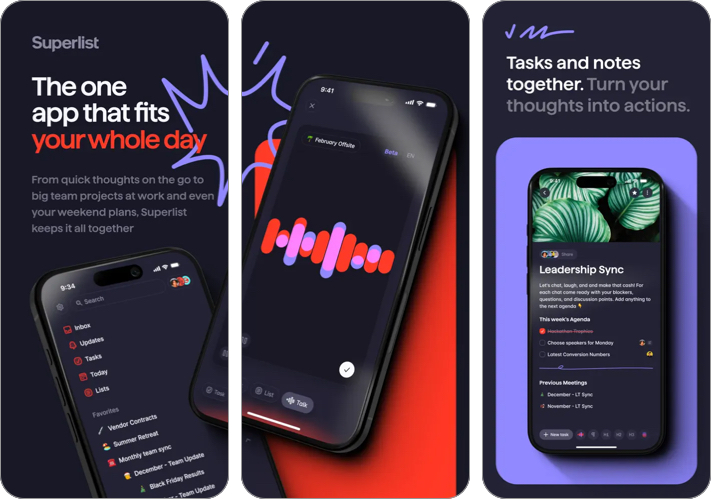
Superlist is a newer productivity app built by the team behind Wunderlist. It focuses on collaboration and task organization for teams and individuals. You can create tasks by talking to its AI assistant or typing in natural language.
The design is modern and visually appealing, and it supports reminders inside notes, shared lists, comments, and file attachments. Moreover, the app can be integrated with Google Calendar, Linear, Slack, etc. This makes Superlist particularly useful for collaborative task planning.
Key Features
- Shared task lists
- Comments and collaboration tools
- File attachments
- Clean modern interface
- Cross-device syncing
- Excellent team collaboration features
- Modern and clean design
- Good for project planning
- Still developing compared to older apps
Pricing: Free version available with paid plans for teams (starting at $6/month).
Best For: Teams and groups who need shared reminders and collaborative task lists.
6. Yapp Random Reminders
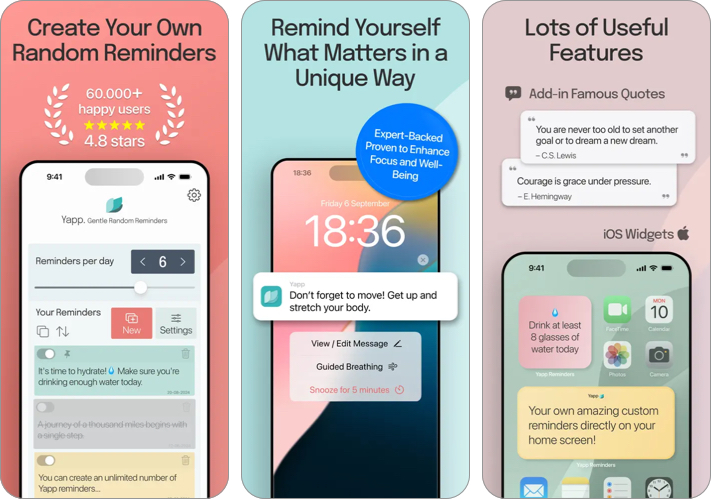
Yapp Random Reminders provides a different kind of reminder. Rather than reminders being sent at regular intervals, reminders are sent randomly. This makes it useful for habits, self-care prompts like drinking water, motivational messages, or mindfulness reminders.
The concept is simple but effective for users who want spontaneous prompts. You can organize the reminders by color-coding and customize settings, such as how many reminders you want per day, your daytime range, active days of the week, etc.
Key Features
- Random reminder notifications
- Custom message reminders
- Habit and motivation prompts
- Simple interface
- Unique reminder concept
- Great for habit building
- Easy to use
- Limited task management features
- Not recommended for creating a structured task list
Pricing: Free with optional upgrades ($2.99/month).
Best For: Users who want random habit reminders and motivation prompts.
Tips for Maximizing Productivity With Reminder Apps
Using a reminder app effectively requires more than just installing it. Here are a few tips to get the most out of your reminder system.
- Capture Tasks Immediately: Whenever a task comes to mind, add it immediately. This prevents mental overload and ensures nothing gets forgotten.
- Use Recurring Reminders: Many tasks repeat regularly. Set recurring reminders for things like weekly meetings, monthly bills, exercise routines, etc. It will not only save time but will also ensure that your routine is consistent.
- Organize Tasks Into Lists: Create separate lists for different areas of life, such as work tasks, personal errands, shopping lists, and long-term goals. So, you can focus on the right tasks at the right time.
- Review Your Tasks Daily: Spend a few minutes each morning reviewing your reminders. This helps you plan your day and prioritize important tasks.
Final Verdict: Which Reminder App Should You Choose?
It’s hard to say which reminder app is the best, as this depends on your personal workflow and productivity style.
- If you want the most powerful all-in-one reminder app, TickTick is one of the best choices available.
- If you prefer a clean and structured task management system, Todoist remains an excellent option.
- For users who want simple reminders without complexity, Google Keep is a reliable and completely free solution.
- If collaboration is important, Superlist provides strong shared task features.
- Meanwhile, Any.do works well for daily planning, while Yapp Random Reminders offers a unique way for your habit-forming needs.
To conclude, the best thing you can do is try out one or two apps and see which one fits your workflow best. The right reminder app can significantly reduce stress in your life and help you stay on top of everything that matters.
You may also like to read these:
Topics

Written by
Ava BiswasAva is a die-hard Apple aficionado and seasoned writer with a knack for breaking down complex tech concepts into easily digestible content. Having honed her writing and editing skills over 4 years at renowned media houses like TechBurner, Ava crafts informative and engaging articles including troubleshooting guides, product reviews, editorials at iGeeksBlog. When not typing, you can find her exploring the latest Apple releases or pondering the future of tech innovation.
View all posts →