
How to Use ChatGPT on iPhone with Apple Intelligence
Switch to ChatGPT for enhanced Siri functionality, better generative AI results, and more.
ChatGPT is now built into Apple Intelligence starting with iOS 18.2, so you can use it on your iPhone without installing the app. Siri can pull answers from ChatGPT, and you can use it in text fields to rewrite, summarize or explain content on your screen or through the camera. It works like a native part of your device instead of a separate app.
This post explains how to use ChatGPT with Siri and Apple Intelligence on your iPhone and get the most out of its new integration.
How to Enable ChatGPT Extension on iPhone
You need to enable the ChatGPT extension on your iPhone before you can use it. This is how you do it:
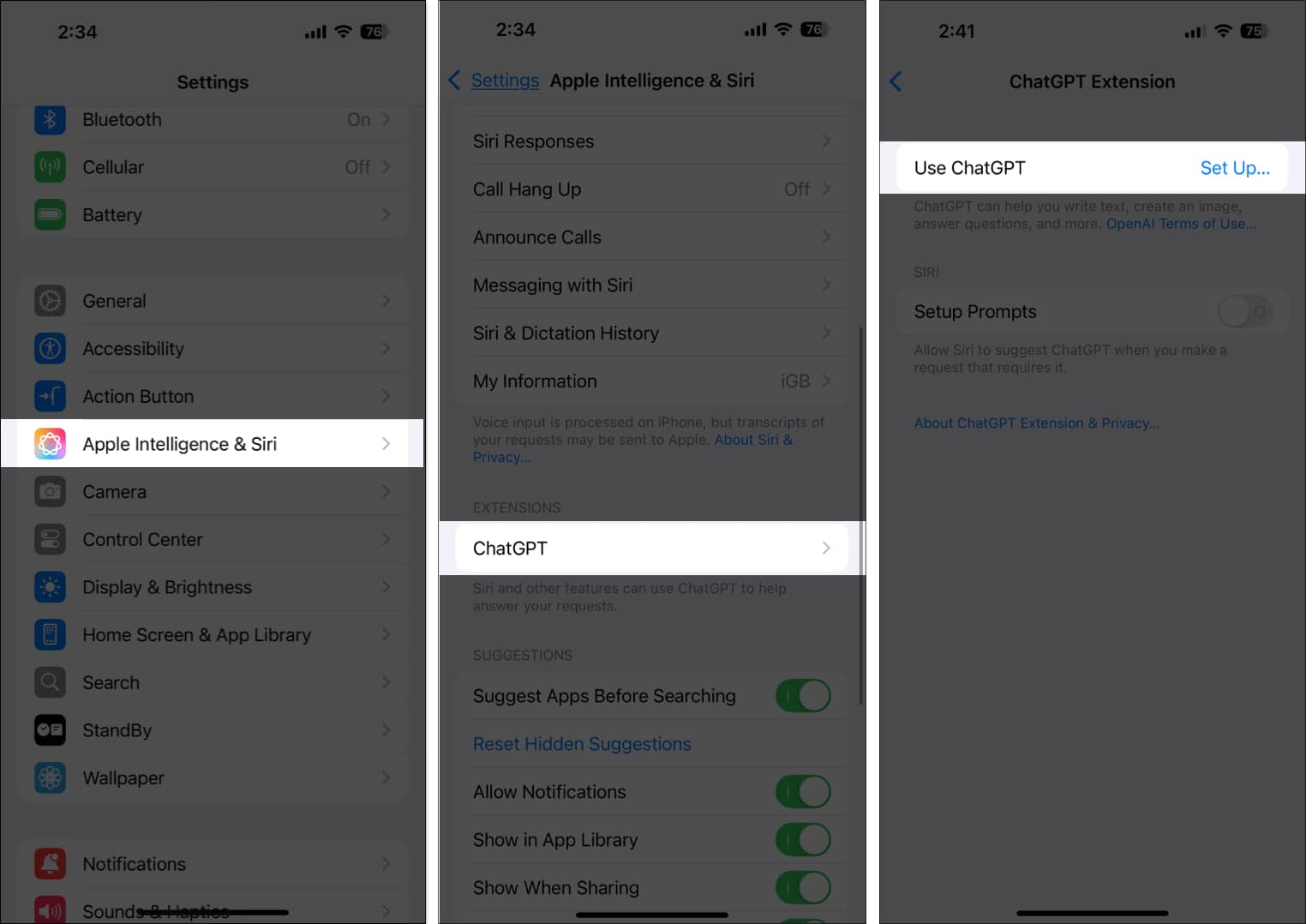
- Open Settings and select Apple Intelligence & Siri.
- Tap ChatGPT under Extensions.
- Tap Set Up next to Use ChatGPT.
- Hit Next on the ChatGPT information screen and tap Enable ChatGPT.
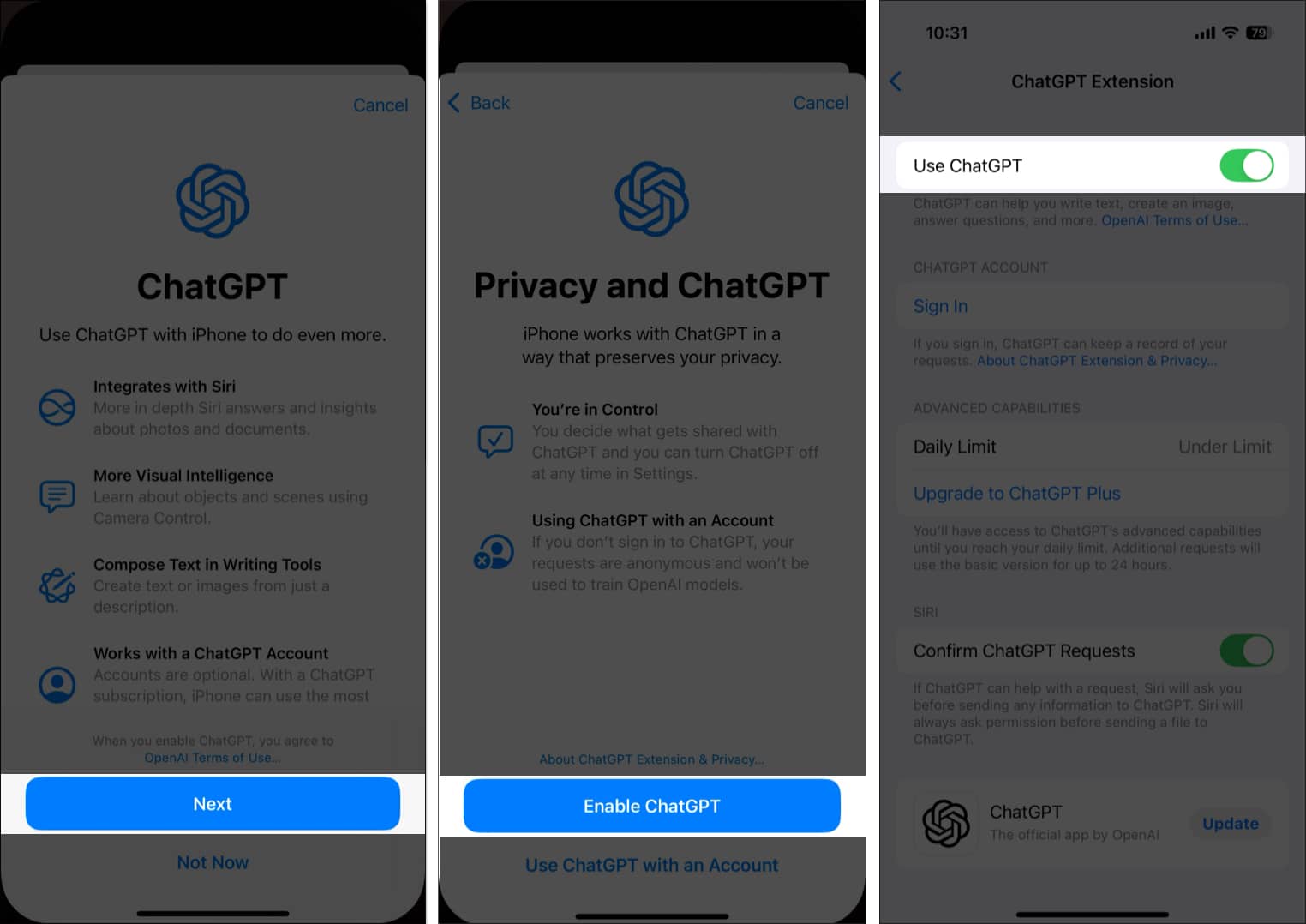
- Alternatively, tap Use ChatGPT with an Account, then sign in to your ChatGPT account if you want to use advanced ChatGPT capabilities and have the iPhone keep a record of your previous requests.
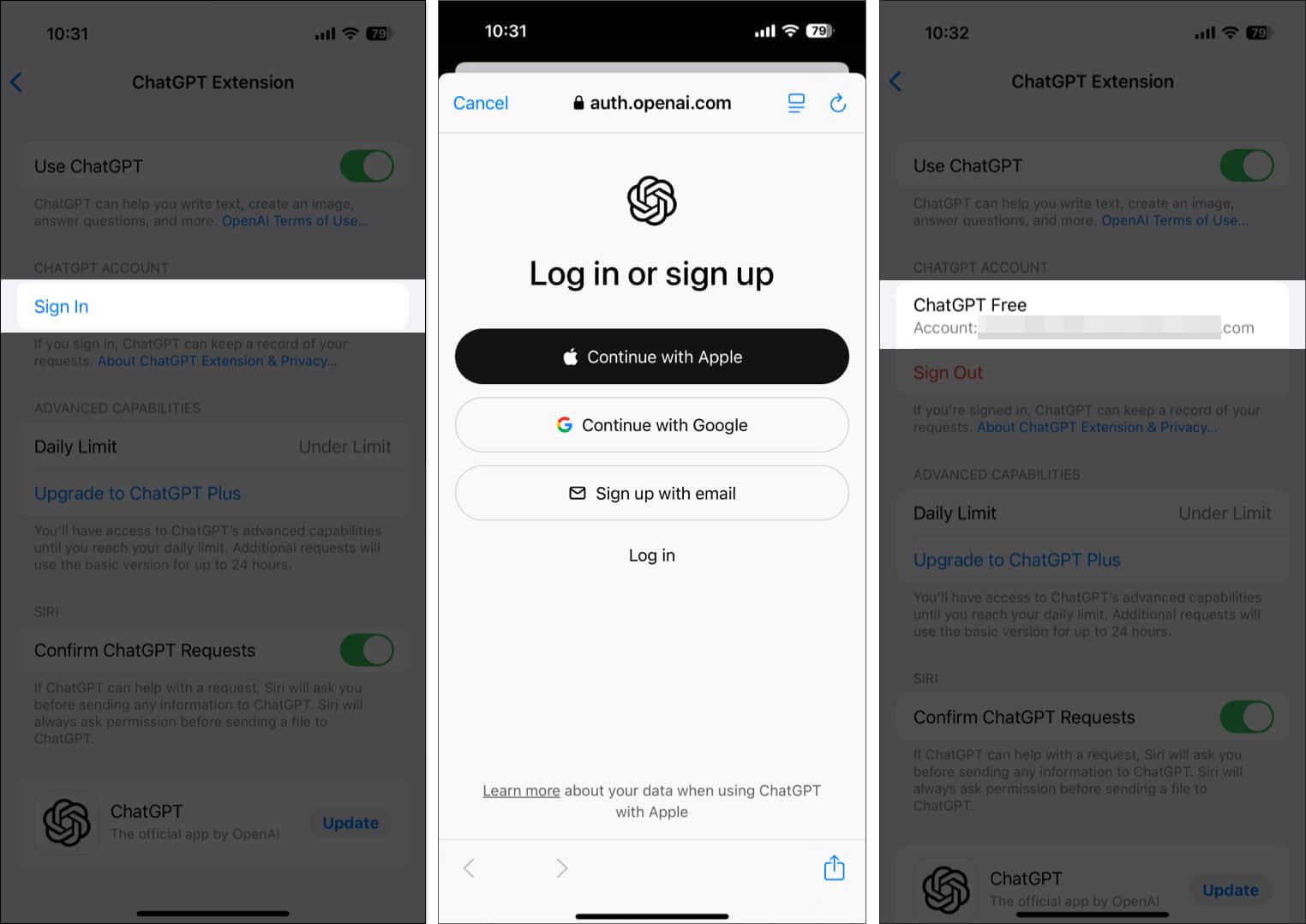
If you didn’t bother linking your ChatGPT account during the setup, you can do it later, as shown in the steps below:
- Head to Settings → Apple Intelligence & Siri → ChatGPT.
- Tap on Sign in under ChatGPT Account.
- Sign in with your preferred account, and your ChatGPT account will be visible under the ChatGPT Account section.
Everything Your iPhone Can Do With ChatGPT and Apple Intelligence
With the ChatGPT extension now available on your iPhone, you can use the ChatGPT-Siri integration to compose text, get more information about the subject via Visual Intelligence, or simply ask Siri to get something done using ChatGPT. Below, I have explained each use case in detail.
1. Use ChatGPT with Writing Tools
Although Writing Tools were part of the initial Apple Intelligence features, the ability to compose text from a description was not available right away. This capability requires the ChatGPT extension to be active on your iPhone, which is now available.
Now that the complete set of Writing Tools is here, you can use Writing Tools to compose texts for you via ChatGPT. Here’s how:
- Open the app you want to use the Apple Intelligence Writing Tools in. In our case, we have used the Notes app.
- Inside a new note, tap the text field, then tap the > button in the contextual menu that appears and choose the Writing Tools option.
- Next, tap on the Compose tab in the Writing Tools window.
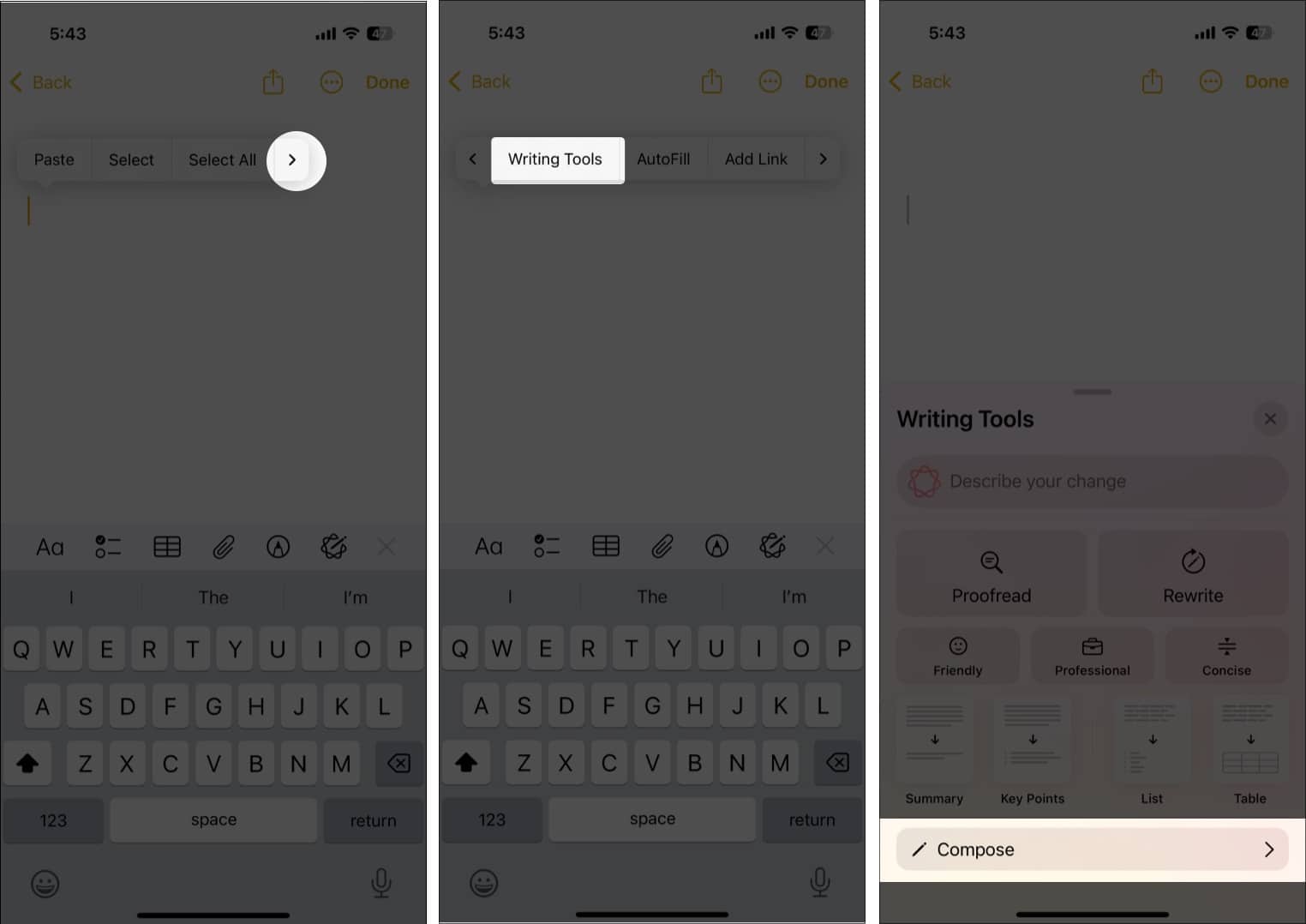
- Now, use the description field to tell ChatGPT what you want it to compose and hit Send. You can ask ChatGPT to compose some text or generate an image.
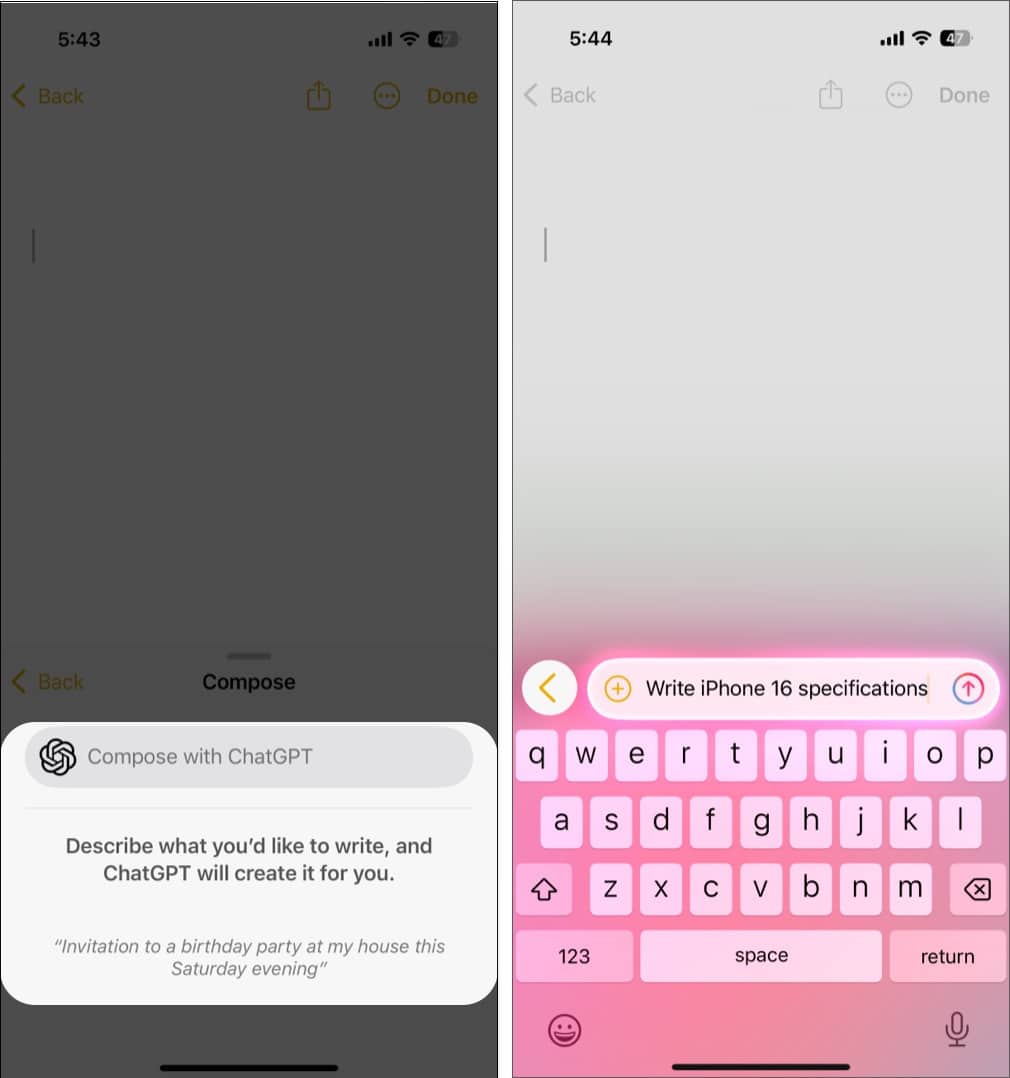
Wait a few seconds, and ChatGPT will compose the text for you.
2. Use ChatGPT with Visual Intelligence
Visual Intelligence lets your iPhone understand what is on your screen or in front of your camera and send that context to ChatGPT for quick, helpful insights. Instead of manually describing an image, you can ask ChatGPT to analyze what you are seeing or what you have captured in a screenshot. This makes the experience feel instant, natural, and deeply integrated into the device.
Use ChatGPT with the Camera View
You can ask ChatGPT to analyze anything your camera is pointed at in real time. This is useful for identifying objects, reading signs, explaining documents, translating boards, understanding ingredient lists on packaging, or getting help with things you cannot easily describe.
- Point your iPhone camera at the subject and long-press the Camera Control button to invoke Visual Intelligence.
- Tap the Ask button in the bottom-left corner, and you will see an “Asking ChatGPT” message as ChatGPT processes the information.
- Once it does, a ChatGPT box will appear on your screen with information about the subject in the frame.
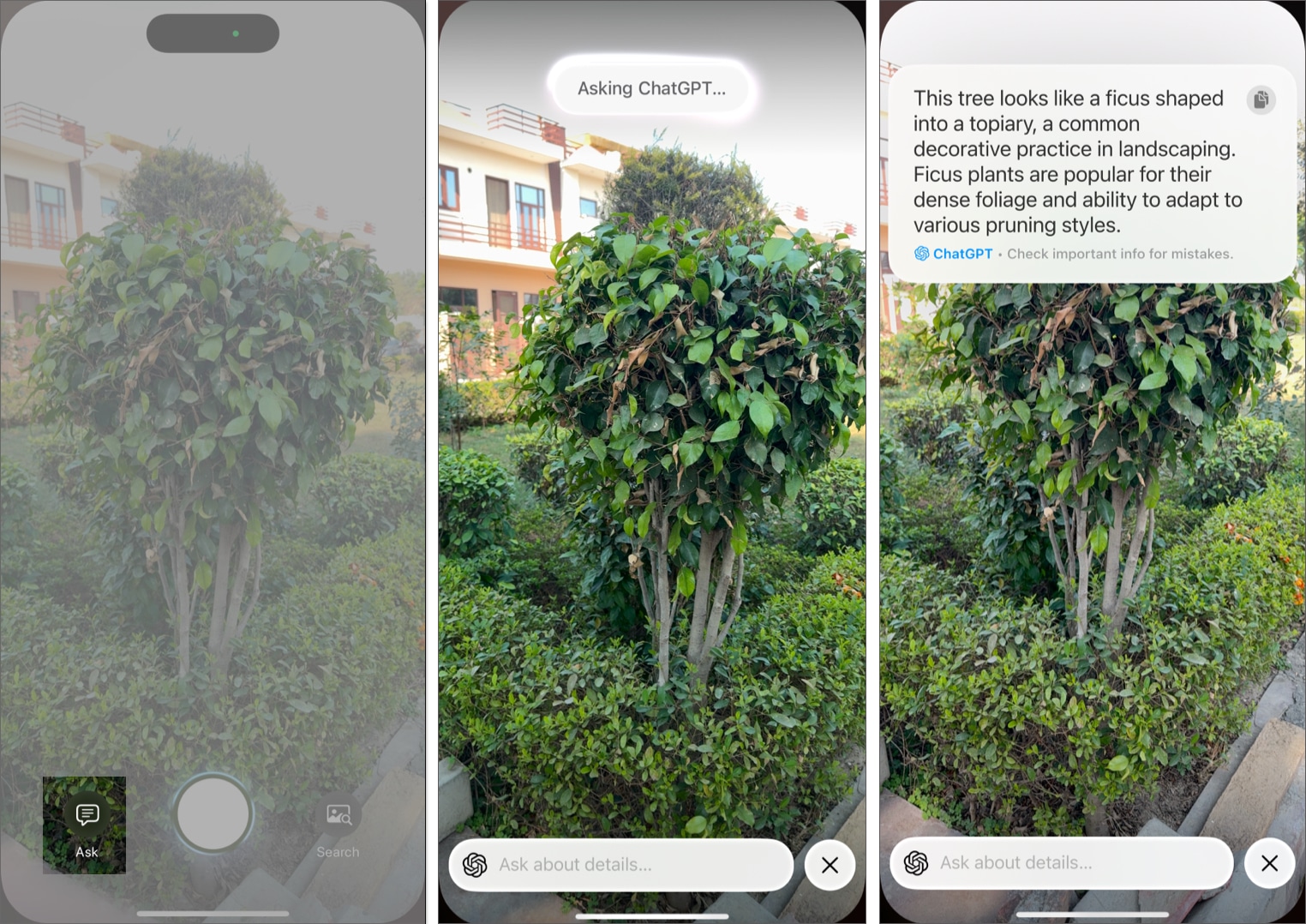
Use ChatGPT with Screenshots
Visual Intelligence also works on screenshots you have already taken. This is helpful when you want to extract text, understand information from an app, break down a chart, summarize content, or identify something captured on your screen.
- Take a screenshot using the side and volume buttons.
- Tap the screenshot preview before it disappears.
- Tap the Ask button at the bottom left corner.
- Speak or type what you want to ask.
- ChatGPT will analyze the screenshot and provide explanations, summaries or specific details based on what you ask.
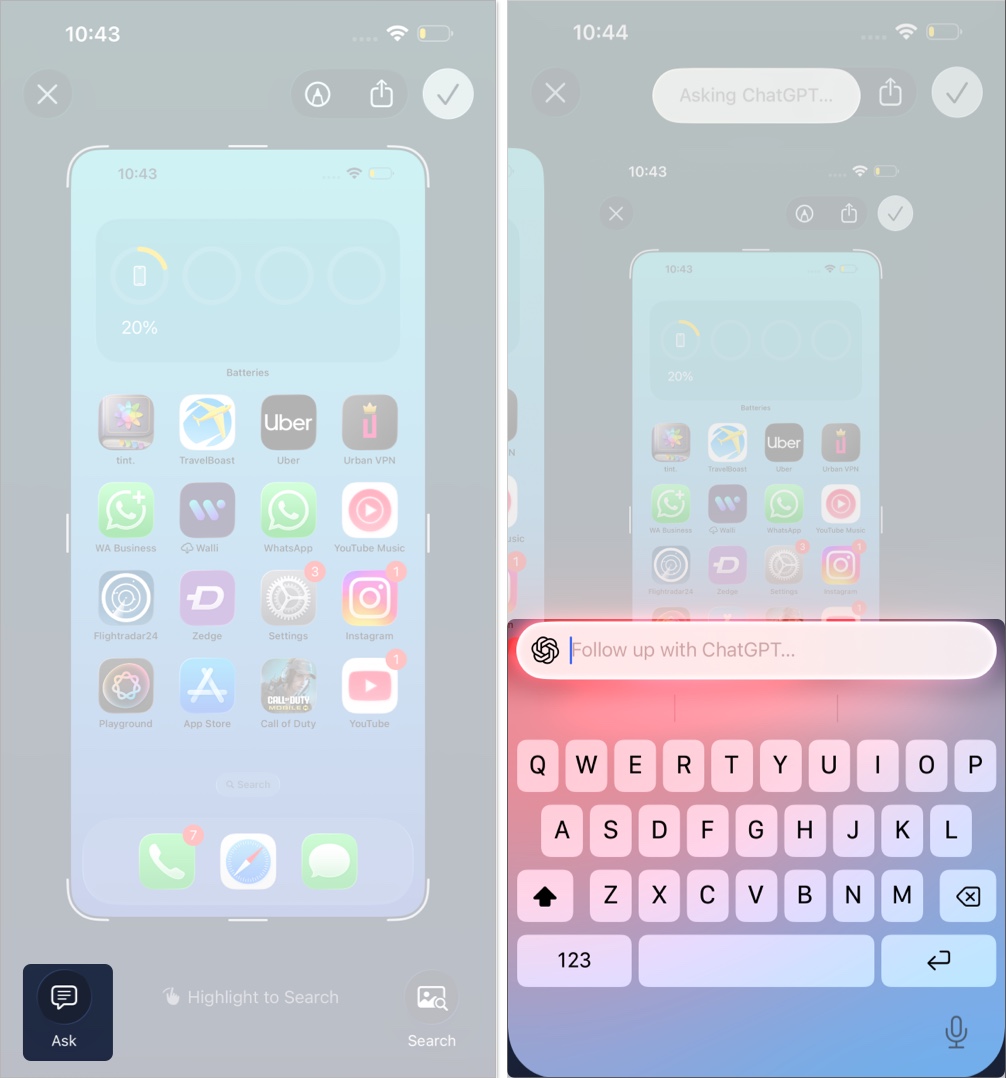
3. Use ChatGPT with Siri
Using ChatGPT with Siri is as easy as making a regular Siri request. The only difference is that Siri will now ask whether you want to use ChatGPT in response to your request. Let me show you how this works:
- Say “Hey Siri” or press and hold the Side button to invoke Siri and ask it to perform a task you would have used ChatGPT for otherwise.
- Alternatively, you can double-tap the app switcher bar at the bottom of the screen to type to Siri instead.
- Once a request is made, Siri will ask whether you want to use ChatGPT to perform the said task. Tap the Use ChatGPT button, and you will see a Working with ChatGPT message, followed by the composed result.
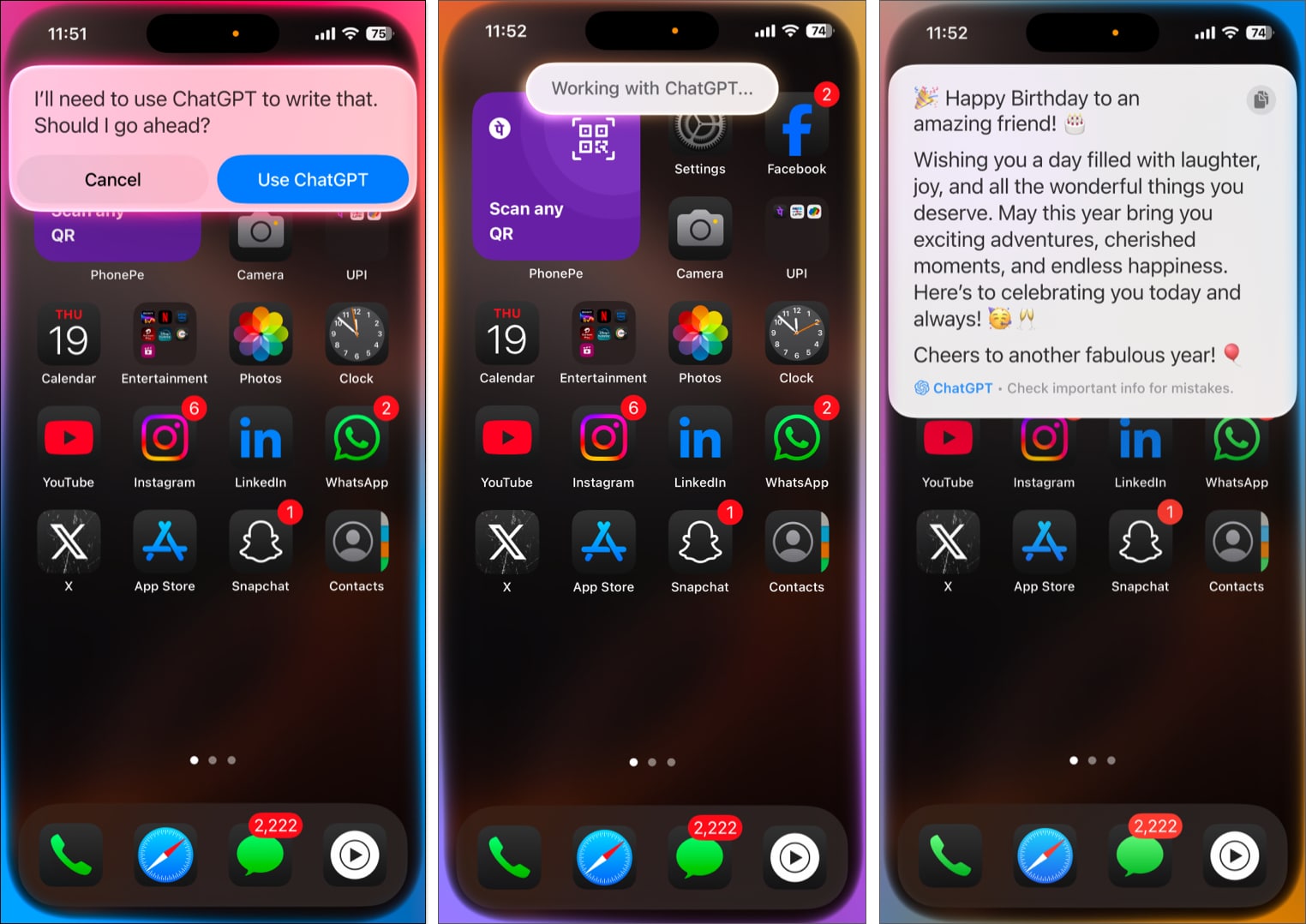
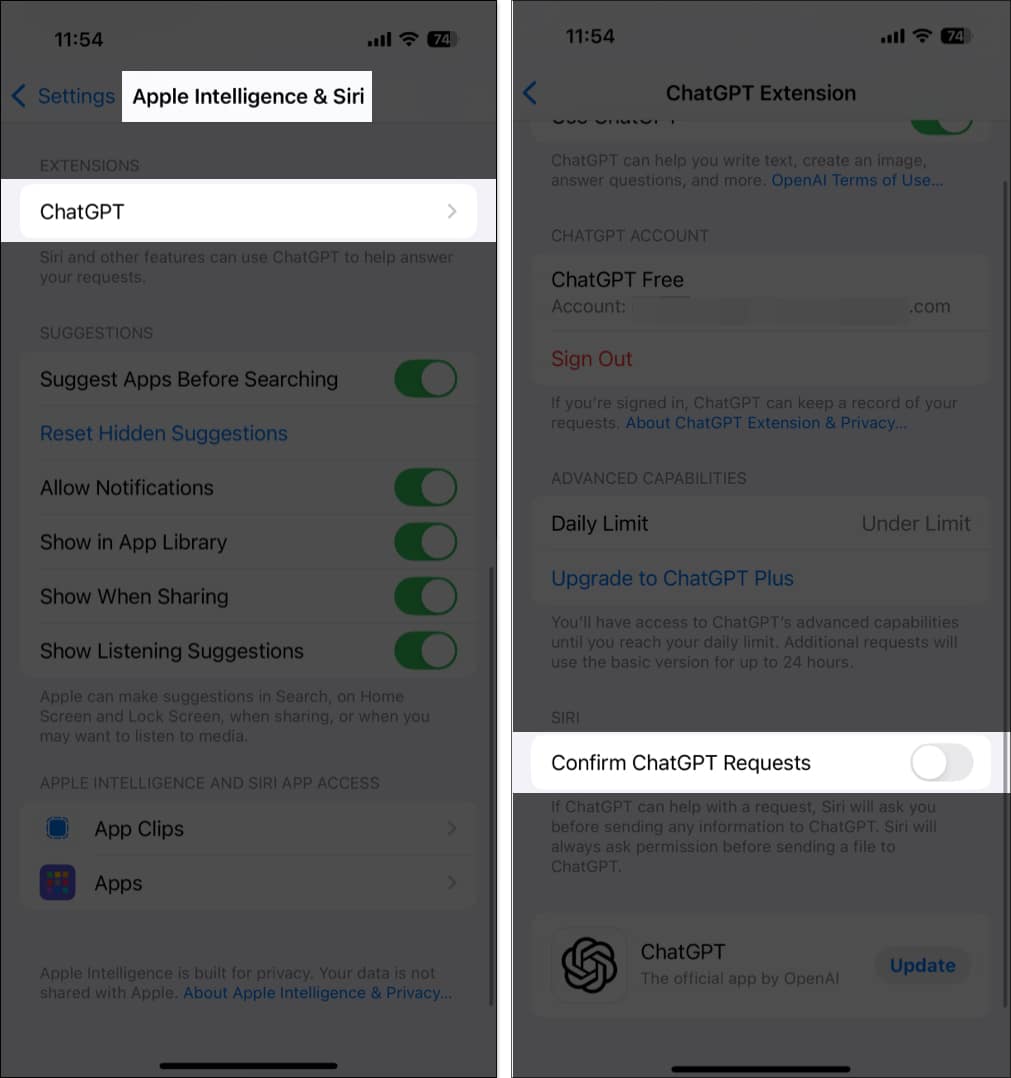
If you primarily use ChatGPT, you might get annoyed with Siri asking you whether you want to use ChatGPT every time you make a request. Although this extra step showcases Apple’s dedication to user privacy, you can get rid of this once and for all. Here’s how:
- Open Settings and go to Apple Intelligence & Siri → ChatGPT.
- Then, tap ChatGPT under Extension and toggle off Confirm ChatGPT Request.
4. Use ChatGPT as the Default Safari Search Engine
As the current Siri-ChatGPT integration works only on the latest iPhone models, OpenAI has introduced a Safari extension in the iOS ChatGPT app. It allows every iPhone user to set ChatGPT as their default search engine in Safari. This integration enables you to receive AI-generated responses directly from the Safari search bar.
- Ensure the ChatGPT app is up to date on your iPhone.
- Now, go to Settings → Apps → Safari.
- Tap Extensions under General.
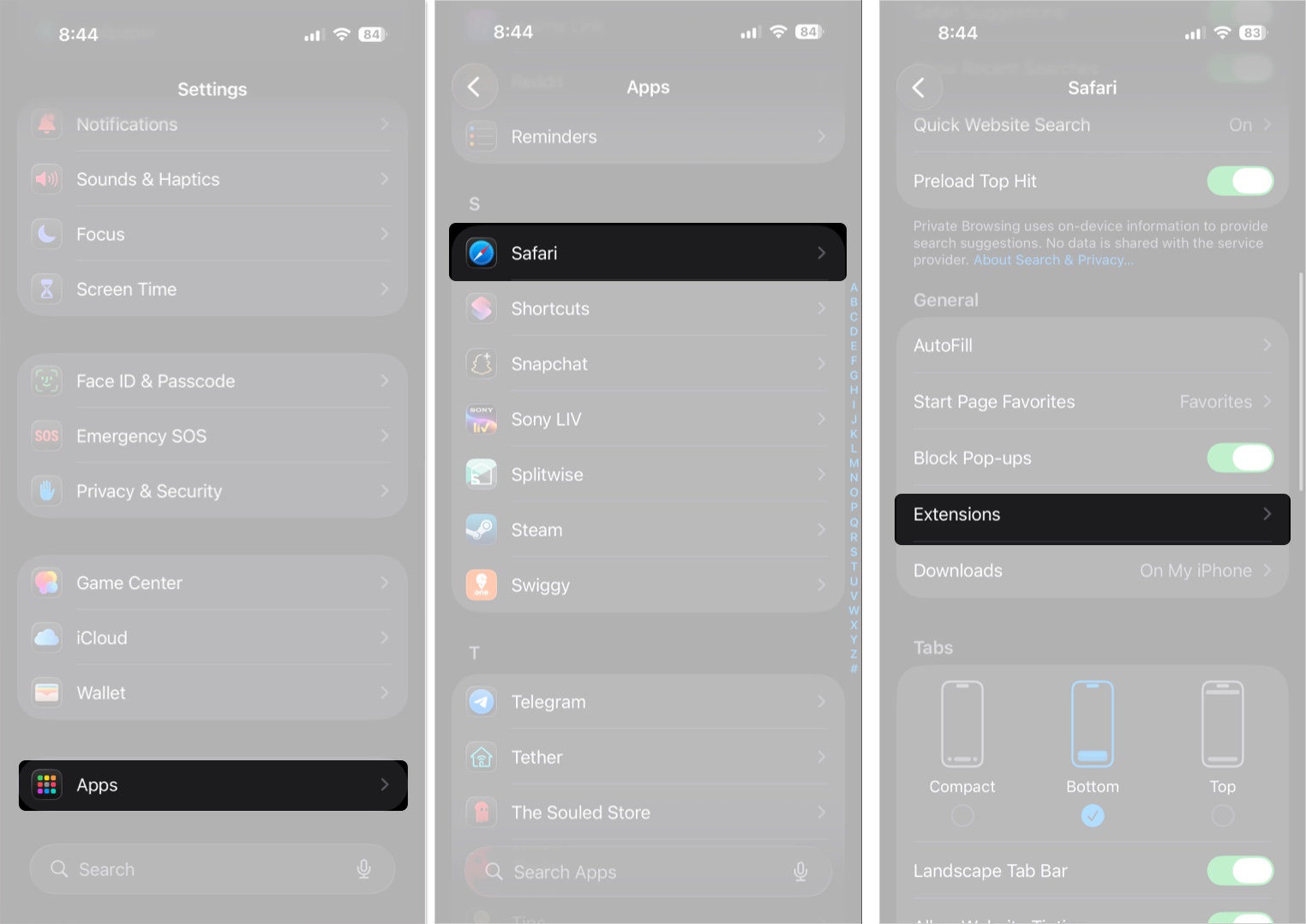
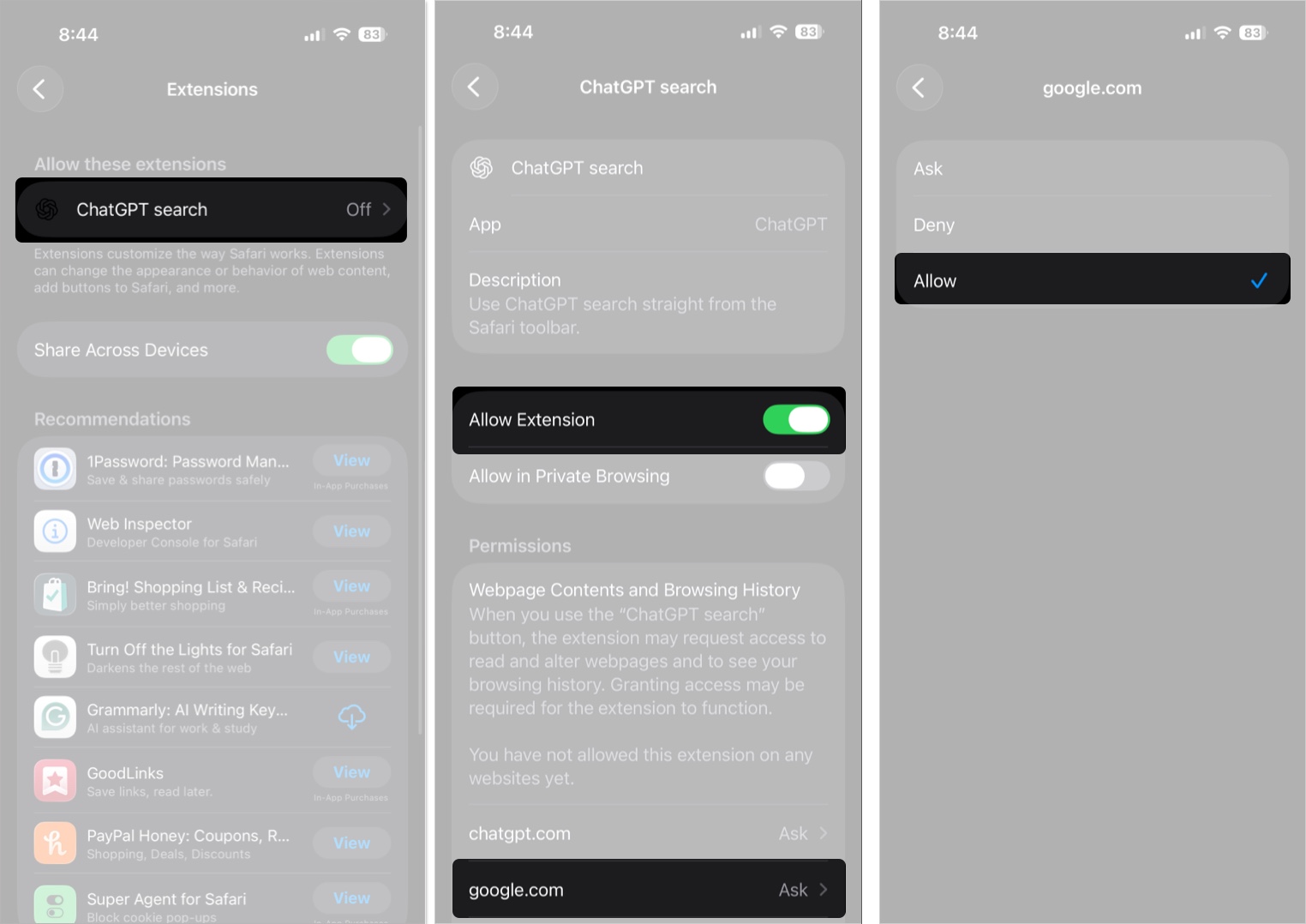
- Tap ChatGPT search under Allow these extensions.
- Toggle on Allow Extension.
- Finally, tap Google.com at the bottom and select Allow.
How to Disable ChatGPT Extensions on iPhone
While Apple’s top priority is user privacy, some users may be a little skeptical about sharing their information with ChatGPT servers. You can permanently disable ChatGPT on your iPhone and regain peace of mind if you feel the same. Here’s how it’s done:
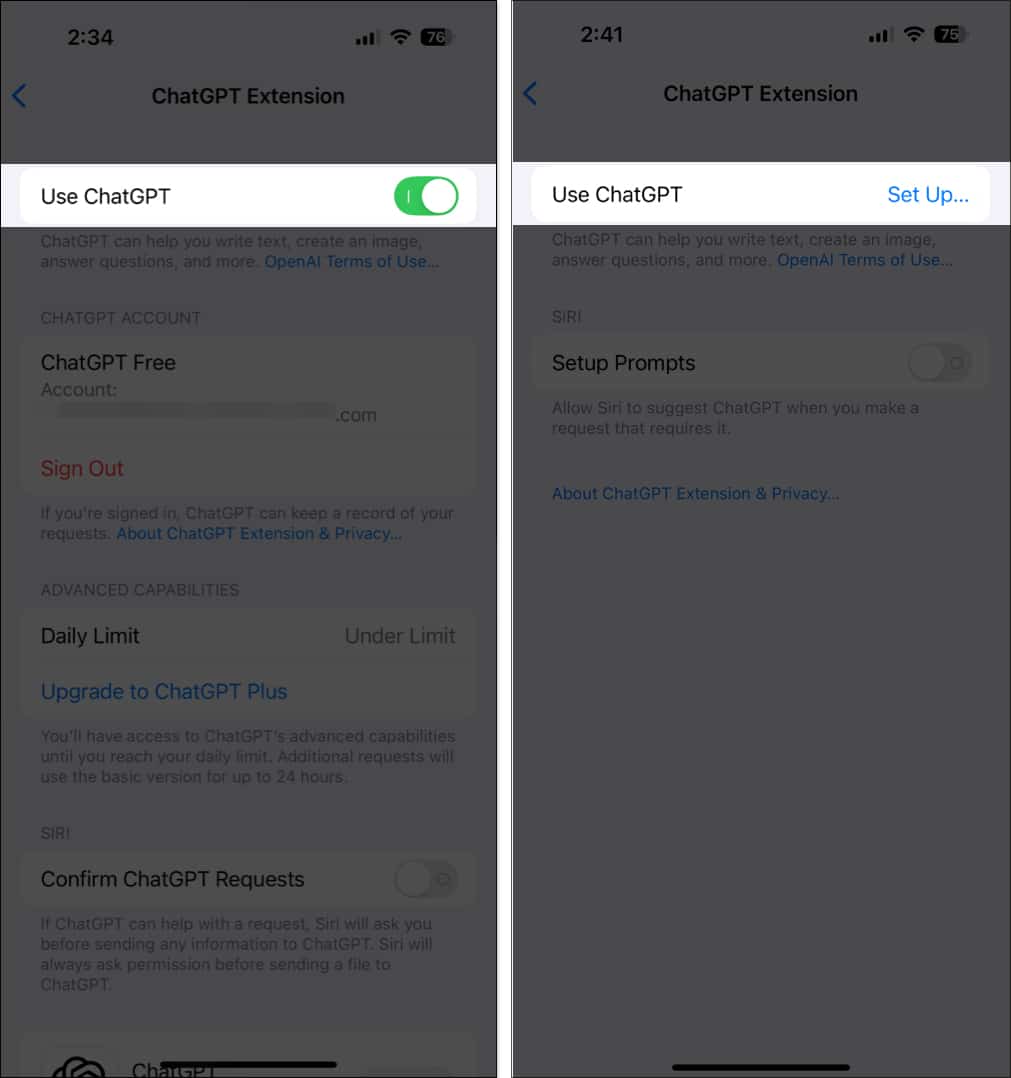
- Open Settings, then go to Apple Intelligence & Siri.
- Scroll down and tap on ChatGPT under Extensions.
- Finally, toggle off Use ChatGPT.
Can’t Sign in to ChatGPT on iPhone? Try These Solutions
While there can be several reasons why you can’t sign in to ChatGPT on your iPhone, some known and some unknown, we have listed a few solutions you can try to resolve the issue.
- Check the internet connection: Make sure your iPhone has a stable, reliable mobile internet connection. If not, switch to a Wi-Fi network and try signing in again.
- Wait a while: If you keep getting the same error even after several attempts, there might be an issue with the ChatGPT server. So, just wait until ChatGPT fixes the issue, and you will be able to get through.
- Verify login credentials: There is a slim chance that you entered the wrong email or password while signing in. So, it’s wise to verify both before you try to sign in next time.
- Restart the iPhone: In some cases, a software bug or glitch might prevent the ChatGPT sign-in on your iPhone. Restarting your iPhone can often eliminate such bugs and glitches.
Signing Off
With ChatGPT now deeply integrated into your iPhone, it is more intelligent and capable than ever. Combined with Apple Intelligence, ChatGPT on iPhone is a more versatile tool for productivity, creativity, and everyday problem-solving.
What do you think of the ChatGPT integration on iPhone? Do share your thoughts in the comments.
Also read:
Topics

Written by
VikhyatVikhyat has a bachelor's degree in Electronic and Communication Engineering and over five years of writing experience. His passion for technology and Apple products led him to the tech writing space, where he specializes in writing App features, How-to guides, and troubleshooting guides for fellow Apple users. When not typing away on his MacBook Pro, he loves exploring the real world.
View all posts →More from How-to

Snapchat Parental Controls: How to Set Up Family Center and Keep Your Teen Safe
Snapchat’s Family Center lets parents monitor their teen’s friend activity and screen time without reading private messages. Here’s how to set it up and what to expect.
VikhyatMarch 3, 2026
How to Block and Unblock Someone on Instagram
Instagram lets you block or unblock someone in seconds. Follow these simple steps to take full control of your privacy and online peace.
 Ava BiswasMarch 2, 2026
Apple Watch Not Responding? 8 Fixes That Actually Work
Is your Apple Watch unresponsive or stuck on a black screen? Here are 8 proven fixes to help you unfreeze it and get it working again quickly.
VikhyatMarch 3, 2026