


Instagram now lets you change your voice in DMs using AI-powered effects, and it quickly stands out once you try it. A simple voice note no longer sounds plain. It can turn into a chipmunk-style reply, a robotic message, or even something that feels like it was recorded in a stadium.
Once you start using it, you will see that this isn’t just another filter layered on top. It changes how voice notes come across in conversations.
The feature is rolling out on iOS and Android and works directly inside chats. If you’ve come across stylized voice notes and wondered how people are sending them, here’s exactly what’s behind it and how to use it.
What are Instagram AI Voice Effects (And what do they actually do?)
Instagram’s AI Voice Effects let you modify how your voice note sounds before sending it. These aren’t basic distortions. The system adjusts pitch, texture, and spatial depth while keeping your words clear and recognizable.
Right now, Instagram includes effects like:
- Chipmunk
- Demon
- Alien
- Robot
- Underwater
- Stadium
- Fishbowl
- Wobble
- Pirate
- Autotune
Each one changes the vibe of your voice without making it hard to understand. So your message still lands, just with more personality.
The best part is that everything happens inside Instagram. No editing apps, no extra steps.
How to use AI Voice Effects in Instagram DMs
Follow these steps to send voice notes with effects:
- Open Instagram and go to your DMs.
- Open any chat or start a new one.
- Tap and hold the mic icon to start recording
- Record your voice note.
- Tap the Voice Effects icon.
- Preview different effects in real time.
- Select one and send your voice note.
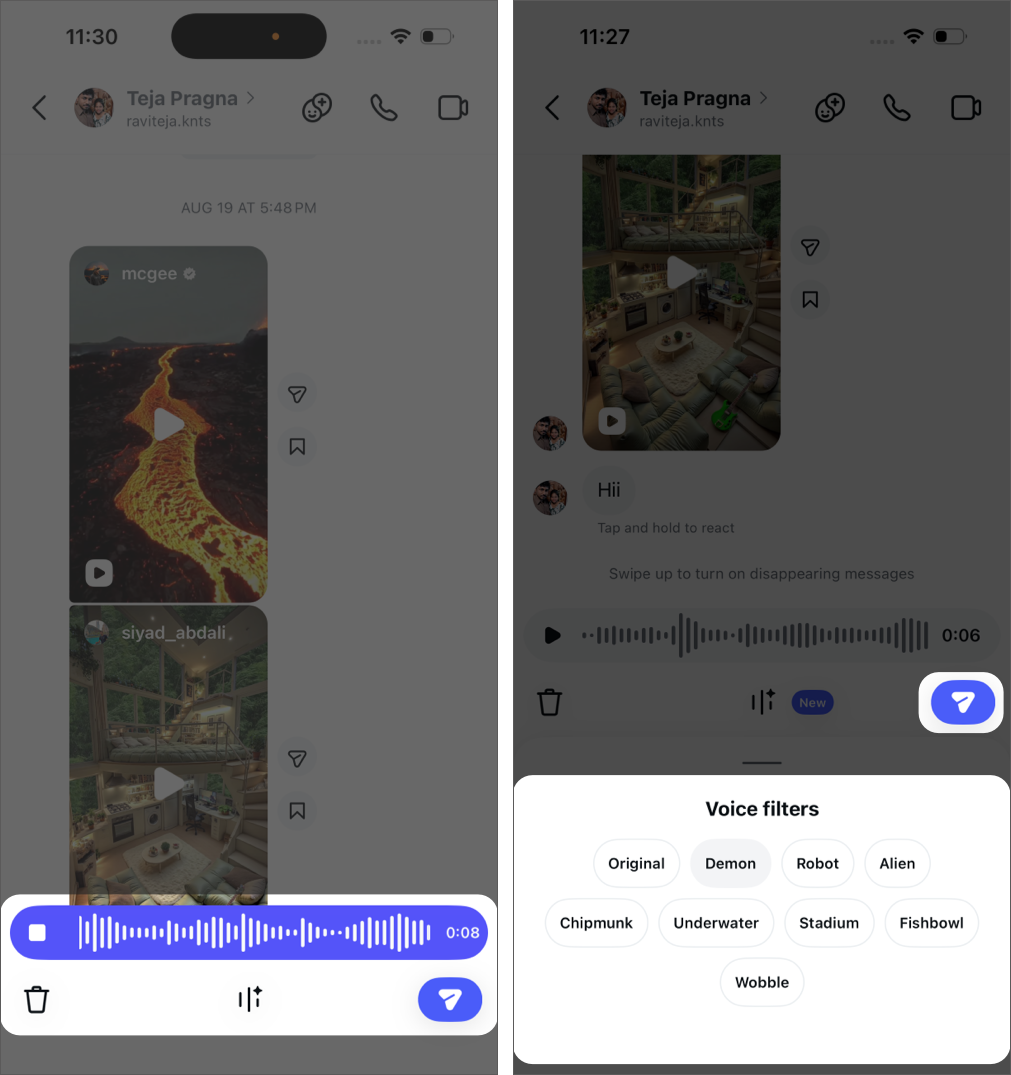
Once you send it, the effect label appears on the message. Anyone in the chat can tap it and use the same effect for their reply.
Why this isn’t just another filter?
This feature changes how voice notes behave in conversations.
Instead of sending plain audio, you can shape how your message is perceived. Tone becomes intentional, not accidental. For example:
- Use Demon for dramatic reactions
- Try Chipmunk for playful replies
- Use Stadium to make announcements feel louder
It adds an expressive layer that text and standard voice notes lack.
Is it actually useful or just a fun add-on?
Right now, it leans more toward fun than necessity.
You’re unlikely to use it in every conversation, but it fits naturally in casual chats, group DMs, and moments where tone matters more than content. It gives voice notes a bit more personality without adding friction to the process.
Over time, its value will depend on how often you use voice messages in the first place. If voice notes are already part of your daily chats, this makes them more engaging. If not, it remains a feature you return to occasionally.


