Google is finally bringing two features Chrome users have been asking for years. Vertical tabs and a revamped reading mode are now rolling out, giving the browser better ways to handle clutter and focus.
These updates matter if you keep a lot of tabs open or spend time reading long articles online. Chrome is catching up to features that have existed in other browsers, but it is doing so in a way that fits directly into its workflow without requiring extensions.
Chrome now lets you move tabs to the side and actually read them
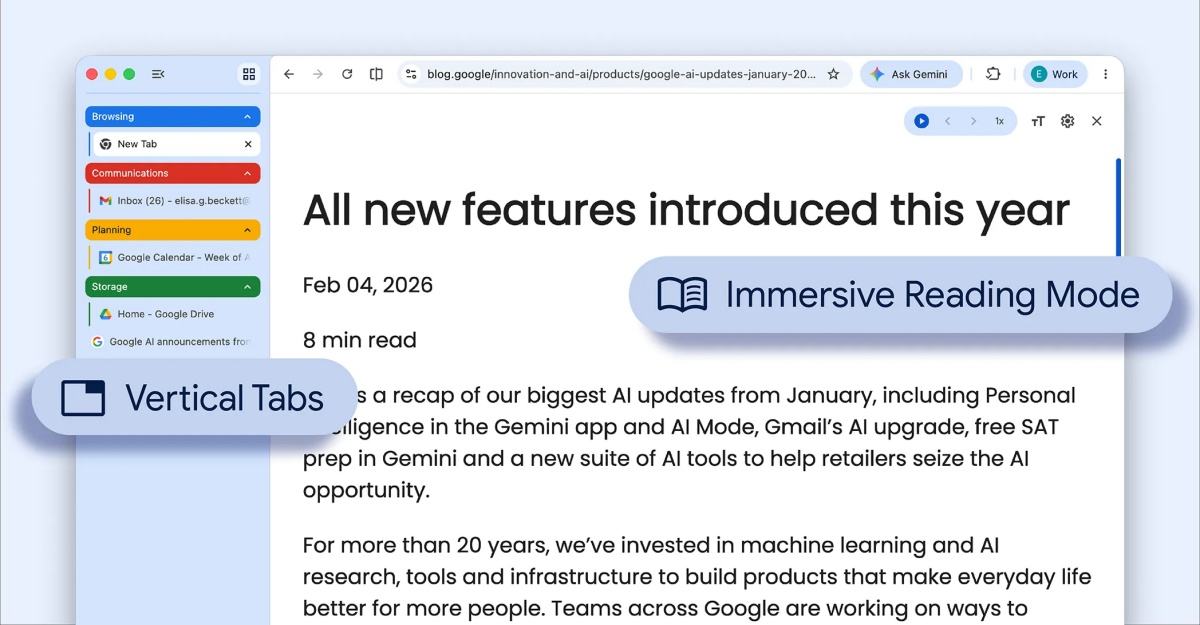
You can now move your tabs from the top of the browser to a vertical panel on the left. Right click on any Chrome window and enable “Show Tabs Vertically” to switch layouts.
The change fixes one of Chrome’s biggest usability problems. When you open many tabs, the titles shrink until they are unreadable. The vertical layout keeps full titles visible and makes it easier to scan what is open.
The side panel expands on hover, so you can quickly glance through tabs without losing space. Tab groups also work here, and you can collapse them to keep your workspace clean.
If you regularly work with research pages, dashboards, or multiple tools at once, this layout makes navigation faster and less frustrating.
Also Read: This Chrome Feature Lets You View Two Web Pages in One Tab on Mac
Reading mode now removes clutter and lets you focus on the content
Chrome’s reading mode has also been upgraded with a full page interface. You can right click on any page and select “Open in reading mode” to strip away distractions.
This removes sidebars, autoplay videos, and large ads, leaving only the main text and key images. The result is a clean reading view that feels closer to a document than a webpage.
You can adjust font size, spacing, and background colors like dark or sepia to match your comfort. This is useful for long reads, documentation, or study sessions where focus matters.
Chrome is closing the gap with Edge and other browsers
Vertical tabs have been available in browsers like Microsoft Edge for a while. Chrome taking this long shows how slowly it moves on interface changes, but also how careful it is about integrating them into its core experience.
Both features are built directly into Chrome, so you do not need third party tools. That matters because extensions often slow things down or break over time.
The rollout is gradual, so not everyone will see it immediately. If it is available, you can enable both features from the context menu and start using them right away.
These updates do not change how Chrome works at a fundamental level. They solve two everyday problems that most users deal with quietly, managing too many tabs and trying to read through cluttered pages.