Apple sent a fresh round of mercenary spyware threat notifications on Thursday, and the company confirmed to TechCrunch that targeted users in 110 countries received them. It is one of the widest waves since Apple started sending these alerts in 2021.
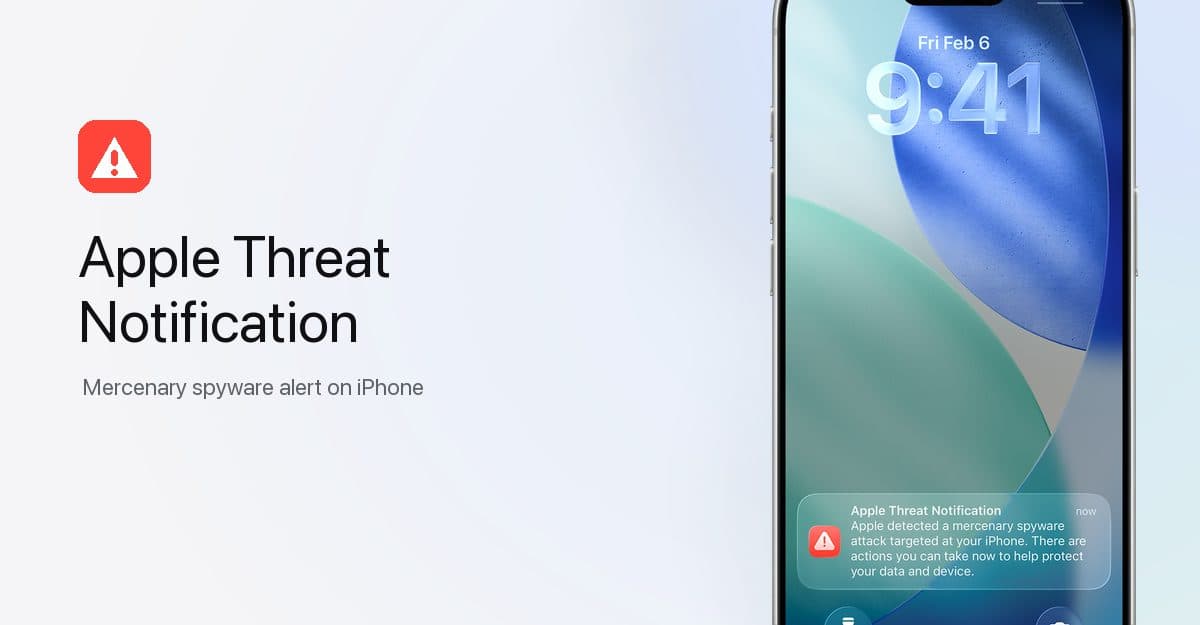
The delivery changed with this round. According to Apple’s updated threat notifications support document, the warning now appears directly on the iPhone Lock Screen and in Settings, alongside the usual email from threat-notifications@email.apple.com and a banner at the top of account.apple.com after you sign in. Until now, a warning could sit unread in an inbox for days. A Lock Screen alert is hard to miss.
The push alert reads: “Apple detected a mercenary spyware attack targeted at your iPhone. There are actions you can take now to protect your data and device.”
John Scott-Railton, a senior researcher at Citizen Lab, first flagged the new round on X and called the push alerts “a big improvement.” As he told TechCrunch, “Notifications create a critical signal that a community is being targeted. People get an alert, and then some of them reach out and seek help. Often this kicks off an investigation that reveals many, many more cases.”
Who these warnings are for
Mercenary spyware is government-grade surveillance software, like NSO Group’s Pegasus, that costs millions of dollars to deploy and targets a very small number of people, usually journalists, activists, politicians, and diplomats. Almost no one reading this will ever get one of these alerts.
Apple says the notifications are high-confidence alerts based entirely on its internal threat intelligence, and it deliberately doesn’t explain what triggers them so attackers can’t adapt. It also doesn’t attribute the attacks to any country or company. Since 2021, Apple has notified users in over 150 countries across multiple waves a year.
What to do if you get one
First, confirm the alert is real. Sign in to account.apple.com, and a genuine notification will appear at the top of the page. Apple never asks you to click links, open files, install apps or profiles, or share your Apple Account password or verification code, so anything that does is a scam dressed up as a warning.
If the notification is genuine, Apple recommends turning on Lockdown Mode and getting expert help from the Digital Security Helpline at Access Now, a nonprofit that runs it around the clock. Apple says it isn’t aware of a single successful mercenary spyware attack against a device with Lockdown Mode turned on.
For everyone else, the standard advice holds: keep your iPhone updated, use two-factor authentication on your Apple Account, turn on Stolen Device Protection, and stick to the App Store for apps.