
Apple Confirms New Icons for Creative Studio Won’t Override Standalone Icons
Apple says the new Creative Studio app icons will not replace existing standalone icons, as the updated designs are exclusive to the subscription versions.
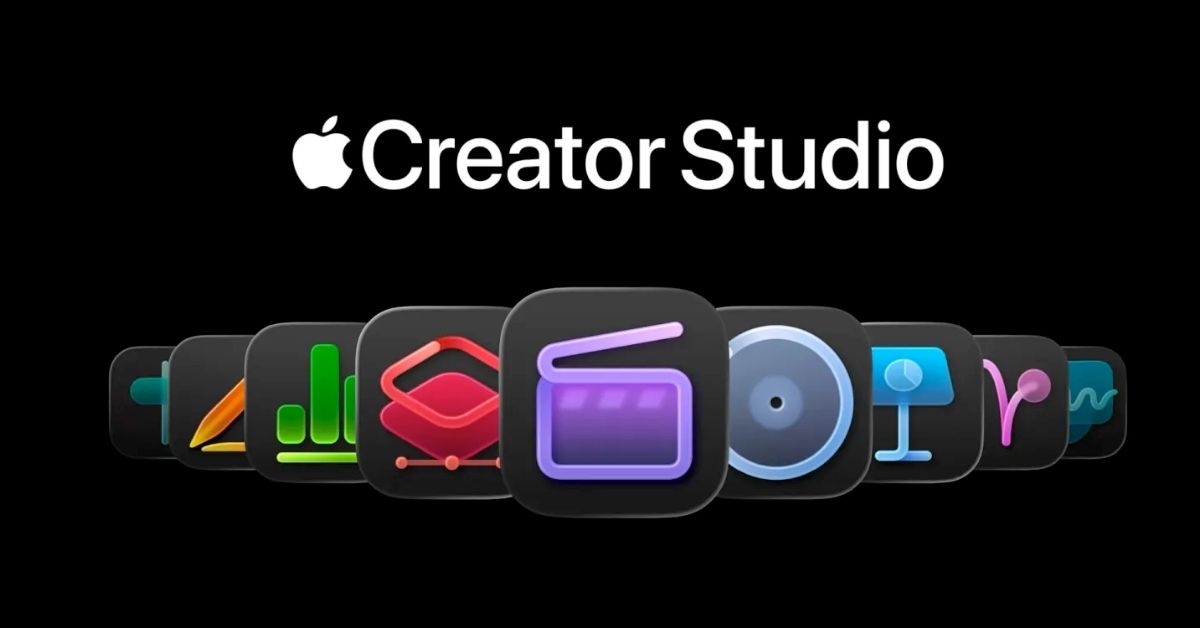
Apple Creative Studio launched a suite of professional apps at a competitive price point, sparking discussions not just for its capabilities but also for the introduction of distinctive new app icons. Responses were varied, with some users appreciating the fresh look, while others expressed reservations.
Fortunately for those attached to existing icons, Apple will not be enforcing these new designs across the board.
New Icons Specifically for Apple Creative Studio Subscription
According to a freshly published support guide, Apple will support both the standalone versions of high-demand apps like Final Cut Pro and Logic Pro, alongside their Creative Studio subscription counterparts. Although certain AI-driven features appear to be exclusive to the subscription model, the one-time purchase versions remain available to users.
These new icons, it turns out, aren’t a full redesign for the apps, but rather a way to differentiate the Creative Studio subscription versions from their standalone counterparts. Apple clarifies this in its support materials:
Final Cut Pro, Motion, Compressor, Logic Pro, MainStage, and Pixelmator Pro can still be purchased outright on the Mac App Store. Owners of both a standalone version and an Apple Creative Studio subscription will have access to either. To help users tell them apart, the Creative Studio versions sport unique icons.
This move represents a significant change in Apple’s strategy for distributing its professional applications on the Mac platform, retaining the traditional purchase model while seamlessly introducing a subscription option with additional enhancements.
Launch Date
The Apple Creative Studio is set to be available from January 28.
How do you feel about the new icon designs for Apple’s Creative Studio? We’re curious to hear your thoughts. Drop a comment below.

Written by
VikhyatVikhyat has a bachelor's degree in Electronic and Communication Engineering and over five years of writing experience. His passion for technology and Apple products led him to the tech writing space, where he specializes in writing App features, How-to guides, and troubleshooting guides for fellow Apple users. When not typing away on his MacBook Pro, he loves exploring the real world.
View all posts →More from News
macOS Will Flag the Slower USB-C Port on MacBook Neo
The MacBook Neo includes two USB-C ports with different capabilities. The left port supports faster speeds and external displays, while the right port is limited to USB 2 speeds for charging and basic accessories.
VikhyatMarch 5, 2026
Apple Launched Studio Display and Studio Display XDR: Full Specs, Features, and Price
Apple launches Studio Display and Studio Display XDR built for creators with Thunderbolt 5, stunning visuals, and pro-level performance. Here’s all the specs, features, and price.
 Ava BiswasMarch 4, 2026
Apple Pre‑Orders Now Live for iPhone 17e, MacBook Neo, M5 Macs and More
Apple has opened global pre-orders for iPhone 17e, MacBook Neo, M5 Macs, and new Studio Displays. Here are the start times, products, and release date.
 Ravi Teja KNTSMarch 4, 2026