
WhatsApp is expanding its web experience by bringing voice and video calls to group chats. The feature is currently being tested with a limited number of beta users and could make it easier for people to stay connected without switching to the mobile or desktop app.
Voice and video calling has already been available to some WhatsApp Web beta users in individual chats. The company is now testing the same functionality for group conversations.
Group calling is coming to WhatsApp Web
According to WABetaInfo, some WhatsApp Web beta users are now seeing a notification that group calling is available.
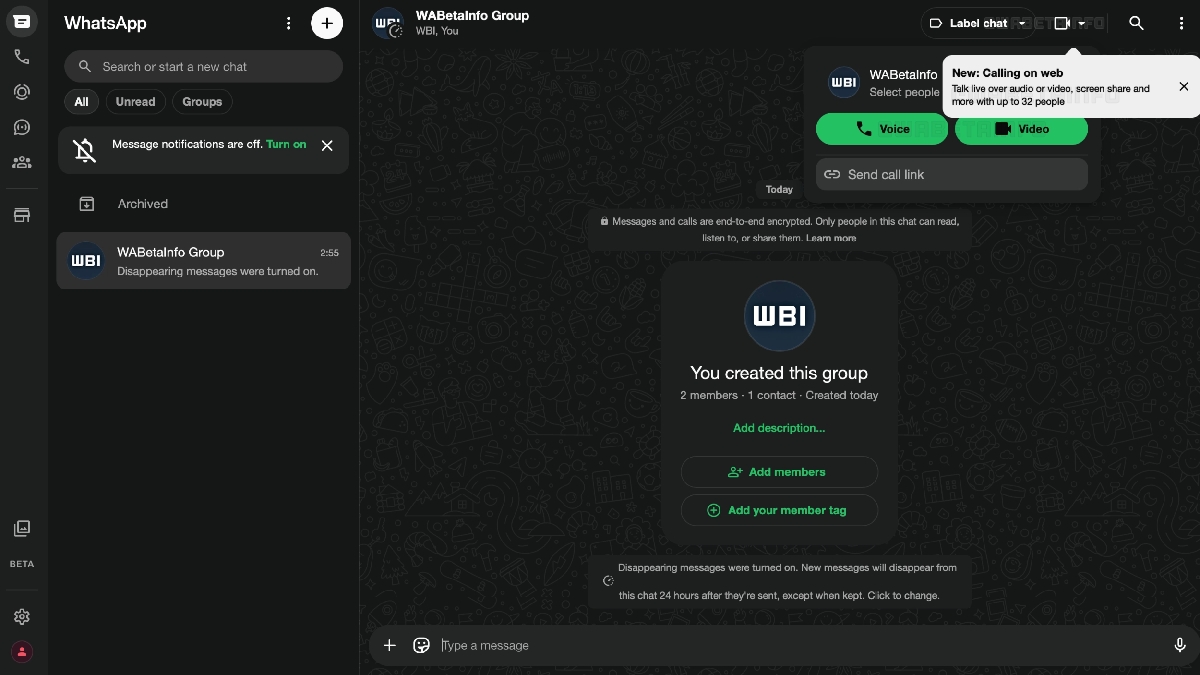
The feature supports voice and video calls with up to 32 participants and also includes screen sharing, bringing the web experience much closer to what is available on the mobile app.
Group calls work similarly to those on smartphones. Once the feature is enabled, users will see a call button at the top of a group chat. Tapping the button allows them to choose between a voice or video call before starting the session.
WhatsApp is also giving users more flexibility by allowing them to select specific group members to join a call rather than inviting the entire group. This can be particularly useful for large group chats where only a handful of participants need to join a conversation.
You may like to rad: How to lock WhatsApp Web with a password
End-to-end encryption and call links are included
Like other WhatsApp calls, group voice and video conversations on the web are protected with end-to-end encryption.
The feature also supports call links, allowing users to invite additional participants without manually adding them to an ongoing conversation.
The rollout is currently limited to a small number of beta users. Those who want to try upcoming WhatsApp Web features can head to Settings > Help and enable the “Join the beta” option.
However, joining the beta program does not guarantee immediate access, as WhatsApp typically rolls out experimental features gradually before making them available to everyone.
Would you use group voice and video calls directly from WhatsApp Web? Let us know in the comments below.