
How to Switch from Business to Personal Account on Instagram
Want to switch back to a personal account on Instagram? Here’s a quick guide to help you make the change and understand what happens next.
With influencer culture and brand marketing on the rise on Instagram, many users are switching to a Business account for insights, ads, and professional tools. These features help track performance and promote content, but they are not useful for everyone. However, not every business or aspiring influencer finds success, and many users eventually prefer a simpler, more private experience.
This is why many users look for ways to turn off their business account. The problem is that Instagram does not offer a direct option to disable a Business account. Instead, you need to switch the account back to a Personal account.
This post explains how to switch your Instagram business account to a personal account and what happens after.
What is an Instagram Business Account?
As the name suggests, a Business Account on Instagram is an account type designed for brands, companies, and service providers. It unlocks various tools and insights useful for growth and marketing that aren’t available to personal accounts and are largely similar to those in creator accounts.
Key features include:
- Insights for posts and followers
- Ad and promotion tools
- Contact buttons, such as email or call
- Access to Meta business tools
- Product tagging and shopping features
2 Ways to Switch Back to Personal Account on Instagram
There are two ways you can turn off the business account on Instagram. Here’s how:
Via the Professional Dashboard
- Tap the Professional Dashboard banner on your Instagram profile.
- Tap the Settings icon in the top right corner.
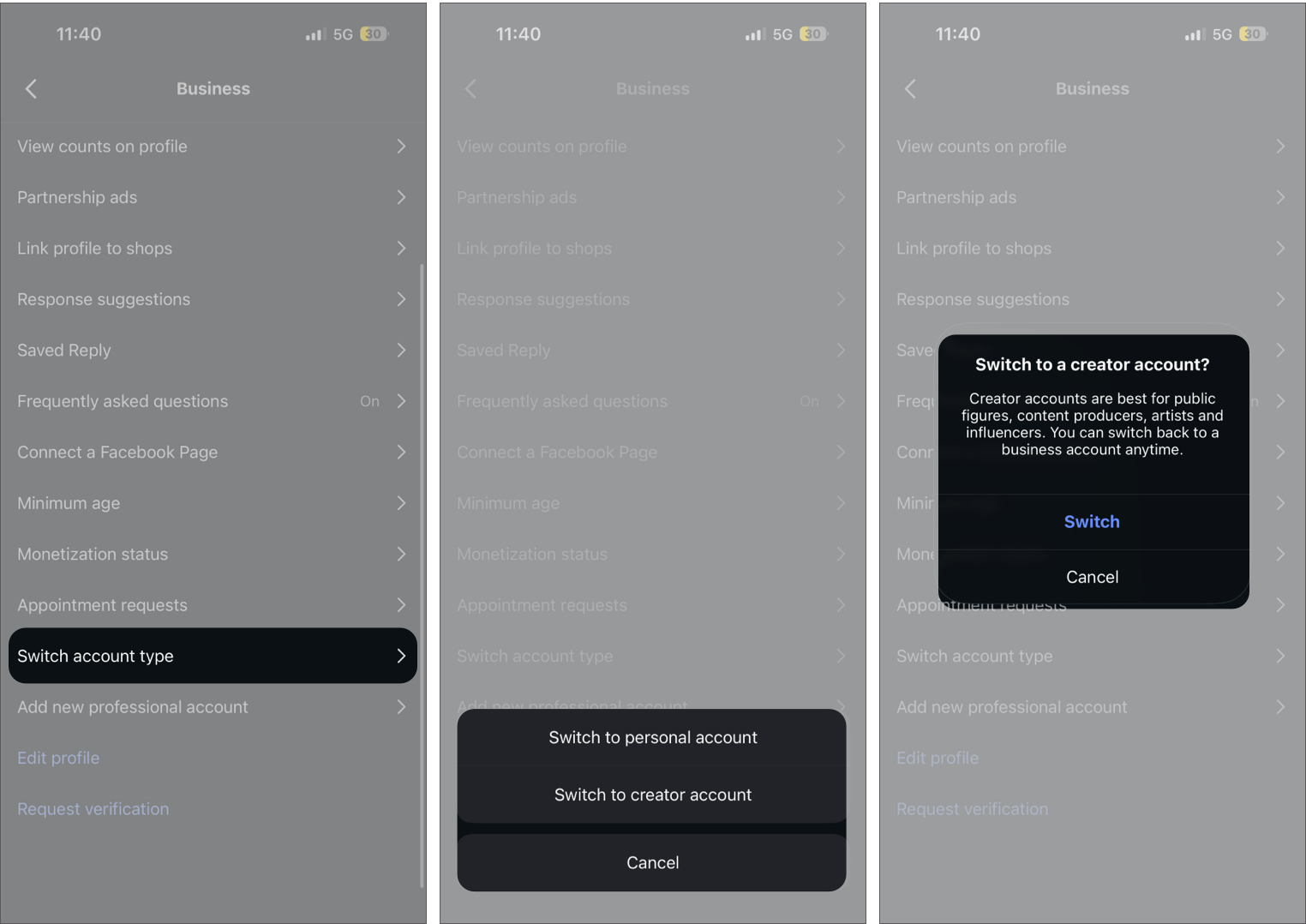
- Next, scroll down and tap Switch account type.
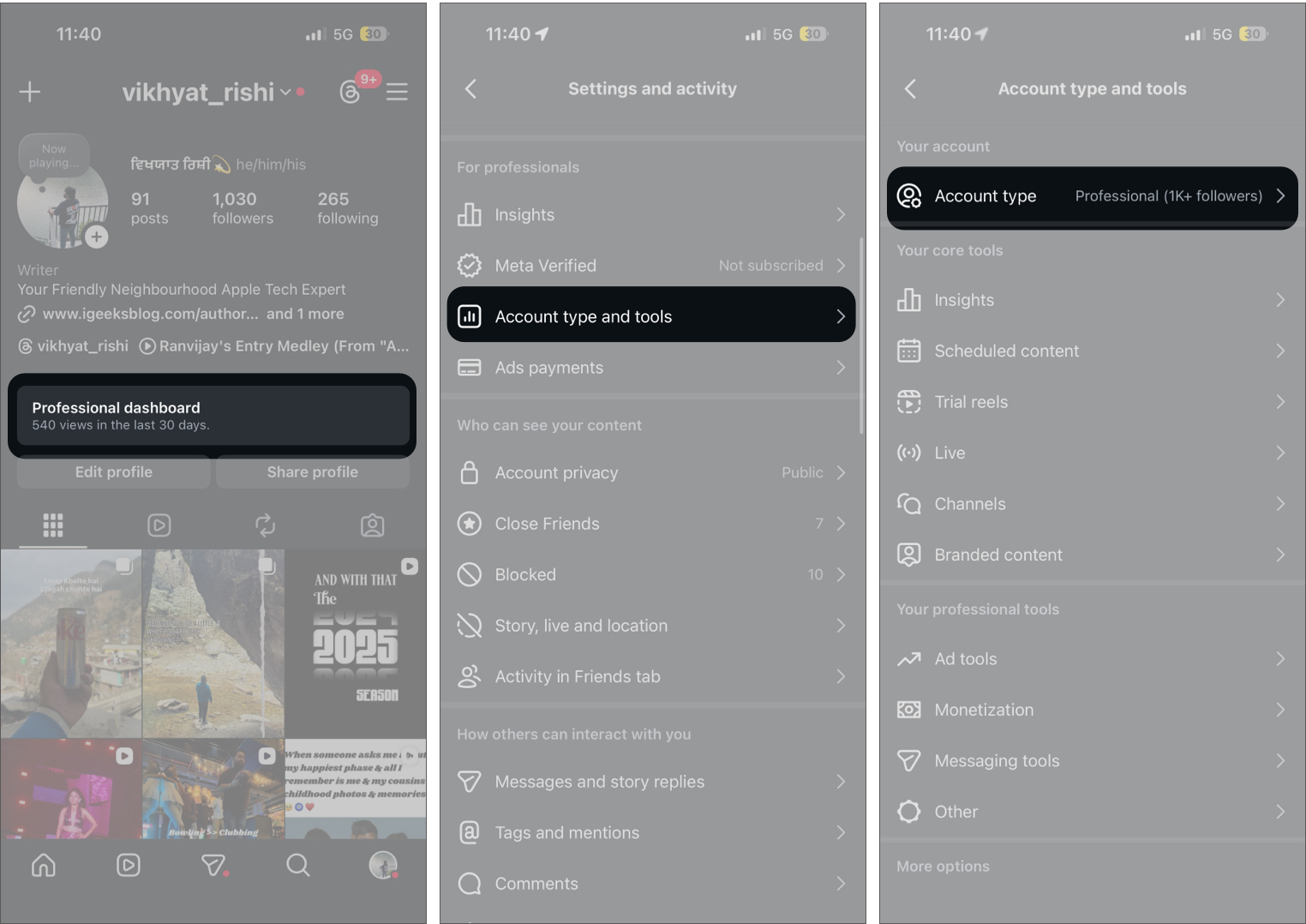
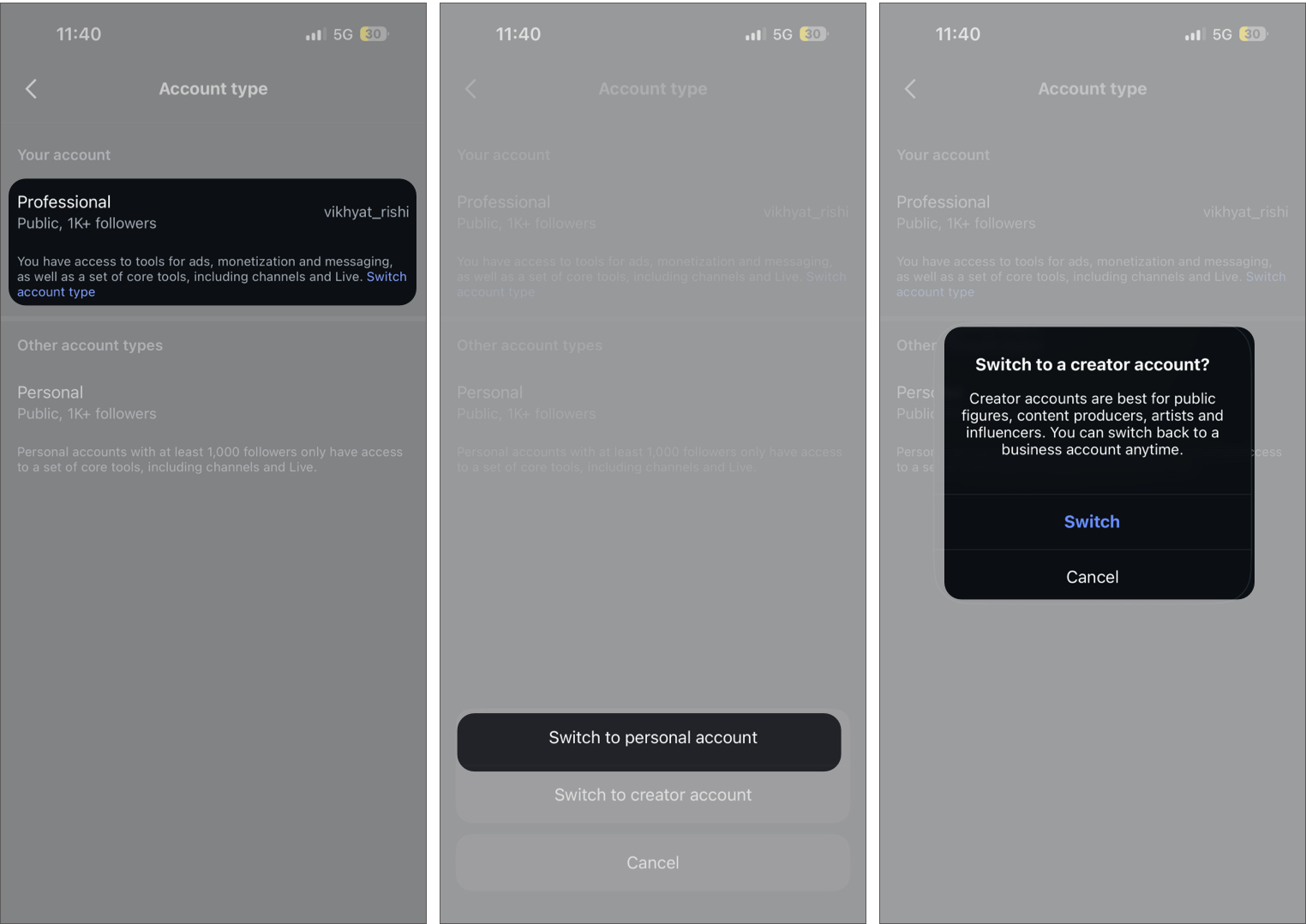
- Now, choose the account type (personal or creator) you want to switch to.
- Tap Switch to confirm.
From the Account Settings
- Head to your Instagram profile and tap the hamburger (More options) icon in the top right corner.
- Here, scroll down and tap Account type and tools under the For professionals section.
- Next, tap Account type.
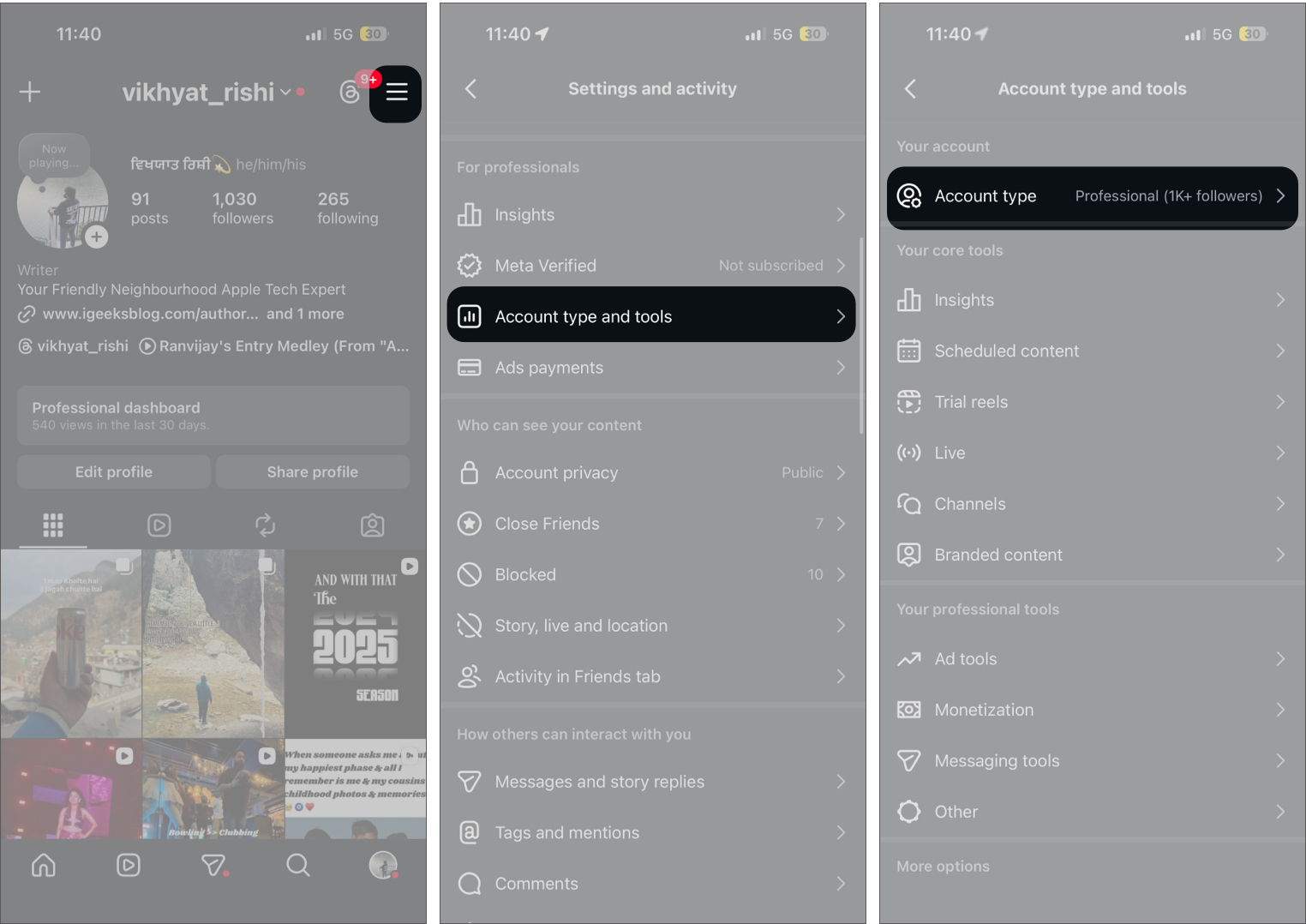
- Now, tap Switch account type, then choose which account type (personal or creator) you want to switch to.
- Tap Switch to confirm.
What Happens After Switching to a Personal Account on Instagram
Switching your account type does not affect your existing content or followers. However, depending on the account type you switch to (personal or creator), you lose access to features and tools such as:
- Insights and analytics data
- Ad and promotion tools
- Contact buttons on your profile
- Access to a professional dashboard
Your account simply returns to a regular Instagram experience.
What Stays the Same:
- Your posts, reels, and stories remain unchanged
- Your followers and following list stay intact
- Direct messages and chats are not affected
Why People Turn Off Business Accounts on Instagram
There are a few common reasons users switch back to a Personal account:
- Simpler experience: Business tools add extra sections and notifications that are not always needed.
- More control over privacy: Personal accounts can be set to private, giving you full control over who sees your content.
- No need for analytics: If you are not tracking growth or running campaigns, insights may not be useful.
Can You Switch Back to a Business Account Later?
Just as you switched from a business account to a personal or creator account, you can switch back to a business account at any time if you decide to use Business features again.
Difference Between a Business and Personal Account on Instagram
Each of the three Instagram account types is designed for a different kind of user and comes with its own tools and limitations. Understanding the differences can help you choose the account type that fits your needs.
| Feature | Personal Account | Creator Account | Business Account |
|---|---|---|---|
| Best for | Everyday users | Influencers, public figures, content creators | Brands, companies, businesses |
| Analytics (Insights) | No | Yes | Yes |
| Ads and Promotions | No | Yes | Yes |
| Contact Buttons | No | Limited | Yes |
| Account Privacy | Can be private | Always Public | Always Public |
| Instagram Shopping | No | Limited | Yes |
| Professional Dashboard | No | Yes | Yes |
| Branded Content Tools | No | Yes | Yes |
| Messaging Controls | Standard | Advanced filtering options | Standard business inbox |
| Category Label on Profile | No | Yes | Yes |
Back to a Simpler Instagram Experience…
And that’s it; now you know that turning off a Business account on Instagram simply means switching it back to a Personal account. The process takes only a few taps and does not affect your posts, followers, or messages.
If you no longer need analytics or promotional tools and want to make your account private, this is the only way to simplify your Instagram experience while keeping everything else intact.
Have you switched your Instagram account back to Personal, or are you still using Business features? Share your experience in the comments.

Written by
VikhyatVikhyat has a bachelor's degree in Electronic and Communication Engineering and over five years of writing experience. His passion for technology and Apple products led him to the tech writing space, where he specializes in writing App features, How-to guides, and troubleshooting guides for fellow Apple users. When not typing away on his MacBook Pro, he loves exploring the real world.
View all posts →