Update:
Verified the latest Basketball Legends Codes on October 21, 2026
Want to unlock free rewards in Basketball Legends? These codes can help you out! Whether you’re aiming to upgrade your gear, try new skins, or boost your stats without grinding for hours, redeeming codes is the easiest way to get ahead.
Developers release free codes during events, milestones, or random updates. If you’re not using them, you’re leaving easy rewards behind. So before your next 5v5 match, take a minute to redeem these.
All Working Basketball Legends Codes
- 640KLIKES: 1k Coins NEW
- 660KLIKES: 1k Coins NEW
- 650KLIKES: 1k Coins NEW
- 620KLIKES: 1K Coins
- 630KLIKES: 1,000 Coins
- BOTS: Summer Effect Case
- MAGIC: Summer Skin Case
- 530KLIKES: 1k coins
- 520KLIKES: 1k coins
- 510KLIKES: 1k coins
- 500KLIKES: 1k Coins
- HWPASS NEW: Halloween Effect Case
- HWCLANS NEW: Halloween Skin Case
- HWSTOCK NEW: Halloween Banner Case
- 670KLIKES NEW: 1,000 Coins
- HWEFFECTS: Halloween Effect Case
- HWSKINS: Halloween Skin Case
- HWBANNERS: Halloween Banner Case
- EMOTESFX: 1 Summer Effect Case
- QOL: 1 Summer Skin Case
- GAUNTLET: 1 Summer Effect Case
- NEWSZN: 1 Summer Skin Case
All codes: 640KLIKES, 660KLIKES, 650KLIKES, 620KLIKES, 630KLIKES, BOTS, MAGIC, 530KLIKES, 520KLIKES, 510KLIKES, 500KLIKES, HWPASS NEW, HWCLANS NEW, HWSTOCK NEW, 670KLIKES NEW, HWEFFECTS, HWSKINS, HWBANNERS, EMOTESFX, QOL, GAUNTLET, NEWSZN
Expired Basketball Legends Codes
100KLIKES, 10KLIKES, 110KLIKES, 120KLIKES, 130KLIKES, 140KLIKES, 150KLIKES, 160KLIKES, 170KLIKES, 180KLIKES, 190KLIKES, 200KLIKES, 2024, 2025, 20KLIKES, 210KLIKES, 220KLIKES, 230KLIKES, 240KLIKES, 250KLIKES, 260KLIKES, 270KLIKES, 280KLIKES, 290KLIKES, 300KLIKES, 30KLIKES, 310KLIKES, 310LIKES, 320KLIKES, 325KLIKES, 40KLIKES, 440KLIKES, 450KLIKES, 460KLIKES, 490KLIKES, 500KFAVS, 50KLIKES, 580KLIKES, 590KLIKES, 5KLIKES, 600KLIKES, 60KLIKES, 610KLIKES, 700MVISITS, 70KLIKES, 80KLIKES, ANIMEBOSSRAID, ANIMECASE, ANIMECASE2, APRIL, BANANA, BLACKFRIDAY, BLOCKS, BOOST, CALIFORNIA, CHAMPIONS, CHEESY, CLANREWORK, CLANS, COINBOOST, COINS, COMPANY, CYBER, DELAYCASE, DELAYED, DELAYLEGENDS, DELAYSKIN, DRIBBLES, EASTER24, ECLIPSE24, ELECTRIC, EVIL, FALLDAY, FESTIVE24, FRIDAY13BANNERS, FRIDAY13EFFECTS, FRIDAY13SKINS, GALAXY, GETDOWN, GORILLA, GREEN, HEARTBURST, HELMET, HL1KLIKES, HURDLE, HWTRAILS, IMLUCKYTODAY, IRISHSPRINGGREEN, JAMALBANANAPUDDING, JAMALCHOCOLATEPUDDING, JANUARY, JOLLY, LOBCITY, MAGICAL, MEMORIALDAY24, MOBILE, NEWCASE, PASSES, RANKED, SANTA24, SCUBA, SEASON7, SHAMROCKSZN, SIXSEVEN, SIXSEVEN>, SKINS, SORRY, SORRY4REBOOT, SPACE2, SPOOKY, SPOOKY2, SPRING2025, SPRINGGREEN, SPRINGSKINS, STPATRICKS, SUMMER, SUMMER24, SUMMER25, SUPERSCARY, SUPERSPOOKY, THANKSGIVING24, TRADEHUB, TURKEY25, TYFOR100K, USA2025, VALENTINE, VALENTINES, WOW, XMAS24
How to Redeem Codes in Basketball Legends
Redeeming codes in Basketball Legends is quick and works on Roblox for Android, iOS, Mac, and Windows apps.
Just follow these steps:
- Open Basketball Legends in Roblox.
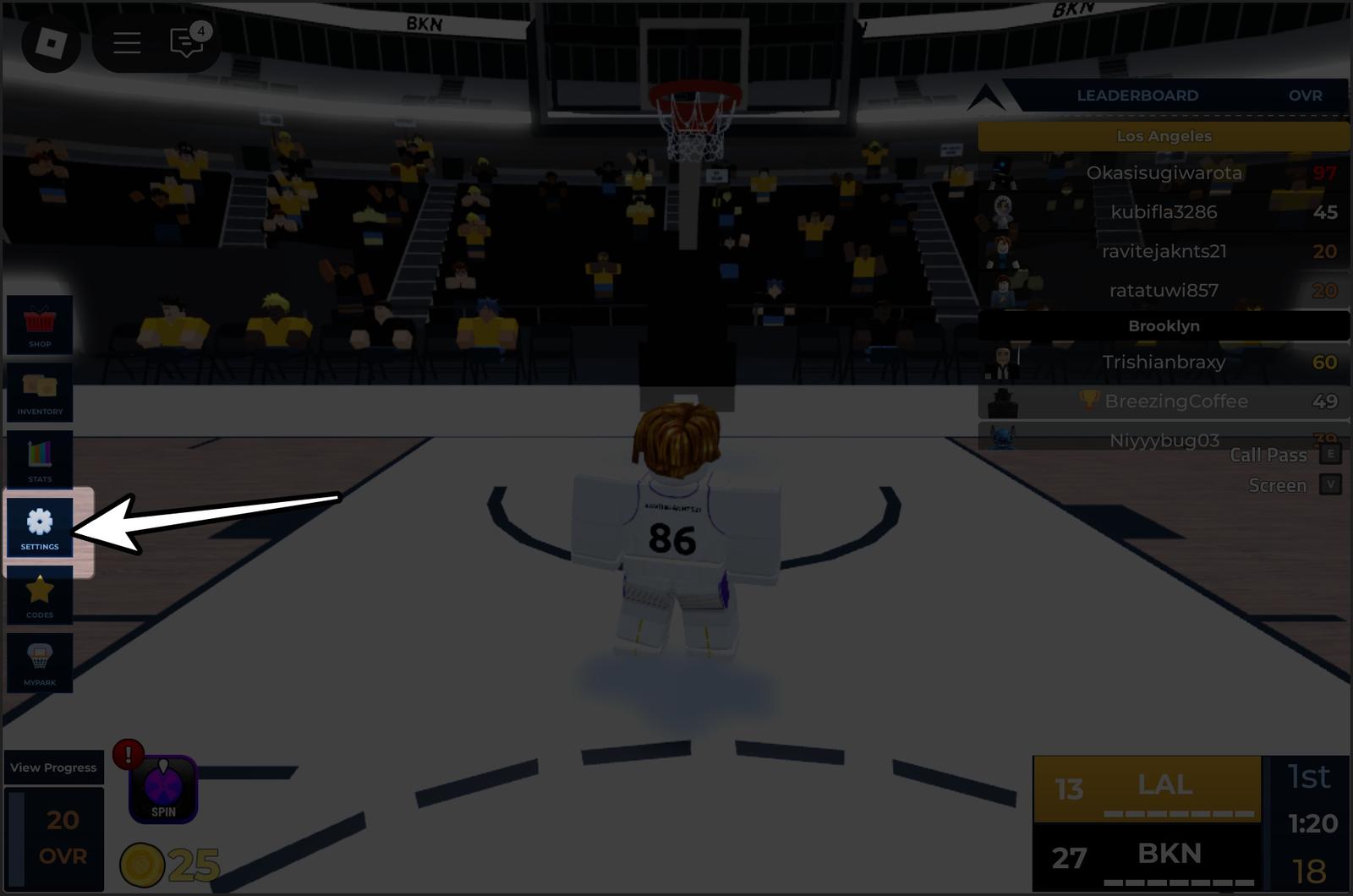
- Click the Settings icon in the bottom-left corner.
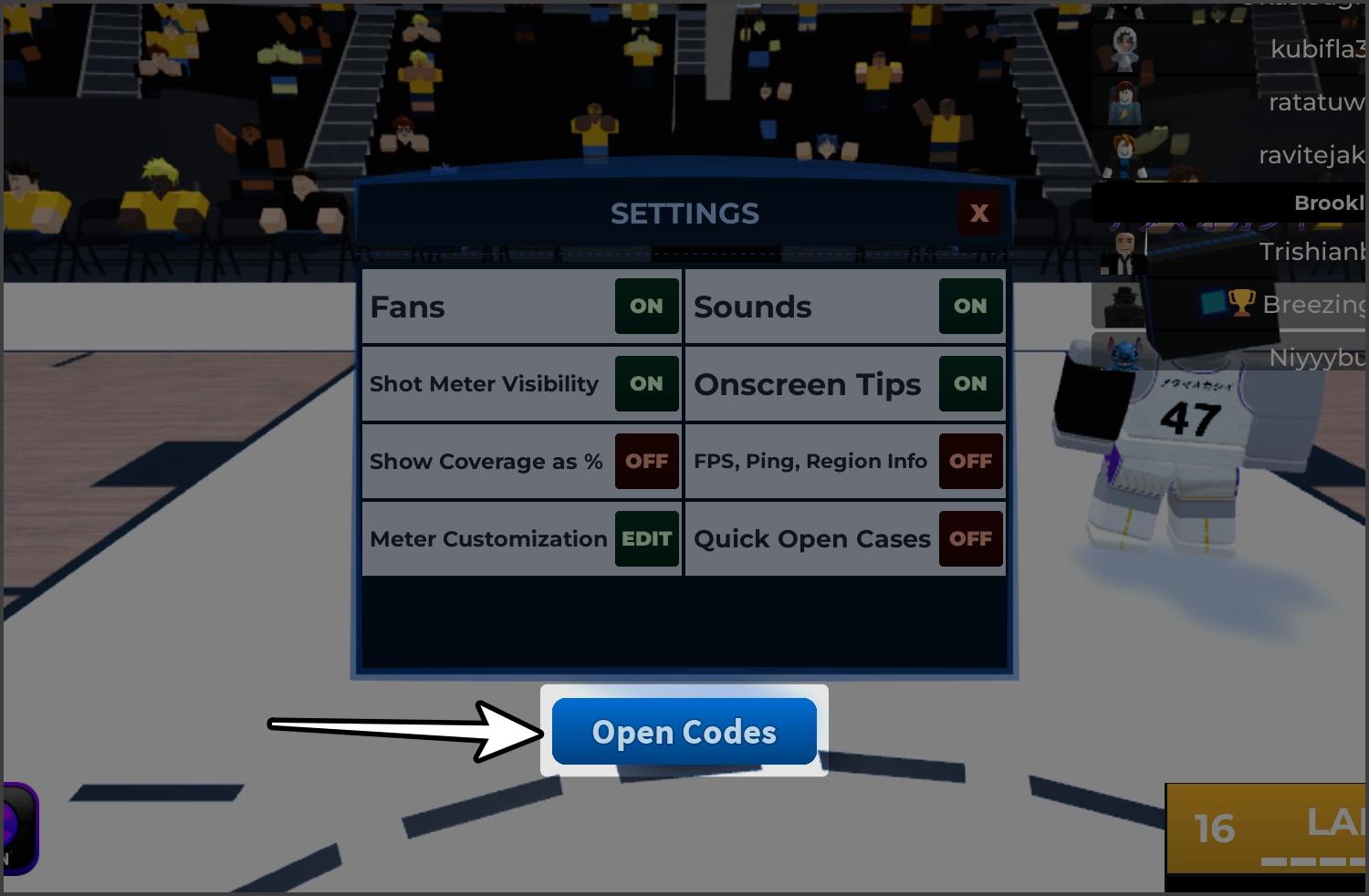
- Click Open Codes.
- Type or paste the code into the text box.
- Hit CLAIM, and your rewards will appear instantly.
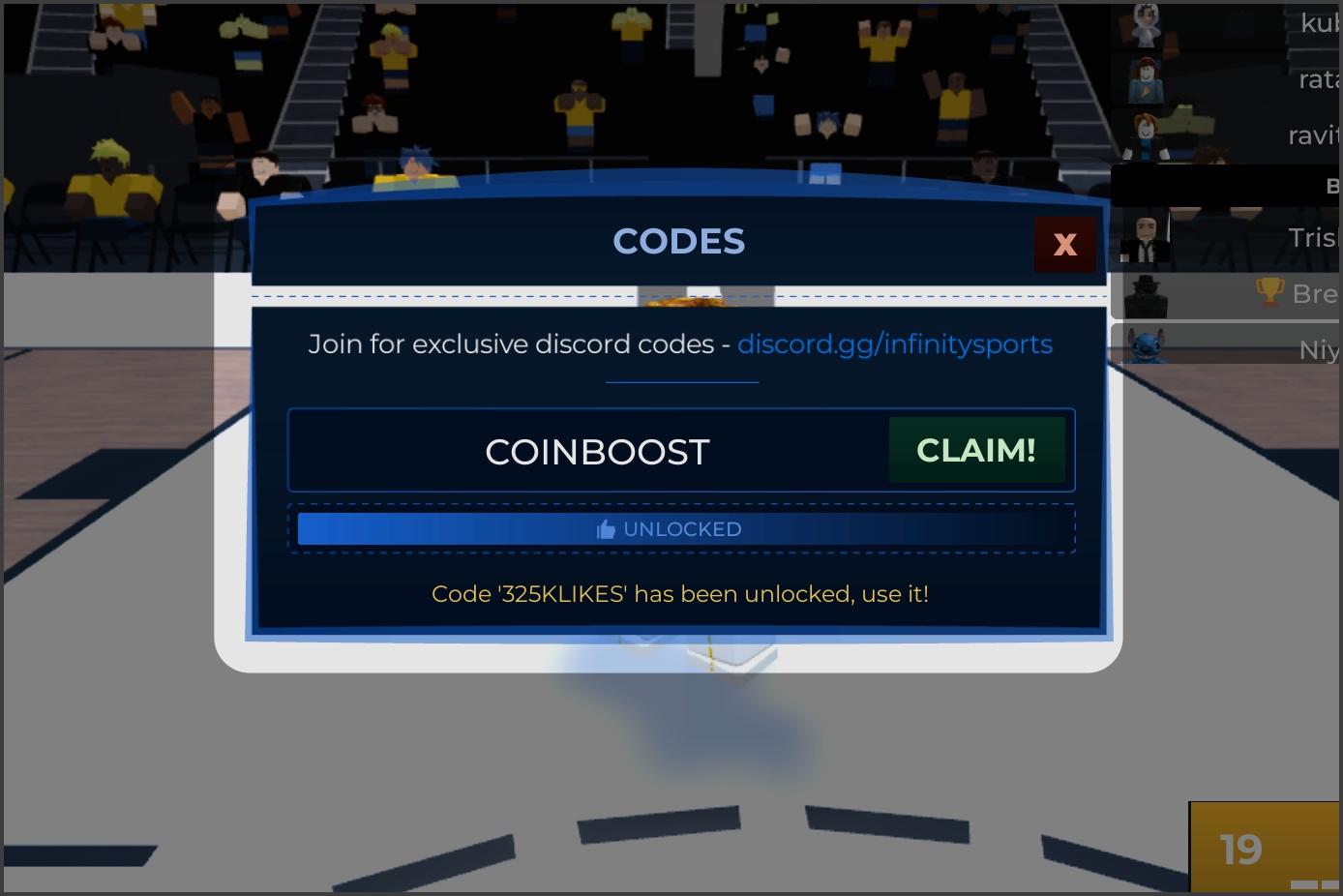
If it works, you’ll see “Code has been redeemed,” and the rewards will show up instantly. For boosts, a timer will appear. If it says “Code is expired,” try a different one.
Where to Find More Basketball Legends Codes
Want to grab new codes before anyone else? Here are a few simple ways to stay ahead:
- Join the official Infinity Sports Discord and check the codes-and-info channel for updates.
- Follow the developers on Twitter/X for surprise code drops during events or milestones.
- Bookmark this article, and we will keep it updated so you won’t miss any new rewards.
Tips to Maximize Code Rewards
Want to get the most out of your freebies? Try these tips:
- Redeem codes as soon as they drop because they can expire quickly.
- Use boosts like COINBOOST when you can play multiple matches in a row to earn the most coins during that time.
- Spend coins on upgrades or gear that actually help in matches instead of wasting them.
- Log in daily so you don’t miss limited-time codes or bonuses.
- Save spins for when there are special skins or animations you want, so they’re worth it.
Common Issues with Codes (and Fixes)
If a code isn’t working, here are the most common reasons and how to fix them:
- Double-check the spelling, as codes are case-sensitive.
- Make sure the code hasn’t expired.
- Copy and paste codes instead of typing them manually.
- Log out and back in to refresh the game.
- Check if the code has already been redeemed by reviewing your inventory or coin balance.
- Enter the code in the correct menu (Settings > Open Codes).
- On mobile, remove any hidden spaces when pasting codes, or type them manually.
- If servers are lagging or your connection is unstable, rejoin the game later and try again.
Final Thoughts
Basketball Legends codes are the easiest way to earn coins, boosts, and rare cosmetics without endless grinding. Redeem them regularly, stay tuned for updates, and you’ll keep your build sharp.
If you spot a new code or find one that no longer works, drop it in the comments. We’ll keep this guide updated so you never miss a free reward.
Read More