Finding love online can feel tiring with too many swipes, small talk, and apps that treat faith like just another checkbox. iSunday App promises to change that by putting Christian values first. There’s also no swiping, no daily like limits, and no pressure to “play the numbers.”
But does iSunday truly deliver on its promise of faith-first dating? Beyond simply calling itself a Christian app, what makes it stand out, and how well does it help people find partners who genuinely share their beliefs? Let’s Dive deep.
What Makes iSunday Different
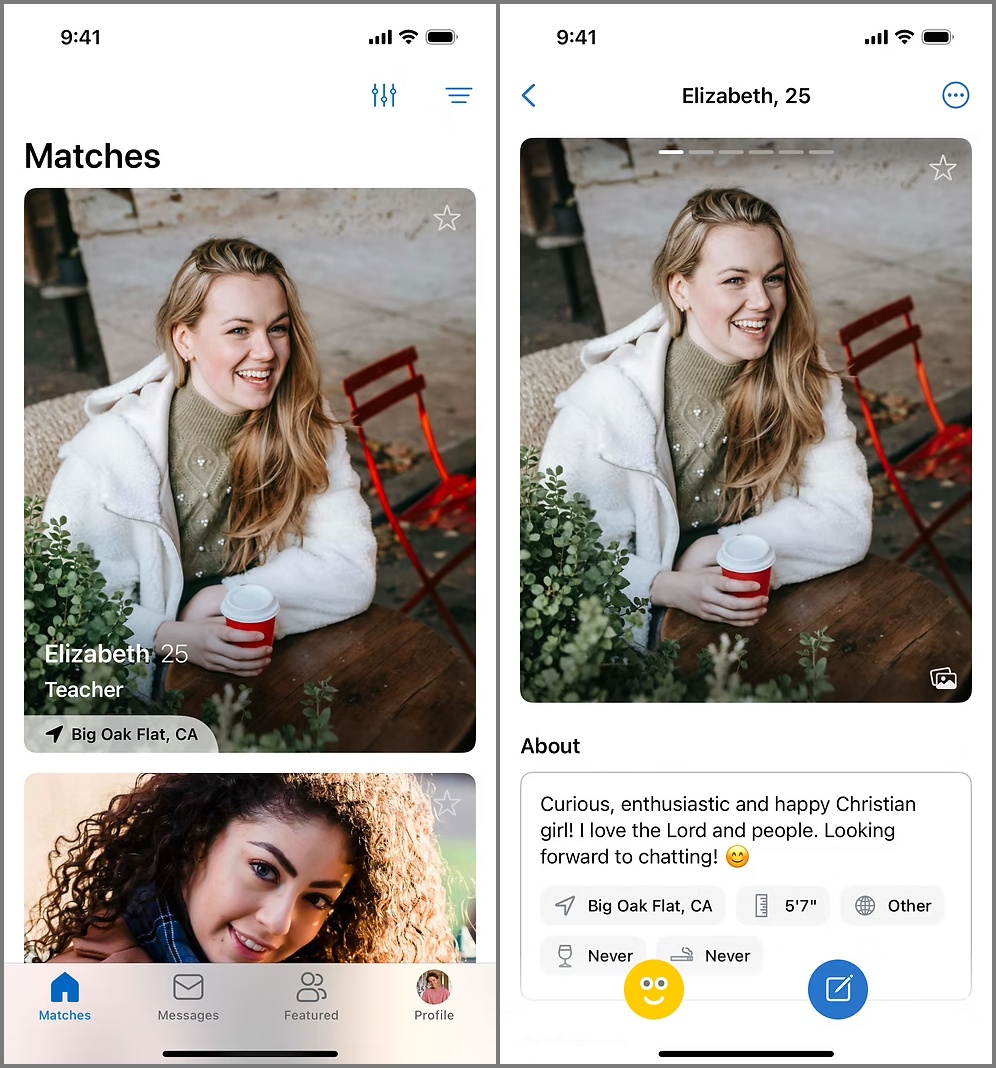
iSunday sets itself apart with a messaging-first approach. Instead of making you swipe endlessly, it focuses on genuine conversations. The idea is simple, faith first, looks second. You can still view profiles and photos, but the real goal here is to talk, share, and connect with someone who understands what faith means to you.
The app’s design feels light, clean, and modern. It opens with a quick tutorial that helps even first-time online daters get started easily. Navigation is simple, tabs at the bottom guide you through messages, matches, and profile settings. Everything loads quickly, giving you a smooth, calm experience that feels refreshing compared to most noisy dating apps.
Features That Actually Matter
iSunday’s features reflect its purpose, intentional dating for Christians who want something deeper than swipes and likes.
1. Detailed Profiles
Every profile shows what really matters, beliefs, church involvement, life goals, and relationship values. You get to know more about a person before you even start a chat, making each match feel meaningful.
2. Messaging and Unlimited Smiles
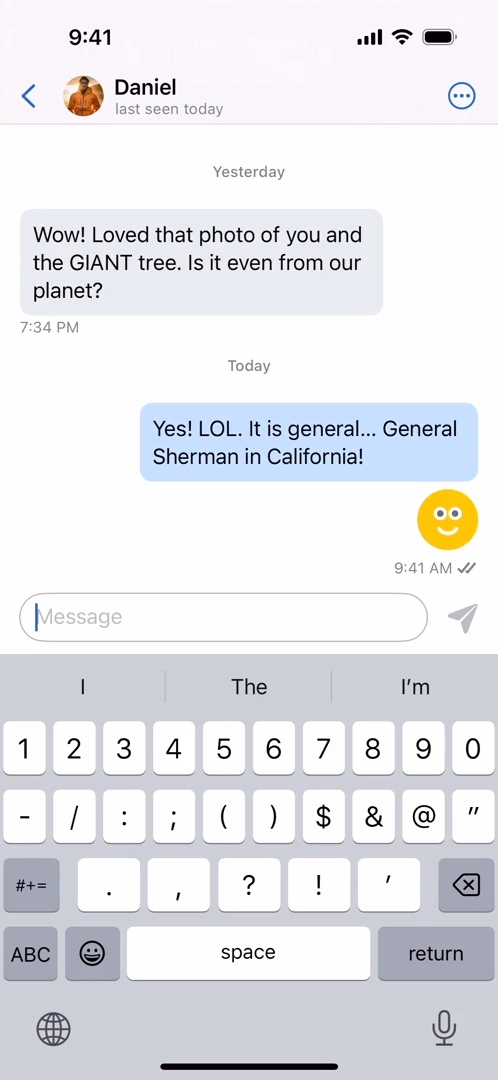
This is where iSunday truly shines. You can send text messages for real conversations or use Smiles, quick reactions to show interest. Smiles are unlimited and free, helping you reach out without pressure or worrying about paywalls. Once you connect, you can reply as much as you like, keeping communication natural.
3. Read Receipts
Transparency matters. You can see when your messages and smiles are delivered and read, so you know if someone’s engaging with you.
4. Match Filters That Go Beyond Looks
With nine filtering options, you can narrow matches by age, height, church attendance, education, marital status, ethnicity, or whether they have or want children. It’s simple but powerful, helping you meet people truly compatible with your lifestyle and faith.

5. Profile Completion Rewards
The more complete your profile, the more message credits you earn. It’s iSunday’s way of encouraging authenticity and rewarding users for showing their true selves.
6. Modern Yet Purposeful Design
The interface feels modern (bright, fast, and smooth) but every detail keeps the focus on connection and faith, not endless browsing.
Free vs Premium Plans
iSunday’s free version is surprisingly generous. You can view full profiles, adjust your match preferences, and reply to messages without time limits or hidden restrictions. The premium plan adds the ability to start conversations and unlocks more message credits.
Here’s how it breaks down:
| Feature | Free | Premium |
|---|---|---|
| View profiles and photos | ✓ | ✓ |
| Adjust preferences | ✓ | ✓ |
| Send unlimited smiles | ✓ | ✓ |
| Reply to messages | ✓ | ✓ |
| Start new conversations | ✗ | ✓ |
| Read receipts | ✓ | ✓ |
If you need more message credits, they’re available starting at $14.99 for 50 chats and going up to $139.99 depending on the package.
Credits never expire and can also be earned by completing your profile.
The Experience of Using iSunday
The app looks good and feels easy to navigate right from the first visit. Setup takes only a few minutes, and even newcomers to online dating will find it straightforward. Free users can stay as long as they want without annoying pop-ups or timers pushing them to upgrade.
It’s clearly designed to make online dating feel calm, safe, and intentional. However, there are no verifications to confirm whether a user is Christian or to check their ethnicity. But as long as users are genuine, the app provides a space to connect with real people who share your faith.
The Downsides
No app is perfect. iSunday is currently available only on iOS, leaving Android users waiting for their turn. Its community is still growing, so you might not find matches everywhere just yet. Also, the app is limited to United States and as of now, the focus of the app is mostly limited to California. However, the platform feels genuine, and its steady growth suggests that could soon change.
Final Thoughts: Should You Try iSunday?
If you’re a Christian tired of superficial dating apps and endless swiping, iSunday feels like a breath of fresh air. It’s not about casual connections, it’s about faith, purpose, and relationships that last.
With its clean interface, transparency, and message-first approach, iSunday succeeds at creating a space where conversations matter more than appearances. The free version is generous, and the premium perks are fair. Sure, it’s small now, but it’s growing, and that might make it even more meaningful for those who join early.
In a world where dating apps often feel rushed and empty, iSunday brings back what’s been missing, sincerity.