

You just played a great game with someone, but once the match ends, they are gone. No easy way to find them again, no way to jump back into their next game unless you add them as a friend.
I used to just move on and forget, but following on Roblox completely fixed that. It lets you keep track of players without sending a friend request, see what they are playing, and join them instantly when their settings allow it. Once you start using it, Roblox feels a lot less random and a lot more connected.
Roblox friend vs follow: What’s the difference?
Friends are mutual. Both users must accept, and this unlocks more interaction features.
Follow is one-way. You do not need approval, and it simply lets you track someone’s public activity and join them when possible. Follows are generally not limited the same way as friends, so you can follow many players on Roblox without filling your friends list.
I personally keep my friends list small and use follow for everyone else. It keeps things clean and still lets me jump into games when I want.
How to follow someone on Roblox
You always follow a user from their profile. The steps are simple, but where you tap or click can vary slightly depending on the device.
Desktop or Web
On desktop or web, you will see most options clearly on the profile page.
- Open Roblox in your browser and sign in.
- Use the search bar to find the player’s username. (Make sure the spelling is correct to avoid following the wrong account).
- Open their profile.
- Click the three-dot menu (•••) near their name.
- Click Follow.
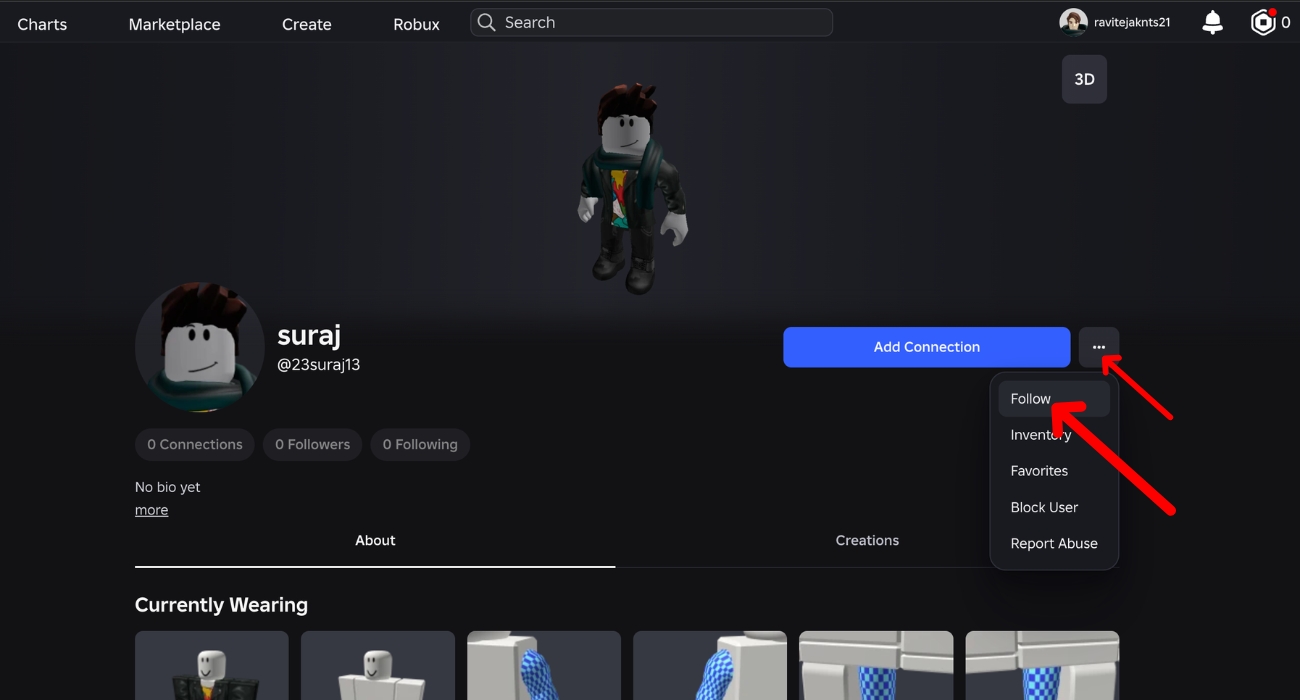
Once done, their activity becomes easier to track, and you may see a Join Experience option when they are in a game.
Mobile (iPhone or Android)
On mobile (iPhone or Android), some options are hidden to keep the screen clean.
- Open the Roblox app and sign in.
- Tap the search icon and enter the username.
- Switch to People tab and select the profile you have to follow. (double-check spelling before opening the profile)
- Open the player’s profile.
- Scroll down and click on View Full Profile.
- Now, tap the three-dot menu in the top-right corner.
- Tap Follow.
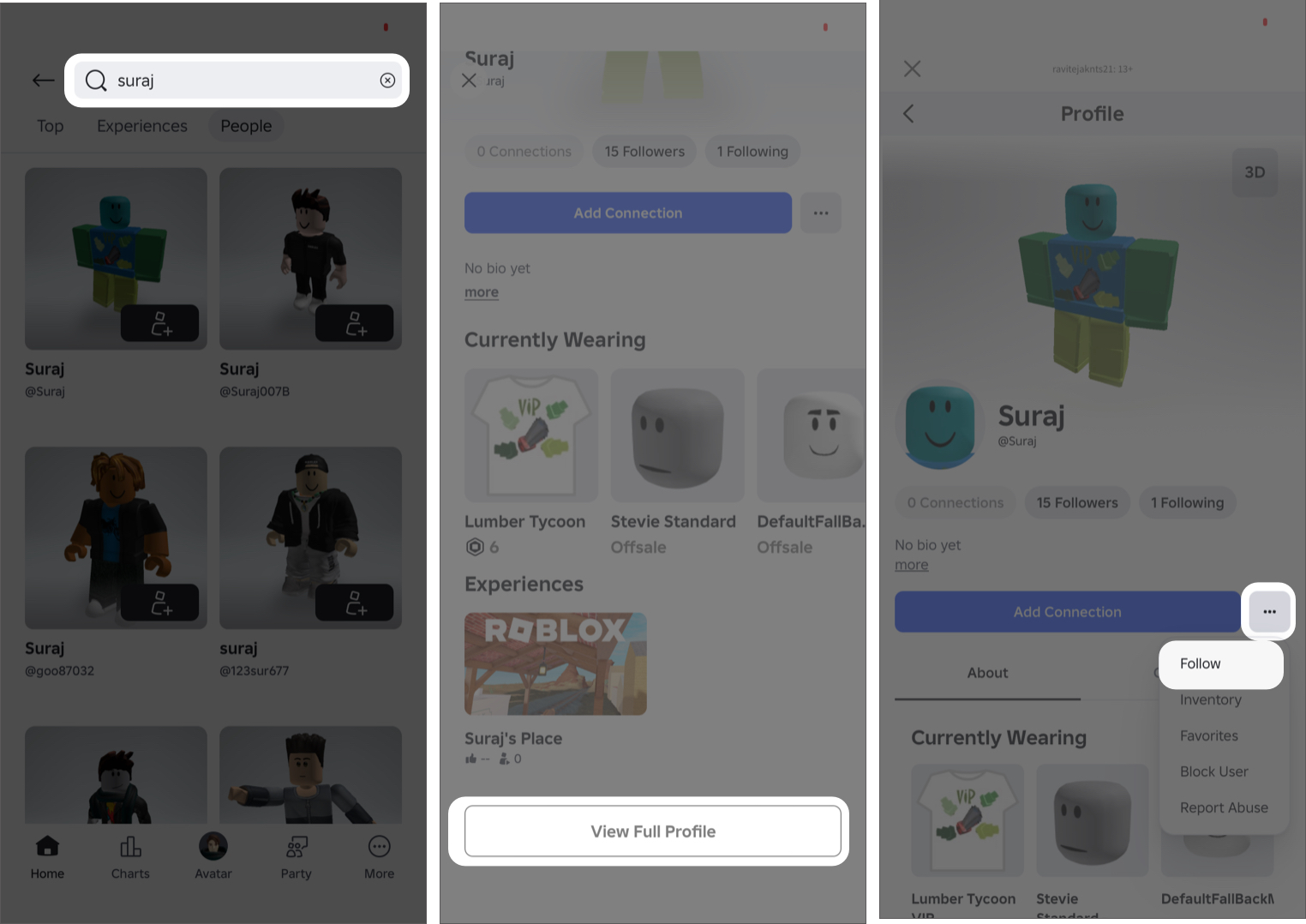
If you do not see the Follow button directly, it will almost always be inside that menu.
Also read: What It Actually Takes to Get Verified on Roblox: Here’s How to Get It
What you actually get when you follow someone on Roblox
Following is a one-way action. The other person does not need to accept anything. It simply lets you keep track of them.
- See when they are playing a game.
- Get a Join Experience option when available.
- Join their session if their privacy settings and the game allow it.
- Track creators, teammates, or active players without using your friends list.
- Access their profile quickly and see updates from your home feed.
Also check: Best Roblox Games to Play With Friends
If it doesn’t work, here’s what to check
If you cannot find the Follow button, the issue is usually simple. You might not be logged in, the button may be inside the three-dot menu, or the user’s privacy settings may restrict interactions. In some cases, parental controls on your account can also limit social features.
If you are trying to join someone after following them and do not see the option, it is not guaranteed. The game might be full, the player could be in a private server, or their settings may block joins. The Join option only appears when everything allows it.
If the Follow button is not working or shows an error, log out and back in, update the app, or try another device. If you performed too many actions quickly, you may also need to wait due to temporary limits.
How to unfollow someone on Roblox
Unfollowing uses the same button and takes only a second.
- Open the user’s profile.
- Click or tap the Follow button again.
This removes them from your follows and stops their updates from appearing.
Following people on Roblox is a small feature, but it changes how you use the platform. Once you start using it, it becomes the easiest way to stay connected, discover what others are playing, and join them without extra steps.
You might also like: