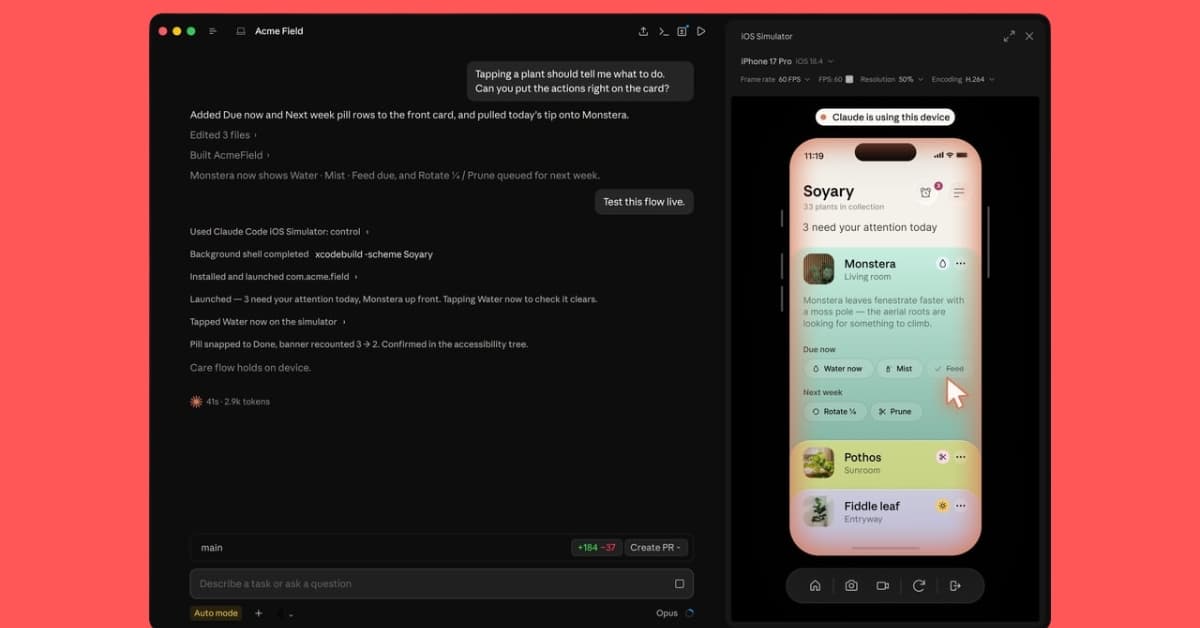
Anthropic has announced a new update for Claude Code on macOS that adds built-in support for Apple’s iOS simulator. The integration is available in public beta and lets developers build, test, and debug iPhone apps without leaving Claude Code.
The feature requires Xcode with the iOS platform installed and is available only in local Claude Code sessions on macOS.
Claude Code on desktop now works with the iOS simulator.
— ClaudeDevs (@ClaudeDevs)
Build and run your iOS app, and the simulator opens in a panel right next to your conversation. Available today in public beta. pic.twitter.com/su4IguzPVb
Claude Code now works directly with the iOS Simulator
With the new simulator pane, Claude Code can automatically launch an app in the iOS Simulator when asked to build, run, or test a project. It can watch the app as it runs, interact with the interface, identify issues, apply fixes, and repeat the process until the task is complete.
Developers can keep using the iOS Simulator while Claude works in the background, so both can interact with the same app during development.
Unlike Anthropic’s Computer Use feature, the new integration communicates directly with the iOS Simulator instead of controlling the Mac like a human user. As a result, it doesn’t require macOS Accessibility or Screen Recording permissions.
Anthropic warns developers against using personal accounts
Anthropic says screenshots captured from the iOS Simulator are sent to its servers and stored under the company’s standard conversation retention policy. For that reason, Anthropic recommends avoiding personal or production accounts while Claude is interacting with the simulator.
The iOS Simulator integration is currently available in the public beta version of Claude Code for macOS. Anthropic has also published setup documentation for developers who want to try the feature.
Would you use Claude Code to build and test iPhone apps, or do you prefer working directly in Xcode? Let us know in the comments below.