
Chrome for iOS Introduces Built-In Gemini Features
Chrome for iOS now includes built in Gemini tools, offering quick page summaries, instant FAQs, and smarter on screen search as Google expands the rollout.
Google is extending its Gemini feature to more users on Chrome for iOS after initially teasing it back in September.
Once this update hits your device, you’ll notice a new icon to the left of the Chrome address bar. The familiar Lens icon is replaced by a page icon adorned with the Gemini spark. Tapping on it reveals the Page tools menu, which now offers two main functions: “Search screen powered by Lens” and “Ask Gemini.”
Choosing “Ask Gemini” opens up an overlay with a brief glow, courtesy of four colors, that attaches the URL of your current page. If you’d rather not include the page context, simply tap the close button to remove the URL.
Key Actions
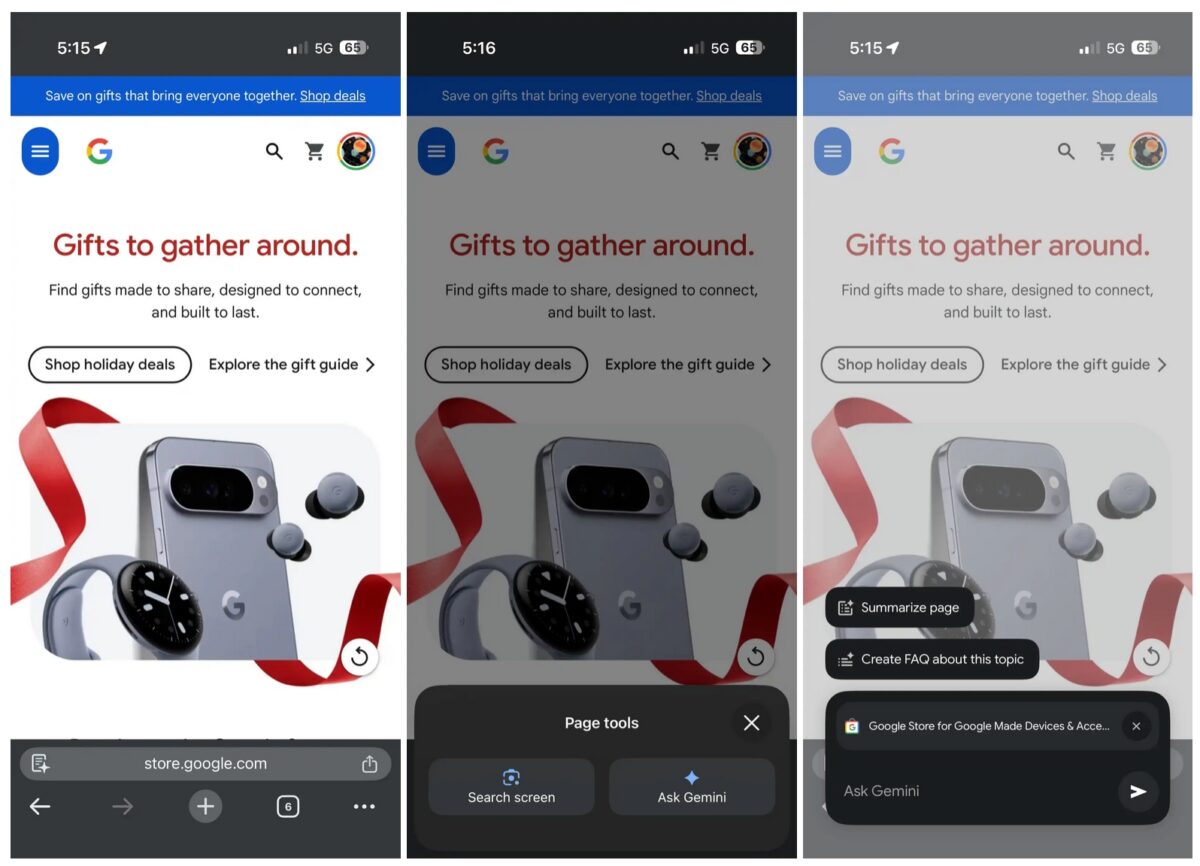
Google emphasizes two main shortcuts designed to make information easily digestible:
- “Summarize page” pulls significant insights from lengthy or complex webpages.
- “Create FAQ” assembles structured Q&A from the page and related resources.
In addition, Gemini offers prompts for more specific assistance, like:
- Breaking down complex topics into digestible pieces.
- Testing your grasp of a new subject.
- Altering recipes to suit different dietary needs.
- Comparing data to provide tailored advice.
Responses appear in a floating panel, allowing you to still see the page behind. You can start new conversations from the top-right corner and find extra controls in the Liquid Glass overflow menu. The iOS interface aligns closely with its Android counterpart but doesn’t include a model selector.
Must read: How to Use Chrome Split View on Mac
Availability and Rollout Status
Gemini is being introduced on Chrome for iPhone and iPad in the U.S. when Chrome is set to English. You’ll need to be logged in to use it, and it won’t work in Incognito mode. Google notes the feature is still being gradually released.
Other New Additions
Alongside Gemini, the latest Chrome update brings biometric checkout options on supported sites, removing the need to enter CVC codes. It also offers new-tab-page tips and encompasses general improvements in stability and performance.
What are your thoughts on Gemini coming to Chrome for iOS? Share your views in the comments below.

Written by
VikhyatVikhyat has a bachelor's degree in Electronic and Communication Engineering and over five years of writing experience. His passion for technology and Apple products led him to the tech writing space, where he specializes in writing App features, How-to guides, and troubleshooting guides for fellow Apple users. When not typing away on his MacBook Pro, he loves exploring the real world.
View all posts →