

WhatsApp is rolling out a feature that lets channel admins reply directly to their own updates. It’s currently available to some users on the latest iOS beta via TestFlight and should expand gradually as reported by WABetaInfo.
Channel replies bring much-needed context to updates
Until now, replying inside channels never really felt natural. If an admin wanted to add context or correct something, it meant posting a new update and hoping followers connected the dots.
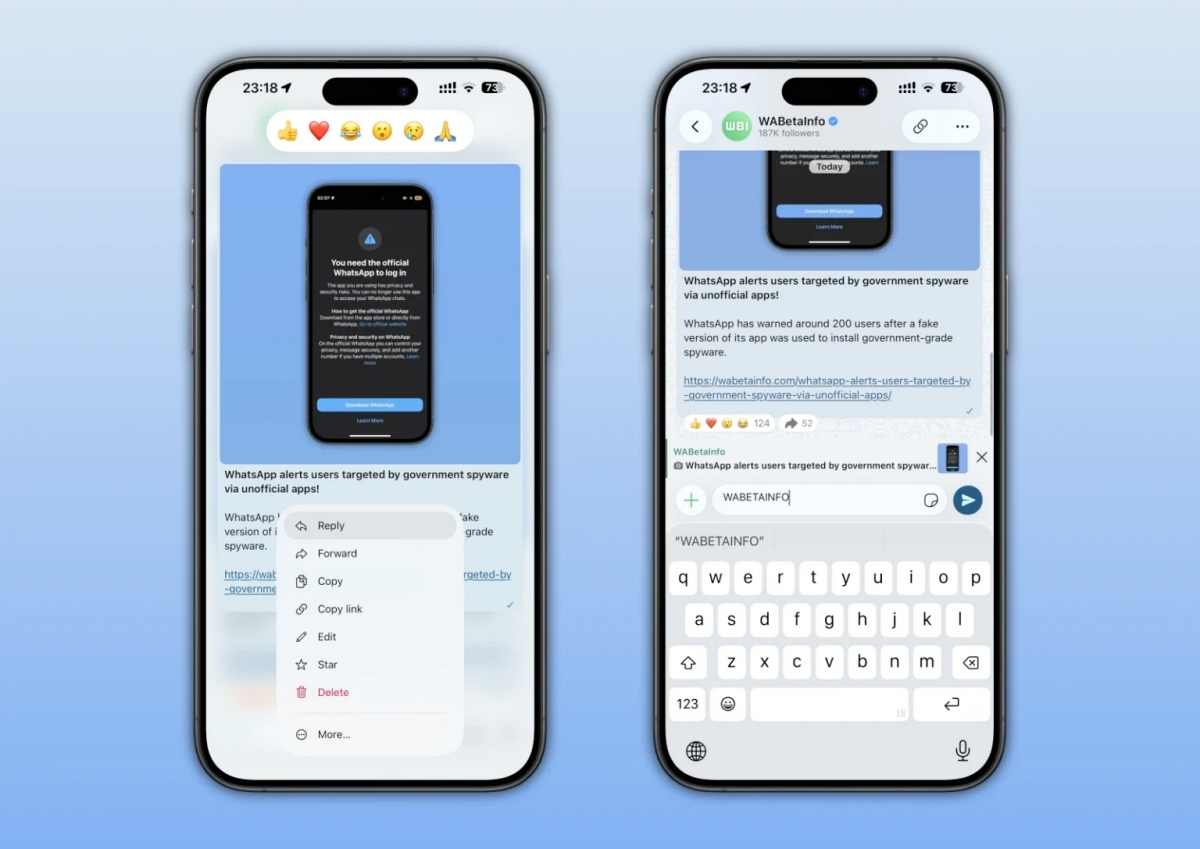
With this change, replies stay attached to the original update. That alone makes a noticeable difference. You can open a reply and immediately see what it refers to, instead of scrolling back or guessing the context.
It’s a small shift in how updates are presented, though it changes how easy they are to follow.
Rolling out with WhatsApp beta on iOS
The feature has been spotted in WhatsApp beta for iOS version 26.13.10.70, available through TestFlight. Right now, access is limited, which means not everyone will see it immediately.
At the same time, WhatsApp has started pushing some beta features to stable users earlier than before, so there’s a chance this shows up outside TestFlight as well.
How to check if channel replies are available on your account
To check if your account has access:
- Open a WhatsApp channel.
- Tap and hold on an update.
- Look for the Reply option.
You can also swipe right on an update to see if the reply interface opens.
If available, any reply you post will automatically include a reference to the original update.
There’s a catch with older updates
Channels only keep updates for 30 days. You can still reply to older updates, but followers who joined later might not be able to open the original post. In those cases, the reply exists, while the full context doesn’t.
It’s not something that shows up immediately, though it can affect how useful replies are in older threads.
What this changes for channel updates
Once you imagine using channels regularly, the benefit becomes clearer. Updates don’t feel isolated anymore, follow-ups stay connected, and it takes less effort to understand what’s happening without jumping between posts.
It doesn’t turn channels into chats, though it removes a layer of friction that’s always been there.
Do you think WhatsApp channels needed replies, or were they fine without it? Share your thoughts in the comments below.